Dell xps 15 L502x refuses to wake after sleep

unforgiven91

New member
Local time
8:07 PM
Messages
7
Hi
I have a dell xps 15 l502x and since two days ago it wouldn't wake up from sleep. I can hear the fan kicks in as i try to wake it up but then screen stays blank. Only way to get the laptop working again is to hold the power button until it force shutdown and restarting it.

The sleep function was working perfectly from start to since 2 days ago. It happened after I updated a bunch of drivers with using driver booster software.

Any help would be appreciated.

Thanks
 

My Computer My Computer

At a glance

Window 7 home premium 64 bit16 GBGT540 2gb
Computer type
Laptop
Computer Manufacturer/Model Number
Dell xps 15 L502X
OS
Window 7 home premium 64 bit
Memory
16 GB
Graphics Card(s)
GT540 2gb
Hard Drives
256 gb ssd
650gb hdd
Antivirus
Bitdefender
Browser
chrome, firefox
The driver affecting sleep most is Display so you might be able to roll it back in Device Manager to get sleep to work again. Otherwise I'd uninstall it along with the software to see what driver Windows 7 wants.

Otherwise there are other fixes here for Sleep Problems.

Why use outdated XP-era driver finder software on a driver-complete OS? You may need to System Restore before this blunder.

Otherwise consider doing a http://www.sevenforums.com/tutorials/219487-clean-reinstall-factory-oem-windows-7-a.html#post1839164 paying close attention to the steps about how drivers are handled in Win7 which are so important they are in red. If still running the Factory Install then that is the worst install of Win7 one can have - you won't even experience native Win7 performance until you Clean Reinstall or at least Clean Up Factory Bloatware

Win7 delivers drivers via Important and Optional Windows Updates, after enabling Automatically deliver drivers via Windows Update (Step 3). Always install all Updates to get the latest drivers as well as Security and Performance patches that are critical to the OS and your hardware.
 
One you get it awake you may need to use System Restore to put it back to a day or two BEFORE the driver updates.

Was the machine working good before the updates? If so, that would tell me one or more of the drivers were not exactly correct for your computer. And not all drivers from sources other than the maker of the computer, including those from Microsoft, are the best for your particular hardware. I've updated the drives for my Win7 computer only once since I built it in late 2009 and that was recently for the USB 3.0 ports.
 

My Computer My Computer

At a glance

Windows 7 Ultimate 64-bit, Windows 8.1 64-bit...
Computer type
PC/Desktop
Computer Manufacturer/Model Number
Customs, Dell, Gateway, HP, Toshiba, Acer, ASUS
OS
Windows 7 Ultimate 64-bit, Windows 8.1 64-bit, Mac OS X 10.10, Linux Mint 17, Windows 10 Pro TP
Keyboard
Microsoft
Mouse
Microsoft
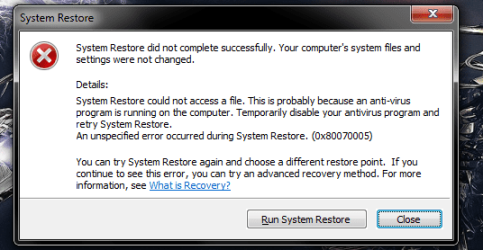
Thanks for the quick reply. I have just tried to run a system restore but was unsuccessful. I have attached the error message. I have disabled my antivirus and tried to restore again but it keeps failing.
 

Attachments

  • system.png
    system.png
    20.5 KB · Views: 6

My Computer My Computer

At a glance

Window 7 home premium 64 bit16 GBGT540 2gb
Computer type
Laptop
Computer Manufacturer/Model Number
Dell xps 15 L502X
OS
Window 7 home premium 64 bit
Memory
16 GB
Graphics Card(s)
GT540 2gb
Hard Drives
256 gb ssd
650gb hdd
Antivirus
Bitdefender
Browser
chrome, firefox
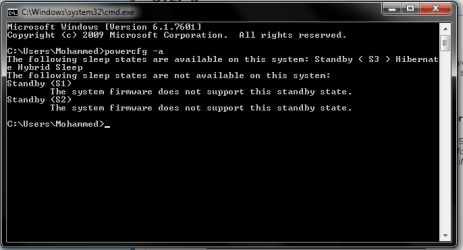
My laptop was refurbished and it didn't came with any driver or window repair disk. It had a recovery partition on hdd. How ever when I upgraded to ssd the recovery partition doesn't work anymore.

I have rollbacked display driver, still no luck.

Maybe it could be to do with firmware?
 

Attachments

  • system1.png
    system1.png
    10.2 KB · Views: 6

My Computer My Computer

At a glance

Window 7 home premium 64 bit16 GBGT540 2gb
Computer type
Laptop
Computer Manufacturer/Model Number
Dell xps 15 L502X
OS
Window 7 home premium 64 bit
Memory
16 GB
Graphics Card(s)
GT540 2gb
Hard Drives
256 gb ssd
650gb hdd
Antivirus
Bitdefender
Browser
chrome, firefox
Back
Top