Dell's Optiplex 7010 mini tower SSD hang-up issue

dc2000

New member
Member
VIP
Local time
9:17 AM
Messages
153
Hi everyone:

I was curious if anyone else experienced this issue? I have a Dell OptiPlex 7010 desktop/mini tower that I bought off the official Dell site. I configured that mini tower to have an SSD drive as the main drive, which I like very much, except one very annoying issue. Sometimes out of the blue Windows 7 will hang up, I can't click anything and the mouse starts spinning in a circle. This continues on for about half a minute and then it always comes back to life. Suddenly I start getting all my previous clicks moving windows, opening things, etc, all at once. This happened at least a dozen of times by now and I started to notice that when this happens the HDD/SSD LED on the case glows solid, which made me suspect that there's something going on with the drive itself.

Does anyone know what's going on and how to fix this?

PS. I tried contacting Dell support about this issue but they are pretty useless. I spent several hours in a chat with a guy once that eventually simply hung up on me. Then I emailed someone at Dell, for which the guy replied with instructions to run their hard drive diagnostic tool, which I did, that did not show any errors. (Note that I don't have a hard drive, it's a solid state drive.) I replied to the guy only to never hear from him again.... So I think I'm pretty much done with the Dell support :(
 

My Computer My Computer

OS
Windows
Hi,

Have you tried updated the firmware on the SSD?
 

My Computer My Computer

Computer type
PC/Desktop
OS
Windows 7 Professional 64bit
CPU
AMD Athlon (tm) X2 5200+ Dual Core 2712 Mhz
Motherboard
Asus
Memory
4GB
Graphics Card(s)
Nividia GeForce 8600 GTS- DIED 25/7/2013 R.I.P
Sound Card
None
Monitor(s) Displays
22" Yuraku LCD (Dont ask)
Screen Resolution
1280x960
Hard Drives
2TB WD Caviar green
PSU
Windy up type
Case
Scout cm Storm
Cooling
Hair dryer on full cool power ;-)
Keyboard
QWERTY
Mouse
Microsoft Special
Internet Speed
BT Infinity 9.38Mb/s Wheeeeeeeeeeeeeeee!!
Antivirus
MSE
Browser
Internet Explore 10 and Chrome
Other Info
Don't shout...I've got a Hangover!
Thank you, guys.

@Northernsoul55: I'm not even sure what SSD it came with. How do I find out?

@gregrocker: No, this mini-tower came pre-installed with this SSD. I uninstalled all their bloat-ware though. The computer is virtually new (about 3-4 months.) We use it as our office/font desk machine so there's virtually very low chance of any malware infection on it.

As for the event log then there's nothing recorded in it. I checked. The only error that seems to be repeating throughout it is this:

Event filter with query "SELECT * FROM __InstanceModificationEvent WITHIN 60 WHERE TargetInstance ISA "Win32_Processor" AND TargetInstance.LoadPercentage > 99" could not be reactivated in namespace "//./root/CIMV2" because of error 0x80041003. Events cannot be delivered through this filter until the problem is corrected.
 

My Computer My Computer

OS
Windows
Device Manager will tell you the type of drive that's in your computer. Then you can check for a firmware update for the drive.
 

My Computer My Computer

OS
Windows 7 Ultimate x64 SP1
CPU
Intel Core i7-2600
Motherboard
Gigabyte GA-P67A-UD3P-B3
Memory
12 GB Patriot Extreme DDR3-1333
Graphics Card(s)
Nvidia GTX 470
Monitor(s) Displays
Dell UltraSharp 2209WA
Hard Drives
OCZ Agility3 240 GB, WD5001AALS, WD7501AALS
PSU
OCZ ModStream 700W
Case
CoolerMaster HAF 912 Advanced
Cooling
CoolerMaster Hyper 212 Plus
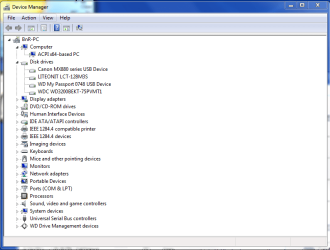
@DeaconFrost: I get this when I bring up the device manager (see attached). The Canon is our printer, then "My passport" is an external hdd. This tower also comes with a regular hard drive as disc D: so I'm not sure which one is which. (Disc D: is rarely used though, so it's not a problem in this case.)

@gregrocker: What I meant by having configured my PC in the first post is what Dell provides on their web site before you order a computer. They have a web page that lets you select the type of hardware for it. I did not mess with it myself after I got it though.
 

Attachments

  • Capture.PNG
    Capture.PNG
    24.6 KB · Views: 4

My Computer My Computer

OS
Windows

My Computer My Computer

Computer type
PC/Desktop
OS
Windows 7 Professional 64bit
CPU
AMD Athlon (tm) X2 5200+ Dual Core 2712 Mhz
Motherboard
Asus
Memory
4GB
Graphics Card(s)
Nividia GeForce 8600 GTS- DIED 25/7/2013 R.I.P
Sound Card
None
Monitor(s) Displays
22" Yuraku LCD (Dont ask)
Screen Resolution
1280x960
Hard Drives
2TB WD Caviar green
PSU
Windy up type
Case
Scout cm Storm
Cooling
Hair dryer on full cool power ;-)
Keyboard
QWERTY
Mouse
Microsoft Special
Internet Speed
BT Infinity 9.38Mb/s Wheeeeeeeeeeeeeeee!!
Antivirus
MSE
Browser
Internet Explore 10 and Chrome
Other Info
Don't shout...I've got a Hangover!
Ok I see what you mean by configure now.

Please post up the requested picture of Disk Management - Post a Screen Capture Image - Windows 7 Help Forums.

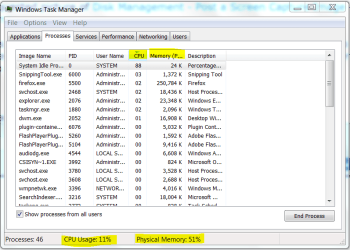
The next time it hangs I would rightclick the task bar or if necessary Control-Alt-Delete to open the Task Manager, immediately look at whether its CPU or RAM at 100%, then order the related column to see what Process(s) is/are causing the hang:

Capture.PNG

Configure the Task Manager>View tab to show PID so you can immediately click to the Services tab to identify the the Service causing the problem.
 
@Northernsoul55: Thanks. I installed the firmware flash. I should admit -- scary stuff :) Hopefully that is it. If you don't hear from me then it probably means that it fixed the problem. (I hope it's just a sloppy driver that caused the issue and not something wrong with the hardware itself.)

@gregrocker: I wish I could run the Task Manager. As I said when this hang-up happens nothing works (well, except that I can move the mouse.) Plus the issue comes up very sporadically. Maybe once a week or so. So there's no way to predict it.
 

My Computer My Computer

OS
Windows
@gregrocker: Sorry. I thought that disk management thing was a part of the commercial that's inserted automatically by this site.

The screenshot is attached here.

As for ctrl+alt+del I tried it too. What happens is that the Windows 7 login-looking screen came up with a message that I've never seen before -- something like "Wait for security to be loaded up." Then it waits until the system becomes operational (as I said about half a minute.) At that point everything starts working normal.

I'm keeping my fingers crossed that Northernsoul55's solution fixes it...
 

Attachments

  • Capture.PNG
    Capture.PNG
    38.7 KB · Views: 3

My Computer My Computer

OS
Windows
Back
Top