
Denied all administrative privileges after permissions change

Bankdraft

New member
Local time
2:41 AM
Messages
6
Hello all,

I've been lurking in this forum for years and generally found it more informative than other Windows 7 forums -- much more so than the Microsoft sponsored sites. Yesterday I was trying to solve a problem with massive replication/nesting of the “Application Data” folder and was reading this thread and found it so informative, I decided to join the forum. Little do I know I would need it two hours later.

In an effort to stop the replication, I changed permissions on C:\ (the above article suggested changing permission in “application data” but I decided to get cute) and now I’m locked out of all system files.

Here’s some of what I cannot do:

• Can’t run regedit.exe
• Can’t run cmd.exe as administrator
• Can’t even look inside C:\
• Can’t delete anything

I read this tutorial (Local Users and Groups) but can’t open it, I tried all three methods.

I logged-off and back on and it shows me as “administrator” but I can’t access anything. I don’t see “administrator” in any of the permission dialogue boxes. Even the owner of the computer is listed as “trusted installer”.

Here’s my User Account screen but I can’t do much but it does appear I can change the password. I haven’t done that yet because I don’t want to complicate things. Previously I did not have a password set.

UserAccount_zps29741219.png


I did System Restore (twice) but the lock-out remains. I was considering a re-install of the OS (I was considering doing that anyway to address some of the original replication issues) but I’m afraid the permissions would stay the same as they did on System Restore.

If I right-click C:\ and look at security, here’s what I get:
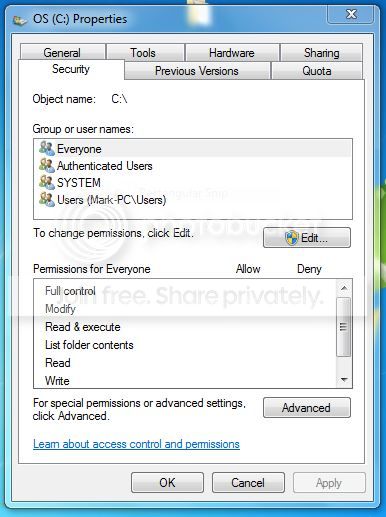
Csecurity_zps7914bb8b.jpg


From here, I cannot click edit and when I click advanced, I get this:

Advanced_zpsd6babb8f.png


I can’t Change Permissions. I can select the Effective Permissions tab but it doesn't seem I can change anything.

Here’s the usual denial I get:

Denial_zps58dc7f7e.png


But sometimes when I click, it just does nothing.

I’m fairly comfortable with Windows 7 but the convolutions of Permissions are over my head. It seems first I need to get administrative privileges back but I haven't been able to do that yet (I'm still reading those tutorials).

Needless to say, any help will be appreciated. I’m running Windows 7 Ultimate.
 

My Computer My Computer

At a glance

Window 7 Ultimate (64 bit)Pentium Dual-Core, T4300 @ 2.10 GHz4.00 GB
Computer type
Laptop
Computer Manufacturer/Model Number
Dell Inspiron 1545
OS
Window 7 Ultimate (64 bit)
CPU
Pentium Dual-Core, T4300 @ 2.10 GHz
Memory
4.00 GB
Hard Drives
500 GB internal hard-drive and a couple of externals from time to time.
Antivirus
Microsoft Security Essentials
Browser
Google Chrome
Are you able to create a new user account?
What are your uac settings set to?
 

My Computer My Computer

At a glance

Windows 10 ProAMD Ryzen 5 2400G Processor with Radeon RX Ve...G.SKILL Ripjaws V Series 16GB (2 x 8GB) 288-P...2047MB NVIDIA GeForce GTX 1060 6GB (EVGA)
Computer type
PC/Desktop
Computer Manufacturer/Model Number
Custom Built
OS
Windows 10 Pro
CPU
AMD Ryzen 5 2400G Processor with Radeon RX Vega 11 Graphics
Motherboard
ASRock X470 Master SLI/AC AM4 AMD Promontory X470 SATA 6Gb/s
Memory
G.SKILL Ripjaws V Series 16GB (2 x 8GB) 288-Pin DDR4 SDRAM D
Graphics Card(s)
2047MB NVIDIA GeForce GTX 1060 6GB (EVGA)
Sound Card
Motherboard Built in
Monitor(s) Displays
Acer R240HY bidx 23.8-Inch IPS HDMI DVI VGA (1920 x 1080) Wi
Screen Resolution
1920 x 1080
Hard Drives
1TB Sandisk SSD PLUS (Main drive)
500 GB Seagate 7200 RPM (Games)
500 GB Western Digital 7200 RPM (Virtual Machines)
PSU
CORSAIR TX Series TX650M 650W 80+ Gold Modular Power Supply
Case
CORSAIR CARBIDE SPEC-02 Mid-Tower Gaming Case, Red LED Fan
Cooling
220mm, two 120mm, and four 60mm fans
Keyboard
Wired Dell keyboard
Mouse
Wireless Logitech mouse
Internet Speed
250mb down, 30mb up
Antivirus
Panda Cloud Antivirus
Browser
Chrome-ish x64
Other Info
Your awesome for reading this.
Hello Andrew,

Thanks for the reply.

The way it is now, I can not even get to UAC. I tried UAC from the run menu, accessing it via the God Mode app, and of course I tried through control panel but it does nothing..

I have been able to activate an administration account (via a regedit procedure in safe mode) but it's asking me for a password and I don't even remember setting a password. I found write-up on resetting the password which I'm doing now.

If I could just get admin privileges back, I'd deal with the permissions stuff later.

I appreciate the reply and I'm all ears.
 

My Computer My Computer

At a glance

Window 7 Ultimate (64 bit)Pentium Dual-Core, T4300 @ 2.10 GHz4.00 GB
Computer type
Laptop
Computer Manufacturer/Model Number
Dell Inspiron 1545
OS
Window 7 Ultimate (64 bit)
CPU
Pentium Dual-Core, T4300 @ 2.10 GHz
Memory
4.00 GB
Hard Drives
500 GB internal hard-drive and a couple of externals from time to time.
Antivirus
Microsoft Security Essentials
Browser
Google Chrome
Able to regain admin privliges

Update:

Using the method above, I now able to log-in as administrator but I'm still denied a lot of access even on things that have the administrator shield.

I do now have regedit capability so maybe that will buy me something. Looks like now it a permissions issue.

Andrew, I noticed you told another guy who lost his password to do a "recovery"? Are you talking about a windows reinstall using the upgrade feature? I mentioned I was considering that but I wasn't sure it would reset anything because system recovery did not reset anything.

I'll keep reading...
 

My Computer My Computer

At a glance

Window 7 Ultimate (64 bit)Pentium Dual-Core, T4300 @ 2.10 GHz4.00 GB
Computer type
Laptop
Computer Manufacturer/Model Number
Dell Inspiron 1545
OS
Window 7 Ultimate (64 bit)
CPU
Pentium Dual-Core, T4300 @ 2.10 GHz
Memory
4.00 GB
Hard Drives
500 GB internal hard-drive and a couple of externals from time to time.
Antivirus
Microsoft Security Essentials
Browser
Google Chrome
 

My Computer My Computer

At a glance

Windows 10 ProAMD Ryzen 5 2400G Processor with Radeon RX Ve...G.SKILL Ripjaws V Series 16GB (2 x 8GB) 288-P...2047MB NVIDIA GeForce GTX 1060 6GB (EVGA)
Computer type
PC/Desktop
Computer Manufacturer/Model Number
Custom Built
OS
Windows 10 Pro
CPU
AMD Ryzen 5 2400G Processor with Radeon RX Vega 11 Graphics
Motherboard
ASRock X470 Master SLI/AC AM4 AMD Promontory X470 SATA 6Gb/s
Memory
G.SKILL Ripjaws V Series 16GB (2 x 8GB) 288-Pin DDR4 SDRAM D
Graphics Card(s)
2047MB NVIDIA GeForce GTX 1060 6GB (EVGA)
Sound Card
Motherboard Built in
Monitor(s) Displays
Acer R240HY bidx 23.8-Inch IPS HDMI DVI VGA (1920 x 1080) Wi
Screen Resolution
1920 x 1080
Hard Drives
1TB Sandisk SSD PLUS (Main drive)
500 GB Seagate 7200 RPM (Games)
500 GB Western Digital 7200 RPM (Virtual Machines)
PSU
CORSAIR TX Series TX650M 650W 80+ Gold Modular Power Supply
Case
CORSAIR CARBIDE SPEC-02 Mid-Tower Gaming Case, Red LED Fan
Cooling
220mm, two 120mm, and four 60mm fans
Keyboard
Wired Dell keyboard
Mouse
Wireless Logitech mouse
Internet Speed
250mb down, 30mb up
Antivirus
Panda Cloud Antivirus
Browser
Chrome-ish x64
Other Info
Your awesome for reading this.
Did a clean install

Thank you for following up.

I ended up doing a clean install. I tried to repair install but for whatever reason, it could not locate my operating system. I believe the operating system was there because from the repair menu, I could open CMD and list the files (\dir) but since my OS didn't show up in the repair menu, there was nothing to repair and I didn't have much choice.

Even the clean install wasn't so clean because the original operating system (and presumably all my files) were in a sector that was protected -- I had no access. In a hair-pulling mood, I formatted the protected sector (with all my files) hoping it would make the space available (it didn't) but it was still protected!

Fortunately, there was enough room on my hard-drive to accommodate another install of Windows and, after the install, I could access the the previously protected (and now empty) sector. It shows up in My Computer as a separate drive. I didn't lose too much and it was definitely a learning experience... especially the junction discussion.

BTW, the problem I was having -- or thought I was having -- with the replicating application folders was space. I wanted to free up my hard-drive and was searching for large files (with Agent Ransack) to possibly remove, when I noticed all the application data folders and all of them had 20-30 GBs so I assumed I was eating up the HD. Had I thought about it, I'd have known something was amiss because I had maybe 30 replications of the AD folder (at 20 GB each) and my hard drive ain't that big. Anyway, at some point I took permission from everyone (as I thought someone suggested) and it was all bad news from there.

All's well that ends well. Thanks again,

Mark
 

My Computer My Computer

At a glance

Window 7 Ultimate (64 bit)Pentium Dual-Core, T4300 @ 2.10 GHz4.00 GB
Computer type
Laptop
Computer Manufacturer/Model Number
Dell Inspiron 1545
OS
Window 7 Ultimate (64 bit)
CPU
Pentium Dual-Core, T4300 @ 2.10 GHz
Memory
4.00 GB
Hard Drives
500 GB internal hard-drive and a couple of externals from time to time.
Antivirus
Microsoft Security Essentials
Browser
Google Chrome
So it sounds like to me all is well now?

Glad to hear it.

Please mark this thread solved if so.

Have a great day! :)
 

My Computer My Computer

At a glance

Windows 10 ProAMD Ryzen 5 2400G Processor with Radeon RX Ve...G.SKILL Ripjaws V Series 16GB (2 x 8GB) 288-P...2047MB NVIDIA GeForce GTX 1060 6GB (EVGA)
Computer type
PC/Desktop
Computer Manufacturer/Model Number
Custom Built
OS
Windows 10 Pro
CPU
AMD Ryzen 5 2400G Processor with Radeon RX Vega 11 Graphics
Motherboard
ASRock X470 Master SLI/AC AM4 AMD Promontory X470 SATA 6Gb/s
Memory
G.SKILL Ripjaws V Series 16GB (2 x 8GB) 288-Pin DDR4 SDRAM D
Graphics Card(s)
2047MB NVIDIA GeForce GTX 1060 6GB (EVGA)
Sound Card
Motherboard Built in
Monitor(s) Displays
Acer R240HY bidx 23.8-Inch IPS HDMI DVI VGA (1920 x 1080) Wi
Screen Resolution
1920 x 1080
Hard Drives
1TB Sandisk SSD PLUS (Main drive)
500 GB Seagate 7200 RPM (Games)
500 GB Western Digital 7200 RPM (Virtual Machines)
PSU
CORSAIR TX Series TX650M 650W 80+ Gold Modular Power Supply
Case
CORSAIR CARBIDE SPEC-02 Mid-Tower Gaming Case, Red LED Fan
Cooling
220mm, two 120mm, and four 60mm fans
Keyboard
Wired Dell keyboard
Mouse
Wireless Logitech mouse
Internet Speed
250mb down, 30mb up
Antivirus
Panda Cloud Antivirus
Browser
Chrome-ish x64
Other Info
Your awesome for reading this.
Back
Top