
Desire to separate master sound control from devices

wkool

New member
Local time
10:53 PM
Messages
2
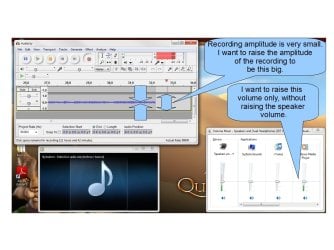
I am running Windows 7 on a nearly brand-new HP Pavilion DV6. I am trying to use Audacity to record a live radio stream playing in Windows Media Player. I am trying to use the Volume Control to do what I am trying to do: In order for the Audacity recording to be of sufficient volume for playback, I have to turn up the sound on Windows Media Player in the Volume Control. This necessitates me also turning up the "master" volume on the speakers in the Volume Control because putting the "master" volume low sets a governor on all the other volumes. But I don't WANT the speakers to blare. I just want to turn up the "internal" volume on Windows Media Player so I can record this properly! :(

My speakers are directly linked to that "master" volume control.

Can I remove the governor link between the "master" volume and the individual program/device volumes? That would be exactly what I need, and there was no governor in Windows XP.

See screenshot attached.

--Wkool
 

Attachments
  • point1.jpg
    point1.jpg
    88.1 KB · Views: 73

My Computer My Computer

At a glance

Windows 7
Computer Manufacturer/Model Number
HP Pavilion DV6
OS
Windows 7
- what hardware are you using for audio..?
 

My Computer My Computer

At a glance

Windows10 Pro - 64Bit vs.10547i7-965 Extreme Edition (8 Cores) at 3.3GHz (n...12G Corsair Dominator DDR3 - tripled2xAMD SapphireNITRO R9 380(4G) crossfire
Computer type
PC/Desktop
Computer Manufacturer/Model Number
benchtec, built to personal specs
OS
Windows10 Pro - 64Bit vs.10547
CPU
i7-965 Extreme Edition (8 Cores) at 3.3GHz (no OC)
Motherboard
BloodRageX58 (Socket1366)
Memory
12G Corsair Dominator DDR3 - tripled
Graphics Card(s)
2xAMD SapphireNITRO R9 380(4G) crossfire
Sound Card
Sonar(SB)X-Fi onboard
Monitor(s) Displays
SyncMaster P2050 20"
Screen Resolution
1600x900 (widescreen)
Hard Drives
480G\OCZSolid3SSD, 64G\OCZVertex3SSD,60G\OCZVertex2SSD, 1TB\spinpointF1SATAHDD
PSU
1200w Power Station Gold
Case
ANTEC 900/2 all blue lights, etc..
Cooling
Noctua SE1366 NH-U12P - a tight fit, but a monster cooler!!
Keyboard
Logitech G19 (wired)
Mouse
Logitech G9 Laser (wired)
Internet Speed
150mb unlimited
Browser
IE11(RP)
Other Info
Xbox One, Nokia735 Windows10 mobile, LG HD/DVD/Blu-Ray r/w, CyberlinkPowerDVD15, LogitechZ5500-SS(5.1), LogitechG35Phones-SS(7.1),MSOffice 2007,CorelDrawX7,Painter2016, Wacom Intuos Pro-SE
I am using the internal speakers of the laptop. There is no "hardware" volume adjuster for them. They are controlled by the touch-slider above the keyboard. This touch slider is linked with the "master" volume I mentioned before. If I change the touch-slider, the "master" volume changes identically, and vice versa.
 

My Computer My Computer

At a glance

Windows 7
Computer Manufacturer/Model Number
HP Pavilion DV6
OS
Windows 7
Back
Top