
Desktop Artifacts

squall325

New member
Local time
6:26 PM
Messages
24
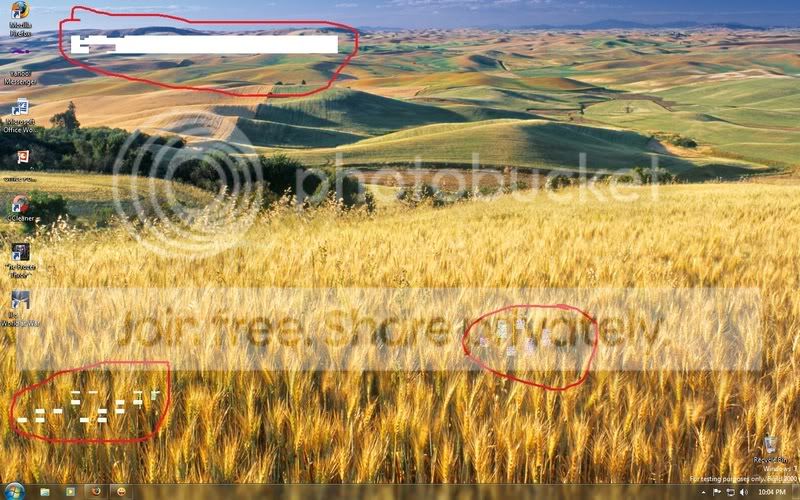
is anyone getting these artifacts?
Untitled-1.jpg


i got it after quitting COD:WAW.. also the slideshow was on... when i turned it off and used a single wallpaper the artifacts were gone.
 

My Computer

OS
Windows 7
CPU
E5200
Motherboard
GA-G31M-S2L
Memory
2GB Kingston 6-6-6-18
Graphics Card(s)
Inno3d 9800GT 512MB
Hard Drives
80GB Barracuda
640GB Caviar
PSU
Gigabyte Superb 550P
Try an update to your graphics driver.
If it's only after quitting COD it might be specific and not be that of a problem.

If it keeps happening though, this might be a hardware issue.Look for overheated graphics card or replace if it goes on. :(
 

My Computer

Computer Manufacturer/Model Number
ENIAC
OS
Windows 7 RC 7100 32bit/64bit
CPU
Intel Core2Duo E4500 2.20 GHz
Motherboard
ASUS P5LD2-X/1333
Memory
2x1GB Kinsgston DDR2 800MHz
Graphics Card(s)
Nvidia 8500GT
Sound Card
Onboard High Definition Audio Device
Monitor(s) Displays
Sony Bravia 42"
Case
LINKW 2222
Cooling
Standard Intel
Keyboard
Some cheap one
Mouse
Microsoft Intellimouse something
Internet Speed
24MBps ADSL
I have never had this but have seen it, ram error on graphics card or HD error, corrupt image. Does the image look the same under an image viewer? Load a different desktop to see if it does the same.
 

My Computer

Computer Manufacturer/Model Number
Self built
OS
Windows 7 64bit home premium
CPU
I5 3570K
Motherboard
Gigabyte Z77-DS3H
Memory
4 x 4GB Crucial Ballistix Sport DDR3 1600 Mhz
Graphics Card(s)
Gigabyte Geforce 660 TI
Sound Card
creative x-fi
Monitor(s) Displays
Primary CiBox 22" Widescreen LCD ,Secondary Dell 22" Widescr
Screen Resolution
Both 1680 x 1050
Hard Drives
2 x 500G HD (SATA) 1 x 2 TB USB
PSU
Corsair HX 620W ATX2.2 Modular SLI Complient PSU
Case
Antec 900 Ultimate Gaming Case
Cooling
3xfront 1xside 1xrear blue fan, 1 200mm blue top fan 1
Keyboard
Trust ds-3200 Wireless keyboard and mouse
Mouse
Trust ds-3200 Wireless keyboard and mouse
Internet Speed
288 / 4000
Other Info
Creative Inspire 7.1 T7900 Speakers
Trust Graphics Tablet
its not an overheat for sure.. idle temps are 48c and load temps if running COD:WAW is 61c... the driver im using the the driver from windows update...
 

My Computer

OS
Windows 7
CPU
E5200
Motherboard
GA-G31M-S2L
Memory
2GB Kingston 6-6-6-18
Graphics Card(s)
Inno3d 9800GT 512MB
Hard Drives
80GB Barracuda
640GB Caviar
PSU
Gigabyte Superb 550P
Perhaps your card is failing then... This might happen if you have touched it with static load or by itself in time. I just replaced one for a client 2 days ago, he never opened his case, but the card just failed and caused these artifacts. Only , in that case, the artifacts appeared almost everywhere, I could see them even on the bios logo at bootup...
 

My Computer

Computer Manufacturer/Model Number
ENIAC
OS
Windows 7 RC 7100 32bit/64bit
CPU
Intel Core2Duo E4500 2.20 GHz
Motherboard
ASUS P5LD2-X/1333
Memory
2x1GB Kinsgston DDR2 800MHz
Graphics Card(s)
Nvidia 8500GT
Sound Card
Onboard High Definition Audio Device
Monitor(s) Displays
Sony Bravia 42"
Case
LINKW 2222
Cooling
Standard Intel
Keyboard
Some cheap one
Mouse
Microsoft Intellimouse something
Internet Speed
24MBps ADSL

My Computer

Computer Manufacturer/Model Number
ENIAC
OS
Windows 7 RC 7100 32bit/64bit
CPU
Intel Core2Duo E4500 2.20 GHz
Motherboard
ASUS P5LD2-X/1333
Memory
2x1GB Kinsgston DDR2 800MHz
Graphics Card(s)
Nvidia 8500GT
Sound Card
Onboard High Definition Audio Device
Monitor(s) Displays
Sony Bravia 42"
Case
LINKW 2222
Cooling
Standard Intel
Keyboard
Some cheap one
Mouse
Microsoft Intellimouse something
Internet Speed
24MBps ADSL
i fixed the in game issue... but for the desktop it happened only once.. but im paranoid though... im proly sure that my card isnt failing ... i just bought it recently.. like a couple of weeks ago... its not happening everywhere... it only happened once on win7.... but i always get a BSOD about nv4_disp.dll loop error when i was using xp with war3 on max settings and upon exiting COD:WAW.. but doesnt happen on RA3, L4D, and NFS:PS.. so a high probablity that it was just a driver issue on xp while now in win7, war3 is now very fine... only prob is the artifact at the desktop.. although it happened only once while using the slideshow...

NOTE: sorry for the wall of text...
 

My Computer

OS
Windows 7
CPU
E5200
Motherboard
GA-G31M-S2L
Memory
2GB Kingston 6-6-6-18
Graphics Card(s)
Inno3d 9800GT 512MB
Hard Drives
80GB Barracuda
640GB Caviar
PSU
Gigabyte Superb 550P
No problems, I just hope you sort it out without replacing any card...
 

My Computer

Computer Manufacturer/Model Number
ENIAC
OS
Windows 7 RC 7100 32bit/64bit
CPU
Intel Core2Duo E4500 2.20 GHz
Motherboard
ASUS P5LD2-X/1333
Memory
2x1GB Kinsgston DDR2 800MHz
Graphics Card(s)
Nvidia 8500GT
Sound Card
Onboard High Definition Audio Device
Monitor(s) Displays
Sony Bravia 42"
Case
LINKW 2222
Cooling
Standard Intel
Keyboard
Some cheap one
Mouse
Microsoft Intellimouse something
Internet Speed
24MBps ADSL
ill just observe after playing a few more COD... cant play this week though since its exams... hehe... maybe its just a flaw of the beta... its still a beta.. and also has a beta drivers... so maybe its a flaw of the slideshow thing...
if the problem persists.. ill sure to update this thread..
 

My Computer

OS
Windows 7
CPU
E5200
Motherboard
GA-G31M-S2L
Memory
2GB Kingston 6-6-6-18
Graphics Card(s)
Inno3d 9800GT 512MB
Hard Drives
80GB Barracuda
640GB Caviar
PSU
Gigabyte Superb 550P
ive partially isolated the problem...
its the WDDM Driver or the OS's errors...

1st error: i got artifacts on desktop after playing COD:WAW when running slideshow wallpaper.

2nd error: got a blank black desktop with no icons after playing WAR3 when not running slidshow, just a single wallpaper.

The artifacts only happen after playing games... while ATItool doesnt detect any artifacts after running it for 5 hours... max temp reached 75c when running it...

still its a beta... :)
 

My Computer

OS
Windows 7
CPU
E5200
Motherboard
GA-G31M-S2L
Memory
2GB Kingston 6-6-6-18
Graphics Card(s)
Inno3d 9800GT 512MB
Hard Drives
80GB Barracuda
640GB Caviar
PSU
Gigabyte Superb 550P
anyone want to confirm this? or support?
 

My Computer

OS
Windows 7
CPU
E5200
Motherboard
GA-G31M-S2L
Memory
2GB Kingston 6-6-6-18
Graphics Card(s)
Inno3d 9800GT 512MB
Hard Drives
80GB Barracuda
640GB Caviar
PSU
Gigabyte Superb 550P
artifacts

Hi, I have been experiencing the same thing in Outlook and at times in Word as well. I have just installed the latest Nvidia Vista 32 bit driver to replace the Windows 7 one and the problem seems to have stopped. Maybe it is just a glitch in the Nvidia Beta driver.:D?
 

My Computer

Computer Manufacturer/Model Number
custom
OS
Windows 7 Ultimate 64bit
CPU
Intel core i7 930
Motherboard
Asus P6X58D-E
Memory
Kingston ddr3 6Gb
Graphics Card(s)
Sapphire HD 5870 PCIE
Monitor(s) Displays
AOC 21.5 x 2
Screen Resolution
1920x1080
Hard Drives
OCZ vertex 2 ssd 64Gb
WD Caviar Black 1TB
PSU
Corsair 650W modular
Case
Lancool
Cooling
Silent Fan
Keyboard
microsoft 5000
Mouse
wireless mouse 5000
Hi!

I got similar artifacts when I installed 7 for the first time. After exiting games or while running a video it looked kinda like yours. For me it was also the graphics driver windows installed. Installing the latest Vista driver (ATI) solved the problem.
Maybe the WU drivers aren't 100% reliable just yet.
 

My Computer

Computer Manufacturer/Model Number
Acer Aspire 1692
OS
XP pro, Win7 Ultimate x86
CPU
Pentium M 1.73GHz
Memory
2GB Samsung DDR2 667
Graphics Card(s)
ATI Mobility Radeon X700 64MB
Sound Card
Conexant AC-Link Audio
Screen Resolution
1280x800
ill try to replace it with the nvidia 64 bit driver
 

My Computer

OS
Windows 7
CPU
E5200
Motherboard
GA-G31M-S2L
Memory
2GB Kingston 6-6-6-18
Graphics Card(s)
Inno3d 9800GT 512MB
Hard Drives
80GB Barracuda
640GB Caviar
PSU
Gigabyte Superb 550P
Back
Top