desktop background changes

Frikster

New member
Member
VIP
Local time
8:36 PM
Messages
135
Location
Macedonia
hello
i have a SyncMaster B2330HD tv/monitor with 1920 x 1080 max resolution and i use a GT 240 1gb geforce graphic card
i have newest drivers and everything is updated

problem :
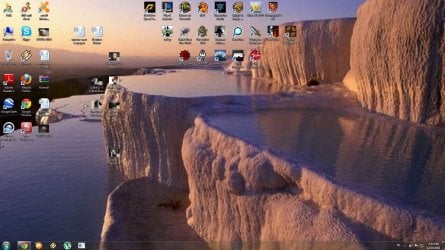
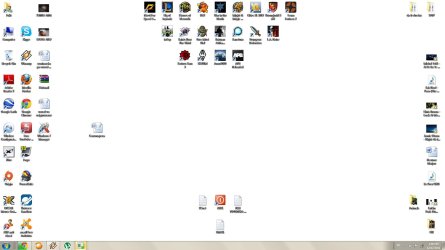
desktop background always changes to "WHITE" like in the picture i attached
after i close a game ( some games ) a part of the screen is missing . the background is still white but icons arent shown but are there
if i try to change resolution it goes down to 1280x720 or even lowest 800x600 ....... after which a reboot must be done or user log off and log back in
any way you can help ? thank you in advance

and ... i just noticed when i tried to take picture ... paint does not want to print out the picture it says low on memory or resource .. .da fak ?? :huh:
 

Attachments
  • Capture.JPG
    Capture.JPG
    108.9 KB · Views: 20
Last edited:

My Computer

Computer type
PC/Desktop
OS
Windows 7 64bit
CPU
i5 6600 3.3 GHz
Motherboard
ASUS B150M-A
Memory
16gb HyperX Fury 2x8gb
Graphics Card(s)
Gigabyte G1 Gaming 1060
Monitor(s) Displays
Samsung SyncMaster B2330HD
Screen Resolution
1920 x 1080
Hard Drives
1tb Toshiba
PSU
Corsair builder VS550
Case
SAMA Assasin
Cooling
Stock
Keyboard
A4Tech KB-28G
Mouse
X7 X-710BK
Internet Speed
99 Mbps
Antivirus
Malwarebytes
Browser
Chrome
Other Info
Nothing at the moment
Hey Frikster,

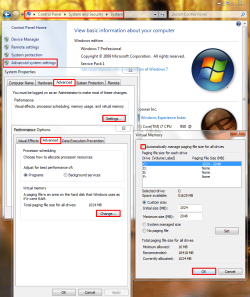
Try this. Find your pagefile and set it to automatic, then restart. See if this does anything. Here is a pic:
pagefilepng.png

Are there any setting changes you've done to Windows 7 that perhaps require some kind of advanced skill level, such as disabling services, registry edits, or BIOS changes?
 

My Computer

Computer type
PC/Desktop
Computer Manufacturer/Model Number
Custom Asus Build
OS
Microsoft Windows 8.1 Pro 64-bit
CPU
Intel(R) Core(TM) i3-4130 CPU @ 3.40GHz
Motherboard
B85M-E
Memory
8.00 GB
Graphics Card(s)
None
Sound Card
Realtek High Definition Audio
Monitor(s) Displays
Asus 23.6" Monitor
Screen Resolution
1920 x 1080 x 32 bits (4294967296 colors) @ 60 Hz
Hard Drives
INTEL SSDSC2BW180A4
Samsung SSD 840 PRO Series
PSU
Seasonic S12II-380Bronze
Case
Lian Li
Cooling
Fan, Passive
Keyboard
Logitech K120
Mouse
Microsoft Touch Mouse
Internet Speed
4ms Ping, 19.0 Mbps Download, 19.0 Mbps Upload
Antivirus
Eset Endpoint
Browser
Internet Explorer, Chrome
it was set to 3070 mb
i have done such edits for certain improvements for some games and have followed guides and not touched anything i know nothing about :D

ok so i restarted , put 76 pictures for desktop slideshow .. works good for now
thank you for the help

but do you know something about the paint problem ?
 

My Computer

Computer type
PC/Desktop
OS
Windows 7 64bit
CPU
i5 6600 3.3 GHz
Motherboard
ASUS B150M-A
Memory
16gb HyperX Fury 2x8gb
Graphics Card(s)
Gigabyte G1 Gaming 1060
Monitor(s) Displays
Samsung SyncMaster B2330HD
Screen Resolution
1920 x 1080
Hard Drives
1tb Toshiba
PSU
Corsair builder VS550
Case
SAMA Assasin
Cooling
Stock
Keyboard
A4Tech KB-28G
Mouse
X7 X-710BK
Internet Speed
99 Mbps
Antivirus
Malwarebytes
Browser
Chrome
Other Info
Nothing at the moment
My Computer

Computer type
PC/Desktop
Computer Manufacturer/Model Number
Custom Asus Build
OS
Microsoft Windows 8.1 Pro 64-bit
CPU
Intel(R) Core(TM) i3-4130 CPU @ 3.40GHz
Motherboard
B85M-E
Memory
8.00 GB
Graphics Card(s)
None
Sound Card
Realtek High Definition Audio
Monitor(s) Displays
Asus 23.6" Monitor
Screen Resolution
1920 x 1080 x 32 bits (4294967296 colors) @ 60 Hz
Hard Drives
INTEL SSDSC2BW180A4
Samsung SSD 840 PRO Series
PSU
Seasonic S12II-380Bronze
Case
Lian Li
Cooling
Fan, Passive
Keyboard
Logitech K120
Mouse
Microsoft Touch Mouse
Internet Speed
4ms Ping, 19.0 Mbps Download, 19.0 Mbps Upload
Antivirus
Eset Endpoint
Browser
Internet Explorer, Chrome
lol .. now it works FINE .. weird

i use avast internet security but wasnt using any kind until 1 week ago
it used to say not enough memory or resource but now it pastes the image with no problem and also saves them
thank you for the help
+R for u ofc :)
 

My Computer

Computer type
PC/Desktop
OS
Windows 7 64bit
CPU
i5 6600 3.3 GHz
Motherboard
ASUS B150M-A
Memory
16gb HyperX Fury 2x8gb
Graphics Card(s)
Gigabyte G1 Gaming 1060
Monitor(s) Displays
Samsung SyncMaster B2330HD
Screen Resolution
1920 x 1080
Hard Drives
1tb Toshiba
PSU
Corsair builder VS550
Case
SAMA Assasin
Cooling
Stock
Keyboard
A4Tech KB-28G
Mouse
X7 X-710BK
Internet Speed
99 Mbps
Antivirus
Malwarebytes
Browser
Chrome
Other Info
Nothing at the moment
Thank you for that. Perhaps Avast! is hogging resources? You might search google to see if that AV has a lot of problems and perhaps try another. If you like it, keep it, but I recommend another, perhaps Microsoft Security Essentials free, as Avast! doesn't seem to be very good. If you do decide to remove it, make sure you use the uninstaller tool to remove it safely.

Glad its working for ya.
 

My Computer

Computer type
PC/Desktop
Computer Manufacturer/Model Number
Custom Asus Build
OS
Microsoft Windows 8.1 Pro 64-bit
CPU
Intel(R) Core(TM) i3-4130 CPU @ 3.40GHz
Motherboard
B85M-E
Memory
8.00 GB
Graphics Card(s)
None
Sound Card
Realtek High Definition Audio
Monitor(s) Displays
Asus 23.6" Monitor
Screen Resolution
1920 x 1080 x 32 bits (4294967296 colors) @ 60 Hz
Hard Drives
INTEL SSDSC2BW180A4
Samsung SSD 840 PRO Series
PSU
Seasonic S12II-380Bronze
Case
Lian Li
Cooling
Fan, Passive
Keyboard
Logitech K120
Mouse
Microsoft Touch Mouse
Internet Speed
4ms Ping, 19.0 Mbps Download, 19.0 Mbps Upload
Antivirus
Eset Endpoint
Browser
Internet Explorer, Chrome
problems problems .. again

same things happen now
i was just dont playing modern warfare 2 and THIS happened

below "Wireless Configurat..." should be icons like xfire , origin , steam etc... but they are there just dont show up on screen :mad:

the next slide for background turned out to be WHITE -.-
i am so uninstalling avast and will see what will happen and will install the one u suggested
 

Attachments

  • Capture.JPG
    Capture.JPG
    232.9 KB · Views: 9

My Computer

Computer type
PC/Desktop
OS
Windows 7 64bit
CPU
i5 6600 3.3 GHz
Motherboard
ASUS B150M-A
Memory
16gb HyperX Fury 2x8gb
Graphics Card(s)
Gigabyte G1 Gaming 1060
Monitor(s) Displays
Samsung SyncMaster B2330HD
Screen Resolution
1920 x 1080
Hard Drives
1tb Toshiba
PSU
Corsair builder VS550
Case
SAMA Assasin
Cooling
Stock
Keyboard
A4Tech KB-28G
Mouse
X7 X-710BK
Internet Speed
99 Mbps
Antivirus
Malwarebytes
Browser
Chrome
Other Info
Nothing at the moment
Alrighty mate,

Follow this tutorial and see if it can fix anything: http://www.sevenforums.com/tutorials/1538-sfc-scannow-command-system-file-checker.html

Now run this tool here 3 times: http://www.sevenforums.com/tutorials/681-startup-repair.html

Are you absolutely sure you have the correct drivers for your system? And you have all of them? What kind of computer do you have, did you custom make it or buy it from a shop? If shop, what make and model?

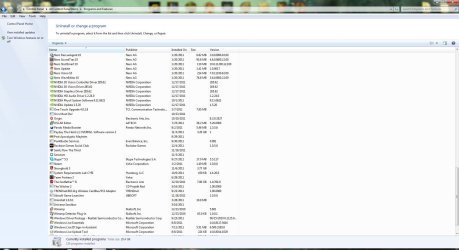
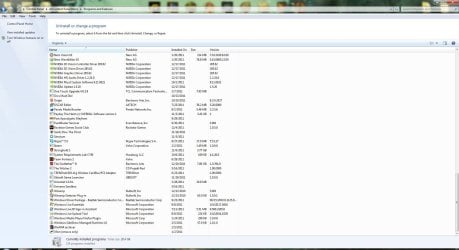
IF nothing else works, mind posting pic of your installed programs?

Let me know if you've ever done any customizing including BIOS changes, Service changes, registry changes, or "personalization" hacks downloaded to your system to make win7 "better".

EDIT* is there something wrong with one of the pictures in the slideshow? Or do all pictures turn to white when this error happens?

Might have to take you through the event viewer and performance tools after you get back to me
 
Last edited:

My Computer

Computer type
PC/Desktop
Computer Manufacturer/Model Number
Custom Asus Build
OS
Microsoft Windows 8.1 Pro 64-bit
CPU
Intel(R) Core(TM) i3-4130 CPU @ 3.40GHz
Motherboard
B85M-E
Memory
8.00 GB
Graphics Card(s)
None
Sound Card
Realtek High Definition Audio
Monitor(s) Displays
Asus 23.6" Monitor
Screen Resolution
1920 x 1080 x 32 bits (4294967296 colors) @ 60 Hz
Hard Drives
INTEL SSDSC2BW180A4
Samsung SSD 840 PRO Series
PSU
Seasonic S12II-380Bronze
Case
Lian Li
Cooling
Fan, Passive
Keyboard
Logitech K120
Mouse
Microsoft Touch Mouse
Internet Speed
4ms Ping, 19.0 Mbps Download, 19.0 Mbps Upload
Antivirus
Eset Endpoint
Browser
Internet Explorer, Chrome
followed tutorial .. found nothing to be fixed

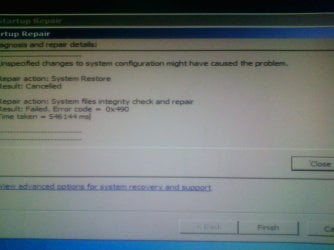
ran system repair got error . as shown on picture :rolleyes:

about my computer drives
in my system spec ( option on sevenforums.com ) i have everything shown and i use windows 7 update to update everything i need .
i also have Windows 7 Manager and Uniblue PowerSuite
the pc was bought from a shop but the parts were chosen ( the GPU , graphic card and ram ) , everything else was chosen by them .
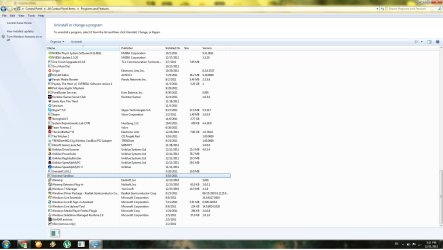
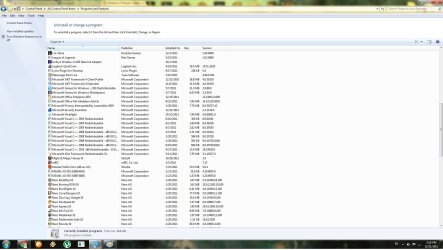
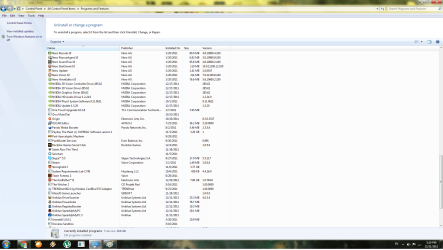
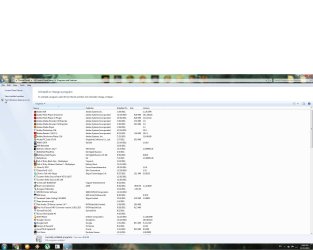
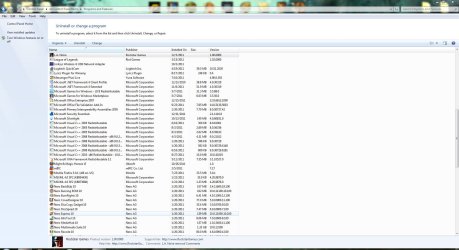
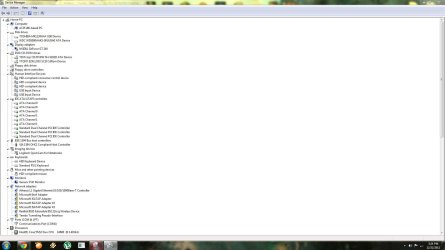
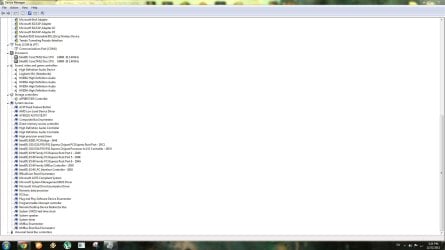
attached 2 pictures from driver manager of installed drivers and all programs from uninstall or change program ( note. on device manager there are 6 more Usb root hub that i didnt take picture of ).

personally i have done none of thing you mentioned to make my windows 7 better , even if i wanted to do that i would need a step by step guide to do it since im not that good in fixing complicated processes . if any of the programs that i have installed changed the registry or anything it would not be my fault since im guessing its designed that way

all the pictures in the folder "Animals" ( the one u can see on one of the previous pictures from where my slideshow pictures are taken ) are valid and good and none of them is "white" when previewed

is there any info i missed or any other details you need ?
 

Attachments

  • 211211-1640.jpg
    211211-1640.jpg
    131.3 KB · Views: 2
  • pic1.jpg
    pic1.jpg
    112.2 KB · Views: 6
  • pic2.jpg
    pic2.jpg
    134.5 KB · Views: 3
  • pic7.jpg
    pic7.jpg
    162.4 KB · Views: 2
  • pic5.jpg
    pic5.jpg
    190.6 KB · Views: 3
  • pic4.png
    pic4.png
    116.6 KB · Views: 3
  • pic3.jpg
    pic3.jpg
    167.4 KB · Views: 3

My Computer

Computer type
PC/Desktop
OS
Windows 7 64bit
CPU
i5 6600 3.3 GHz
Motherboard
ASUS B150M-A
Memory
16gb HyperX Fury 2x8gb
Graphics Card(s)
Gigabyte G1 Gaming 1060
Monitor(s) Displays
Samsung SyncMaster B2330HD
Screen Resolution
1920 x 1080
Hard Drives
1tb Toshiba
PSU
Corsair builder VS550
Case
SAMA Assasin
Cooling
Stock
Keyboard
A4Tech KB-28G
Mouse
X7 X-710BK
Internet Speed
99 Mbps
Antivirus
Malwarebytes
Browser
Chrome
Other Info
Nothing at the moment
i also have Windows 7 Manager and Uniblue PowerSuite
Frikster, I would guess that these two programs are some of your problem. Believe it or not, windows 7 doesn't need any optimizer as it is already optimized, and 3rd party optimizers may only serve to wreck havooc on your pc, which I believe has been done here. Windows registry never needs to be messed with. I would ask that you remove those programs, but it is entirely up to you. They benefit you minimally. Disk cleanup and defragmenter are fine tools that are built within windows to clean it up a bit, nothing else is really needed. Believe me on this, there are many who believe as I do. There are others, but ask them how many reinstalls they do a year...
the pc was bought from a shop but the parts were chosen ( the GPU , graphic card and ram ) , everything else was chosen by them .
Alright, I would like to know who, and what the name of your computer is (should have a name, as an example, Dell has Inspiron One 2305 for sell).
attached 2 pictures from driver manager of installed drivers and all programs from uninstall or change program ( note. on device manager there are 6 more Usb root hub that i didnt take picture of ).
Sorry, it is hard for me to see those pictures other than the first one. Try this method of uploading pictures: How to Use the Snipping Tool in Vista - Vista Forums

personally i have done none of thing you mentioned to make my windows 7 better , even if i wanted to do that i would need a step by step guide to do it since im not that good in fixing complicated processes . if any of the programs that i have installed changed the registry or anything it would not be my fault since im guessing its designed that way
Just what things have I meantioned to do to make Windows 7 better? Let me know exactly what you haven't done so I can know where to go from here and can help you out if you'd like.

Also, installing registry editors is once again not recommended, as it has the potential to have disasterous effects.
 

My Computer

Computer type
PC/Desktop
Computer Manufacturer/Model Number
Custom Asus Build
OS
Microsoft Windows 8.1 Pro 64-bit
CPU
Intel(R) Core(TM) i3-4130 CPU @ 3.40GHz
Motherboard
B85M-E
Memory
8.00 GB
Graphics Card(s)
None
Sound Card
Realtek High Definition Audio
Monitor(s) Displays
Asus 23.6" Monitor
Screen Resolution
1920 x 1080 x 32 bits (4294967296 colors) @ 60 Hz
Hard Drives
INTEL SSDSC2BW180A4
Samsung SSD 840 PRO Series
PSU
Seasonic S12II-380Bronze
Case
Lian Li
Cooling
Fan, Passive
Keyboard
Logitech K120
Mouse
Microsoft Touch Mouse
Internet Speed
4ms Ping, 19.0 Mbps Download, 19.0 Mbps Upload
Antivirus
Eset Endpoint
Browser
Internet Explorer, Chrome
Can you boot the computer in safe mode? Tutorial how-to: http://www.sevenforums.com/tutorials/69585-safe-mode.html

After that, use the sfc scan again: http://www.sevenforums.com/tutorials/1538-sfc-scannow-command-system-file-checker.html

Do this bit here just to test (requires time and patience):

Irfan H said:
Click Start, type msconfig in the Start Search box, and then press ENTER.
If you are prompted for an administrator password or for a confirmation, type the password, or click Continue.
2. On the General tab, click Selective Startup.
3. Under Selective Startup, click to clear the Load Startup Items check box.
4. Click the Services tab, click to select the Hide All Microsoft Services check box, and then click Disable All.
5. Click OK.
6. When you are prompted, click Restart.
7. After the computer starts, check if the issue is fixed.
If your issue is resolved after performing Clean Boot, then follow the steps mentioned in the following KB article to narrow down the exact source: How to troubleshoot a problem by performing a clean boot in Windows Vista or in Windows 7
If you can isolate one service that is selected when the problem occurs, that service is the one that causes the problem
Source: Ststem Restore error code 0x490 and Sys file integrity check error - Microsoft Answers
 

My Computer

Computer type
PC/Desktop
Computer Manufacturer/Model Number
Custom Asus Build
OS
Microsoft Windows 8.1 Pro 64-bit
CPU
Intel(R) Core(TM) i3-4130 CPU @ 3.40GHz
Motherboard
B85M-E
Memory
8.00 GB
Graphics Card(s)
None
Sound Card
Realtek High Definition Audio
Monitor(s) Displays
Asus 23.6" Monitor
Screen Resolution
1920 x 1080 x 32 bits (4294967296 colors) @ 60 Hz
Hard Drives
INTEL SSDSC2BW180A4
Samsung SSD 840 PRO Series
PSU
Seasonic S12II-380Bronze
Case
Lian Li
Cooling
Fan, Passive
Keyboard
Logitech K120
Mouse
Microsoft Touch Mouse
Internet Speed
4ms Ping, 19.0 Mbps Download, 19.0 Mbps Upload
Antivirus
Eset Endpoint
Browser
Internet Explorer, Chrome
deleted both power suite and win 7 manager

my pc does not have a name since its mostly custom made parts picked by me ( the most important ones like i said ) and it was bought from a shop where i know the guy and name doesnt matter to me so i didnt even bother to find it then .

uploaded new pictures ... 6 of them .. used snipping tool :) but u can see the previous pictures , u click on the picture .. click on it again after it opens and then ZOOM with left click :) simple

Let me know if you've ever done any customizing including BIOS changes, Service changes, registry changes, or "personalization" hacks downloaded to your system to make win7 "better".

this kind of things, like the ones u mentioned. Hacked stuff like data , movies , music and everything is common here because if u got genuine stuff u must be richer than god and in the same time u must be stupid ( thats how we call it anyway ) . i still have not done ANY of the registry changed , bios changes , personalization hacks or the serve changes u mentioned ... if the program i installed ( lets say some kind of game ) changed some parameters it is not my fault .

i will try the things u asked in the 2nd post and will edit the post
 

Attachments

  • uninst 2.JPG
    uninst 2.JPG
    199.8 KB · Views: 1
  • picture unins.JPG
    picture unins.JPG
    165.8 KB · Views: 0
  • snip4.JPG
    snip4.JPG
    166.9 KB · Views: 0
  • snip5.JPG
    snip5.JPG
    166.4 KB · Views: 1
  • device manager.JPG
    device manager.JPG
    114.6 KB · Views: 0
  • device manager2.JPG
    device manager2.JPG
    128.2 KB · Views: 1

My Computer

Computer type
PC/Desktop
OS
Windows 7 64bit
CPU
i5 6600 3.3 GHz
Motherboard
ASUS B150M-A
Memory
16gb HyperX Fury 2x8gb
Graphics Card(s)
Gigabyte G1 Gaming 1060
Monitor(s) Displays
Samsung SyncMaster B2330HD
Screen Resolution
1920 x 1080
Hard Drives
1tb Toshiba
PSU
Corsair builder VS550
Case
SAMA Assasin
Cooling
Stock
Keyboard
A4Tech KB-28G
Mouse
X7 X-710BK
Internet Speed
99 Mbps
Antivirus
Malwarebytes
Browser
Chrome
Other Info
Nothing at the moment
Hacked stuff like data , movies , music and everything is common here because if u got genuine stuff u must be richer than god and in the same time u must be stupid ( thats how we call it anyway ) . i still have not done ANY of the registry changed , bios changes , personalization hacks or the serve changes u mentioned ... if the program i installed ( lets say some kind of game ) changed some parameters it is not my fault .
Frikster, listen to me very carefully. Everything you do on your computer is your fault, whether it be good or bad. And piracy is very bad, considering it is illegal and can get you prison time. It is also against forum rules and can get you banned
 

My Computer

Computer type
PC/Desktop
Computer Manufacturer/Model Number
Custom Asus Build
OS
Microsoft Windows 8.1 Pro 64-bit
CPU
Intel(R) Core(TM) i3-4130 CPU @ 3.40GHz
Motherboard
B85M-E
Memory
8.00 GB
Graphics Card(s)
None
Sound Card
Realtek High Definition Audio
Monitor(s) Displays
Asus 23.6" Monitor
Screen Resolution
1920 x 1080 x 32 bits (4294967296 colors) @ 60 Hz
Hard Drives
INTEL SSDSC2BW180A4
Samsung SSD 840 PRO Series
PSU
Seasonic S12II-380Bronze
Case
Lian Li
Cooling
Fan, Passive
Keyboard
Logitech K120
Mouse
Microsoft Touch Mouse
Internet Speed
4ms Ping, 19.0 Mbps Download, 19.0 Mbps Upload
Antivirus
Eset Endpoint
Browser
Internet Explorer, Chrome
ok everything is my fault .
i am guessing you will not be helping me anymore
or anyone else for that matter
i just wanted to be honest but should have known by now that honesty in this world takes me nowhere

just wanted to post this picture to show problem is not fixed
 

Attachments

  • well this is new.JPG
    well this is new.JPG
    252.1 KB · Views: 2

My Computer

Computer type
PC/Desktop
OS
Windows 7 64bit
CPU
i5 6600 3.3 GHz
Motherboard
ASUS B150M-A
Memory
16gb HyperX Fury 2x8gb
Graphics Card(s)
Gigabyte G1 Gaming 1060
Monitor(s) Displays
Samsung SyncMaster B2330HD
Screen Resolution
1920 x 1080
Hard Drives
1tb Toshiba
PSU
Corsair builder VS550
Case
SAMA Assasin
Cooling
Stock
Keyboard
A4Tech KB-28G
Mouse
X7 X-710BK
Internet Speed
99 Mbps
Antivirus
Malwarebytes
Browser
Chrome
Other Info
Nothing at the moment
No frikster, honesty takes you somewhere. Piracy isn't honest. Perhaps someone else may pipe in, as I've come to the limits of my knowledge

I recommend removing all pirated software, as much of it can be bad for your computer (it is pirated after all, and what do they care?). After that, see if you get things working. If not, do a complete reinstall to make sure you've removed all bad leftovers. Stick to the real stuff. You'll get in trouble any other way
 

My Computer

Computer type
PC/Desktop
Computer Manufacturer/Model Number
Custom Asus Build
OS
Microsoft Windows 8.1 Pro 64-bit
CPU
Intel(R) Core(TM) i3-4130 CPU @ 3.40GHz
Motherboard
B85M-E
Memory
8.00 GB
Graphics Card(s)
None
Sound Card
Realtek High Definition Audio
Monitor(s) Displays
Asus 23.6" Monitor
Screen Resolution
1920 x 1080 x 32 bits (4294967296 colors) @ 60 Hz
Hard Drives
INTEL SSDSC2BW180A4
Samsung SSD 840 PRO Series
PSU
Seasonic S12II-380Bronze
Case
Lian Li
Cooling
Fan, Passive
Keyboard
Logitech K120
Mouse
Microsoft Touch Mouse
Internet Speed
4ms Ping, 19.0 Mbps Download, 19.0 Mbps Upload
Antivirus
Eset Endpoint
Browser
Internet Explorer, Chrome
Back
Top