
Desktop Computer icon replicates itself

RJKinsman

New member
Member
Local time
5:56 PM
Messages
26
OK, this is apparently a weird problem. I can't seem to find a thread addressing it.

The "Computer" icon on my desktop tends to replicate itself. When I show the desktop, suddenly I see "Computer" 12 times or more. I seem to be able to re-create the problem when closing tabs in Google Chrome, but I'm not sure if it's limited to Chrome.

I'm uploading a png file showing the multiple computer icons.

Any clues? Thanks!
 

Attachments
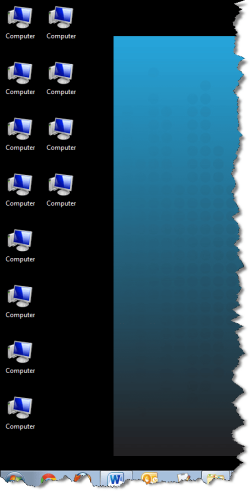
  • SNAG-04.png
    SNAG-04.png
    41.7 KB · Views: 13

My Computer

Computer Manufacturer/Model Number
Dell Latitude E6410
OS
Windows 7 Professional 64-bit
CPU
Intel Core i5 2.67 GHz
Memory
8 GB
Last edited:

My Computer

Computer type
PC/Desktop
Computer Manufacturer/Model Number
Self assembled
OS
Windows 10 Home 64Bit
CPU
Intel Core i5 10400 @ 2.90GHz
Motherboard
Intel Corporation DG41WV (PROCESSOR)
Memory
8.00GB Single-Channel Unknown @ 1329MHz (16-20-20-38)
Sound Card
Realtek High Definition Audio
Monitor(s) Displays
DELL E170S
Screen Resolution
1280x1024 pixels
Hard Drives
931GB TOSHIBA DT01ACA100 (SATA)
238GB TEAM TM8PS7256G (SATA SSD)
Case
Nothing Fancy
Cooling
Fans
Keyboard
A4 Tech Co LTD
Mouse
A4 Tech Co Ltd/Logitech
Internet Speed
25 Mbps
OK, so hold on there, it looks like you're jumping to a conclusion. Are you thinking this is caused by malware? Help me figure out how you got there. Thanks.

This is a corporate laptop. My IT department installed McAfee Suite, including VirusScan Enterprise.
 

My Computer

Computer Manufacturer/Model Number
Dell Latitude E6410
OS
Windows 7 Professional 64-bit
CPU
Intel Core i5 2.67 GHz
Memory
8 GB
The logical first steps for what you present are to check for infection and then check for System file damage. I would also use Malwarebytes.

In addition MucAfee is one of the worst infections we see here. Uninstalling it solves most issues where is is present. Maybe it has a completely different IT solution not written by Typhoid Mary but for consumer Win7 it is the worst.
 
OK, thanks, @gregrocker. I'll run a Malwarebytes scan, it can't hurt. As far as uninstalling McAfee, it's not an option. I won't be able to connect to corporate network if it's not there.
 

My Computer

Computer Manufacturer/Model Number
Dell Latitude E6410
OS
Windows 7 Professional 64-bit
CPU
Intel Core i5 2.67 GHz
Memory
8 GB
I ran a Malwarebytes full scan in safe mode. Removed a single threat -- "PUP.FunWebProducts" not sure if this solved the problem, or if it just went away after re-booting. Next time it starts happening, I'll just re-boot and re-post if here.

Thanks!
 

My Computer

Computer Manufacturer/Model Number
Dell Latitude E6410
OS
Windows 7 Professional 64-bit
CPU
Intel Core i5 2.67 GHz
Memory
8 GB
Fun Web products can be hard to root out sometimes. I would also run SuperAntiSpyware, look closely at your browser add-ons and only enable those which you know are required to display the page correctly - normally Flash, Shockwave, WMP or QT player add-on
 

My Computer

Computer type
PC/Desktop
Computer Manufacturer/Model Number
Home made Desktop
OS
Windows 10 Pro. 64/ version 1709 Windows 7 Pro/64
CPU
Intel i7-6800K @ 4.3
Motherboard
ASUS X-99 Deluxe II
Memory
Corsair Platinum 16 gig @2400
Graphics Card(s)
EVGA GTX 1070 OC
Monitor(s) Displays
Asus 27" LED LCD/VE278Q
Screen Resolution
1920-1080 or 1280-720 HDMI
Hard Drives
INTEL SSD 730-240 Gb Sata 3.0/
PSU
EVGA Platium 1200W
Case
Phanteks Luxe Tempered Glass 8 fans/ one radiator
Cooling
XSPC/ Water Cooled CPU
Keyboard
Das 4 Professional
Mouse
Logitech M705/MX Anywhere 2-S
Internet Speed
100 mbits
Antivirus
Microsoft Security Essentials/ Malwarebytes Premium 3.0/ SAS
Browser
I.E. 11 default/Firefox/ ISP Time Warner Cable/Spectrum
Other Info
LG BluRay Burner/
Sound system-KLipsch-THX/
Icy Dock ssd Hot Swap bays.
OK, now I'm really not convinced removing FunWebProducts had any relevence to the original problem posted ("Computer desktop icon replicates itself"). So, here's the latest symptom. It started happening again. It is clearly related to Chrome. Once it starts happening, I can cause another icon to appear by opening and then closing a tab in Chrome. As soon as I close the tab, another Computer icon appears. Here's the weird thing. I re-booted, and all of the icons disappeared. And the problem stopped happening. By the way, this has been happening for a long time (over a year). I just got annoyed enough (and have some free time) to post about it.
 

My Computer

Computer Manufacturer/Model Number
Dell Latitude E6410
OS
Windows 7 Professional 64-bit
CPU
Intel Core i5 2.67 GHz
Memory
8 GB
Try IE9 or Firefox to see the difference.

Any installed Google program is spyware which will paste interest ads everywhere you go based on intensive spying it does on you. You can only partially mitigate this using Opt Out of Network Advertising.

I don't install any Google programs, stay signed out of their sites, only using the stable Google search box built into Firefox or IE9 which blocks them from spying.
 
Paranoid much?
 

My Computer

Computer Manufacturer/Model Number
Dell Latitude E6410
OS
Windows 7 Professional 64-bit
CPU
Intel Core i5 2.67 GHz
Memory
8 GB
Personally, I love all things google -- Chrome, Voice, gmail, drive and more. As far as I'm concerned, the ads are not intrusive, and if it's free to me and paid for by someone else, fine. No problem. I'd be very surprised if it was google advertising replicating the Computer icon on my desktop. Seriously. But I draw the line at Android. Tried it, hate it. All of my mobile devices run iOS. And that's just because sadly, webOS failed.
 

My Computer

Computer Manufacturer/Model Number
Dell Latitude E6410
OS
Windows 7 Professional 64-bit
CPU
Intel Core i5 2.67 GHz
Memory
8 GB

My Computer

Computer type
Laptop
Computer Manufacturer/Model Number
Employer provided Dell Latitude
OS
W7 Pro SP1 64bit
CPU
i7
Memory
8GB
Graphics Card(s)
Intel HD Graphics
Hard Drives
crappy SSD
Antivirus
Employer mandated Symantec Endpoint Protection
Browser
Pale Moon 64bit, IE11 64bit & Chrome 64bit
Interesting article about Ubuntu. I had a terrible experience with it on a netbook, long sad story. Ended up falling back to Windows. I might be willing to give it a shot on a phone, but I would be very cautious. I run my life out that thing! Could be quite disruptive. I might try putting it on my old Treo that is sitting around doing nothing, just to play with it.

Anyway...

Here's the information you requested...
Chrome Version 24.0.1312.45 beta-m (BTW, it says "Google Chrome is up to date.")
Default Theme (hmmm... never tried themes. Interesting)
Extensions:
AddThis - Share & Bookmark (new) 2.9.9
CloudShare Plugin 1.4.4.0
DB 3.0 (Unofficial Dropbox application (icon/link)
Google Voice (by Google) 2.3.6.8
IE Tab 3.10.10.1
LastPass 2.0.14
Tabs to the front! 0.2.4
WebSlingPlayer 1.5.7.158
 

My Computer

Computer Manufacturer/Model Number
Dell Latitude E6410
OS
Windows 7 Professional 64-bit
CPU
Intel Core i5 2.67 GHz
Memory
8 GB
One other thing, it's not easy to replicate. Once it starts happening, it keeps happening until I reboot. But I'm not sure what sequence of events leads up to it starting to happen.
 

My Computer

Computer Manufacturer/Model Number
Dell Latitude E6410
OS
Windows 7 Professional 64-bit
CPU
Intel Core i5 2.67 GHz
Memory
8 GB
Paranoid much?

Not until it started parsing what I was writing in emails, pasting ads based on what I'd just written to a friend. These ads will follow you everywhere you go, to other devices, sites, etc. and are so intrusive they'll even limit ads to exactly what you (confidentially) tell correspondents you're looking for. That much you can mitigate with the Advertising Initiative, but just the fact that Google can do this is too much for me.
 
Paranoid much?

Not until it started parsing what I was writing in emails, pasting ads based on what I'd just written to a friend. These ads will follow you everywhere you go, to other devices, sites, etc. and are so intrusive they'll even limit ads to exactly what you (confidentially) tell correspondents you're looking for. That much you can mitigate with the Advertising Initiative, but just the fact that Google can do this is too much for me.

I understand that concern, I've heard it before, and I know it's doing it. It doesn't bother me. I know it's a just a machine. Actually sometimes it's kind of amusing.
 

My Computer

Computer Manufacturer/Model Number
Dell Latitude E6410
OS
Windows 7 Professional 64-bit
CPU
Intel Core i5 2.67 GHz
Memory
8 GB
Just take the computer icon off the desktop.

right click the desktop> click personalize> change desktop icons> uncheck the computer icon> click ok

see if it works.
 

My Computer

Computer type
PC/Desktop
Computer Manufacturer/Model Number
Skylake Special #666
OS
Windows 10 Pro x64
CPU
Intel Core i7 6700K
Motherboard
Asus Sabertooth Z170 Mark 1
Memory
GSkill TridentZ RGB 16GB 3600 16-16-16-36
Graphics Card(s)
EVGA GTX 980 Ti SC x2
Sound Card
Realtek High Definition
Monitor(s) Displays
AOC G2460PG
Screen Resolution
1920 x 1080 144Hz
Hard Drives
Samsung 860 Pro 256GB, Seagate Barracuda 4TB x2
PSU
EVGA 1000 P2, EVGA White Custom Braided Cables
Case
Corsair Vengeance C70 Gunmetal Black
Cooling
Corsair H100i v2, Corsair ML120 x2, Thermal Grizzly Kryonaut
Keyboard
Logitech G910 Orion Spectrum
Mouse
Logitech G700s
Internet Speed
Verizon Fios Quantum Gateway 75/75
Antivirus
Windows Defender, Malwarebytes Free 3.8.3
Browser
Chrome
Other Info
Corsair SP120 x4, LG Blu-ray Drive, Durabrand HT-395 100 Watt Dolby Digital Amp, Corsair H2100 Wireless 7.1 Headset
Just take the computer icon off the desktop.

right click the desktop> click personalize> change desktop icons> uncheck the computer icon> click ok

see if it works.

Thanks, @AddRAM. Yes, I've done that, but after removing them, the icons just start replicating again until I reboot.
 

My Computer

Computer Manufacturer/Model Number
Dell Latitude E6410
OS
Windows 7 Professional 64-bit
CPU
Intel Core i5 2.67 GHz
Memory
8 GB
Tell me how you got it to do that, I want it on 1 of my machines. :D
 

My Computer

Computer type
PC/Desktop
Computer Manufacturer/Model Number
Skylake Special #666
OS
Windows 10 Pro x64
CPU
Intel Core i7 6700K
Motherboard
Asus Sabertooth Z170 Mark 1
Memory
GSkill TridentZ RGB 16GB 3600 16-16-16-36
Graphics Card(s)
EVGA GTX 980 Ti SC x2
Sound Card
Realtek High Definition
Monitor(s) Displays
AOC G2460PG
Screen Resolution
1920 x 1080 144Hz
Hard Drives
Samsung 860 Pro 256GB, Seagate Barracuda 4TB x2
PSU
EVGA 1000 P2, EVGA White Custom Braided Cables
Case
Corsair Vengeance C70 Gunmetal Black
Cooling
Corsair H100i v2, Corsair ML120 x2, Thermal Grizzly Kryonaut
Keyboard
Logitech G910 Orion Spectrum
Mouse
Logitech G700s
Internet Speed
Verizon Fios Quantum Gateway 75/75
Antivirus
Windows Defender, Malwarebytes Free 3.8.3
Browser
Chrome
Other Info
Corsair SP120 x4, LG Blu-ray Drive, Durabrand HT-395 100 Watt Dolby Digital Amp, Corsair H2100 Wireless 7.1 Headset
Back
Top