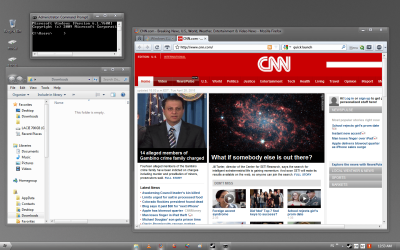
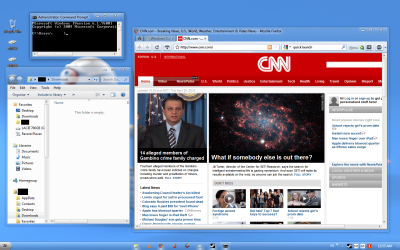
desktop enhancements

youllbelost

Goofy Goosebumped
Power User
Local time
6:51 AM
Messages
389
Location
India
I need to change the way my desktop looks please help!!

List all the software that (the best ones) you use for enhancing your desktop
post a Pic....
 

My Computer

Computer Manufacturer/Model Number
AMD _(Assembled)_
OS
Dual Booting Windows 7 64-Bit Ultimate Edition and Fedora 16.
CPU
AMD Phenom X4 925
Motherboard
MSI 785g-E53
Memory
4gb DDR3 G.skill RipJaws
Graphics Card(s)
ATI Radeon HD 6770
Sound Card
Realtek
Monitor(s) Displays
Dell IN2020M LED
Screen Resolution
1600*900 20"
Hard Drives
Seagate 500 Gibs
External 320 Gb Western Digital(Got Glitchy)
PSU
Cooler Master
Case
Cooler Master
Cooling
Cooler Master
Keyboard
Logitech K100
Mouse
Razor Death Adder v2 3500 dPi (Razer Goliathus Pad)
Internet Speed
Back to college Internet with Cyberroam X|

My Computer

Computer type
PC/Desktop
Computer Manufacturer/Model Number
Custom built
OS
Windows 8 Pro 64-bit
CPU
Intel Core i7 950 @4.4GHz
Motherboard
EVGA 131-GT-E767
Memory
12GB DDR3 1333MHz @1400 (9-9-9-24)
Graphics Card(s)
2x AMD Radeon HD 6770
Sound Card
Sound Blaster Audigy
Monitor(s) Displays
Acer S231HL + Acer E19T5W
Screen Resolution
1920x1080 + 1440x900
Hard Drives
128GB Samsung 840 Pro
1TB Seagate Barracuda 7200RPM 64mb
500GB Seagate Barracuda 7200RPM 16mb
PSU
Corsair GS800
Case
Custom-made
Cooling
CM Hyper212+, lots of fans
Keyboard
NMB RT8255C+
Mouse
Func MS-3
Internet Speed
30/1.5
Antivirus
Microsoft Security Essentials/Spybot SD/Malwarebytes
Browser
Google Chrome
Other Info
Onkyo TX-27 receiver & two Realistic Optimus T100s.
If you simply want to change your theme as most do, there's a simple way to do that.

First you need to download Universal Theme Patcher and follow this tutorial
http://www.sevenforums.com/tutorials/28377-theme-how-apply-custom-themes.html

Second, you'll need a find a theme you like, I get mine from deviantART: where ART meets application!

Third, if your theme comes with any system files (explorer.exe, explorerfram.dll, etc)

Download Windows Theme Installer and use it to install your theme and use it to install your theme and system files.

Windows Themes Installer : Install Windows 7 & Vista themes easily | The Windows Club

The latest version of Windows Theme Installer actually makes using the Universal product unneccesary but I'm unsure if the WTI actually will make backups of the initial files that are replaced. If it does, then you could just use that. If it doesn't you can either use the UTP or just use the sfc /scannow command when you want to revert to original files.

Most of the dock products are just that, program docks that don't actually change your theme. They're useful if you'd like to use a dock, but I've found that the new "superbar" actually functions just like a dock and will work just as well, and may be more stable.

If you want to change icons, you can do so through a few ways. I changed navigation bar icons and default folder icons through registry changes. I changed my superbar icons through changing the properties of the initial shortcut I used to launch the programs. I changed the internal program icons by editing the programs using Restorator. You'll find that there are many ways to get to the same road in this department, some involve more work on your end, some involve paying for a product and others are just hard to find.

If you want transparent windows you have a few options. You can use the product mentioned by the OP or you can install the theme that I use, which is called "Soft7 1.8" it basically makes all of your Windows transparent so that all your Window frames change to whatever color your background is.

i.e.

 

Attachments

  • desktop.png
    desktop.png
    272.6 KB · Views: 159
  • desktop2.png
    desktop2.png
    238.9 KB · Views: 110

My Computer

Computer Manufacturer/Model Number
Apple Macbook Pro (April 2009)
OS
W7 Ult. x64 | OS X
CPU
Intel Mobile Core 2 Duo 2.93Ghz [T9800 Penryn]
Motherboard
NVIDIA nForce 730i Rev. B1 [Mac-F2268EC8 (U2E1)]
Memory
4096MB Samsung DDR3 Dual Channel [PC3-8500F 1066Mhz]
Graphics Card(s)
NVIDIA GeForce 9600M GT 512MB [G96M Rev. C1]
Sound Card
SB X-Fi Surround 5.1 USB | Onboard Realtek (Disabled)
Monitor(s) Displays
Acer x223wbd 22" | Apple Anti-Glare 17" (Disabled)
Screen Resolution
{Current} 1440x900 {Acer} 1680x1050 {Apple} 1920x1200
Hard Drives
{Internal}
Seagate Momentus 320GB 2.5" 7200RPM [ST9320421AS]

{Externals}
LaCie 320GB USB 2.0 HDD [301284UR]
LaCie 750GB USB 2.0 FW400 eSATA HDD [301314U]
LaCie 1TB USB 2.0 HDD [301304UR]
PSU
Magsafe
Case
Aluminum/Unibody (MBP52)
Cooling
2 x 6000 RPM Fans
Keyboard
Logitech G-15v2 [PN 920-000379]
Mouse
Logitech G-9 [PN 910-000338]
Internet Speed
12Mbps/2.5Mbps w/ 24Mbps Speed Boost [Comcast]
Other Info
Logitech X-540 Speakers [PN 970223-0122]
Sennheiser PC-151 Headset
Well i'm still using Yahoo widgets over here ... Yahoo! Widgets: useful, fun, beautiful little apps for Mac and Windows

desktoppe.jpg


and although I don't use them much .. you could also have a fiddle about with Winstep and Nexus .. WinStep: Desktop Themes and Customizing Windows!
 

My Computer

OS
Windows 7 64bit RTM
CPU
AMD Athlon 64 X2 3800+
Motherboard
ASUS M2N-E SLI
Memory
4G Dual channel
Graphics Card(s)
POV GeForce 7600 GT
Sound Card
USB 2.1
Monitor(s) Displays
Samsung 17 in LCD
Hard Drives
80G Western Digital
250G Western Digital
500G Buffalo Drivestation
rocketdock
rainmeter
fences
 

My Computer

OS
Windows 7 Ultimate 64bit
CPU
AMD Phenom II X4 945 @3.0ghz
Motherboard
Asrock
Memory
4gb kingston hyperX
Graphics Card(s)
1gb Radeon HD 5670
Most of the dock products are just that, program docks that don't actually change your theme. They're useful if you'd like to use a dock, but I've found that the new "superbar" actually functions just like a dock and will work just as well, and may be more stable.

i.e.
please if u can tell me how to make the icons in the superbar align to centre i found that before too, but could'nt get a software to do it..
 

My Computer

Computer Manufacturer/Model Number
AMD _(Assembled)_
OS
Dual Booting Windows 7 64-Bit Ultimate Edition and Fedora 16.
CPU
AMD Phenom X4 925
Motherboard
MSI 785g-E53
Memory
4gb DDR3 G.skill RipJaws
Graphics Card(s)
ATI Radeon HD 6770
Sound Card
Realtek
Monitor(s) Displays
Dell IN2020M LED
Screen Resolution
1600*900 20"
Hard Drives
Seagate 500 Gibs
External 320 Gb Western Digital(Got Glitchy)
PSU
Cooler Master
Case
Cooler Master
Cooling
Cooler Master
Keyboard
Logitech K100
Mouse
Razor Death Adder v2 3500 dPi (Razer Goliathus Pad)
Internet Speed
Back to college Internet with Cyberroam X|
Most of the dock products are just that, program docks that don't actually change your theme. They're useful if you'd like to use a dock, but I've found that the new "superbar" actually functions just like a dock and will work just as well, and may be more stable.

i.e.
please if u can tell me how to make the icons in the superbar align to centre i found that before too, but could'nt get a software to do it..

Here's a tutorial on that,
http://www.sevenforums.com/tutorials/20602-taskbar-center-icons.html
 

My Computer

Computer type
PC/Desktop
Computer Manufacturer/Model Number
Self Built
OS
Win 10 Pro x64
CPU
Intel I5-2500K @3.3GHz
Motherboard
Asrock P67 Extreme4
Memory
16GB G.Skill Ripjaws X (4x4GB)
Graphics Card(s)
EVGA GeForce 750 Ti SC 2GB
Sound Card
ASUS Xonar DG 5.1 Channels 24-bit 96KHz PCI Interface Sound
Monitor(s) Displays
auria eq2367
Screen Resolution
1920 x 1080
Hard Drives
250GB Samsung 850 EVO SSD
1TB WD Blue
1TB Hitachi
PSU
SeaSonic X 650W 80 Plus Gold
Case
Corsair Obsidian 750D
Cooling
Corsair H60, Three 140mm case fans
Keyboard
Logitech Wireless Keyboard K520
Mouse
Logitech Wireless Mouse M310
Internet Speed
Wave Broadband ~ 100 dn 5 up
Antivirus
Windows Defender, Malwarebytes Premium
Browser
Edge, IE11, Chrome
Other Info
Laptop specs: HP g7-1365dx /
CPU: AMD A6-3420M APU with Radeon(tm) HD Graphics /
RAM: Crucial 8Gb (2x4Gb) /
SSD: Crucial M4-CT128M4SSD2 ATA Device/ FW 000F /
GFX: AMD Radeon HD 6520G /
OS: Windows 10 Pro x64

My Computer

Computer type
PC/Desktop
Computer Manufacturer/Model Number
Self Assembled
OS
Microsoft Windows 10 Pro Insider Preview 64-bit
CPU
Intel(R) Core(TM) i3-4130 CPU @ 3.40GHz
Motherboard
Gigabyte Technology Co., Ltd. B85M-D3H
Memory
Corsair Vengence 4GB x2 (8.00GB Dual-Channel DDR3 @ 798MHz)
Graphics Card(s)
2047MB GeForce GTS 450 (ZOTAC International)
Sound Card
Onboard (Realtek High Definition Audio)
Monitor(s) Displays
LG Flatron E2040T
Screen Resolution
1600x900
Hard Drives
Western Digital 1 TB
Seagate 500 GB
PSU
Corsair VS550
Case
Cooler Master K380
Cooling
Cooler Master Seidon 120V Plus
Keyboard
Logitech MK260r
Mouse
Logitech MK260r
Internet Speed
PMPL Broadband
Antivirus
Windows Defender + MBAM
Browser
Firefox
Other Info
Dell Studio 15" Laptop
Back
Top