Desktop freeze

dwarfer66

New member
Power User
Local time
1:57 AM
Messages
233
Location
Kwinana, Western Australia
Hey guys for about the last month or so, at random times my desktop just freezes, could be for a few seconds or until I reboot, but it don't happen when playing games, it first started when I had win 8 (thought it was that) then I reinstalled win 7 but it still happens, even went back to earlier graphic drivers. Temps are all fine, ram is fine etc, just can be really annoying. Any ideas?
 

My Computer

Computer type
PC/Desktop
Computer Manufacturer/Model Number
Home Build
OS
Windows 8.1 Pro
CPU
i5 3550 Ivy Bridge
Motherboard
Gigabyte Z77MX-D3H
Memory
8gb 1600 GSkill 9-9-9-24 xmp
Graphics Card(s)
Gigabyte GTX 760 OC
Sound Card
VIA VT2021 onboard
Monitor(s) Displays
BenQ GL2760H 27inch hdmi; LG Flatron E2351 23inch dvi
Screen Resolution
1920x1080
Hard Drives
1x Samsung 850 Evo 120GB
1x 4TB WD Green HDD
1x 3TB WD Green HDD
2x 2TB Seagate HDD
1x 1TB Seagate External HDD
PSU
Cooler Master V750
Case
Coolermaster HAF 912 Advanced
Cooling
Standard
Keyboard
Logitech K120 USB
Mouse
Razor Abyssus USB
Internet Speed
Broadband
Antivirus
MSE + Malwarebytes
Browser
Palemoon
Other Info
It's been the worst day since yesterday (thanks Flogging Molly) so apt!
Hi dwarfer66.
Are the system specs in your profile relevant and up to date?

Please export and upload your system event log.

  1. :orb: Start > type eventvwr > hit Enter.
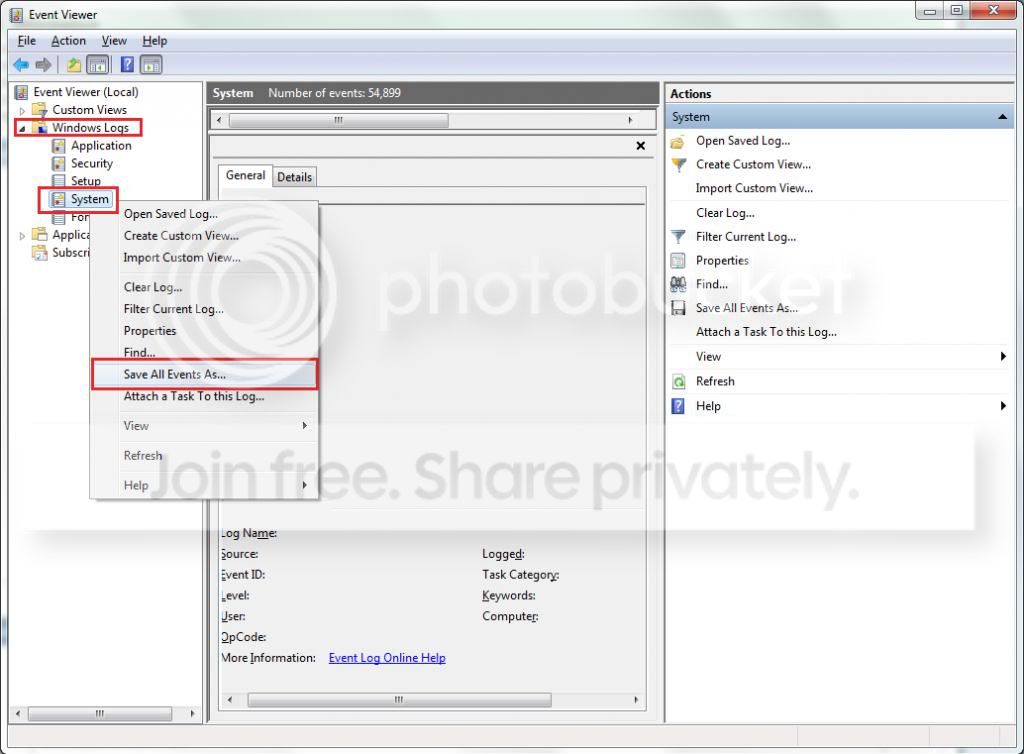
  2. Toggle open the triangle to the left of Windows Logs, right-click on system and choose Save All Events As...
  3. syseventvwrlog1_zps5b0a5395.jpg
  4. A dialogue box will pop up asking you to name the file and select the save directory, name the file the same as your Seven Forums user-name and save it to the desktop.
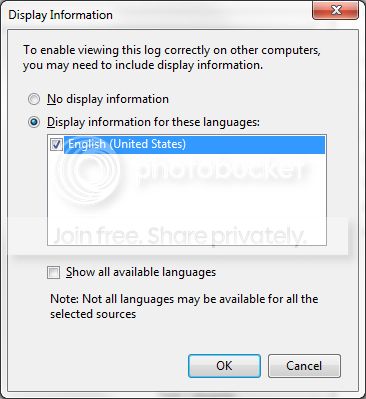
  5. A second dialogue box will appear asking you to select the Display Information, select Display information for these languages and check the box next to English (if you don't have English automatically offered check the box at the bottom to display additional languages - Show all available languages and check English).
  6. syseventvwrlog2_zpsdafa4dba.jpg
  7. Wait a few moments until the cursor returns to normal. The file will now be on your desktop (given it's the directory it was saved to) UserName.evtx, next to it there will be a folder called LocaleMetaData select both the .evtx file as well as the folder and compress them using Winrar / 7zip and attach it in your next post.
 

My Computer

Computer type
PC/Desktop
OS
Windows 10
CPU
Intel Core i5 3570K
Motherboard
Asus P8Z77V-PRO
Memory
16GB 1600Mhz G.Skill
Graphics Card(s)
Gigabyte GTX 970 G1-Gaming
PSU
Seasonic 1000W Platinum
Case
Fractal Design Define R4
Cooling
Noctua NH-D14
Yes and here you go
 

Attachments

My Computer

Computer type
PC/Desktop
Computer Manufacturer/Model Number
Home Build
OS
Windows 8.1 Pro
CPU
i5 3550 Ivy Bridge
Motherboard
Gigabyte Z77MX-D3H
Memory
8gb 1600 GSkill 9-9-9-24 xmp
Graphics Card(s)
Gigabyte GTX 760 OC
Sound Card
VIA VT2021 onboard
Monitor(s) Displays
BenQ GL2760H 27inch hdmi; LG Flatron E2351 23inch dvi
Screen Resolution
1920x1080
Hard Drives
1x Samsung 850 Evo 120GB
1x 4TB WD Green HDD
1x 3TB WD Green HDD
2x 2TB Seagate HDD
1x 1TB Seagate External HDD
PSU
Cooler Master V750
Case
Coolermaster HAF 912 Advanced
Cooling
Standard
Keyboard
Logitech K120 USB
Mouse
Razor Abyssus USB
Internet Speed
Broadband
Antivirus
MSE + Malwarebytes
Browser
Palemoon
Other Info
It's been the worst day since yesterday (thanks Flogging Molly) so apt!
Nope, you didn't attach the file :geek: .
 

My Computer

Computer type
PC/Desktop
OS
Windows 10
CPU
Intel Core i5 3570K
Motherboard
Asus P8Z77V-PRO
Memory
16GB 1600Mhz G.Skill
Graphics Card(s)
Gigabyte GTX 970 G1-Gaming
PSU
Seasonic 1000W Platinum
Case
Fractal Design Define R4
Cooling
Noctua NH-D14
All done tried it 4 times, as a 7zip file, but worked with a rar file.
 

My Computer

Computer type
PC/Desktop
Computer Manufacturer/Model Number
Home Build
OS
Windows 8.1 Pro
CPU
i5 3550 Ivy Bridge
Motherboard
Gigabyte Z77MX-D3H
Memory
8gb 1600 GSkill 9-9-9-24 xmp
Graphics Card(s)
Gigabyte GTX 760 OC
Sound Card
VIA VT2021 onboard
Monitor(s) Displays
BenQ GL2760H 27inch hdmi; LG Flatron E2351 23inch dvi
Screen Resolution
1920x1080
Hard Drives
1x Samsung 850 Evo 120GB
1x 4TB WD Green HDD
1x 3TB WD Green HDD
2x 2TB Seagate HDD
1x 1TB Seagate External HDD
PSU
Cooler Master V750
Case
Coolermaster HAF 912 Advanced
Cooling
Standard
Keyboard
Logitech K120 USB
Mouse
Razor Abyssus USB
Internet Speed
Broadband
Antivirus
MSE + Malwarebytes
Browser
Palemoon
Other Info
It's been the worst day since yesterday (thanks Flogging Molly) so apt!
You seem to have Driver Verifier enabled, which takes up a fair amount of system resources.
Code:
The computer has rebooted from a bugcheck.  The bugcheck was: [COLOR=Red][U][B]0x000000c9[/B][/U][/COLOR] (0x0000000000000215, 0xfffff88002c777cb, 0xfffff98006488e10, 0x0000000000000000). A dump was saved in: C:\Windows\MEMORY.DMP. Report Id: 111613-19858-01.
Please disable Driver Verifier | http://www.sevenforums.com/tutorials/101379-driver-verifier-enable-disable.html.

You have an infection:
Code:
The description for Event ID 1116 from source Microsoft Antimalware cannot be found. Either the component that raises this event is not installed on your local computer or the installation is corrupted. You can install or repair the component on the local computer.

If the event originated on another computer, the display information had to be saved with the event.

The following information was included with the event: 

%%860
4.3.0219.0
{13365691-B87C-4D08-8163-C60F9A68A6A5}
2013-10-24T14:30:41.909Z
2147625929
VirTool:Win32/Obfuscator.XZ
5
Severe
34
Tool
http://go.microsoft.com/fwlink/?linkid=37020&name=VirTool:Win32/Obfuscator.XZ&threatid=2147625929
1
1
3
%%818
C:\Windows\explorer.exe
Dwarfer-PC\Dwarfer
file:_I:\Crack\steam_api.dll;file:_\Device\SCDEmu\SCDEmuCd0\Crack\steam_api.dll
0
%%844
1
%%813
1
%%821
0
9
%%887
0x00000000
The operation completed successfully. 
0
0
No additional actions required
AV: 1.161.588.0, AS: 1.161.588.0, NIS: 109.0.0.0
AM: 1.1.10003.0, NIS: 2.1.10003.0
Please scan:

(*Kaspersky Rescue CD from a USB thumbdrive)

nVidia errors
:

Code:
The description for Event ID 14 from source nvlddmkm cannot be found. Either the component that raises this event is not installed on your local computer or the installation is corrupted. You can install or repair the component on the local computer.

If the event originated on another computer, the display information had to be saved with the event.

The following information was included with the event: 

\Device\Video5
!051d(2528)
Code:
Warning    06/11/2013 04:43:43    Display    4101    None
Display driver nvlddmkm stopped responding and has successfully recovered.
Could be software, thermals, hardware.
Let's deal with the above first.

Disk errors:
Code:
Error    17/10/2013 05:10:39    Disk    11    None
The driver detected a controller error on \Device\Harddisk4\DR4.
Please upload the MSINFO32 file:

:orb:Start → Run → type MSINFO32 then hit Enter.
In MSINFO32 go to, File → Save → name it your user-name.
Once the file is saved right click it and choose Send toCompressed (zipped) folder.

Attach the file in your next post.
 

My Computer

Computer type
PC/Desktop
OS
Windows 10
CPU
Intel Core i5 3570K
Motherboard
Asus P8Z77V-PRO
Memory
16GB 1600Mhz G.Skill
Graphics Card(s)
Gigabyte GTX 970 G1-Gaming
PSU
Seasonic 1000W Platinum
Case
Fractal Design Define R4
Cooling
Noctua NH-D14
Have run TDSS killer, have malwarebytes installed and run, nothing found. Driver verifier is off, when on could not even boot as a blue screen caused by wincd emu (now deleted).
 

Attachments

My Computer

Computer type
PC/Desktop
Computer Manufacturer/Model Number
Home Build
OS
Windows 8.1 Pro
CPU
i5 3550 Ivy Bridge
Motherboard
Gigabyte Z77MX-D3H
Memory
8gb 1600 GSkill 9-9-9-24 xmp
Graphics Card(s)
Gigabyte GTX 760 OC
Sound Card
VIA VT2021 onboard
Monitor(s) Displays
BenQ GL2760H 27inch hdmi; LG Flatron E2351 23inch dvi
Screen Resolution
1920x1080
Hard Drives
1x Samsung 850 Evo 120GB
1x 4TB WD Green HDD
1x 3TB WD Green HDD
2x 2TB Seagate HDD
1x 1TB Seagate External HDD
PSU
Cooler Master V750
Case
Coolermaster HAF 912 Advanced
Cooling
Standard
Keyboard
Logitech K120 USB
Mouse
Razor Abyssus USB
Internet Speed
Broadband
Antivirus
MSE + Malwarebytes
Browser
Palemoon
Other Info
It's been the worst day since yesterday (thanks Flogging Molly) so apt!
What about an AV software?

The disk with the above mentioned errors;
Code:
Model    Seagate Expansion Desk USB Device
Partition    Disk #4, Partition #0
   Warning
The Following Method Should NOT Be Performed On An SSD!

Testing the HDD:


  1. Perform a Disk Check | Disk Check- Scroll down to OPTION TWO of the tutorial and use the /R switch in the CHKDSK command | chkdsk X: /R - X being the letter of the above mentioned Hard-Disk Drive.
  2. Then Post the Disk Check results following | This Tutorial.
  3. Once back in Windows, download Crystal Disk Info and post a screenshot (multiple shots if you have more than one drive).

Please follow this detailed quote and roll-back to a known stable release
:
Install the 314.22 WHQL only.

  • Uninstall All nvidia items in Control Panel > Programs and features
    • 3D Vision Control Driver
    • 3D Vision Driver
    • Graphics Driver
    • HD Audio Driver
    • PhysX
    • nvidia Update
    (Are you using nvidia chipset drivers? If so, dont uninstall anything other than those are listed).
  • Now follow Drivers - Clean Left over Files after Uninstalling
  • Boot normally now. Download 314.22 WHQL. While installing, Select Custom (Advanced) install. In the next page, follow this settings:


What is the make, model and age of your PSU?
Fill out this form and post back the result:


Test for thermals and stability:

  • Download HWinfo and post a Screenshot of the summary window, one at idle and another while putting load on the PC using Prime95 for the CPU side and Furmark for the GPU.
    • Before running Prime95 make sure to enable Round-off checking (see 1st post under the tutorial).

Let us know the results.
 

My Computer

Computer type
PC/Desktop
OS
Windows 10
CPU
Intel Core i5 3570K
Motherboard
Asus P8Z77V-PRO
Memory
16GB 1600Mhz G.Skill
Graphics Card(s)
Gigabyte GTX 970 G1-Gaming
PSU
Seasonic 1000W Platinum
Case
Fractal Design Define R4
Cooling
Noctua NH-D14
AV is MSE, Nvidia drivers will take a while to download as I am on slow speed at the moment, will install when they are done. Check disk will take a while since it is a 3TB drive. PSU is about 5 years old. No overclocking has been used at all.
 

Attachments

My Computer

Computer type
PC/Desktop
Computer Manufacturer/Model Number
Home Build
OS
Windows 8.1 Pro
CPU
i5 3550 Ivy Bridge
Motherboard
Gigabyte Z77MX-D3H
Memory
8gb 1600 GSkill 9-9-9-24 xmp
Graphics Card(s)
Gigabyte GTX 760 OC
Sound Card
VIA VT2021 onboard
Monitor(s) Displays
BenQ GL2760H 27inch hdmi; LG Flatron E2351 23inch dvi
Screen Resolution
1920x1080
Hard Drives
1x Samsung 850 Evo 120GB
1x 4TB WD Green HDD
1x 3TB WD Green HDD
2x 2TB Seagate HDD
1x 1TB Seagate External HDD
PSU
Cooler Master V750
Case
Coolermaster HAF 912 Advanced
Cooling
Standard
Keyboard
Logitech K120 USB
Mouse
Razor Abyssus USB
Internet Speed
Broadband
Antivirus
MSE + Malwarebytes
Browser
Palemoon
Other Info
It's been the worst day since yesterday (thanks Flogging Molly) so apt!
Back
Top