Desktop gadgets disappeared

viper4266

New member
Local time
12:13 AM
Messages
6
I have searched for an answer to this issue for 2 days. My gadgets have just disappeared. I didn't change anything as far as I knowI have never changed the user account settings (they are on the 3rd setting). I have win7 installed on the computer already I bought 4 months ago. When I try to click on the gadget settings on the desktop dialogue or control panel a dialogue box comes up and says: "Windows desktop gadgets have stopped working, windows is searching for a solution to the problem" and the box stays on for a few seconds and then disappears.

Important note: When I created another user account (guest), and go to that account the gadgets work fine. Only my administrator account do they not work. I have tried putting my registry back to a 2 week point and still nothing on the admin account.

Any ideas?
 

My Computer

Computer Manufacturer/Model Number
Toshiba Satellite L505
OS
Windows 7
CPU
Intel core 2
Memory
4gb
Hello Viper,

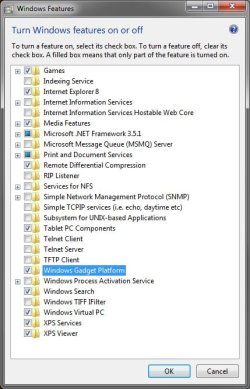
See if turning off Windows Gadget Platform in Windows Features, restart computer, turn it back on, restart computer again may be able to reset it for you.
Windows_Features.jpg
Hope this helps,
Shawn
 

My Computer

Computer type
PC/Desktop
Computer Manufacturer/Model Number
Self built custom
OS
64-bit Windows 11 Pro for Workstations
CPU
Intel i7-8700K OC'd to 5 GHz
Motherboard
ASUS ROG Maximus XI Formula Z390
Memory
64 GB (4x16GB) G.SKILL TridentZ RGB DDR4 3600 MHz
Graphics Card(s)
ASUS ROG-STRIX-GTX1080TI-O11G-GAMING
Sound Card
Integrated
Monitor(s) Displays
2 x Samsung Odyssey G7 27"
Screen Resolution
2560x1440
Hard Drives
1TB Samsung 990 PRO M.2,
4TB Samsung 990 PRO PRO M.2,
TerraMaster F8 SSD Plus NAS
PSU
Seasonic Prime Titanium 850W
Case
Thermaltake Core P3
Cooling
Corsair Hydro H115i
Keyboard
Logitech wireless K800
Mouse
Logitech MX Master 4
Internet Speed
2 Gb/s Download and 100 Mb/s Upload
Antivirus
Malwarebyte Anti-Malware Premium
Browser
Google Chrome
Other Info
Logitech Z625 speaker system,
Logitech BRIO 4K Pro webcam,
HP Color LaserJet Pro MFP M477fdn,
APC SMART-UPS RT 1000 XL - SURT1000XLI,
Galaxy S23 Plus phone
Thanks Shawn, I just tried that and it didn't work.

Another note...I removed configfree (I have a Toshiba laptop) from the computer since before the radar would pop (then go away quickly) when I tried to execute the gadgets on the desktop. Now the dialogue that said: "Windows desktop gadgets have stopped working, windows is searching for a solution to the problem"
Does not even come up anymore.

Gadgets still work on the guest account though.
 

My Computer

Computer Manufacturer/Model Number
Toshiba Satellite L505
OS
Windows 7
CPU
Intel core 2
Memory
4gb
try running sfc /scannow, and if that doesnt fix it, you can always run a repair install.. hope this helps... ;)
 

My Computer

Computer type
PC/Desktop
Computer Manufacturer/Model Number
LENOVO K450 @3.0GHZ
OS
64-bit Windows 8.1 Pro
CPU
Core(TM) i5 CPU 4330 Haswell @ 3.20GHz
Motherboard
LENOVO
Memory
12.00 GB
Graphics Card(s)
Intel(R) HD Graphics
Sound Card
Intel HD integtrated
Monitor(s) Displays
HP 25' ISP Monitor
Screen Resolution
1900/1020
Hard Drives
(1) ST1000DM003-1CH162 (2) Generic STORAGE DEVICE USB Device (3) Generic STORAGE DEVICE USB Device
Internet Speed
100mb down/10mb up
Well I think it's fixed now...I found the answer here:SIDEBAR.EXE MISSING

This is what I did, I have no clue why it worked though...:confused:

Hi JMQ17,

Jeremy M is right...it ought to be reachable from there. If it isn't, you might need to re-register some necessary dll files.

Try this:

1. Click Start
2. Type "CMD" without the quotes
3. Right click cmd.exe and select 'Run as Administrator'
4. In the command prompt the pops up, type the following:

Regsvr32 -u "%ProgramFiles%\Windows Sidebar\sbdrop.dll"
Regsvr32 -u "%ProgramFiles%\Windows Sidebar\wlsrvc.dll"
Regsvr32 atl.dll
Regsvr32 "%ProgramFiles%\Windows Sidebar\sbdrop.dll"
Regsvr32 "%ProgramFiles%\Windows Sidebar\wlsrvc.dll"

5. Reboot the computer.
See if this brings back your sidebar.

I hope this helps!
 

My Computer

Computer Manufacturer/Model Number
Toshiba Satellite L505
OS
Windows 7
CPU
Intel core 2
Memory
4gb
Okay, this only did a partial fix. All gadgets are showing up now. But the Weather and Currency converter are their respective colors but blank of information. It says: cannot connect to service. On my other laptop they are working fine so I don't think it's a connection issue.

The RSS feed and other third party gadgets are working stellar. Any ideas from here?
 

My Computer

Computer Manufacturer/Model Number
Toshiba Satellite L505
OS
Windows 7
CPU
Intel core 2
Memory
4gb
Okay, this only did a partial fix. All gadgets are showing up now. But the Weather and Currency converter are their respective colors but blank of information. It says: cannot connect to service. On my other laptop they are working fine so I don't think it's a connection issue.

The RSS feed and other third party gadgets are working stellar. Any ideas from here?

They have not refreshed yet. Reboot please
 

My Computer

Computer type
Laptop
Computer Manufacturer/Model Number
Apple
OS
El Capitan / Windows 10
CPU
i7-4980HQ
Memory
16GB
Graphics Card(s)
Iris 5200
Thanks...but that (rebooting) didn't work either. I am pretty thorough and if I post on the internet for an answer it is usually that it is not here yet and not a simple fix because I have searched for hours and sometimes days for answers.

For anyone else with this problem...

I did the above fix and then I just went to the MS gadget download page and re-downloaded the MSN weather and currency converter and reinstalled them and wala!

I hope this saves someone else from the stupid grief of something like this.
 

My Computer

Computer Manufacturer/Model Number
Toshiba Satellite L505
OS
Windows 7
CPU
Intel core 2
Memory
4gb
Thanks - my gadgets were vaporized also after I used the taskbar control that minimizes everything and shows the desktop -- the above fix with re-registering the dll's fixed the problem Thanks very much!
 

My Computer

Computer Manufacturer/Model Number
HP e9720f
OS
windows 7
CPU
i7 840
Memory
8 gb
Monitor(s) Displays
HP w2408h
Back
Top