Desktop gadgets not working - Crashing

Melissa

New member
Power User
Local time
10:56 AM
Messages
394
Dear Forum,

My desktop gadgets are not appearing. Following instructions on Microsoft and Seven Forums troubleshooting to no avail.

I am a beginner and just wish to eliminate what type of issues to look out for or what assisted other users.

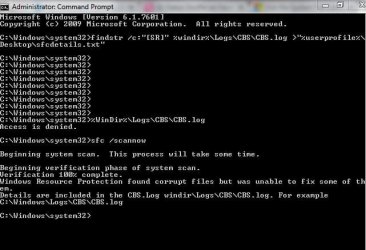
I am posting the sfc results and hopefully someone may be able to assist.
 

Attachments
Last edited:

My Computer

Computer type
Laptop
Computer Manufacturer/Model Number
Sony VAIO / E Series VPCEB46FG
OS
Windows 7 Home Premium 64bit
CPU
Windows 7 Service Pack 1 x86 NTFS
Motherboard
AMD E-350 Processor
Memory
4 GB
Hard Drives
500GB
Other Info
1.6GHz
Melissa, many have stopped using gadgets as there is some security risks associated with them. The alternative is a program called rainmeter. It uses simple .ini scripts that display things on your desktop. You can learn more from rainmeter.net Many people share what they make for others to use on sites like diviantart.com. Just Google rainmeter skins. That's what the scripts are called. Hope there is something that you can find that you like.
Douglas
 

My Computer

Computer type
PC/Desktop
Computer Manufacturer/Model Number
Custom Build
OS
Microsoft Windows 7 Home Premium 64-bit 7601 Multiprocessor Free Service Pack 1
CPU
AMD Phenom(tm) II X4 965 Processor
Motherboard
ASUSTeK Computer INC. M4A785-M
Memory
8.0 GB
Graphics Card(s)
NVIDIA GeForce GTX 560 Ti
Sound Card
(1) NVIDIA High Definition Audio (2) NVIDIA High Definitio
Monitor(s) Displays
Samsung SyncMaster T220G
Screen Resolution
1680 x 1050 x 32 bits (4294967296 colors) @ 59 Hz
Hard Drives
WDC WD7500AADS-00M2B0
PSU
650 Watt
Case
Cooler Master HAF XM
Cooling
Air
Keyboard
CompUSA SK-6200
Mouse
Logitech M-510
Internet Speed
Comcast
Antivirus
MSE
Browser
Firefox 27.0 IE 11
Other Info
Belkin Hub To Go F5U706
Hello Douglas,

I am thankful for such a reply.

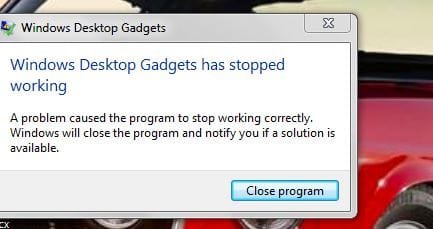
I gather then as a beginner, as it seems that perhaps desktop gadgets are no longer used, then - at startup when I am receiving the error message that they have crashed - how do I get this issue solved.

Thanks for the alternative. I know that perhaps Microsoft went from gadgets to apps - so I better get with the times. I am old.
 

Attachments

  • desktop gadgets.JPG
    desktop gadgets.JPG
    29.1 KB · Views: 11

My Computer

Computer type
Laptop
Computer Manufacturer/Model Number
Sony VAIO / E Series VPCEB46FG
OS
Windows 7 Home Premium 64bit
CPU
Windows 7 Service Pack 1 x86 NTFS
Motherboard
AMD E-350 Processor
Memory
4 GB
Hard Drives
500GB
Other Info
1.6GHz
Back
Top