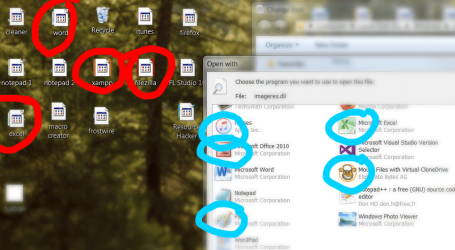
My *desktop program icons* are all messed up. See attachments for my screenshot.
As you can see in the red circle, there appears to be "layers of icons" for each program. Yet when I open a window or go elsewhere, the problem is not there. It happens only in desktop.
Obviously there is no issue with loading the correct icon. The problem is two fold:
- why the "second layer" of that ugly 8 bit .ico image?
- why on my desktop only?
I've been playing a lot with my desktop and icons recently. But I'm not sure what exactly triggered this. For example I am scatterbrained and lately I've been cleaning up my desktop. I had a work project dealing with fireworks and I wanted easier access to that folder. So I gave the folder a custom icon (a fireworks symbol). I did this 10+ times successfuly in the past with no problems for months. Now I did the same exact thing again with the fireworks and I guess I tripped some invisible wire...
Thank you sincerely for any person who wants to take a stab at the root cause of this.
As you can see in the red circle, there appears to be "layers of icons" for each program. Yet when I open a window or go elsewhere, the problem is not there. It happens only in desktop.
Obviously there is no issue with loading the correct icon. The problem is two fold:
- why the "second layer" of that ugly 8 bit .ico image?
- why on my desktop only?
I've been playing a lot with my desktop and icons recently. But I'm not sure what exactly triggered this. For example I am scatterbrained and lately I've been cleaning up my desktop. I had a work project dealing with fireworks and I wanted easier access to that folder. So I gave the folder a custom icon (a fireworks symbol). I did this 10+ times successfuly in the past with no problems for months. Now I did the same exact thing again with the fireworks and I guess I tripped some invisible wire...
Thank you sincerely for any person who wants to take a stab at the root cause of this.
Attachments
My Computer
At a glance
64 bit Windows 78 gb
- Computer type
- PC/Desktop
- Computer Manufacturer/Model Number
- Lenovo Thinkpad
- OS
- 64 bit Windows 7
- Memory
- 8 gb
- Hard Drives
- SSD
- Antivirus
- 2Good4U