I think your file associations are wrong for web documents. At least that's a guess.
Try this once. Go to the Start orb and in the search box enter
default programs. Open that and find your main browser. Now view my screenshots...
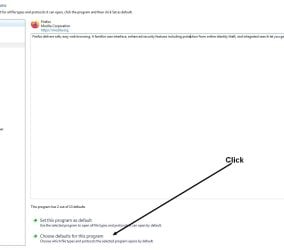
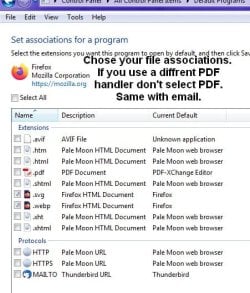
Tip: To take a fast screenshot, enter
snipping tool in the search box... Alternatively, you can press the Print Screen key on the keyboard, then go into a paint or document program and hit paste. Give it a try once. No more using a camera to take an image of the computer screen.
Also, you really do want to show file extensions for better security so files are A) better to identify and B) helps stay abreast of shenanigans where files masquerade as something different then their intended purposes. Example: an MP3 file is actually an exe. Double click it and bam, you're now in malware land... To show file extensions type
folder options in the search box. Now see my screenshot.

Unrelated question: Did you read the entire manual for Veracrypt? It's a must read for sure. I highly encourage everyone who uses Truecrypt or Veracrypt to read the ENTIRE manual.
Tip: I also use Spotify (a paid account). If you would like to download your playlists as a file of the songs titles so that you can easily use that file to migrate to another platform like Deezer, Amazon music or Pandora, you'll want a playlist file on hand and as as backup. I once used the service Soundiiz to migrate from Amazon Music to Spotify (Amazon Music kept deleting my songs). But now I use
Tune My Music to download a CSV (Comma Separated Values) text file of all the song titles. That way if God forbid I lose my Spotify account (
read the BS TOS in tl;dr format) or would like to migrate to another platform or just for research purposes, I have this text file of song titles on hand. Evey once in a while I download a new version as I add more songs to Spotify. You can use this text file with Tune My Music to carry over all of your songs to other platforms... I actually store my songs text file in my password manager. I use a combination of Keepass and Bitwarden. And Keepass allows plugins for 2FA (2 Factor Auth)... At this time I can highly recommend Bitwarden due to it not having privacy invading crap and whatnot... And the Aegis App for 2FA. I use Keepass, Aegis and Keepass2Android for 2FA ( I roll my own. Sayonara BS Authy) . LOL! Plus, Bitwarden is cross platform and web accessible. You could even roll your own server... You could do so at home with ZeroTier...
Oh, the songs playlist file in CSV format can be opened in LibreOffice or MS office of course. I also use Notepad++. The word "Love" in all the songs I have in my playlists shows up some 30 times I think it was. I looked that up because a lot of songs (and passwords) use the word love like they played tennis. LOL
- - - Updated - - -
For TV? Check this out:
GitHub - 4gray/iptvnator: Cross-platform IPTV player application with multiple features, such as support of m3u and m3u8 playlists, favorites, TV guide, TV archive/catchup and more.
The free streams:
https://iptv-org.github.io/iptv/regions/amer.m3u
https://i.mjh.nz/PlutoTV/us.m3u8
https://raw.githubusercontent.com/DeltaSr95/Combined/master/combined.m3u
GitHub - Sphinxroot/TV: Only Direct Stream
You just ad the M3U stream link in the IPTVnator program.
Anyway.... I'm referring to your icons I see on your desktop. LOL At one time I saw a news chopper over a bridge in NY City via the ADSBExchange website. I fired up IPTVNator and tuned a local NY station and found out what it was... a stranded cattle truck on the bridge. LOL! Technology these days is wild, let me tell you...