
Desktop Icon Problem

evilpea

New member
Local time
9:45 PM
Messages
1
i have a program called Open Office(great program beats microsoft office by a land slide,its a great alternative program to microsoft office and best of all its an open source program so its FREEEEEEEEEEEEEEEE)theres a program called swwriter from open office that i use,only when i save my work to the desk top the icon is a black square with the actual icon REALLY SMALL in botton right corner of this black square im almost sure it has something to do with the display setting resolution maybe but is there any way i can make only that icon the appropriate size without affecting all the others since its the only one im having trouble with the Open Office program saves fine and looks great on the desktop its just the sub program swwriter extention that lookes funky
 

Attachments
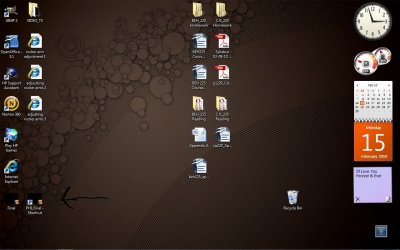
  • my poblem.jpg
    my poblem.jpg
    153.9 KB · Views: 42

My Computer

Computer Manufacturer/Model Number
HP
OS
windows 7
CPU
AMD TURIAN II ultra dual core 2500 Mhz
Motherboard
wouldnt know where to find it
Memory
4 GB
Graphics Card(s)
AMD M880G with ATI Mobility Radeon HD 4200
Monitor(s) Displays
generic PnP monitor
What you may want to do is put the actual icon in documents or somewhere else of your chosing. You can then put a short cut on the desktop, chose the icon and it will be the same size as the others.

With short cuts, right click and properies and choose icon.

In addition, if you click on an icon, then hold down control, with the mouse wheel you can choose any size.
 

My Computer

Computer type
PC/Desktop
Computer Manufacturer/Model Number
Dell XPS 420
OS
Windows 10, Home Clean Install
CPU
Intel Core2 processsor Q8200(2.33Ghz 1333FSB) Quad Core Tech
Motherboard
Dell
Memory
6 gb
Graphics Card(s)
ATI Radeon 256MB HD3650
Sound Card
Intergrated 7.1 Channel Audio
Monitor(s) Displays
Dell SP2009W 20"
Hard Drives
640 GB Serial ATA Hard drive
Cooling
Fan
Keyboard
Dell USB Keyboard
Mouse
Dell Premium Optical USB
Internet Speed
DSL 2.85
http://www.sevenforums.com/tutorials/53402-shortcut-change-icon.html

Right click the icons and select Properties. On the Shortcut Tab, select Change Icons and in the window that opens, click the browse button and navigate to the program folder to see if you can find an icon file. Select it, or if there isn't one, select the program exe, and it may display some icon options. Choose one and see what happens.
 
Last edited by a moderator:

My Computer

Computer Manufacturer/Model Number
DIY
OS
W7x64 Pro, SuSe 12.1/** W7 x64 Pro, XP MCE
CPU
Phenom II 1090T w/Noctua NH-D14 /**4400+ X2 w/CM Hyper TX 3
Motherboard
ASRock 890FX Deluxe 4/**A8N-SLI
Memory
2 x 2GB Patriot PGS34g1600LLKA/**4x1GB Corsair VS
Graphics Card(s)
EVGA GTX460 SC/**EVGA 8800GTS
Sound Card
Asus Xonar D2X/**Xonar D1
Monitor(s) Displays
Acer X233H, Dell E152FPc /**LG M237-WD
Screen Resolution
1920x1080 & 1024x768/**1980x1080
Hard Drives
WDC 2TB, 1.5TB, 1TB, 500GB,Seagate 500GB , Maxtor 80GB /**500GB Seagate & WDC 1TB Black
PSU
CM RS600 w/ APC BX1000G/**Antec 500 TP w/ APC BX1000
Case
HAF922/**Antec 1040IIB
Cooling
3x200mm, 1x140 and 1x120mm/**5x80mm fans
Keyboard
Logitech Media USB/**Saitek Eclipse
Mouse
Cordless Trackman Wheel/**Ditto
Internet Speed
3.3Mbps
Other Info
SB 560 5.1 w/ Sennheiser RS140/**Creative T20 speakers, Dvico FusionHDTV7 Gold RT, Cisco E3000, HP 5510V AIO, Linksys E3000, Belkin F5U237 hub and **F5D8055 adapter
(** = 2nd rig)
Back
Top