Solved Desktop icons are positioned on the taskbar!

Jamal NUMAN

New member
Member
VIP
Local time
6:56 AM
Messages
144
Desktop icons are positioned on the taskbar!

I wanted to replace the icons of my desktop on the desktop itself instead of being positioned on the task bar. Please, have a look on the attached screenshot


All what I need is to get these icons back to the desktop instead of being on the task bar.


Thank you

Best

Jamal
 

Attachments
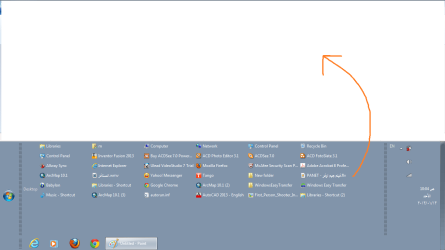
  • Untitled.png
    Untitled.png
    25.7 KB · Views: 10

My Computer My Computer

OS
Windows 7 Ultimate x64
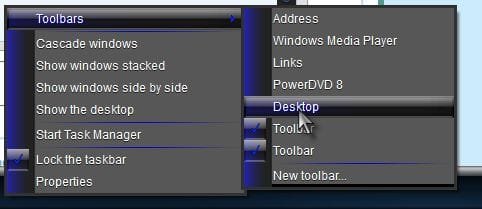
Try this

Right click taskbar> Toolbars> Uncheck Desktop if it is checked

Taskbar.jpg

I don't think that would remove them from the desktop though? What were you doing when this happened? Do you have a system restore point from before this happened?

http://www.sevenforums.com/tutorials/700-system-restore.html

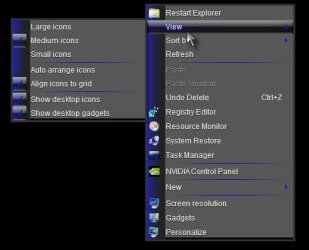
Right click on desktop> View

Is Show desktop icons checked?

Desktop.jpg

A Guy
 

My Computer My Computer

Computer type
PC/Desktop
OS
Windows 10 Home x64
CPU
INTEL Core i5-750 Quad-Core 3.37GHz
Motherboard
ASUS P7P55D
Memory
HyperX Fury Black Series 8GB (2 x 4GB) 1866Mhz
Graphics Card(s)
EVGA GeForce GTX 750 Superclocked 1GB 128-Bit GDDR5
Monitor(s) Displays
LG 32MA68HY 32" IPS
Screen Resolution
1920 x 1080
Hard Drives
Samsung 840 Evo 120GB, SEAGATE 500GB Barracuda® 7200.12, SATA 3 Gb/s, 7200 RPM, 16MB cache
PSU
ANTEC TruePower New TP-550, 80 PLUS, 550W
Case
ANTEC Three Hundred Illusion
Cooling
COOLER MASTER Hyper 212 Plus, 4 x 120mm 1 x 140mm Noctua's
Internet Speed
85 + Mbps
Antivirus
Avast
Browser
Vivaldi
Try this

Right click taskbar> Toolbars> Uncheck Desktop if it is checked

View attachment 249908

I don't think that would remove them from the desktop though? What were you doing when this happened? Do you have a system restore point from before this happened?

http://www.sevenforums.com/tutorials/700-system-restore.html

Right click on desktop> View

Is Show desktop icons checked?

View attachment 249909

A Guy

Thank you very much A Guy for the answer.

The most useful answers are those powered by screenshots! Your reply has solved my issue

Very much appreciated

Best

Jamal
 

My Computer My Computer

OS
Windows 7 Ultimate x64
My pleasure, glad you got it sorted ;)

A Guy
 

My Computer My Computer

Computer type
PC/Desktop
OS
Windows 10 Home x64
CPU
INTEL Core i5-750 Quad-Core 3.37GHz
Motherboard
ASUS P7P55D
Memory
HyperX Fury Black Series 8GB (2 x 4GB) 1866Mhz
Graphics Card(s)
EVGA GeForce GTX 750 Superclocked 1GB 128-Bit GDDR5
Monitor(s) Displays
LG 32MA68HY 32" IPS
Screen Resolution
1920 x 1080
Hard Drives
Samsung 840 Evo 120GB, SEAGATE 500GB Barracuda® 7200.12, SATA 3 Gb/s, 7200 RPM, 16MB cache
PSU
ANTEC TruePower New TP-550, 80 PLUS, 550W
Case
ANTEC Three Hundred Illusion
Cooling
COOLER MASTER Hyper 212 Plus, 4 x 120mm 1 x 140mm Noctua's
Internet Speed
85 + Mbps
Antivirus
Avast
Browser
Vivaldi
Back
Top