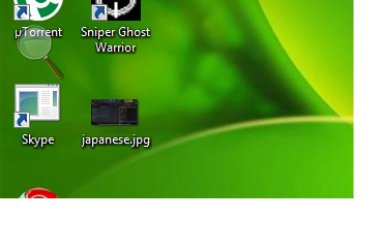
Desktop icons become unrecognized

ranteo

New member
Local time
4:55 AM
Messages
19
Hi

I started up my com today and found my desktop icons, as well as taskbar shortcut icons, become unknown icons. Unlike the programme icons that they were, like the S for Skype etc it became an unknown program icon.

Does anybody know how I can fix this?

I've tried restarting my com, but to no avail.

Many thanks in advance.

Sincerely,
Ran
 

Attachments

  • screenshot1.jpg
    screenshot1.jpg
    195.9 KB · Views: 241

My Computer My Computer

At a glance

Windows 7 Home Premium 32 Bit
OS
Windows 7 Home Premium 32 Bit
There are many technical people at this forum, who can give you the technical reason for what happened as well as a technical solution. I, prefer to try the easy way first. Using system restore, restore to a time prior to the problem. Everything should be back to normal. I would then make a system image, put it in a safe place and save it for furutre problems.
 

My Computer My Computer

At a glance

Windows 10, Home Clean InstallIntel Core2 processsor Q8200(2.33Ghz 1333FSB)...6 gbATI Radeon 256MB HD3650
Computer type
PC/Desktop
Computer Manufacturer/Model Number
Dell XPS 420
OS
Windows 10, Home Clean Install
CPU
Intel Core2 processsor Q8200(2.33Ghz 1333FSB) Quad Core Tech
Motherboard
Dell
Memory
6 gb
Graphics Card(s)
ATI Radeon 256MB HD3650
Sound Card
Intergrated 7.1 Channel Audio
Monitor(s) Displays
Dell SP2009W 20"
Hard Drives
640 GB Serial ATA Hard drive
Cooling
Fan
Keyboard
Dell USB Keyboard
Mouse
Dell Premium Optical USB
Internet Speed
DSL 2.85
Increase the size of your icons. Does that change anything?

Also, try deleting your shelliconcache file and reboot.
 

My Computer My Computer

At a glance

Windows 8.1 PRO3rd Generation Intel Core i7‐3612QM CPU @ 2.1...8GB DDR3NVIDIA GeForce GT 525M (128 bit), 1GB Grpahics
Computer type
PC/Desktop
Computer Manufacturer/Model Number
DELL VOSTRO 3650
OS
Windows 8.1 PRO
CPU
3rd Generation Intel Core i7‐3612QM CPU @ 2.10GHZ
Memory
8GB DDR3
Graphics Card(s)
NVIDIA GeForce GT 525M (128 bit), 1GB Grpahics
Screen Resolution
1920X1080
Hard Drives
750GB 5400RPM
I tried increasing the size of the icons, no effect.
Also tried deleting the shelliconcache file and rebooted but no effect.

I did system restore to a month ago and it worked perfectly well. Thanks loads! :)
 

My Computer My Computer

At a glance

Windows 7 Home Premium 32 Bit
OS
Windows 7 Home Premium 32 Bit
I just realized that the icons become unrecognizable after I install photoshop cs4. Does anybody else have the same situation or is it just me?
 

My Computer My Computer

At a glance

Windows 7 Home Premium 32 Bit
OS
Windows 7 Home Premium 32 Bit
I have Photoshop CS4 installed and have no problems...
 

My Computer My Computer

At a glance

Windows 7 Ultimate RTM (Technet)3.00 gigahertz Intel Core2 Duo E84004GBATI Radeon X1950 Pro
Computer Manufacturer/Model Number
Custom
OS
Windows 7 Ultimate RTM (Technet)
CPU
3.00 gigahertz Intel Core2 Duo E8400
Motherboard
ASUSTeK Computer INC. P5K/EPU Rev 1.xx
Memory
4GB
Graphics Card(s)
ATI Radeon X1950 Pro
Sound Card
Built in HD Audio
Monitor(s) Displays
22" Gateway LCD
Screen Resolution
1920 x 1200
Hard Drives
ST3160023A [Hard drive] (160.04 GB) -- drive 0, rev 8.01, ST3500630AS [Hard drive] (500.11 GB) -- drive 2, rev 3.AAK
ST3500630AS [Hard drive] (500.11 GB) -- drive 1, rev 3.AAK
Keyboard
Logitech G11
Mouse
Microsoft Wireless Laser Mouse 5000
Internet Speed
13.44 Mbps
The same problem!

Hello,
I have the same problem...
I'm with Windows 7 PRO and have no backup files, so...
Here are 2 screenshots. The first one is before changes, and the second one I've made after changing the icon's size. After that I rolled back the size, but they were still like in the second Screenshot.
 

Attachments

  • unrecognized.jpg
    unrecognized.jpg
    92.5 KB · Views: 33
  • unrecognized2.jpg
    unrecognized2.jpg
    50.6 KB · Views: 20

My Computer My Computer

At a glance

Win 7 PRO x64
OS
Win 7 PRO x64
Back
Top