Desktop icons bug

napok

New member
Local time
6:16 AM
Messages
3
Since I started using Windows 7 I found something that bothers me a lot.

Everytime I move an icon or several icons on my desktop, and run an application that uses a different resolution, the icons I have moved before get randomly placed on the desktop. A way to prevent this from happening, is rebooting the system before running this application, but lately I tend to keep these icons unsorted anyway.

I am certain this is something that occured on Windows 7, I have never noticed this when using Windows XP.

Is there any way to prevent this from happening without having to reboot the machine?
 

My Computer

OS
Windows 7 Professional x64
They are displaced, because desktop gets resized.
But mine get back where they should after computers switches back to original screen resolution.

Try right click menu on Desktop - Refresh, before you start that application, which changes resolution (many users report that refreshing helps, actually).

Or you could try to use this third party extension to save and restore icon positions.
 

My Computer

Computer type
PC/Desktop
OS
Windows 8.1 ; Windows 7 x86 (Dec2008-Jan2013)
Other Info
"The scale icon at the top right of a post or tutorial is how you can give rep to the member."

My Computer

Computer Manufacturer/Model Number
HP, Dell, Gateway, Toshiba - 4 laptops and 2 desktops
OS
Vista, Windows7, Mint Mate, Zorin, Windows 8
CPU
from 1.6GHz Duo to i7
Monitor(s) Displays
2x HP w2207
Hard Drives
5x HDD, 7x SSD, 12x Externals
Keyboard
with trackball - no mices
Mouse
Trackball mice
Internet Speed
DSL 6000
Personally, I don't bother with desktop icons as I prefer an uncluttered screen.

All my shortcuts are either on the taskbar or in the Start folder.
 

My Computer

Computer Manufacturer/Model Number
HP Pavilion Elite 495UK
OS
Windows 7 Ultimate SP1 64-Bit
CPU
Intel Core i7 870 @ 2.93GHz
Motherboard
MSI 2A9C (CPU1)
Memory
8Gb Dual-Channel DDR3 @ 664MHz
Graphics Card(s)
nVidia GeForce GTX 460 1024MB dedicated RAM
Sound Card
Realtek HD Audio
Monitor(s) Displays
HP2310i
Screen Resolution
1920 x 1080
Hard Drives
1x1954GB Hitachi HDS22020ALA 330 (RAID), 1x1954GB Hitachi External for backup and storage
PSU
460W
Case
HP Elite
Cooling
Air cooled
Keyboard
Logitech K750 solar-powered keyboard
Mouse
Logitech Wireless M180 mouse
Internet Speed
2Mb
Other Info
Pure Avanti Flow Internet Radio with iPod Dock, 64Gb iPod, HP USB Speakers, Sony MDR-V500 Headphones, Sony Vaio F-Series Laptop
All my shortcuts are either on the taskbar or in the Start folder
.

That is fine if you have few. But I have about 100 shortcuts - for that you need more structure.
 

My Computer

Computer Manufacturer/Model Number
HP, Dell, Gateway, Toshiba - 4 laptops and 2 desktops
OS
Vista, Windows7, Mint Mate, Zorin, Windows 8
CPU
from 1.6GHz Duo to i7
Monitor(s) Displays
2x HP w2207
Hard Drives
5x HDD, 7x SSD, 12x Externals
Keyboard
with trackball - no mices
Mouse
Trackball mice
Internet Speed
DSL 6000
All my shortcuts are either on the taskbar or in the Start folder
.

That is fine if you have few. But I have about 100 shortcuts - for that you need more structure.

Yes, you're quite right, of course.

It works for me because the only programs I use on a regular basis are MS Office and Adobe Design Premium.
 

My Computer

Computer Manufacturer/Model Number
HP Pavilion Elite 495UK
OS
Windows 7 Ultimate SP1 64-Bit
CPU
Intel Core i7 870 @ 2.93GHz
Motherboard
MSI 2A9C (CPU1)
Memory
8Gb Dual-Channel DDR3 @ 664MHz
Graphics Card(s)
nVidia GeForce GTX 460 1024MB dedicated RAM
Sound Card
Realtek HD Audio
Monitor(s) Displays
HP2310i
Screen Resolution
1920 x 1080
Hard Drives
1x1954GB Hitachi HDS22020ALA 330 (RAID), 1x1954GB Hitachi External for backup and storage
PSU
460W
Case
HP Elite
Cooling
Air cooled
Keyboard
Logitech K750 solar-powered keyboard
Mouse
Logitech Wireless M180 mouse
Internet Speed
2Mb
Other Info
Pure Avanti Flow Internet Radio with iPod Dock, 64Gb iPod, HP USB Speakers, Sony MDR-V500 Headphones, Sony Vaio F-Series Laptop
Thanks for your replies.

Most icons on my desktop are not shortcuts but files, mostly documents. I usually work with many programs at a time, so taskbar space is a must.

I have installed IconRestorer and it seems to work, although I am now unable to move icons myself. As soon as I get out of the application, new positions are restored to an earlier moment. I am fine with this for now.
 

My Computer

OS
Windows 7 Professional x64
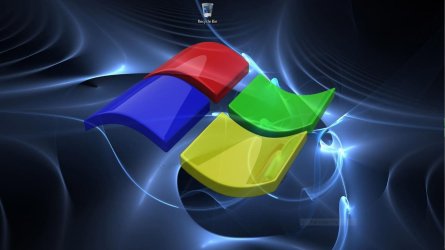
This is the way I work.

A clear desktop except for the recycle bin.

Desktop.JPG

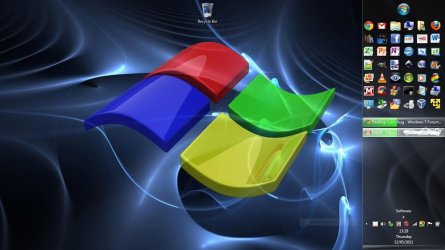
Most used programs in a toolbar expanded in the auto hide task bar at the right.

Most Used.JPG

Everything in a toolbar (menu view).

Everything.JPG

Works for me.
 

My Computer

Computer type
Laptop
Computer Manufacturer/Model Number
Hewlett-Packard/G62-107SA Notebook
OS
Microsoft Windows 7 Home Premium 64-bit Service Pack 1
CPU
Intel(R) Core(TM) i3 CPU M 330 @ 2.13GHz
Motherboard
Hewlett-Packard 1425
Memory
8 GB DDR3
Graphics Card(s)
Intel(R) HD Graphics
Sound Card
Realtek High Definition Audio
Monitor(s) Displays
Builtin
Screen Resolution
1366 x 768 x 32 bits (4294967296 colors) @ 60 Hz
Hard Drives
250 GB SATA Hard Disk Drive 7200 rpm
2TB Seagate GoFlex USB 2 Drive
1TB Iomega Prestige USB 2 Drive
1.5TB Iomega Prestige USB 2 Drive (Samsung)
2TB WD MyBook Live NAS.
Mouse
Logitech Anywhere MX
Internet Speed
152 Mbs download 10 Mbs upload
Antivirus
Norton 360
Browser
Chrome
It's not a bug. Windows will reorder your icons if the screen size changes.

You might find a tool by Stardock called "Fences" to be invaluable. I know I do. It lets you create little "zones" on your desktop to organize icons in. Then you can create snapshots of those icon locations and always restore at any time.
 

My Computer

Computer Manufacturer/Model Number
Self-Built
OS
Windows 7 64 bit SP1
CPU
Core i7 920
Motherboard
Gigabyte GA-X58A-UD3R
Memory
12 GB (6x2GB Corsair)
Graphics Card(s)
nVidia 250GTS
Sound Card
Built-in
Monitor(s) Displays
2x Samsung SyncMaster 2343 (23" Widescreen)
Keyboard
Microsoft Natural Keyboard
Mouse
Logitech Laser
I find it much quicker to just hit the start menu button and type a few letters then hit enter, always gets me what i need.
 

My Computer

Computer Manufacturer/Model Number
Asus G73JH-A2
OS
Windows 7 Ultimate x64
CPU
Intel Core i7 720QM
Memory
8GB factory installed
Graphics Card(s)
ATI Mobility Radeon 5870 W/ Flashed VBIOS to fix GSOD
Screen Resolution
1920x1080
Hard Drives
1 500GB 1 250GB
Keyboard
G15
Mouse
G9x
Internet Speed
Rogers extreme/Bell fibe25 depending on where I am.
That is fine if you have few. But I have about 100 shortcuts - for that you need more structure.
That is exactly the situation I am in, I have been using the desktop for storage for years now.

This is the way I work.

A clear desktop except for the recycle bin.

View attachment 154127

Most used programs in a toolbar expanded in the auto hide task bar at the right.

View attachment 154130

Everything in a toolbar (menu view).

View attachment 154129

Works for me.
I do not understand how you can possibly find that useful.

It's not a bug. Windows will reorder your icons if the screen size changes.

You might find a tool by Stardock called "Fences" to be invaluable. I know I do. It lets you create little "zones" on your desktop to organize icons in. Then you can create snapshots of those icon locations and always restore at any time.
It reorders the icons, and it should place them back when returning to the original resolution, like it used to do on XP. According to Neutron16 his W7 is still doing that, which means something is ****ed up on my computer.
 

My Computer

OS
Windows 7 Professional x64
I don't claim it would work for anyone else. I have to confess that if I am working long term on a document or trying out a new program I will drop a link on the desktop until I am finished with it.:D
 

My Computer

Computer type
Laptop
Computer Manufacturer/Model Number
Hewlett-Packard/G62-107SA Notebook
OS
Microsoft Windows 7 Home Premium 64-bit Service Pack 1
CPU
Intel(R) Core(TM) i3 CPU M 330 @ 2.13GHz
Motherboard
Hewlett-Packard 1425
Memory
8 GB DDR3
Graphics Card(s)
Intel(R) HD Graphics
Sound Card
Realtek High Definition Audio
Monitor(s) Displays
Builtin
Screen Resolution
1366 x 768 x 32 bits (4294967296 colors) @ 60 Hz
Hard Drives
250 GB SATA Hard Disk Drive 7200 rpm
2TB Seagate GoFlex USB 2 Drive
1TB Iomega Prestige USB 2 Drive
1.5TB Iomega Prestige USB 2 Drive (Samsung)
2TB WD MyBook Live NAS.
Mouse
Logitech Anywhere MX
Internet Speed
152 Mbs download 10 Mbs upload
Antivirus
Norton 360
Browser
Chrome
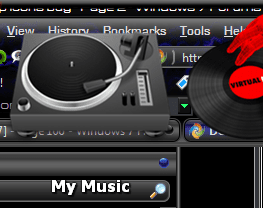
i use objectdock and have shortcuts for folders also on there, i like to keep documents etc on an external Hd you could have a clean desktop and still access the folders easily, also you can change the icon for the folder making them more personal ie my music folder shows a turntable icon
2011-05-14_0754.png
 

My Computer

Computer Manufacturer/Model Number
Hewlett packard/p6512uk
OS
Microsoft Windows 7 Home Premium 64-bit 7600
CPU
IIx4 amd athelon 635 processor
Motherboard
FOXCONN 2AA9
Memory
2x2gb
Graphics Card(s)
ati radeon HD 5450
Sound Card
(1) Realtek High Definition Audio (2) AMD High Definition
Monitor(s) Displays
samsung lcd tv 32"
Screen Resolution
1360x 768
Hard Drives
(1) WDC WD10 01FAES-60Z2A0 SATA Disk Device (2) Maxtor OneTouch USB Device (3) ST310003 33AS USB Device (4) WD My Book 1111 USB Device
PSU
?
Cooling
air!
Keyboard
wireless hp
Mouse
wireless Hp,optical
Internet Speed
1.10mb/s
Antivirus
MSE
Browser
Firefox
Back
Top