brenkworth
New member
Hello,
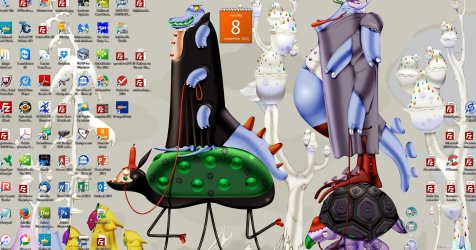
Yesterday the icons for desktop "files" (not shortcuts) all changed to the Filezilla icon. I have tried rebuilding the iconcache.db and its does not fix the problem. I have been troubleshooting and it appears that the icons are all correct up until explorer.exe loads, then they all blank out, come back normal, and then the Filezilla logo looks to overlay on top of the normal icon.
I am running Win 7 64 bit SP1 with 16 GB memory, Core i7.
Thoughts?
Barb
Yesterday the icons for desktop "files" (not shortcuts) all changed to the Filezilla icon. I have tried rebuilding the iconcache.db and its does not fix the problem. I have been troubleshooting and it appears that the icons are all correct up until explorer.exe loads, then they all blank out, come back normal, and then the Filezilla logo looks to overlay on top of the normal icon.
I am running Win 7 64 bit SP1 with 16 GB memory, Core i7.
Thoughts?
Barb
My Computer
- Computer type
- PC/Desktop
- Computer Manufacturer/Model Number
- DELL XPS
- OS
- Win 7 Home Premium 64 bit
- CPU
- Intel Core i7-2600 CPU @ 3.40 GHz
- Motherboard
- Dell 0Y2MRG V. A00
- Memory
- 16 GB
- Graphics Card(s)
- AMD Radeon HD 6450
- Hard Drives
- 1.5 TB Serial ATA 2 7200 RPM
- Antivirus
- mcafee
- Browser
- firefox