Desktop Icons Have Disappeared

PaulRichards

New member
Local time
4:47 PM
Messages
17
I have just applied 3 updates (KB980408, 976422, 975496) and restarted my pc as requested. On re-boot my icons have disappeared from my Desktop.

If I open Windows Explorer and then open the Desktop folder, all my icons are shown. So how do I get them to re-appear on my Desktop?

Thanks

Windows 7 Pro 64 bit
 

My Computer My Computer

Computer Manufacturer/Model Number
ASUS N61JV
OS
Windows 7 Pro 64 bit
CPU
Intel Core i5
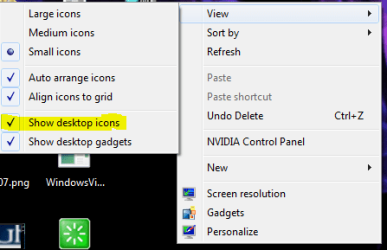
Make sure this is enabled:

Capture.PNG
 

My Computer My Computer

Computer Manufacturer/Model Number
Custom
OS
Windows 7 Professional x64
CPU
Intel i7 2600K OC'd @ 4620 MHz
Motherboard
Asus P8Z68-V Pro
Memory
16GB GSkill Sniper 2133 Mhz (4x4GB)
Graphics Card(s)
EVGA GeForce GTX 480 SuperClocked+
Sound Card
Realtek High Definition Audio
Monitor(s) Displays
2x Acer S273HLbmii 27"
Screen Resolution
2 x 1920x1080
Hard Drives
64GB Crucial M4 SSD

Storage: Hitachi 1TB 5400RPM, Samsung 1.5TB 5400RPM
PSU
Corsair HW Series 750w (modular)
Case
Cooler Master HAF 932 Advanced Blue Edition
Cooling
CM Hyper 212+ CPU cooler, 3x 230mm + 1x 140mm case fans
Keyboard
Logitech MK320 (wireless)
Mouse
Logitech MK320 (wireless)
Internet Speed
30 Mb/s : 2 Mb/s
Jonathan: thanks, that restored my icons.

I've no idea why the updates 'hid' them, though.
 

My Computer My Computer

Computer Manufacturer/Model Number
ASUS N61JV
OS
Windows 7 Pro 64 bit
CPU
Intel Core i5
For whatever reason, Updates can do weird stuff. I keep my system restore link handy, and use it often in case I need it.
 

My Computer My Computer

Computer Manufacturer/Model Number
Custom
OS
Windows 7 Professional x64
CPU
Intel i7 2600K OC'd @ 4620 MHz
Motherboard
Asus P8Z68-V Pro
Memory
16GB GSkill Sniper 2133 Mhz (4x4GB)
Graphics Card(s)
EVGA GeForce GTX 480 SuperClocked+
Sound Card
Realtek High Definition Audio
Monitor(s) Displays
2x Acer S273HLbmii 27"
Screen Resolution
2 x 1920x1080
Hard Drives
64GB Crucial M4 SSD

Storage: Hitachi 1TB 5400RPM, Samsung 1.5TB 5400RPM
PSU
Corsair HW Series 750w (modular)
Case
Cooler Master HAF 932 Advanced Blue Edition
Cooling
CM Hyper 212+ CPU cooler, 3x 230mm + 1x 140mm case fans
Keyboard
Logitech MK320 (wireless)
Mouse
Logitech MK320 (wireless)
Internet Speed
30 Mb/s : 2 Mb/s
Yes, I'm usually pretty careful about creating Restore points.
 

My Computer My Computer

Computer Manufacturer/Model Number
ASUS N61JV
OS
Windows 7 Pro 64 bit
CPU
Intel Core i5
Back
Top