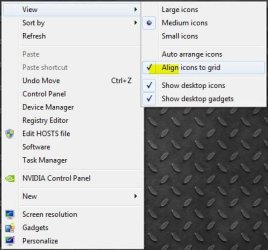
How can I stop this? I like to organize the desktop icons my way and lately they have been shifting and organizing themselves when I restart or resume I think. I must have done something. Any ideas?
My Computer
At a glance
Win7 64 BitI-58 GBIntel 4000
Computer type
Laptop
Computer Manufacturer/Model Number
Dell Latitude 6530 Notebook ( 15.6 screen)
OS
Win7 64 Bit
CPU
I-5
Memory
8 GB
Graphics Card(s)
Intel 4000
Monitor(s) Displays
FHD 1980 x 1080
Screen Resolution
1980x1280
Hard Drives
Samsung 840 Pro 256 GB for OS Samsung Pro 840 256 GB for Storage.
Still moved over on me. I'm not sure whats causeing it. A complete shutdown? sleep mode may not be doing it. But it annoys me still.
Any ideas from here? I have unchecked auto and align grid. And uncheck change with themes.
My Computer
At a glance
Win7 64 BitI-58 GBIntel 4000
Computer type
Laptop
Computer Manufacturer/Model Number
Dell Latitude 6530 Notebook ( 15.6 screen)
OS
Win7 64 Bit
CPU
I-5
Memory
8 GB
Graphics Card(s)
Intel 4000
Monitor(s) Displays
FHD 1980 x 1080
Screen Resolution
1980x1280
Hard Drives
Samsung 840 Pro 256 GB for OS Samsung Pro 840 256 GB for Storage.
No I haven't..thanks...I recently found in the themes list an unsaved theme that was the current desktop picture so I saved the theme. I couldn't delete it because it wasn't saved I guess. So I saved and organized my icons again. I'll see it that does it if it doesn't work I'll go to your recommendation.
jim
My Computer
At a glance
Win7 64 BitI-58 GBIntel 4000
Computer type
Laptop
Computer Manufacturer/Model Number
Dell Latitude 6530 Notebook ( 15.6 screen)
OS
Win7 64 Bit
CPU
I-5
Memory
8 GB
Graphics Card(s)
Intel 4000
Monitor(s) Displays
FHD 1980 x 1080
Screen Resolution
1980x1280
Hard Drives
Samsung 840 Pro 256 GB for OS Samsung Pro 840 256 GB for Storage.
Still no luck and I tried Icon Casche rebuild as well. They stay for a while then go back to the left side. Don't know what sets them off to go. Seemed fine for a day and then this morning they were shifted.
So far I've uncheck align icons to grid,change with theme,auto and saved a theme (a picture from my pictures for destop background).
My Computer
At a glance
Win7 64 BitI-58 GBIntel 4000
Computer type
Laptop
Computer Manufacturer/Model Number
Dell Latitude 6530 Notebook ( 15.6 screen)
OS
Win7 64 Bit
CPU
I-5
Memory
8 GB
Graphics Card(s)
Intel 4000
Monitor(s) Displays
FHD 1980 x 1080
Screen Resolution
1980x1280
Hard Drives
Samsung 840 Pro 256 GB for OS Samsung Pro 840 256 GB for Storage.
Windows 11 Pro x64 [Latest Release and Releas...Ryzen 9 5950X, 3.8 - 5.2 MHz64GB [2 x 32GB] DDR4 3200MHz4GB NVIDIA GEFORCE GTX 1650 Ti
Computer type
PC/Desktop
Computer Manufacturer/Model Number
ChillBlast - Custom to my design
OS
Windows 11 Pro x64 [Latest Release and Release Preview]
CPU
Ryzen 9 5950X, 3.8 - 5.2 MHz
Motherboard
Asus Prime X570-Pro
Memory
64GB [2 x 32GB] DDR4 3200MHz
Graphics Card(s)
4GB NVIDIA GEFORCE GTX 1650 Ti
Sound Card
On-board SPDIF to 5.1 System + HDMI [5.1 system]
Monitor(s) Displays
32" UHD 32 Bit HDR Monitor + 43" UHD 4K 32Bit HDR TV
Screen Resolution
2 x 3840 x 2160 @60Hz
Hard Drives
1TB M2 SSD OS, 500GB Fast Access SSD, 2 x 8TB Data + Various Externals from 1TB to 4TB, 10TB NAS
PSU
NZXT C750 80 PLUS Gold 750W Modular PSU
Case
Workstation Case [Matt Black]
Cooling
NZXT Kraken X63 280mm CPU Cooler +2x Quiet Case fans
Keyboard
Logitech Wireless MX Keys & K400 + others
Mouse
Logitech Wireless MX Master 3S
Internet Speed
920 MB Down 50 MB Up
Antivirus
BitDefender Total Security Pro
Browser
Chrome (always run latest Non-Beta)
Other Info
Also run ...
Laptop - Quad 8GB - Windows 10 Pro x64
Nexus 7 Android tablet x2
Samsung 10.2" tablet
Blackview TAB 8 4G Android Tablet c/w Keyboard
Wacom Intuos Pro Medium Pen Pad
Wacom Intuos Pro Small Pen Pad
Wacom Expresskeys Remote
Loopdeck+ Graphics Controller
Shuttle Pro v2 Control
At a glance
Windows 11 Pro x64 Latest RPIntel I7 10750H 5.0GHz32GB [2x16GB] DDR4 2933 MHznVidia GTX1650Ti 4 GB GDDR6
Computer type
Laptop
System Manufacturer/Model Number
Dell XPS 17 10750H
OS
Windows 11 Pro x64 Latest RP
CPU
Intel I7 10750H 5.0GHz
Motherboard
Dell XPS
Memory
32GB [2x16GB] DDR4 2933 MHz
Graphics Card(s)
nVidia GTX1650Ti 4 GB GDDR6
Sound Card
Stock [Realtek] 4 Speaker
Monitor(s) Displays
17" IPS UHD+ Infinity Edge Touchscreen
Screen Resolution
3840 x 2400
Hard Drives
2TB M2 NVMe, 4TB External + various 500GB & 1TB External NVMe (also have access to spinner HDD from
PSU
Stock
Case
Stock XPS Aluminium & Carbon Fibre
Cooling
Stock - Active Fan Control
Keyboard
Backlit + Various Logitech
Mouse
Stock Track Pad + Logitech MX Trackball
Internet Speed
72 MB Down 18MB Up
Browser
Chrome
Other Info
Also run ...
Laptop - Quad 8GB - Windows 10 Pro x64
Nexus 7 Android tablet x2
10.2" tablet
Sony Z3 Android Smartphone
Wacom Intuos Pro Medium Pen Pad
Wacom Intuos Pro Small Pen Pad
Wacom Expresskeys Remote
Loopdeck+ Graphics Controller
Shuttle Pro v2 Control Pad
10TB NAS
Yes it's off. I just found out one of the ways or the cause. I have MSN Premium as a browser. When I adjust the dashboard on the right side the main screen seperates and moves to the left causeing the icons to shift as well. Wierd. With XP It never did this but with xp I had a 14 in display and this one is 15.6 so this new size affects MSN Premium.
My Computer
At a glance
Win7 64 BitI-58 GBIntel 4000
Computer type
Laptop
Computer Manufacturer/Model Number
Dell Latitude 6530 Notebook ( 15.6 screen)
OS
Win7 64 Bit
CPU
I-5
Memory
8 GB
Graphics Card(s)
Intel 4000
Monitor(s) Displays
FHD 1980 x 1080
Screen Resolution
1980x1280
Hard Drives
Samsung 840 Pro 256 GB for OS Samsung Pro 840 256 GB for Storage.