
AnthonyKash
New member
- Local time
- 5:54 PM
- Messages
- 3
Hello, This is kind of a difficult issue to explain but I will try.
Occasionally my desktop icons and/or the taskbar go black/missing and do not reappear until I hover my mouse over the area where they should have been.
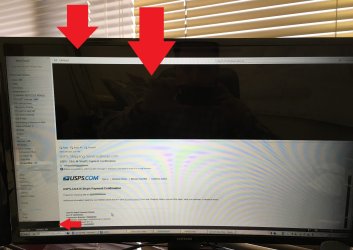
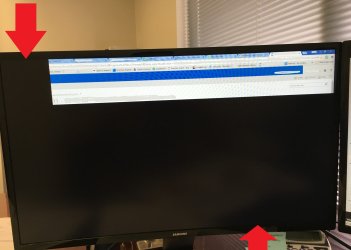
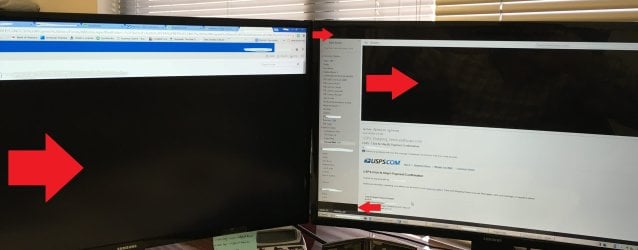
Another issue I occasionally have is that when I have a program open (like MS Outlook for example) and have one or more desktop folders open which overlap the program, I will minimize the folder, but it will leave these little black boxes or this weird "imprint" of that folder i just minimized onto the maximized MS Outlook or whatever program I have open. The only way it goes away usually is when I minimize and maximize all folders or programs that i have open or hover it with my mouse until it goes away and displays correctly.
Again I know this is a little hard to explain, especially the 2nd issue I noted above with the "imprint" and black boxes, but fortunately, I was able to catch the issue above with some photos which I am attaching so you can see exactly what im talking about. There are a total of 3 pictures; the 1st and 2nd pics are individual pics of each monitor and the 3rd one is a pic of the monitors side by side. Please pay attention to the areas which i've drawn red arrows on the pics to see the areas i'm referring to. I had previously posted a thread on this issue before with a video of what was occurring but never got a solution. I'm hoping with these pictures, somebody will be able to solve this issue for me.
Some important things I think I should note:
-I have a dual monitor setup - Two Samsung S27E510C monitors
-This is a new dell XPS8900 desktop PC running windows 7 Pro 64 bit - 6th gen i7-6700, 8gb Ram, 500gb SSD, 2gb Nvidia graphics card
-My windows screen saver is set to "Blank" and I have it set to make the screen blank after 7 minutes of inactivity...I may be wrong about this but it seems that these issues happen more often after I resume working on my computer and it comes out of the blank screen saver.
Any help would be very much appreciated,
Occasionally my desktop icons and/or the taskbar go black/missing and do not reappear until I hover my mouse over the area where they should have been.
Another issue I occasionally have is that when I have a program open (like MS Outlook for example) and have one or more desktop folders open which overlap the program, I will minimize the folder, but it will leave these little black boxes or this weird "imprint" of that folder i just minimized onto the maximized MS Outlook or whatever program I have open. The only way it goes away usually is when I minimize and maximize all folders or programs that i have open or hover it with my mouse until it goes away and displays correctly.
Again I know this is a little hard to explain, especially the 2nd issue I noted above with the "imprint" and black boxes, but fortunately, I was able to catch the issue above with some photos which I am attaching so you can see exactly what im talking about. There are a total of 3 pictures; the 1st and 2nd pics are individual pics of each monitor and the 3rd one is a pic of the monitors side by side. Please pay attention to the areas which i've drawn red arrows on the pics to see the areas i'm referring to. I had previously posted a thread on this issue before with a video of what was occurring but never got a solution. I'm hoping with these pictures, somebody will be able to solve this issue for me.
Some important things I think I should note:
-I have a dual monitor setup - Two Samsung S27E510C monitors
-This is a new dell XPS8900 desktop PC running windows 7 Pro 64 bit - 6th gen i7-6700, 8gb Ram, 500gb SSD, 2gb Nvidia graphics card
-My windows screen saver is set to "Blank" and I have it set to make the screen blank after 7 minutes of inactivity...I may be wrong about this but it seems that these issues happen more often after I resume working on my computer and it comes out of the blank screen saver.
Any help would be very much appreciated,
Attachments
My Computer
- Computer type
- PC/Desktop
- Computer Manufacturer/Model Number
- Dell XPS 8900
- OS
- Windows 7 Professional - 64 bit
- CPU
- i7

