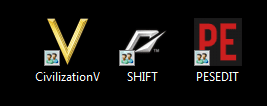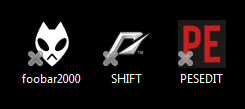
Desktop icons with an "X" on them.

000

New member
Local time
11:18 PM
Messages
10
Hi! When I woke up this morning, my icons were like this.What is this "X"?
 

Attachments

  • icons.png
    icons.png
    2.4 KB · Views: 1,965

My Computer My Computer

Computer Manufacturer/Model Number
N/A(custom PC)
OS
Windows 7 Ultimate x64 SP1
CPU
Pentium Dual Core E5200@2,50GHz,3487 Mhz
Motherboard
ASUS P5QL PRO
Memory
4.00 GB
Graphics Card(s)
ATI Radeon HD 4850 1 GB
Sound Card
Realtek HD audio
Monitor(s) Displays
DELL Trinitron(CRT) 21'
Screen Resolution
1600x1200
Hard Drives
HDD primary WD 500 GB Caviar Blue

My Computer My Computer

Computer type
PC/Desktop
OS
Microsoft Windows 7 Home Premium 64-bit 7601 Multiprocessor Free Service Pack 1
CPU
Intel(R) Core(TM) i7-3770 CPU @ 3.40GHz
Motherboard
ASUSTeK COMPUTER INC. P8H77-M
Memory
8.00 GB
Graphics Card(s)
Intel(R) HD Graphics 4000
Sound Card
On Board
Monitor(s) Displays
Dell 24"
Screen Resolution
1920 x 1080
Hard Drives
(1) INTEL SSDSC2CT180A3 ATA Device (2) ST500DM002-1BD142 ATA Device (3) WDC WD3200AAKS-75L9A0 ATA Device (4) Generic- Compact Flash USB Device (5) Generic- MS/MS-Pro USB Device (6) Generic- SD/MMC USB Device (7) Generic- SM/xD-Picture USB
PSU
500w Corsair
Case
Cooler Master
Cooling
3 Fans
Keyboard
Logitech MK300
Mouse
Logitech WOM
Internet Speed
75Mb
Antivirus
Norton 360
Browser
Firefox, Opera, IE
Yes, they work as normal.I'm just surprised by this "X".

....

profile edited.
 

My Computer My Computer

Computer Manufacturer/Model Number
N/A(custom PC)
OS
Windows 7 Ultimate x64 SP1
CPU
Pentium Dual Core E5200@2,50GHz,3487 Mhz
Motherboard
ASUS P5QL PRO
Memory
4.00 GB
Graphics Card(s)
ATI Radeon HD 4850 1 GB
Sound Card
Realtek HD audio
Monitor(s) Displays
DELL Trinitron(CRT) 21'
Screen Resolution
1600x1200
Hard Drives
HDD primary WD 500 GB Caviar Blue
Thanks for putting your system specs on. From that I notice you have SP1 on your OS. Did you install that lately?
Just as a test, try a different desktop theme. Perhaps a simple one like Windows 7 Basic and see if the "X's" are still there!
 

My Computer My Computer

Computer type
PC/Desktop
OS
Microsoft Windows 7 Home Premium 64-bit 7601 Multiprocessor Free Service Pack 1
CPU
Intel(R) Core(TM) i7-3770 CPU @ 3.40GHz
Motherboard
ASUSTeK COMPUTER INC. P8H77-M
Memory
8.00 GB
Graphics Card(s)
Intel(R) HD Graphics 4000
Sound Card
On Board
Monitor(s) Displays
Dell 24"
Screen Resolution
1920 x 1080
Hard Drives
(1) INTEL SSDSC2CT180A3 ATA Device (2) ST500DM002-1BD142 ATA Device (3) WDC WD3200AAKS-75L9A0 ATA Device (4) Generic- Compact Flash USB Device (5) Generic- MS/MS-Pro USB Device (6) Generic- SD/MMC USB Device (7) Generic- SM/xD-Picture USB
PSU
500w Corsair
Case
Cooler Master
Cooling
3 Fans
Keyboard
Logitech MK300
Mouse
Logitech WOM
Internet Speed
75Mb
Antivirus
Norton 360
Browser
Firefox, Opera, IE

My Computer My Computer

Computer Manufacturer/Model Number
N/A(custom PC)
OS
Windows 7 Ultimate x64 SP1
CPU
Pentium Dual Core E5200@2,50GHz,3487 Mhz
Motherboard
ASUS P5QL PRO
Memory
4.00 GB
Graphics Card(s)
ATI Radeon HD 4850 1 GB
Sound Card
Realtek HD audio
Monitor(s) Displays
DELL Trinitron(CRT) 21'
Screen Resolution
1600x1200
Hard Drives
HDD primary WD 500 GB Caviar Blue
I'll bet its only shortcuts that have the x on them. Looks like the shortcut overlay got busted. Do you do any modes to try and hide the shortcut arrows?
 

My Computer My Computer

Computer type
PC/Desktop
Computer Manufacturer/Model Number
Home Built
OS
Windows 10 Education 64 bit
CPU
AMD Phenom II X4 980 Black Edition Deneb 3.7GHz
Motherboard
Asus M4N68T-M V2 µATX Motherboard
Memory
8GB 4GBx2 Kingston PC10600 DDR3 1333 Memory
Graphics Card(s)
Zotac NVIDIA Geforce GT640 2 Gig DDR3 PCIe
Sound Card
VIA VT1708s High Definition Audio 8-channel Onboard
Monitor(s) Displays
22" LG E2242 1080p and 2 19" I-INC AG191D
Screen Resolution
1280x1024 - 1920x1080 - 1280x1024
Hard Drives
Crucial M100 256 GB SSD and 500 GB WD Blue SATA
PSU
Thermaltake TR 620
Case
Power Up Black ATX Mid-Tower Case
Cooling
Stock heatsink and fan
Keyboard
Logitech Wireless K350 Wave
Mouse
Logitech Wireless M570 Trackman Wheel
Internet Speed
80 Mbps Down 30 Mbps Up
Antivirus
Windows Defender
Browser
Internet Explorer 11
Other Info
HP DVD1040e Lightscribe - External USB2
No, but I use CCleaner and Windows 7 Manager to clean and Optimize the system.I think there's maybe a problem with the icon cache or something like that.
 

My Computer My Computer

Computer Manufacturer/Model Number
N/A(custom PC)
OS
Windows 7 Ultimate x64 SP1
CPU
Pentium Dual Core E5200@2,50GHz,3487 Mhz
Motherboard
ASUS P5QL PRO
Memory
4.00 GB
Graphics Card(s)
ATI Radeon HD 4850 1 GB
Sound Card
Realtek HD audio
Monitor(s) Displays
DELL Trinitron(CRT) 21'
Screen Resolution
1600x1200
Hard Drives
HDD primary WD 500 GB Caviar Blue
Or that theme maybe? Did you recently change themes? You might want to try a different theme anyway as a test to see if they go back to normal. Id use one of the default windows themes that come bundles with windows.
 

My Computer My Computer

Computer type
PC/Desktop
Computer Manufacturer/Model Number
Home Built
OS
Windows 10 Education 64 bit
CPU
AMD Phenom II X4 980 Black Edition Deneb 3.7GHz
Motherboard
Asus M4N68T-M V2 µATX Motherboard
Memory
8GB 4GBx2 Kingston PC10600 DDR3 1333 Memory
Graphics Card(s)
Zotac NVIDIA Geforce GT640 2 Gig DDR3 PCIe
Sound Card
VIA VT1708s High Definition Audio 8-channel Onboard
Monitor(s) Displays
22" LG E2242 1080p and 2 19" I-INC AG191D
Screen Resolution
1280x1024 - 1920x1080 - 1280x1024
Hard Drives
Crucial M100 256 GB SSD and 500 GB WD Blue SATA
PSU
Thermaltake TR 620
Case
Power Up Black ATX Mid-Tower Case
Cooling
Stock heatsink and fan
Keyboard
Logitech Wireless K350 Wave
Mouse
Logitech Wireless M570 Trackman Wheel
Internet Speed
80 Mbps Down 30 Mbps Up
Antivirus
Windows Defender
Browser
Internet Explorer 11
Other Info
HP DVD1040e Lightscribe - External USB2
Restarted the PC and the "X" is gone, but I suspect it's temporary.It appeared during the night, when the PC is not in use, but still working.I have a bad feeling about this.

Anyway - Thanks for your support.I'll come back later.:)
 

My Computer My Computer

Computer Manufacturer/Model Number
N/A(custom PC)
OS
Windows 7 Ultimate x64 SP1
CPU
Pentium Dual Core E5200@2,50GHz,3487 Mhz
Motherboard
ASUS P5QL PRO
Memory
4.00 GB
Graphics Card(s)
ATI Radeon HD 4850 1 GB
Sound Card
Realtek HD audio
Monitor(s) Displays
DELL Trinitron(CRT) 21'
Screen Resolution
1600x1200
Hard Drives
HDD primary WD 500 GB Caviar Blue
Think positive and don't worry. If they come back just post here and we will help you solve the problem!
 

My Computer My Computer

Computer type
PC/Desktop
OS
Microsoft Windows 7 Home Premium 64-bit 7601 Multiprocessor Free Service Pack 1
CPU
Intel(R) Core(TM) i7-3770 CPU @ 3.40GHz
Motherboard
ASUSTeK COMPUTER INC. P8H77-M
Memory
8.00 GB
Graphics Card(s)
Intel(R) HD Graphics 4000
Sound Card
On Board
Monitor(s) Displays
Dell 24"
Screen Resolution
1920 x 1080
Hard Drives
(1) INTEL SSDSC2CT180A3 ATA Device (2) ST500DM002-1BD142 ATA Device (3) WDC WD3200AAKS-75L9A0 ATA Device (4) Generic- Compact Flash USB Device (5) Generic- MS/MS-Pro USB Device (6) Generic- SD/MMC USB Device (7) Generic- SM/xD-Picture USB
PSU
500w Corsair
Case
Cooler Master
Cooling
3 Fans
Keyboard
Logitech MK300
Mouse
Logitech WOM
Internet Speed
75Mb
Antivirus
Norton 360
Browser
Firefox, Opera, IE
If you have overlay icons (your Xs) over your shortcut arrows on top of your Desktop icons this Tutorial may help: Shortcut Arrow.

If you follow the Tutorial (above) you may need to make the following adjustment: when “extracting” the ZIP file, right-click on the ZIP file, select Open With, and choose: Internet Explorer. Then select: Extract file to remove or replace shortcut arrow. That opens up a Folder, in which each of the files can be right-clicked and Properties can be accessed.

I had a similar type of problem a while back and created a thread on it (in Vista Forums), which might be of some help and guidance for your problem too: HELP! I've Got Double-Layer Desktop Icons! - Vista Forums
 

My Computer My Computer

Computer Manufacturer/Model Number
HP Pavillion dv5t (generation 1)
OS
Vista 64 bit and 32 bit (SP2)
CPU
Intel(R) Core(TM)2 Duo Processor T9400 (2.53 GHz
Memory
4GB DDR2 System Memory (2 Dimm)
Graphics Card(s)
512 MB NVIDIA GeForce 9600M GT
Monitor(s) Displays
15.4" diagonal WSXGA+ High-Definition HP BrightView Widescre
Screen Resolution
1680 x 1050
Hard Drives
320GB 5400RPM SATA Hard Drive with HP ProtectSmart Hard Drive Protection
Keyboard
Built-in HP
Mouse
Built in - Synaptics TouchPad V6.5 on PS/2 Port
Internet Speed
Max
Other Info
~ Intel Next-Gen Wireless-N Mini-card w/Bluetooth ~ Blu-Ray ROM DVD+/-R/RW ~ Integ. HDTV Hybrid Tuner ~ 12 Cell Battery ~ MS Office (Home Premium) 2007 ~
Hi again!Look at my icons today.I have no idea what is going on.Is this some new MS style or what?
 

Attachments

  • icons.png
    icons.png
    3.1 KB · Views: 548

My Computer My Computer

Computer Manufacturer/Model Number
N/A(custom PC)
OS
Windows 7 Ultimate x64 SP1
CPU
Pentium Dual Core E5200@2,50GHz,3487 Mhz
Motherboard
ASUS P5QL PRO
Memory
4.00 GB
Graphics Card(s)
ATI Radeon HD 4850 1 GB
Sound Card
Realtek HD audio
Monitor(s) Displays
DELL Trinitron(CRT) 21'
Screen Resolution
1600x1200
Hard Drives
HDD primary WD 500 GB Caviar Blue
Thats the overlay you get when you share a printer. I wouldn't be in a big hurry to blame Microsoft, except for the fact that they won't let you easily ditch the shortcut arrows. Its more likely the result of the theme your using and the way it installed. That or running a program to try and remove the shortcut arrow overlay. There are a few suggestions and links posted did you look at or try any of them yet. :)
 

My Computer My Computer

Computer type
PC/Desktop
Computer Manufacturer/Model Number
Home Built
OS
Windows 10 Education 64 bit
CPU
AMD Phenom II X4 980 Black Edition Deneb 3.7GHz
Motherboard
Asus M4N68T-M V2 µATX Motherboard
Memory
8GB 4GBx2 Kingston PC10600 DDR3 1333 Memory
Graphics Card(s)
Zotac NVIDIA Geforce GT640 2 Gig DDR3 PCIe
Sound Card
VIA VT1708s High Definition Audio 8-channel Onboard
Monitor(s) Displays
22" LG E2242 1080p and 2 19" I-INC AG191D
Screen Resolution
1280x1024 - 1920x1080 - 1280x1024
Hard Drives
Crucial M100 256 GB SSD and 500 GB WD Blue SATA
PSU
Thermaltake TR 620
Case
Power Up Black ATX Mid-Tower Case
Cooling
Stock heatsink and fan
Keyboard
Logitech Wireless K350 Wave
Mouse
Logitech Wireless M570 Trackman Wheel
Internet Speed
80 Mbps Down 30 Mbps Up
Antivirus
Windows Defender
Browser
Internet Explorer 11
Other Info
HP DVD1040e Lightscribe - External USB2
Have you got up to date AV such as MSE and anti-malware such as Malwarebytes Anti-Malware on your system? If so give it a thorugh scan!
 

My Computer My Computer

OS
win7
Have you got up to date AV such as MSE and anti-malware such as Malwarebytes Anti-Malware on your system? If so give it a thorugh scan!

I have Outpost Security Suite free(real time), MBAM, SAS, Emsisoft Free Emergency Kit (On Demand scanners).

Thats the overlay you get when you share a printer. I wouldn't be in a big hurry to blame Microsoft, except for the fact that they won't let you easily ditch the shortcut arrows. Its more likely the result of the theme your using and the way it installed. That or running a program to try and remove the shortcut arrow overlay. There are a few suggestions and links posted did you look at or try any of them yet.
smile.gif
Tried and removed the arrows, but the problem still persists.
 

My Computer My Computer

Computer Manufacturer/Model Number
N/A(custom PC)
OS
Windows 7 Ultimate x64 SP1
CPU
Pentium Dual Core E5200@2,50GHz,3487 Mhz
Motherboard
ASUS P5QL PRO
Memory
4.00 GB
Graphics Card(s)
ATI Radeon HD 4850 1 GB
Sound Card
Realtek HD audio
Monitor(s) Displays
DELL Trinitron(CRT) 21'
Screen Resolution
1600x1200
Hard Drives
HDD primary WD 500 GB Caviar Blue
Have you got up to date AV such as MSE and anti-malware such as Malwarebytes Anti-Malware on your system? If so give it a thorugh scan!

I have Outpost Security Suite free(real time), MBAM, SAS, Emsisoft Free Emergency Kit (On Demand scanners).

Thats the overlay you get when you share a printer. I wouldn't be in a big hurry to blame Microsoft, except for the fact that they won't let you easily ditch the shortcut arrows. Its more likely the result of the theme your using and the way it installed. That or running a program to try and remove the shortcut arrow overlay. There are a few suggestions and links posted did you look at or try any of them yet.
smile.gif
Tried and removed the arrows, but the problem still persists.

This isn't meant to be sarcastic, but I think the problem is that you tried to remove the arrows in the first place. My recommendation is to undo and or uninstall whatever program you used to try and remove them. It obviously isn't working the way it was intended. Its not pointing to a blank/clear overlay in what ever dll file its referenced too.
 

My Computer My Computer

Computer type
PC/Desktop
Computer Manufacturer/Model Number
Home Built
OS
Windows 10 Education 64 bit
CPU
AMD Phenom II X4 980 Black Edition Deneb 3.7GHz
Motherboard
Asus M4N68T-M V2 µATX Motherboard
Memory
8GB 4GBx2 Kingston PC10600 DDR3 1333 Memory
Graphics Card(s)
Zotac NVIDIA Geforce GT640 2 Gig DDR3 PCIe
Sound Card
VIA VT1708s High Definition Audio 8-channel Onboard
Monitor(s) Displays
22" LG E2242 1080p and 2 19" I-INC AG191D
Screen Resolution
1280x1024 - 1920x1080 - 1280x1024
Hard Drives
Crucial M100 256 GB SSD and 500 GB WD Blue SATA
PSU
Thermaltake TR 620
Case
Power Up Black ATX Mid-Tower Case
Cooling
Stock heatsink and fan
Keyboard
Logitech Wireless K350 Wave
Mouse
Logitech Wireless M570 Trackman Wheel
Internet Speed
80 Mbps Down 30 Mbps Up
Antivirus
Windows Defender
Browser
Internet Explorer 11
Other Info
HP DVD1040e Lightscribe - External USB2
Have you got up to date AV such as MSE and anti-malware such as Malwarebytes Anti-Malware on your system? If so give it a thorugh scan!

I have Outpost Security Suite free(real time), MBAM, SAS, Emsisoft Free Emergency Kit (On Demand scanners).

Thats the overlay you get when you share a printer. I wouldn't be in a big hurry to blame Microsoft, except for the fact that they won't let you easily ditch the shortcut arrows. Its more likely the result of the theme your using and the way it installed. That or running a program to try and remove the shortcut arrow overlay. There are a few suggestions and links posted did you look at or try any of them yet.
smile.gif
Tried and removed the arrows, but the problem still persists.

This isn't meant to be sarcastic, but I think the problem is that you tried to remove the arrows in the first place. My recommendation is to undo and or uninstall whatever program you used to try and remove them. It obviously isn't working the way it was intended. Its not pointing to a blank/clear overlay in what ever dll file its referenced too.
I did all this already.:)
 

My Computer My Computer

Computer Manufacturer/Model Number
N/A(custom PC)
OS
Windows 7 Ultimate x64 SP1
CPU
Pentium Dual Core E5200@2,50GHz,3487 Mhz
Motherboard
ASUS P5QL PRO
Memory
4.00 GB
Graphics Card(s)
ATI Radeon HD 4850 1 GB
Sound Card
Realtek HD audio
Monitor(s) Displays
DELL Trinitron(CRT) 21'
Screen Resolution
1600x1200
Hard Drives
HDD primary WD 500 GB Caviar Blue
I don't have any other suggestions. :(
 

My Computer My Computer

Computer type
PC/Desktop
Computer Manufacturer/Model Number
Home Built
OS
Windows 10 Education 64 bit
CPU
AMD Phenom II X4 980 Black Edition Deneb 3.7GHz
Motherboard
Asus M4N68T-M V2 µATX Motherboard
Memory
8GB 4GBx2 Kingston PC10600 DDR3 1333 Memory
Graphics Card(s)
Zotac NVIDIA Geforce GT640 2 Gig DDR3 PCIe
Sound Card
VIA VT1708s High Definition Audio 8-channel Onboard
Monitor(s) Displays
22" LG E2242 1080p and 2 19" I-INC AG191D
Screen Resolution
1280x1024 - 1920x1080 - 1280x1024
Hard Drives
Crucial M100 256 GB SSD and 500 GB WD Blue SATA
PSU
Thermaltake TR 620
Case
Power Up Black ATX Mid-Tower Case
Cooling
Stock heatsink and fan
Keyboard
Logitech Wireless K350 Wave
Mouse
Logitech Wireless M570 Trackman Wheel
Internet Speed
80 Mbps Down 30 Mbps Up
Antivirus
Windows Defender
Browser
Internet Explorer 11
Other Info
HP DVD1040e Lightscribe - External USB2
As dumb as it may sound, I had issues with my icons because of an app not too long ago; I deleted all the shorcuts and created new ones, problem gone. Nothing I did would fix the icons/shorcuts already there. Probably won't help but it's at least something.. I can't think of anything other than what's already been posted.
 

My Computer My Computer

Computer Manufacturer/Model Number
HPE-112y Custom + Custom Build
OS
HP Win7 Pro x64 | Custom Win7 Pro x64
CPU
HP PhII X4 965 Black Ed. 3.4Ghz | PhII X6 1100T 3.3/3.7
Motherboard
OEM HP | ASUS Crosshair IV Extreme 890FX
Memory
8GB DDR3 1333 OC Black Edition x2
Graphics Card(s)
HP XFX Radeon HD4890 1GB | AMD Radeon HD 6990
Sound Card
Realtek 7.1 Digital HDMI x2
Monitor(s) Displays
HP 20" 1680x1050 LCD | Samsung 23" 2ms 1920x1200 LED
Screen Resolution
1680x1050 + 1920x1200 & HDTV for Gaming/TV
Hard Drives
1TB WD "Green" 5,400 RPM SCSI W/ AMD RAID/Xpert
Custom 2x 128GB OCZ Enyo SSD
PSU
Thermaltake Black Widow 850watt Modular x2
Case
HP HPE- 112y OEM Modded | Custom Xclio A380S
Cooling
HP Antec120mm | Custom Antec 360mm/250mm/200mm/120mm
Keyboard
HP G15 | G19
Mouse
G500 x2
Internet Speed
15mb down, 2mb up
Other Info
2x DVD-RAM | 2x BD-ROM
I had the same issue, found out it had to do with SugarSync desktop auto sync was active.
 

My Computer My Computer

OS
Windows 7 64
Back
Top