Desktop Icons

Aljay

New member
Member
Local time
2:55 AM
Messages
25
Location
New Zealand
I have come from XP and trying to get to grips with win7.
After installing a program and having its Icon on the desktop I then pin it to the taskbar, but cannot get rid of the associated desktop Icon. Is is possible to only have the one taskbar Icon for the program.? I presume there is some help for this elsewhere but I can't find it. Any help appreciated. Thanks.
 

My Computer

OS
Windows 7 Home Premium 32bit
If you want to get rid of your desktop icon after pinning it to the taskbar, just delete it - no worries. Make certain it's a shortcut and not the actual program, however.
 

My Computer

Computer Manufacturer/Model Number
Toshiba L355D
OS
Windows 7 Ultimate x64 SP1
CPU
Core2 Duo
Motherboard
Intel
Memory
4 GB
Graphics Card(s)
GM965 on-board
Sound Card
RealTek on-board
Monitor(s) Displays
19"+17"(laptop)
Screen Resolution
1440x900 (x 2)
Hard Drives
500GB Ext. 200GB Internal
PSU
N/A
Case
N/A
Cooling
N/A
If you want to get rid of your desktop icon after pinning it to the taskbar, just delete it - no worries. Make certain it's a shortcut and not the actual program, however.
Thanks. I will give a try. I have only had win7 for a few days and am still trying things.
 

My Computer

OS
Windows 7 Home Premium 32bit
Have fun trying things out, Aljay, you are going to enjoy working on Windows 7.

You will also enjoy the many members that populate the Windows Seven Forums.

Welcome! :D
 

My Computer

Computer Manufacturer/Model Number
Toshiba L355D
OS
Windows 7 Ultimate x64 SP1
CPU
Core2 Duo
Motherboard
Intel
Memory
4 GB
Graphics Card(s)
GM965 on-board
Sound Card
RealTek on-board
Monitor(s) Displays
19"+17"(laptop)
Screen Resolution
1440x900 (x 2)
Hard Drives
500GB Ext. 200GB Internal
PSU
N/A
Case
N/A
Cooling
N/A
That didn't work. I get the Icon on the desktop, but when I pin it to the taskbar, I can't get rid of the desktop Icon so end up with two Icons for the one program. I guess I will sort it eventually.
 

My Computer

OS
Windows 7 Home Premium 32bit
Are you sure you are using the correct procedure?

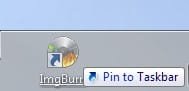
Here is the simplest way I know of. Grab an icon (shortcut to a program) on the desktop:
Screenshot_2.jpg

Drag it to the taskbar and release it there:
Screenshot_4.jpg

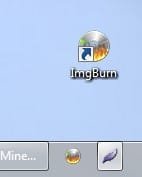
That will result in a desktop icon and a pinned icon:
Screenshot_5.jpg

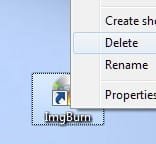
Right-click the desktop icon and click "delete":
Screenshot_6.jpg

That will leave you with only the pinned icon on the task bar:
Screenshot_7.jpg

Note: when you unpin the taskbar icon it will not restore the desktop icon.
 

My Computer

Computer Manufacturer/Model Number
Toshiba L355D
OS
Windows 7 Ultimate x64 SP1
CPU
Core2 Duo
Motherboard
Intel
Memory
4 GB
Graphics Card(s)
GM965 on-board
Sound Card
RealTek on-board
Monitor(s) Displays
19"+17"(laptop)
Screen Resolution
1440x900 (x 2)
Hard Drives
500GB Ext. 200GB Internal
PSU
N/A
Case
N/A
Cooling
N/A
That is an unusual problem. Right click and delete has always worked for me..
But possibly a more efficient way to create the taskbar shortcut, is to go into the proram files filder, find the program folder and its .exe, right click it and then selct "Pin to taskbar"
If you follow this method, then you will not have the desktop icon in your face.
This does not explain why you have the problem, unfortunately.
 

My Computer

Computer Manufacturer/Model Number
Three desktops and one laptop with good specs..
OS
Vista and now 7 in 32 and 64 bit.
Mikedl, Thanks. That should work but I must have made a "Program" Icon and when I delete the Desktop Icon it sends the Program to the Recycle Bin. Live and learn eh.? I am find this win7 a bit of a learning curve.
 

My Computer

OS
Windows 7 Home Premium 32bit
That is an unusual problem. Right click and delete has always worked for me..
But possibly a more efficient way to create the taskbar shortcut, is to go into the proram files filder, find the program folder and its .exe, right click it and then selct "Pin to taskbar"
If you follow this method, then you will not have the desktop icon in your face.
This does not explain why you have the problem, unfortunately.
I have worked it out. My own stupid mistake. Cheers.
 

My Computer

OS
Windows 7 Home Premium 32bit
Back
Top