
Sup! An uncle of mine currently has an old dekstop . He purchased a couple of Technomaster speakers with subwoofer (2.1 Sound System) a couple of weeks ago. He sent the computer to repair at one moment, because the Mobo's LAN card somewhat died (It wasn't detecting the plugged in cable), and was replaced for a new one (not soldered to the mobo).
Now, he called me back to check for sound issues: There's only one speaker (The left one) which is being heard. At first I thought it was the cable, since the speakers connect using a standard RCA plug and I tried connecting the speakers to the different outputs of the subwoofer. So I asked him to purchase a new RCA cable. It did not work.
This was the troubleshoot I did:
1) Check connection cables. Everything plugged in correctly.
2) Tried the speakers with another device. When I connected it to his phone, both speakers sound perfectly! So the neither the speakers nor the cables are the problem.
3) Uninstalled the device software from Device Manager an restarted the PC. Didn't do the trick :/
4) Tested the computer output with a different speaker and got the same result. Seems that the headphone jacket is giving problems, just outputting the left channel.
What I believe the problem is:
- Some onboard devices on the Mobo died, because the onboard LAN had problems.
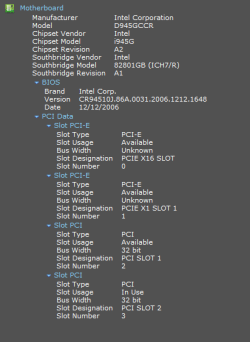
From Speccy, this seems to be the details of the Motherboard and the integrated sound card:
Motherboard: Intel Corporation D945GCCR
The sound card it says: "High Definition Audio Device" which I believe it stands for the generic one included by the motherboard.
Solution: Purchase another sound card.
Will this one work?
Amazon.com: Syba SD-PEX63034 7.1 Channel Surround Digital/Analog PCI-e Sound Card, VIA VT1723 Envy24DT Chipset: Computers & Accessories
If it's possible to find something not too exaggerated since it won't go beyond the 2.1 spectrum.
Thanks a million for the help in advance!
Now, he called me back to check for sound issues: There's only one speaker (The left one) which is being heard. At first I thought it was the cable, since the speakers connect using a standard RCA plug and I tried connecting the speakers to the different outputs of the subwoofer. So I asked him to purchase a new RCA cable. It did not work.
This was the troubleshoot I did:
1) Check connection cables. Everything plugged in correctly.
2) Tried the speakers with another device. When I connected it to his phone, both speakers sound perfectly! So the neither the speakers nor the cables are the problem.
3) Uninstalled the device software from Device Manager an restarted the PC. Didn't do the trick :/
4) Tested the computer output with a different speaker and got the same result. Seems that the headphone jacket is giving problems, just outputting the left channel.
What I believe the problem is:
- Some onboard devices on the Mobo died, because the onboard LAN had problems.
From Speccy, this seems to be the details of the Motherboard and the integrated sound card:
Motherboard: Intel Corporation D945GCCR
The sound card it says: "High Definition Audio Device" which I believe it stands for the generic one included by the motherboard.
Solution: Purchase another sound card.
Will this one work?
Amazon.com: Syba SD-PEX63034 7.1 Channel Surround Digital/Analog PCI-e Sound Card, VIA VT1723 Envy24DT Chipset: Computers & Accessories
If it's possible to find something not too exaggerated since it won't go beyond the 2.1 spectrum.
Thanks a million for the help in advance!
Attachments
My Computer
At a glance
Windows 8.1 (Update 1) Both MachinesIntel Core 2 Duo T8300 - 2.4GHZ & Intel Core ...4GB @ 800 MHz DDR2 & 16GB @ 1600 MHz DDR3Nvidia Geforce 8600m GT & 750m SLI
- Computer Manufacturer/Model Number
- Dell XPS M1530 - Lenovo Y510p
- OS
- Windows 8.1 (Update 1) Both Machines
- CPU
- Intel Core 2 Duo T8300 - 2.4GHZ & Intel Core i7 4700MQ
- Memory
- 4GB @ 800 MHz DDR2 & 16GB @ 1600 MHz DDR3
- Graphics Card(s)
- Nvidia Geforce 8600m GT & 750m SLI
- Sound Card
- Sigmatel High Definition Audio 5.1
- Monitor(s) Displays
- Samsung SyncMaster 2494
- Screen Resolution
- 1680 x 1050 (Laptop) && 1920 x 1080
- Hard Drives
- Hitachi 320 GB, @7200 RPM
- Internet Speed
- 480/100 KB/s DL/UP
- Browser
- Opera, Palemoon, Chrome, Internet Explorer 11