Hi,
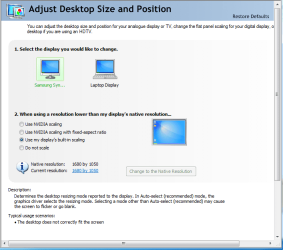
I am fairly new to windows 7. I have it installed on a laptop with a screen resolution of 1440x900 with a Nvidia GeForce 9400M. My second display is a Samsung Syncmaster with a resolution of 1680x1050. Everything is working okay but the standard Windows 7 wall paper seems to be displaying at the same resolution as my laptop, leaving a 1 or so inch black border around it. When I drag my browser over to my second display, it does let me drag it from corner to corner of my second screen (full 1680x1050). I've tried playing with all the settings in the control panel, including the Nvidia prefs but no luck.
Is this just a Windows issue, or is there a fix for this?
Thanks in advance!
I am fairly new to windows 7. I have it installed on a laptop with a screen resolution of 1440x900 with a Nvidia GeForce 9400M. My second display is a Samsung Syncmaster with a resolution of 1680x1050. Everything is working okay but the standard Windows 7 wall paper seems to be displaying at the same resolution as my laptop, leaving a 1 or so inch black border around it. When I drag my browser over to my second display, it does let me drag it from corner to corner of my second screen (full 1680x1050). I've tried playing with all the settings in the control panel, including the Nvidia prefs but no luck.
Is this just a Windows issue, or is there a fix for this?
Thanks in advance!
My Computer
- OS
- Windows 7 Home 64bit