Solved Desktop screen got Blurred

maan143

New member
Local time
11:42 AM
Messages
9
I was using my Laptop yesterday as usual, but when I did shut down and then restart it, everything got Blurred (and still it is).
Please check the attachment to know more..
* Attachment 1: Blurred Screen
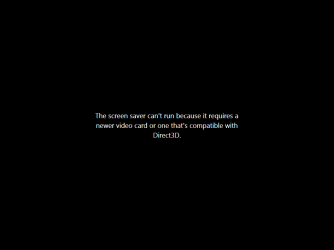
* Attachment 2: Screensaver couldn't initiate (as per it's time), during this blurred Screen


Other modes such as "Safe mode with Networking" is working fine (no blurring).

PS: Now I'm using Safe mode w/ networking.

Regards,
Maan.
 

Attachments
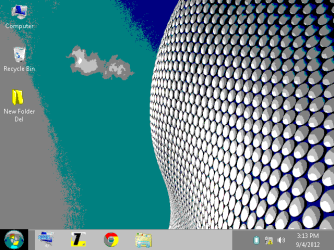
  • Blurred Screen.png
    Blurred Screen.png
    35.1 KB · Views: 18
  • Screen saver warning (during 'Blurred' vision of desktop).png
    Screen saver warning (during 'Blurred' vision of desktop).png
    2.9 KB · Views: 24

My Computer

OS
Windows 7 Ultimate x86

My Computer

Computer type
PC/Desktop
Computer Manufacturer/Model Number
Self Assembled
OS
Microsoft Windows 10 Pro Insider Preview 64-bit
CPU
Intel(R) Core(TM) i3-4130 CPU @ 3.40GHz
Motherboard
Gigabyte Technology Co., Ltd. B85M-D3H
Memory
Corsair Vengence 4GB x2 (8.00GB Dual-Channel DDR3 @ 798MHz)
Graphics Card(s)
2047MB GeForce GTS 450 (ZOTAC International)
Sound Card
Onboard (Realtek High Definition Audio)
Monitor(s) Displays
LG Flatron E2040T
Screen Resolution
1600x900
Hard Drives
Western Digital 1 TB
Seagate 500 GB
PSU
Corsair VS550
Case
Cooler Master K380
Cooling
Cooler Master Seidon 120V Plus
Keyboard
Logitech MK260r
Mouse
Logitech MK260r
Internet Speed
PMPL Broadband
Antivirus
Windows Defender + MBAM
Browser
Firefox
Other Info
Dell Studio 15" Laptop

My Computer

Computer Manufacturer/Model Number
Acer Aspire One 722 (AO722)
OS
Windows 7 Home Premium Service Pack 1 32-bit Build 7601
CPU
AMD C-50 Processor 1.0 Ghz
Memory
2 GB DDR3 RAM (1.73 usable in System Properties)
Graphics Card(s)
AMD Radeon HD 6200 series Graphics
Sound Card
High Definition Audio Device
Monitor(s) Displays
Generic PnP Monitor
Screen Resolution
1366 x 768 (recommended)
Hard Drives
320 GB HDD storage
298.09 GB in Disk Management (REAL)
Keyboard
Built-in on my laptop
Mouse
External mouse
Other Info
Installed Windows 7 Service Pack 1 by 9/9/2012
Your Graphics Card driver needs updating.
 

My Computer

Computer Manufacturer/Model Number
Advent
OS
Dual-boot: Windows 7 HP 32-bit SP1 & Windows XP Pro 32-bit SP2.
CPU
AMD Phenom X4 9550 2.8Ghz
Motherboard
FOXCONN A6VMX (Socket 940)
Memory
4.0GB RAM
Graphics Card(s)
256MB On-board ATI Radeon X1200 Series
Sound Card
UnKnown
Monitor(s) Displays
19" TFT Mointor
Screen Resolution
1400 by 900
Hard Drives
500GB Western Digital WDC
Keyboard
HP Keyboard
Internet Speed
Dial-up via Mobile phone (Three)
Other Info
80GB External Hard-drive.

Also I have an old Windows XP Laptop for backup/occasional use etc.
Hello everybody,
thx. for the useful replies..

Firstly, I want to add, my machine was working very well till yesterday
[for couple of months of 'Window 7 Ultimate' installed on it].

Hello maan.

Please fill up your System Specs.
Follow http://www.sevenforums.com/tutorials/180324-system-info-see-your-system-specs.html to know your system specs and feel it in here.

We need the information about your graphics card or onboard graphics.

Though apparently it seems that your GPU is outdated.
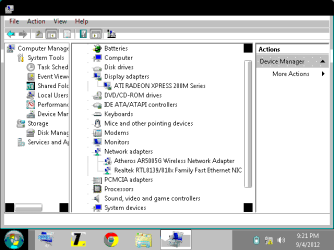
I attached the snapshots in the 'attachments' (named: Device Manager) that could tell you the configuration which might be needed.

[PS: My machine was working very fine, with the OS installed for long time, I don't feel the change of Graphics card, if I seek the same performance. It all just happened after I uninstalled some programs from Control Panel (which were not significant as far as I could remember) ]

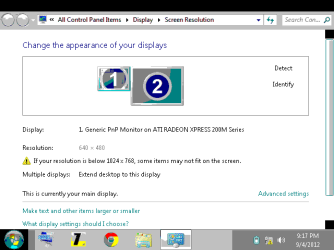
Your display is currently running on 640x480 resolution and 8-bit color depth.

Try the following:
http://www.sevenforums.com/tutorials/255-screen-resolution-display-settings.html
http://www.sevenforums.com/tutorials/258-color-bit-depth-display-settings.html
http://www.sevenforums.com/tutorials/256-screen-refresh-rate-display-settings.html

If all else fails, you need to go to your PC manufacturer to update your graphics card to the latest version possible.
Reply back if it helps.

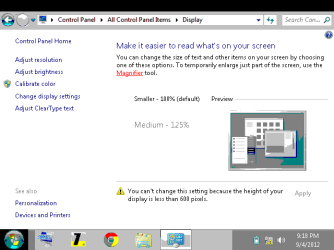
That is the "only" resolution which is available now in 'simple mode'. Check the attachment, I post some snapshots. (named: 1. Display 2. Screen Resolution)

[PS: Now, I'm using "safe mode with networking" to talk to you guys]


Your Graphics Card driver needs updating.

May be you're right! where could I get the exact drivers which I might needed for my prob.
 

Attachments

  • Device Manager.png
    Device Manager.png
    10.5 KB · Views: 19
  • Display.png
    Display.png
    8.5 KB · Views: 15
  • Screen Resolution.png
    Screen Resolution.png
    7.9 KB · Views: 15
Last edited:

My Computer

OS
Windows 7 Ultimate x86
@JonathanV
it couldn't show the active options.
 

My Computer

OS
Windows 7 Ultimate x86
Hi,

I agree, you should try to update the GFX card drivers - if you perform a Windows update, it may download and install a driver. Try that first.

Regards,
Golden
 

My Computer

Computer type
PC/Desktop
Computer Manufacturer/Model Number
Golden Mk. I.4
OS
Windows 10 Pro x64 ; Xubuntu x64
CPU
Intel i7 860 @ 2.80 GHz O/C'ed to 4.0GHz
Motherboard
Gigabyte P55A-UD3R Rev.1. Award BIOS F13
Memory
16GB Corsair Vengance DDR3 @ 661 MHz Dual Channel (9-9-9-24)
Graphics Card(s)
EVGA NVidia GTX 560 1024MB
Sound Card
Realtek Integrated
Monitor(s) Displays
Dual Samsung SyncMaster 2494HS
Screen Resolution
1920*1080 and 1920*1080
Hard Drives
1*Samsung 840 EVO 120GB SSD;
1*OCZ Vertex 2 60GB SSD;
2*Samsung F3 SpinPoint 1TB in RAID0;
1*Samsung F1 SpinPoint 1TB;
2*Western Digital 1TB External USB 3.0
1*Western Digital 500GB External USB 3.0
1*Seagate 500GB External USB 2.0
PSU
Thermaltake ToughPower QFan 750W
Case
Thermaltake Element S VK60001W2Z
Cooling
Corsair H60 Water Cooling, 2*230mm and 2*80mm case fans
Keyboard
Logitech G110
Mouse
Logitech MX518
Thanks everybody, for helping me out on this prob.

The Problem is Solved.

I figured out (with ur help of course), it was a minor issue, it just need to re-installing the drivers concerned (display/graphics; what ever you say it).

I doubted that earlier too but when I examined it (earlier) it shows the drivers are 'up-to-date' or 'working fine'. So, kept wondering what the prob. is supposed to be, if it shows 'driver's fine'

But today, I un-installed it anyways, and restarts my Lappy, VOILA, it automatically installed the drivers it needed.

and yeah, I'm posting this mess. in simple mode....(and Not 'Safe mode w/ networking).

Everything is Just fine as it was before, it was just Graphics driver un-installing.....

Thanx. everone,
Arc, JonathanV, Carl and Golden......it was a great help from you guys.
You guys made me feel comfy in this experience.
 

My Computer

OS
Windows 7 Ultimate x86
:thumbsup:
 

My Computer

Computer type
PC/Desktop
Computer Manufacturer/Model Number
Golden Mk. I.4
OS
Windows 10 Pro x64 ; Xubuntu x64
CPU
Intel i7 860 @ 2.80 GHz O/C'ed to 4.0GHz
Motherboard
Gigabyte P55A-UD3R Rev.1. Award BIOS F13
Memory
16GB Corsair Vengance DDR3 @ 661 MHz Dual Channel (9-9-9-24)
Graphics Card(s)
EVGA NVidia GTX 560 1024MB
Sound Card
Realtek Integrated
Monitor(s) Displays
Dual Samsung SyncMaster 2494HS
Screen Resolution
1920*1080 and 1920*1080
Hard Drives
1*Samsung 840 EVO 120GB SSD;
1*OCZ Vertex 2 60GB SSD;
2*Samsung F3 SpinPoint 1TB in RAID0;
1*Samsung F1 SpinPoint 1TB;
2*Western Digital 1TB External USB 3.0
1*Western Digital 500GB External USB 3.0
1*Seagate 500GB External USB 2.0
PSU
Thermaltake ToughPower QFan 750W
Case
Thermaltake Element S VK60001W2Z
Cooling
Corsair H60 Water Cooling, 2*230mm and 2*80mm case fans
Keyboard
Logitech G110
Mouse
Logitech MX518
Back
Top