
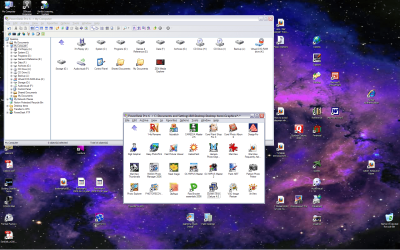
Perhaps I'm a little dense, but I've 'till now been using PowerDesk Pro (which is getting a little long in the tooth) to customize my desktop by adding a Shortcut which is actually to another instance of PDP, containing a collection of shortcuts to programs with related purposes. The attachment shows an open instance of one such, for Graphics programs. On the desktop, you'll also see others for Support, Reference, Audiovisual, Backup , Games, & Publishing. Each of these instances of PDP can be individually configured as to display type (here it's medium icons), presence or absence of indexbar (absent), presence or absence of toolbars (mostly absent), organization of files (alphabet, newness or size), etc. See the foreground of the screenshot.
What I'd like to do is reproduce this in Win 7 (or using a free Explorer replacement, if necessary). Vista and Win 7 only allow for global customization, so if I remove the Indexbar from one window, I remove it from all. In the background of this shot, you'll also see the main screen of PDP, with Indexbar and various toolbars & statusbar still in place
Any suggestions? ??Am I just missing something basic?? ??Do others like to do it this way??
Thanx for your help,
Bill Zigrang
What I'd like to do is reproduce this in Win 7 (or using a free Explorer replacement, if necessary). Vista and Win 7 only allow for global customization, so if I remove the Indexbar from one window, I remove it from all. In the background of this shot, you'll also see the main screen of PDP, with Indexbar and various toolbars & statusbar still in place
Any suggestions? ??Am I just missing something basic?? ??Do others like to do it this way??
Thanx for your help,
Bill Zigrang
Attachments
My Computer
- Computer Manufacturer/Model Number
- Self-built
- OS
- Win XP,Vista (32-bit), Win 7 (64-bit)