Desktop shortcut to tell computer to sleep in 25 minutes

Hello LongApple,

Firstly, it's 'rundll32.exe'. Not 'rund1132.exe'.

Secondly...

I am having trouble getting the sleep command to work[.] Also where do I put the time? Shouldn't there be an XX or 00 like in the shutdown command? Is what I am typing into cmd prompt wrong?

Rundll32 is not a command. It is a wrapper program that's purpose is to launch other programs stored within dll files and should never be invoked by the user directly; not through the command prompt, not through shourtcuts.

Forcing Windows to sleep using this method is considered dangerous.


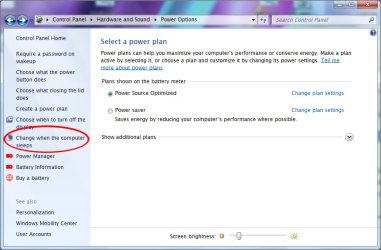
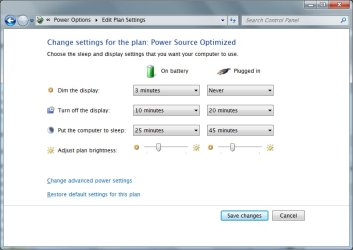
You should instead be using "Control Panel\Hardware and Sound\Power Options\Edit Plan Settings" to choose when your computer sleeps.

PowerOptions1.jpeg
PowerOptions2.jpeg


If you really want your computer to sleep through a shortcut/command, it's recommended you download PsShutdown from here and create a shortcut to that instead.
 

My Computer My Computer

At a glance

Windows 10, Windows 8.1 Pro, Windows 7 Profes...
Computer type
PC/Desktop
OS
Windows 10, Windows 8.1 Pro, Windows 7 Professional, OS X El Capitan
Not sure why this would be dangerous. I just tried it and it worked fine.

rundll32.exe powrprof.dll,SetSuspendState 0,1,1


Would need to put this in a batch file, something like:

timeout 1800
rundll32.exe powrprof.dll,SetSuspendState 0,1,1


>timeout /?

TIMEOUT [/T] timeout [/NOBREAK]

Description:
This utility accepts a timeout parameter to wait for the specified
time period (in seconds) or until any key is pressed. It also
accepts a parameter to ignore the key press.

Parameter List:
/T timeout Specifies the number of seconds to wait.
Valid range is -1 to 99999 seconds.

/NOBREAK Ignore key presses and wait specified time.

/? Displays this help message.

NOTE: A timeout value of -1 means to wait indefinitely for a key press.

Examples:
TIMEOUT /?
TIMEOUT /T 10
TIMEOUT /T 300 /NOBREAK
TIMEOUT /T -1
 

My Computer My Computer

At a glance

Windows 10 Pro X64Intel Quad Core i7-4770 @ 3.4Ghz16.0GB PC3-12800 DDR3 SDRAM 1600 MHzIntel Integrated HD Graphics
Computer type
PC/Desktop
Computer Manufacturer/Model Number
Lenovo IdeaCenter 450
OS
Windows 10 Pro X64
CPU
Intel Quad Core i7-4770 @ 3.4Ghz
Memory
16.0GB PC3-12800 DDR3 SDRAM 1600 MHz
Graphics Card(s)
Intel Integrated HD Graphics
Sound Card
Realtek HD Audio
Monitor(s) Displays
HP 22" LCD
Screen Resolution
1680 x 1050
Hard Drives
250GB Samsung EVO SATA-3 SSD
2TB Seagate ST2000DM001 SATA-2
1.5TB Seagate ST3150041AS SATA
Keyboard
Dell USB
Mouse
Lenovo USB
Internet Speed
Cable via Road Runner 3MB Upload, 30MB Download
Antivirus
Windows Defender, MBAM Pro, MBAE
Browser
Seamonkey
Other Info
UEFI/GPT
PLDS DVD-RW DH16AERSH
A quote from a user at Superuser.com briefly describes Rundll32s problems by invoking Rundll32 this way.

windows 7 - What is the command to use to put your computer to sleep (not hibernate)? - Super User

accolade said:
rundll32.exe PowrProf.dll,SetSuspendState is not recommended. It is dangerous. (Because it corrupts the stack, as it does not comply with the function signature demanded by Rundll32. Then unforeseeable bad things may happen, as Raymond Chen warns…)

Also see Michaels post How to use Rundll32 to execute DLL Function? - Stack Overflow

Michael said:
Rundll32 only supports running DLL exports with the following signature:
void CALLBACK EntryPoint(HWND hwnd, HINSTANCE hinst, LPSTR lpszCmdLine, int nCmdShow);It does not support running arbitrary entry points. Since ShellExecute does not have that signature, clearly bad things will happen.
INFO: Windows Rundll and Rundll32 Interface has more info on the rundll32 interface.
If you want to do the equivelent of ShellExecute from the command line, just use start:
C:\>start "C:\Documents and Settings\admin\Desktop\tmp"
 

My Computer My Computer

At a glance

Windows 10, Windows 8.1 Pro, Windows 7 Profes...
Computer type
PC/Desktop
OS
Windows 10, Windows 8.1 Pro, Windows 7 Professional, OS X El Capitan
Does that warning apply in this case? It did not cause me any harm and I ran it several times.

For completeness:

The command I gave, rundll32.exe powrprof.dll,SetSuspendState 0,1,1, suspends the computer.

This one, Rundll32.exe Powrprof.dll,SetSuspendState Sleep, puts it to sleep.
 

My Computer My Computer

At a glance

Windows 10 Pro X64Intel Quad Core i7-4770 @ 3.4Ghz16.0GB PC3-12800 DDR3 SDRAM 1600 MHzIntel Integrated HD Graphics
Computer type
PC/Desktop
Computer Manufacturer/Model Number
Lenovo IdeaCenter 450
OS
Windows 10 Pro X64
CPU
Intel Quad Core i7-4770 @ 3.4Ghz
Memory
16.0GB PC3-12800 DDR3 SDRAM 1600 MHz
Graphics Card(s)
Intel Integrated HD Graphics
Sound Card
Realtek HD Audio
Monitor(s) Displays
HP 22" LCD
Screen Resolution
1680 x 1050
Hard Drives
250GB Samsung EVO SATA-3 SSD
2TB Seagate ST2000DM001 SATA-2
1.5TB Seagate ST3150041AS SATA
Keyboard
Dell USB
Mouse
Lenovo USB
Internet Speed
Cable via Road Runner 3MB Upload, 30MB Download
Antivirus
Windows Defender, MBAM Pro, MBAE
Browser
Seamonkey
Other Info
UEFI/GPT
PLDS DVD-RW DH16AERSH
Back
Top