Desktop shortcuts disappear when renamed

Leeto

New member
Local time
8:17 AM
Messages
2
Hi, I'm new to these forums. I just installed Windows 7 Professional, and I noticed something.

When I rename one of my desktop shortcuts, the icon disappears. When I refresh with F5, the icon shows up but in the top left.

Is there any way to fix this? It isn't a big deal but it's getting a little annoying.
 

My Computer My Computer

OS
Windows 7 Professional
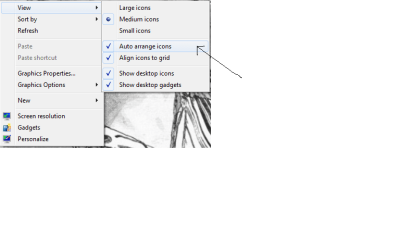
Not sure what you're looking. You can right click anywhere on the desktop and click View>Auto Arrange icons to fix it.

Untitled.png
 

My Computer My Computer

Computer Manufacturer/Model Number
Samsung NP530U4B-S02IN
OS
Windows® 8 Pro (64-bit)
CPU
Intel® Core™ i5 Processor 2467M (1.60GHz, 3MB L3 Cache)
Motherboard
Samsung Electronics
Memory
6GB DDR3 System Memory at 1,333MHz (on BD 4GB + 2GB x 1)
Graphics Card(s)
AMD Radeon™ HD7550M 1GB DDR3 (Ext. Graphic)
Sound Card
Realtek High Definition Audio
Monitor(s) Displays
35.56cm (14.0) SuperBright 300nit HD LED Display
Screen Resolution
1366x768
Hard Drives
1TB S-ATA II Hard Drive (5400RPM) with ExpressCache 16GB SSD
Internet Speed
sucks
Antivirus
Microsoft Security Essentials
Browser
Google Chrome (Sync enabled)
Hi, I'm new to these forums. I just installed Windows 7 Professional, and I noticed something.

When I rename one of my desktop shortcuts, the icon disappears. When I refresh with F5, the icon shows up but in the top left.

Is there any way to fix this? It isn't a big deal but it's getting a little annoying.

I had the same thing happen to me just after a clean install but it only happened the one time, and I quite regularly rename things on the Desktop, maybe it's something that only occurs on the first boot, but I'm not sure what would be the cause or how to fix it.
 

My Computer My Computer

Computer Manufacturer/Model Number
Home Brew
OS
Windows 7 Ultimate Vista Ultimate x64
CPU
Core 2 Duo E8500 3.16Ghz @ 3.8Ghz
Motherboard
eVGA 750i FTW
Memory
2x2Gigs Patriot PC2-6400 LL
Graphics Card(s)
Inno3D GeForce GTX260 216 SP
Monitor(s) Displays
ASUS VW222U 22" 2ms Response time
Screen Resolution
1680x1050
Hard Drives
SATA 150GB
SATA II 250GB
USB IDE 750GB Ext.
PSU
HYTEC 600W & Thermaltake 650W Toughpower Power Exp
Case
Thermaltake Armor LCS (Liquid Cooling System)
Cooling
Liquid Cooling System
Keyboard
Logitech G15 Gaming Keyboard
Mouse
Logitech G9 Gaming Mouse
I mean when I rename the shortcut, the moment I press enter to confirm the rename the icon vanishes. The only way to get it to show up again is to refresh the desktop.
 

My Computer My Computer

OS
Windows 7 Professional
As said by Mr. Grim, restart windows and install all updates. this might fix it.
 

My Computer My Computer

Computer Manufacturer/Model Number
Samsung NP530U4B-S02IN
OS
Windows® 8 Pro (64-bit)
CPU
Intel® Core™ i5 Processor 2467M (1.60GHz, 3MB L3 Cache)
Motherboard
Samsung Electronics
Memory
6GB DDR3 System Memory at 1,333MHz (on BD 4GB + 2GB x 1)
Graphics Card(s)
AMD Radeon™ HD7550M 1GB DDR3 (Ext. Graphic)
Sound Card
Realtek High Definition Audio
Monitor(s) Displays
35.56cm (14.0) SuperBright 300nit HD LED Display
Screen Resolution
1366x768
Hard Drives
1TB S-ATA II Hard Drive (5400RPM) with ExpressCache 16GB SSD
Internet Speed
sucks
Antivirus
Microsoft Security Essentials
Browser
Google Chrome (Sync enabled)
this problems a little annoying
 

My Computer My Computer

Computer Manufacturer/Model Number
Custom Built - TheTeZ
OS
Windows 7 -x6
CPU
Intel Core 2 Extreme QX9650 Processor- (Quad)
Motherboard
Asus P5N-D Motherboard
Memory
OCZ Platnum 8gb(2gbx4) PC 6400 DDR2 800MHz
Graphics Card(s)
EVGA 01G-P3-1145-TR GeForce GTS 250 Video Card
Sound Card
Realtek ALC883
Monitor(s) Displays
19" WideScreen Mag Innovision & Acer X203H Vertical Mount
Screen Resolution
1440x900 & 1600x900
Hard Drives
Western Digital WD7500AADS Caviar Green Hard Drive - 750GB
Western Digital WD500
Hitachi 1TB Serial ATA HD
PSU
Kingwin Mach 1 Modular Power Supply
Case
NZXT Tempest ATX Mid-Tower Case -- AKA Flow Master
Cooling
Thermaltake SpinQ CPU Cooler - Aerocool Touch 1000 LCD Panel
fixes?
 

My Computer My Computer

Computer Manufacturer/Model Number
Custom Built - TheTeZ
OS
Windows 7 -x6
CPU
Intel Core 2 Extreme QX9650 Processor- (Quad)
Motherboard
Asus P5N-D Motherboard
Memory
OCZ Platnum 8gb(2gbx4) PC 6400 DDR2 800MHz
Graphics Card(s)
EVGA 01G-P3-1145-TR GeForce GTS 250 Video Card
Sound Card
Realtek ALC883
Monitor(s) Displays
19" WideScreen Mag Innovision & Acer X203H Vertical Mount
Screen Resolution
1440x900 & 1600x900
Hard Drives
Western Digital WD7500AADS Caviar Green Hard Drive - 750GB
Western Digital WD500
Hitachi 1TB Serial ATA HD
PSU
Kingwin Mach 1 Modular Power Supply
Case
NZXT Tempest ATX Mid-Tower Case -- AKA Flow Master
Cooling
Thermaltake SpinQ CPU Cooler - Aerocool Touch 1000 LCD Panel
sfc /scannow or
reinstall clean
 

My Computer My Computer

Computer Manufacturer/Model Number
Custom
OS
Windows 7 Ultimate RTM (Technet)
CPU
3.00 gigahertz Intel Core2 Duo E8400
Motherboard
ASUSTeK Computer INC. P5K/EPU Rev 1.xx
Memory
4GB
Graphics Card(s)
ATI Radeon X1950 Pro
Sound Card
Built in HD Audio
Monitor(s) Displays
22" Gateway LCD
Screen Resolution
1920 x 1200
Hard Drives
ST3160023A [Hard drive] (160.04 GB) -- drive 0, rev 8.01, ST3500630AS [Hard drive] (500.11 GB) -- drive 2, rev 3.AAK
ST3500630AS [Hard drive] (500.11 GB) -- drive 1, rev 3.AAK
Keyboard
Logitech G11
Mouse
Microsoft Wireless Laser Mouse 5000
Internet Speed
13.44 Mbps
it was a brand new install on a new hard drive, it seems to be an issue with business/ultimate
 

My Computer My Computer

Computer Manufacturer/Model Number
Custom Built - TheTeZ
OS
Windows 7 -x6
CPU
Intel Core 2 Extreme QX9650 Processor- (Quad)
Motherboard
Asus P5N-D Motherboard
Memory
OCZ Platnum 8gb(2gbx4) PC 6400 DDR2 800MHz
Graphics Card(s)
EVGA 01G-P3-1145-TR GeForce GTS 250 Video Card
Sound Card
Realtek ALC883
Monitor(s) Displays
19" WideScreen Mag Innovision & Acer X203H Vertical Mount
Screen Resolution
1440x900 & 1600x900
Hard Drives
Western Digital WD7500AADS Caviar Green Hard Drive - 750GB
Western Digital WD500
Hitachi 1TB Serial ATA HD
PSU
Kingwin Mach 1 Modular Power Supply
Case
NZXT Tempest ATX Mid-Tower Case -- AKA Flow Master
Cooling
Thermaltake SpinQ CPU Cooler - Aerocool Touch 1000 LCD Panel
Disappearing Desktop Icons

I have exactly the same problem on Win 7 Ultimate 64-bit.

It seems to have started after the last lot of Tuesday Microsoft patches.

One thing I have narrowed it down to is that only the icons that are also on the Public Desktop are affected.

I know I could take ownership of the public desktop and that would probably fix it, but that is a clumsy solution which may affect other users (if I allow them near my PC :D ).

I have already tried sfc /scannow, which indicated my system files are OK.

Any ideas anyone?

Update:
OK. After multiple restarts etc since my original post 2 weeks ago, I have now done a clean install and the problem is still there.

So I took ownership of the public desktop & it made no difference.

I still have to manually refresh the desktop after renaming any of my shortcut icons that are also on the public desktop.
 
Last edited:

My Computer My Computer

Computer type
PC/Desktop
Computer Manufacturer/Model Number
Me
OS
Windows 7 Ultimate 64-bit
CPU
Intel Core i7 3770K
Motherboard
Asus P8Z77-V PRO
Memory
G.Skill ARES DDR3 1600 - 3 x 4GB
Graphics Card(s)
ASUS HD7770-DC-1GD5-V2
Sound Card
on board
Monitor(s) Displays
ASUS PB278Q PLS LED LCD 6ms
Screen Resolution
2560 x 1440
Hard Drives
Samsung 840 EVO SSD 500GB
2 x Seagate SATA3 2TB 64Mb Cache (ST2000DM001)
PSU
Corsair HX-650
Case
Coolermaster Centurion 5 II
Cooling
Coolermaster Hyper 212 Plus
Keyboard
Logitech K290
Mouse
MS Wireless Laser Mouse 5000
Internet Speed
100Mb down / 2.5Mb up
Other Info
Leadtek DTV2000DS Dual HD TV Tuner
USB3 kit for 2 front panel USB3 ports
Looks like I may have found why my renamed desktop icons won't auto-refresh.

Extract of Log:
Malwarebytes' Anti-Malware 1.42
Database version: 3307
Windows 6.1.7600
Internet Explorer 8.0.7600.16385
7-Dec-09 14:29:33
mbam-log-2009-12-07 (14-29-04).txt
Scan type: Full Scan (C:\|D:\|E:\|F:\|)
Registry Data Items Infected: 1
Registry Keys Infected:
(No malicious items detected)
Registry Values Infected:
(No malicious items detected)
Registry Data Items Infected:
HKEY_LOCAL_MACHINE\SOFTWARE\Microsoft\Windows\CurrentVersion\Policies\Explorer\NoActiveDesktopChanges (Hijack.DisplayProperties) -> Bad: (1) Good: (0) -> No action taken.

I will correct the registry value and see how it goes.


Update:
I tried this and it didn't work so I also set the value of the key immediately above this one

.......\NoActiveDesktop to 0 (zero decimal) and it worked.

I can now edit my desktop icons without having to manually refresh.
 
Last edited:

My Computer My Computer

Computer type
PC/Desktop
Computer Manufacturer/Model Number
Me
OS
Windows 7 Ultimate 64-bit
CPU
Intel Core i7 3770K
Motherboard
Asus P8Z77-V PRO
Memory
G.Skill ARES DDR3 1600 - 3 x 4GB
Graphics Card(s)
ASUS HD7770-DC-1GD5-V2
Sound Card
on board
Monitor(s) Displays
ASUS PB278Q PLS LED LCD 6ms
Screen Resolution
2560 x 1440
Hard Drives
Samsung 840 EVO SSD 500GB
2 x Seagate SATA3 2TB 64Mb Cache (ST2000DM001)
PSU
Corsair HX-650
Case
Coolermaster Centurion 5 II
Cooling
Coolermaster Hyper 212 Plus
Keyboard
Logitech K290
Mouse
MS Wireless Laser Mouse 5000
Internet Speed
100Mb down / 2.5Mb up
Other Info
Leadtek DTV2000DS Dual HD TV Tuner
USB3 kit for 2 front panel USB3 ports
---bump...
 

My Computer My Computer

Computer Manufacturer/Model Number
Custom Built - TheTeZ
OS
Windows 7 -x6
CPU
Intel Core 2 Extreme QX9650 Processor- (Quad)
Motherboard
Asus P5N-D Motherboard
Memory
OCZ Platnum 8gb(2gbx4) PC 6400 DDR2 800MHz
Graphics Card(s)
EVGA 01G-P3-1145-TR GeForce GTS 250 Video Card
Sound Card
Realtek ALC883
Monitor(s) Displays
19" WideScreen Mag Innovision & Acer X203H Vertical Mount
Screen Resolution
1440x900 & 1600x900
Hard Drives
Western Digital WD7500AADS Caviar Green Hard Drive - 750GB
Western Digital WD500
Hitachi 1TB Serial ATA HD
PSU
Kingwin Mach 1 Modular Power Supply
Case
NZXT Tempest ATX Mid-Tower Case -- AKA Flow Master
Cooling
Thermaltake SpinQ CPU Cooler - Aerocool Touch 1000 LCD Panel
Back
Top