Desktop still black after most known solutions

popolino

New member
Local time
6:34 AM
Messages
5
Hey guys,

After series of attempts to solve my problem i would ask community for this.
After login my desktop turns black. Ok, there was few described solutions on the net, but none of it worked in my case.
1.There are not configurations in policy group
2.In Easy center check box remove background images is unchecked
3.TranscodedWallpaper.jpg is correct and at the right place - preview is fine
4.sfc /scannow done but no result (as administrator)
5.It is legitimate copy of Windows 7 Professional

blackdesktop.jpg


Thanks
 

My Computer My Computer

At a glance

windows 7
Computer type
PC/Desktop
OS
windows 7
Hi popolino, welcome to the Forum.

Read through this Forum tutorial to check that you have all the required attributes to run Windows Aero. These are shown in the Warnings section, so pay particular attention to that.
There are also some solutions you can try as well.

Transparency - Enable Full Clear Glass Transparency
 

My Computer My Computer

At a glance

Windows 7 Home Premium 64 bit sp1Intel i5 3570 3.4Ghz Ivy Bridge SKT 1155 quad...G-Skill Rip Jaws 16Gb (8x2) DDR3 -1600 PC3 12...Gigabyte NVIDIA GT610 1Gb DDR3 810/1200 PCI-E...
Computer type
PC/Desktop
Computer Manufacturer/Model Number
Self built using existing case
OS
Windows 7 Home Premium 64 bit sp1
CPU
Intel i5 3570 3.4Ghz Ivy Bridge SKT 1155 quad core
Motherboard
Gigabyte Z77-HD3 SKT 1155 2xSata 3, 4x USB 3.0
Memory
G-Skill Rip Jaws 16Gb (8x2) DDR3 -1600 PC3 12800 CL 10 red
Graphics Card(s)
Gigabyte NVIDIA GT610 1Gb DDR3 810/1200 PCI-E 2.0 Silent
Sound Card
NVIDIA High Definition & Realtech High Definition Audio
Monitor(s) Displays
2 x Philips 226V4L 16:9 aspect ratio
Screen Resolution
1920 x 1080 HD
Hard Drives
Samsung 840 Pro 256gb SSD, SATA 3.
Hitachi Touro Portable 1tb, USB 3.0 HDD used for image b/ups.
PSU
Corsair VS450
Case
Codeng
Cooling
PSU fan & CPU fan
Keyboard
Logitech
Mouse
Logitech Wireless trackball M570
Internet Speed
Wireless 3G. 3mg down & 550kb up.
Antivirus
Bitdefender Internet Security 2020
Browser
Opera (Current Version) & Firefox
Other Info
MS Office 2013 Pro. Davis weather station software. MGE Nova 600 avr UPS.
Hey Ranger4,

Thanks for Your advice. I appreciate it. But, all important stuff comes after "but" :).
Anyway, here some prehistory.
My PC machine worked fine with the same settings, including Aero theme a year - since i bought it.
I'm sure this Aero theme is not relevant to this issue. Below is some of PC characteristics:
  • Operating System: Windows 7 Professional 64-bit Service Pack 1
  • Processor: AMD FX(tm)-6300 Six-Core Processor (6 CPUs), ~3.5GHz
  • Memory: 8192MB RAM
  • Available OS Memory: 7918MB RAM
  • DirectX Version: DirectX 11
  • Card name: ATI Radeon 3000 Graphics

What i have to share is that before this stupid unsolved issue i used Autoruns64 to check what services are running and during this check in the section Everything i unchecked these lines where software(Autoruns64) shows - File not found. That's it. Then after restart whaauuu - My desktop turns black!!!
Meanwhile i updated display driver to check this options as a solution, but no luck!
I run Malwarebytes - no threat detected!
I removed Avast and then installed Kaspersky Antivirus trial version - no threat detected!
So, virus is not the case obviously.
Somewhere i read that Remote accessing software like Logme in, could turn in black Desktop - no such thing here!
None of all known solutions worked for me.
I can't figure out how get rid of this little problem that caused so much annoying headaches.
 
Last edited:

My Computer My Computer

At a glance

windows 7
Computer type
PC/Desktop
OS
windows 7
It seems so obvious that I don't know if it's your case.
I see from your post nº1 that the desktop background color is black. Change it to another color or photo.
 

My Computers My Computers

  • At a glance

    Windows 7 HP 64i5 6600K - 800MHz to 4200MHz4+4G GSkill DDR4 3000IG - Intel 530
    Computer type
    PC/Desktop
    Computer Manufacturer/Model Number
    custom build
    OS
    Windows 7 HP 64
    CPU
    i5 6600K - 800MHz to 4200MHz
    Motherboard
    GA-Z170-HD3P
    Memory
    4+4G GSkill DDR4 3000
    Graphics Card(s)
    IG - Intel 530
    Monitor(s) Displays
    Samsung 226BW
    Screen Resolution
    1680x1050
    Hard Drives
    (1) -1 SM951 – 128GB M.2 AHCI PCIe SSD drive for Windows 7 and Lubuntu
    (2) -1 WD SATA 3 - 1T for Data
    (3) -1 WD SATA 3 - 1T for backup
    PSU
    Thermaltake 450W TR2 gold
    Keyboard
    Old and good Chicony mechanical keyboard
    Mouse
    Logitech mX performance - 9 buttons (had to disable some)
    Internet Speed
    500Mb/s
    Browser
    Firefox 64
    Other Info
    TinyWall firewall
  • At a glance

    Windows 7 Proi7-4500U 800MHz to 3.0GHz(4+4)G DDR3 1600IG intel 4400 + NVIDIA GeForce GT 745M
    Computer type
    Laptop
    System Manufacturer/Model Number
    Asus Q550LF
    OS
    Windows 7 Pro
    CPU
    i7-4500U 800MHz to 3.0GHz
    Motherboard
    Asus Q550LF
    Memory
    (4+4)G DDR3 1600
    Graphics Card(s)
    IG intel 4400 + NVIDIA GeForce GT 745M
    Sound Card
    Realtek
    Monitor(s) Displays
    LG Display LP156WF4-SPH1
    Screen Resolution
    1920 x 1080
    Hard Drives
    BX500 120G SSD for Windows and programs +
    1T HDD for data
    Internet Speed
    500 Mb/s
    Browser
    Firefox
    Other Info
    TinyWall firewall
Hi Megahertz07,

Thanks for Your assistance, but maybe i was misunderstood!
Desktop still remains black despite of my attempts to change background image. There is an issue to change Desktop background image at all.
According to Your advice to change background color - Yes! It is possible. But this is not the case, buddy! :)
 

My Computer My Computer

At a glance

windows 7
Computer type
PC/Desktop
OS
windows 7
Never do make any changes where you are not sure what is the result of it.
Unless you make take notes on the steps, so that you can reverse it if it is not what you want.

This Autoruns for Windows is created by Windows Sysinternals.
The staff that create all this small utility (also portable) were MS staff.
Some of these utility do make changes in the registry.

This is not any malware &or virus, so there is no need to check.


Do list your specs on your profile, not on the post itself.


Do you have any restore point.

Do use the restore point to undo all the changes you had made.

Whenever windows updates is about to do updating, it will create a system restore point.

Check the system restore point to undo your changes.
 

My Computer My Computer

At a glance

Windows 7 x64
Computer type
Laptop
Computer Manufacturer/Model Number
Toshiba L630 and L735
OS
Windows 7 x64
Hard Drives
240 GB SSD
Hey Eric3742,

Thank for Your valuable words.
You're right about the changes. I assume that, maybe, just maybe, i could unchecked some undesired in this Autoruns64 utility options but it hardly to believe that this could cause loosing opportunity to change the Desktop background images.
And, yes, to use restore point is my last resort!!!
I'm just looking for an explanation what could cause this issue to avoid it in future.
 

My Computer My Computer

At a glance

windows 7
Computer type
PC/Desktop
OS
windows 7
Sorry, getting confused.
Since you don't have saved theme, there is no way to recover the one you were using.
If you can change you theme, why don't you build your own theme so it gets the way it was before?
 

My Computers My Computers

  • At a glance

    Windows 7 HP 64i5 6600K - 800MHz to 4200MHz4+4G GSkill DDR4 3000IG - Intel 530
    Computer type
    PC/Desktop
    Computer Manufacturer/Model Number
    custom build
    OS
    Windows 7 HP 64
    CPU
    i5 6600K - 800MHz to 4200MHz
    Motherboard
    GA-Z170-HD3P
    Memory
    4+4G GSkill DDR4 3000
    Graphics Card(s)
    IG - Intel 530
    Monitor(s) Displays
    Samsung 226BW
    Screen Resolution
    1680x1050
    Hard Drives
    (1) -1 SM951 – 128GB M.2 AHCI PCIe SSD drive for Windows 7 and Lubuntu
    (2) -1 WD SATA 3 - 1T for Data
    (3) -1 WD SATA 3 - 1T for backup
    PSU
    Thermaltake 450W TR2 gold
    Keyboard
    Old and good Chicony mechanical keyboard
    Mouse
    Logitech mX performance - 9 buttons (had to disable some)
    Internet Speed
    500Mb/s
    Browser
    Firefox 64
    Other Info
    TinyWall firewall
  • At a glance

    Windows 7 Proi7-4500U 800MHz to 3.0GHz(4+4)G DDR3 1600IG intel 4400 + NVIDIA GeForce GT 745M
    Computer type
    Laptop
    System Manufacturer/Model Number
    Asus Q550LF
    OS
    Windows 7 Pro
    CPU
    i7-4500U 800MHz to 3.0GHz
    Motherboard
    Asus Q550LF
    Memory
    (4+4)G DDR3 1600
    Graphics Card(s)
    IG intel 4400 + NVIDIA GeForce GT 745M
    Sound Card
    Realtek
    Monitor(s) Displays
    LG Display LP156WF4-SPH1
    Screen Resolution
    1920 x 1080
    Hard Drives
    BX500 120G SSD for Windows and programs +
    1T HDD for data
    Internet Speed
    500 Mb/s
    Browser
    Firefox
    Other Info
    TinyWall firewall
Hi Megahertz07,

Thanks again for trying to help me, i appreciate it!
Here is more visual evidences about what is the problem:

blackdesktop2.jpg


On the image above are showed two circumstances :
1.TranscodedWallPaper.jpg is NOT corrupted and is not previewed as a Desktop background image!
2.I saved the themeTest for example

The system not changing the Desktop background image in any user interactions!
 

My Computer My Computer

At a glance

windows 7
Computer type
PC/Desktop
OS
windows 7
Ok, you already changed the color.
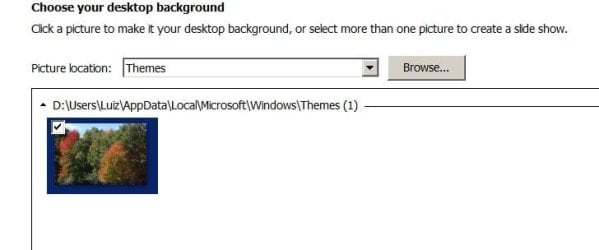
Click on Desktop Background - Browse- to \Users\(your name)\AppData\Local\Microsoft\Windows\Themes and select the one on your image (transcodewalpaper.jpg) or any photo from your library.
 

Attachments

  • Theme.JPG
    Theme.JPG
    24.1 KB · Views: 1

My Computers My Computers

  • At a glance

    Windows 7 HP 64i5 6600K - 800MHz to 4200MHz4+4G GSkill DDR4 3000IG - Intel 530
    Computer type
    PC/Desktop
    Computer Manufacturer/Model Number
    custom build
    OS
    Windows 7 HP 64
    CPU
    i5 6600K - 800MHz to 4200MHz
    Motherboard
    GA-Z170-HD3P
    Memory
    4+4G GSkill DDR4 3000
    Graphics Card(s)
    IG - Intel 530
    Monitor(s) Displays
    Samsung 226BW
    Screen Resolution
    1680x1050
    Hard Drives
    (1) -1 SM951 – 128GB M.2 AHCI PCIe SSD drive for Windows 7 and Lubuntu
    (2) -1 WD SATA 3 - 1T for Data
    (3) -1 WD SATA 3 - 1T for backup
    PSU
    Thermaltake 450W TR2 gold
    Keyboard
    Old and good Chicony mechanical keyboard
    Mouse
    Logitech mX performance - 9 buttons (had to disable some)
    Internet Speed
    500Mb/s
    Browser
    Firefox 64
    Other Info
    TinyWall firewall
  • At a glance

    Windows 7 Proi7-4500U 800MHz to 3.0GHz(4+4)G DDR3 1600IG intel 4400 + NVIDIA GeForce GT 745M
    Computer type
    Laptop
    System Manufacturer/Model Number
    Asus Q550LF
    OS
    Windows 7 Pro
    CPU
    i7-4500U 800MHz to 3.0GHz
    Motherboard
    Asus Q550LF
    Memory
    (4+4)G DDR3 1600
    Graphics Card(s)
    IG intel 4400 + NVIDIA GeForce GT 745M
    Sound Card
    Realtek
    Monitor(s) Displays
    LG Display LP156WF4-SPH1
    Screen Resolution
    1920 x 1080
    Hard Drives
    BX500 120G SSD for Windows and programs +
    1T HDD for data
    Internet Speed
    500 Mb/s
    Browser
    Firefox
    Other Info
    TinyWall firewall
@ popolino. This website might help you with finding where the original Windows 7 Aero themes are located & if necessary you can download the original ones.

Original Windows 7 Themes
 

My Computer My Computer

At a glance

Windows 7 Home Premium 64 bit sp1Intel i5 3570 3.4Ghz Ivy Bridge SKT 1155 quad...G-Skill Rip Jaws 16Gb (8x2) DDR3 -1600 PC3 12...Gigabyte NVIDIA GT610 1Gb DDR3 810/1200 PCI-E...
Computer type
PC/Desktop
Computer Manufacturer/Model Number
Self built using existing case
OS
Windows 7 Home Premium 64 bit sp1
CPU
Intel i5 3570 3.4Ghz Ivy Bridge SKT 1155 quad core
Motherboard
Gigabyte Z77-HD3 SKT 1155 2xSata 3, 4x USB 3.0
Memory
G-Skill Rip Jaws 16Gb (8x2) DDR3 -1600 PC3 12800 CL 10 red
Graphics Card(s)
Gigabyte NVIDIA GT610 1Gb DDR3 810/1200 PCI-E 2.0 Silent
Sound Card
NVIDIA High Definition & Realtech High Definition Audio
Monitor(s) Displays
2 x Philips 226V4L 16:9 aspect ratio
Screen Resolution
1920 x 1080 HD
Hard Drives
Samsung 840 Pro 256gb SSD, SATA 3.
Hitachi Touro Portable 1tb, USB 3.0 HDD used for image b/ups.
PSU
Corsair VS450
Case
Codeng
Cooling
PSU fan & CPU fan
Keyboard
Logitech
Mouse
Logitech Wireless trackball M570
Internet Speed
Wireless 3G. 3mg down & 550kb up.
Antivirus
Bitdefender Internet Security 2020
Browser
Opera (Current Version) & Firefox
Other Info
MS Office 2013 Pro. Davis weather station software. MGE Nova 600 avr UPS.
Hey Eric3742,

Thank for Your valuable words.
You're right about the changes. I assume that, maybe, just maybe, i could unchecked some undesired in this Autoruns64 utility options but it hardly to believe that this could cause loosing opportunity to change the Desktop background images.
And, yes, to use restore point is my last resort!!!
I'm just looking for an explanation what could cause this issue to avoid it in future.


Alternately if you want to try to see the changes.

Before making the changes, do Create A Restore Point.

In this way, if it is not what you want, you can use the Restore Point to undo the changes.

Do take advantages on using Restore Point for any purpose.


Eric.
 

My Computer My Computer

At a glance

Windows 7 x64
Computer type
Laptop
Computer Manufacturer/Model Number
Toshiba L630 and L735
OS
Windows 7 x64
Hard Drives
240 GB SSD
Back
Top