
Desktop Thumbnails Images problem

Alex230

New member
Local time
8:01 AM
Messages
3
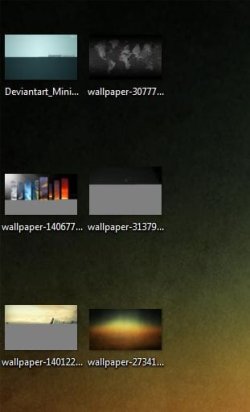
I started to have this problem lately, some of my desktop image thumbnails are not showing completely ,like they are not downloaded correctly or unfinished.
It doesn't happen with all images ,but it happens pretty often.

Files affected: images - downloaded or saved on the desktop by various programs such as adobe photoshop ,photomatix HDR generated image ,mainly big image files like over 1MB.

I tried the disk cleanup thumbnail cache ,it worked recovering the unfinished thumbnails ,but it still happens again.

A restart doesn't help. And it only happens on the desktop. in folder files are fine.

Thank you.

Here's a screenshot with what's happening:
 

Attachments
  • Capture.JPG
    Capture.JPG
    21.3 KB · Views: 29

My Computer

OS
Windows 7 ultimate x64
CPU
Core i5 2500k
Motherboard
MSI P67A-GT65 B3
Memory
2x4 GB Corsair Vengeance LP
Graphics Card(s)
BFG Geforce GTX260 Core 216 OC
Sound Card
Creative X-Fi Titanium
Monitor(s) Displays
LG L227W
Hard Drives
1x60GB Team Group Extreem S1 SSD - boot
1x400GB Samsung 400LJ - storrage
1x640GB WD AAKS - storrage
PSU
Enermax ELT500AWT - 500W
Case
Antec P183
Cooling
Zerotherm FZ120 cpu cooler ,4x120 Noiseblockers S1
Keyboard
Logitech G11
Mouse
Logitech G9
If you can still open them fine, something is corrupt in the generation process of the thumbnail images. Have you installed any codec packages on the machine?
 

My Computer

OS
XP / Win7 x64 Pro
CPU
Intel Quad-Core Q9450 @ 3.2GHz
Motherboard
Asus P5-E
Memory
2x2GB GSkill DDR2
Graphics Card(s)
NVIDIA GeForce 8600 GTS (EVGA)
Monitor(s) Displays
Dell 2408WFP
Screen Resolution
1920x1200
Yes ,they open fine ,no problem.
Nope ,no codecs installed lately.
 

My Computer

OS
Windows 7 ultimate x64
CPU
Core i5 2500k
Motherboard
MSI P67A-GT65 B3
Memory
2x4 GB Corsair Vengeance LP
Graphics Card(s)
BFG Geforce GTX260 Core 216 OC
Sound Card
Creative X-Fi Titanium
Monitor(s) Displays
LG L227W
Hard Drives
1x60GB Team Group Extreem S1 SSD - boot
1x400GB Samsung 400LJ - storrage
1x640GB WD AAKS - storrage
PSU
Enermax ELT500AWT - 500W
Case
Antec P183
Cooling
Zerotherm FZ120 cpu cooler ,4x120 Noiseblockers S1
Keyboard
Logitech G11
Mouse
Logitech G9
Not just lately. Have you installed any codecs on the machine at all?
 

My Computer

OS
XP / Win7 x64 Pro
CPU
Intel Quad-Core Q9450 @ 3.2GHz
Motherboard
Asus P5-E
Memory
2x2GB GSkill DDR2
Graphics Card(s)
NVIDIA GeForce 8600 GTS (EVGA)
Monitor(s) Displays
Dell 2408WFP
Screen Resolution
1920x1200
Yes ,K-Lite codecs pack. But i have them installed like months ago ,and the problem appeared a few days ago...
What do you suggest?
 

My Computer

OS
Windows 7 ultimate x64
CPU
Core i5 2500k
Motherboard
MSI P67A-GT65 B3
Memory
2x4 GB Corsair Vengeance LP
Graphics Card(s)
BFG Geforce GTX260 Core 216 OC
Sound Card
Creative X-Fi Titanium
Monitor(s) Displays
LG L227W
Hard Drives
1x60GB Team Group Extreem S1 SSD - boot
1x400GB Samsung 400LJ - storrage
1x640GB WD AAKS - storrage
PSU
Enermax ELT500AWT - 500W
Case
Antec P183
Cooling
Zerotherm FZ120 cpu cooler ,4x120 Noiseblockers S1
Keyboard
Logitech G11
Mouse
Logitech G9
Well, I can't say for sure, but often times such third party codec packs can corrupt the thumbnailing process. Since you've had them installed for months without a problem, it's tough to say that's your issue but it might be a good idea to completely uninstall them and rebuild the thumbnail cache again to see if the problem persists. Although the Shark007 codecs have atrocious "support", you might want to try them out instead. However, make sure you completely uninstall the k-lite codecs before doing so. Sometimes there can be issues.

http://www.sevenforums.com/music-pictures-video/16179-win7codecs-36.html#post1629593
 

My Computer

OS
XP / Win7 x64 Pro
CPU
Intel Quad-Core Q9450 @ 3.2GHz
Motherboard
Asus P5-E
Memory
2x2GB GSkill DDR2
Graphics Card(s)
NVIDIA GeForce 8600 GTS (EVGA)
Monitor(s) Displays
Dell 2408WFP
Screen Resolution
1920x1200
Back
Top