desperate problem with missing partitions and drive

hxl7

New member
Member
Local time
7:26 AM
Messages
47
  • I started using an external USB drive and backup program. It makes both Image and File backups
  • I have 3 physical HD’s in my computer. 2 came with the computer and the 3rd was from a previous computer ( Drive H: )
  • When I ran the backup program, it was, to my surprise, auto-configured to make an image of Drive H, but of course, it should make it for Drive C
  • I contacted support for the backup drive and they said there was no way to change the drive and that it selected the first physical drive for the image backup
  • I thought that odd since the two original drives, including drive C, naturally, came installed with the computer. The 3rd drive I added should not have been the 1st physical drive, but it should appear as Drive H, which it did. The drive name was correct, but the computer saw it as the first physical drive.
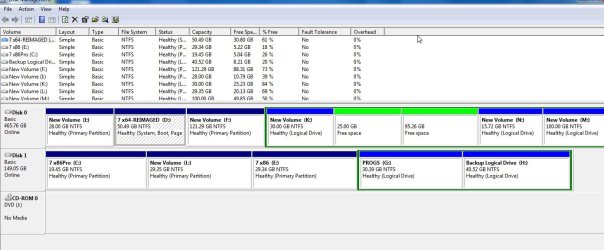
  • So, I opened Disk Management and sure enough, Drive H: was listed at the top as Drive 0, along with it’s 3 partitions. Drive C was listed as Drive 1
  • Wanting a workaround, I opened Explorer, right-clicked the drive H, clicked the Hardware tab, highlighted the drive, clicked Properties at the bottom, then the Driver tab, then the Disable button.
  • Then, I restarted my computer, ran the backup on the external drive, and this time it configured itself to backup drive C instead of H. So far, so good.
  • When it finished backing up, I reversed the above steps and Enabled drive H once again and rebooted
  • Then I went back into Disk Manager and was horrified to only see one large partition for Drive H. The other 2 did not show up.
  • How do I recover the other partitions???
  • Now, after rebooting, the drive is missing entirely from Explorer, even though it shows in BIOS normally
    Please help.
    Thank you. -Bill
 

My Computer

Computer Manufacturer/Model Number
cool tech, quiet elite
OS
win 7 64 ultimate
CPU
Intel i& 950 3.06GHz
Motherboard
Asus P6TD Deluxe
Memory
12GB PC3 12800
Graphics Card(s)
ATI Radeon HD 4850
Sound Card
-
Monitor(s) Displays
HP w2207
Hard Drives
2 WD Quiet 640GB 7200
Case
Antec P183
Cooling
Noctua NH-U12P SE 1366

My Computers

System One System Two

  • Computer type
    PC/Desktop
    OS
    7 X64
    CPU
    i5 8400
    Motherboard
    gigabyte b365m ds3h
    Memory
    2x8gb 3200mhz
    Hard Drives
    various
    PSU
    pure power 11 400w cm
    Case
    Coolermaster
    Cooling
    cryorig m9i
  • Computer type
    PC/Desktop
    OS
    7x64
    CPU
    g5400
    Motherboard
    ga b365m ds3h
    Memory
    8gb ddr4 2400
    PSU
    xfx pro 450w

My Computer

Computer Manufacturer/Model Number
cool tech, quiet elite
OS
win 7 64 ultimate
CPU
Intel i& 950 3.06GHz
Motherboard
Asus P6TD Deluxe
Memory
12GB PC3 12800
Graphics Card(s)
ATI Radeon HD 4850
Sound Card
-
Monitor(s) Displays
HP w2207
Hard Drives
2 WD Quiet 640GB 7200
Case
Antec P183
Cooling
Noctua NH-U12P SE 1366
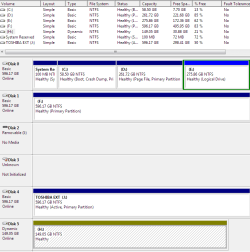
You appear to have a dynamic drive ( nominally 160gb ) in there .

The disk map may be useful -like this

disk map.jpg
 

My Computers

System One System Two

  • Computer type
    PC/Desktop
    OS
    7 X64
    CPU
    i5 8400
    Motherboard
    gigabyte b365m ds3h
    Memory
    2x8gb 3200mhz
    Hard Drives
    various
    PSU
    pure power 11 400w cm
    Case
    Coolermaster
    Cooling
    cryorig m9i
  • Computer type
    PC/Desktop
    OS
    7x64
    CPU
    g5400
    Motherboard
    ga b365m ds3h
    Memory
    8gb ddr4 2400
    PSU
    xfx pro 450w
Sorry. Didn't know that could help. Thanks, again.
3.png
 

My Computer

Computer Manufacturer/Model Number
cool tech, quiet elite
OS
win 7 64 ultimate
CPU
Intel i& 950 3.06GHz
Motherboard
Asus P6TD Deluxe
Memory
12GB PC3 12800
Graphics Card(s)
ATI Radeon HD 4850
Sound Card
-
Monitor(s) Displays
HP w2207
Hard Drives
2 WD Quiet 640GB 7200
Case
Antec P183
Cooling
Noctua NH-U12P SE 1366
It seems to have been changed to a dynamic drive - was it like that in the first place?

That's a bit awkward.

You will need third party app. to convert it back to a basic drive without data loss - there used to be a free app. called Partition Wizard 4.2 that would do it. The new Partition Wizard 5.2 doesn't have that feature.
 

My Computers

System One System Two

  • Computer type
    PC/Desktop
    OS
    7 X64
    CPU
    i5 8400
    Motherboard
    gigabyte b365m ds3h
    Memory
    2x8gb 3200mhz
    Hard Drives
    various
    PSU
    pure power 11 400w cm
    Case
    Coolermaster
    Cooling
    cryorig m9i
  • Computer type
    PC/Desktop
    OS
    7x64
    CPU
    g5400
    Motherboard
    ga b365m ds3h
    Memory
    8gb ddr4 2400
    PSU
    xfx pro 450w
That drive was ported over to my current computer from my last computer. I really don't know if it has always been like that. I think it has been. It has always run just fine and still does, even right now. The only problem is that I am seeing only one partition instead of three.

I really appreciate you responding, but I don't understand your suggestion. How would converting to a basic drive solve my partition problem?
 

My Computer

Computer Manufacturer/Model Number
cool tech, quiet elite
OS
win 7 64 ultimate
CPU
Intel i& 950 3.06GHz
Motherboard
Asus P6TD Deluxe
Memory
12GB PC3 12800
Graphics Card(s)
ATI Radeon HD 4850
Sound Card
-
Monitor(s) Displays
HP w2207
Hard Drives
2 WD Quiet 640GB 7200
Case
Antec P183
Cooling
Noctua NH-U12P SE 1366

My Computer

Computer Manufacturer/Model Number
HP, Dell, Gateway, Toshiba - 4 laptops and 2 desktops
OS
Vista, Windows7, Mint Mate, Zorin, Windows 8
CPU
from 1.6GHz Duo to i7
Monitor(s) Displays
2x HP w2207
Hard Drives
5x HDD, 7x SSD, 12x Externals
Keyboard
with trackball - no mices
Mouse
Trackball mice
Internet Speed
DSL 6000
Back
Top