Desperate to connect online...

nick2124

New member
Local time
7:36 PM
Messages
1
Hey guys!

This is my very first post :D

I have win7 64bit ultimate, my friend has 32 bit vista ultimate.

He is able to recieve wireless internet with his laptop... I don't have a wireless reciever, so I connected an ethernet cable from this computer to mine, thinking it would allow us to share his wireless internet.

I can connect to his COMPUTER but not to the internet... we've tried enable all the file-sharing options in windows, but nothing seems to work.

any suggestions?

Thanks!
 

My Computer

OS
Windows 7 Ultimate 64-bit
CPU
e8400
Graphics Card(s)
8800 GT
Hey guys!

This is my very first post :D

I have win7 64bit ultimate, my friend has 32 bit vista ultimate.

He is able to recieve wireless internet with his laptop... I don't have a wireless reciever, so I connected an ethernet cable from this computer to mine, thinking it would allow us to share his wireless internet.

I can connect to his COMPUTER but not to the internet... we've tried enable all the file-sharing options in windows, but nothing seems to work.

any suggestions?

Thanks!

Nick is yours a laptop or desktop? If desktop you could buy a cheap wifi card. if laptop and it has a pcmiaa slot thats another option. Finally if you want to stay cabled you nead to brigde the connections in yours friends laptop, and might need a crossover cable.

Let us know if we can help in what ever way you wan to go .

Ken J+
 

My Computer

Computer Manufacturer/Model Number
HP Pavillion dv-7 1005 Tx
OS
Win 8 Release candidate 8400
CPU
[email protected]
Memory
4 gigs
Graphics Card(s)
Nvidia 9600M
Sound Card
HD built-in
Monitor(s) Displays
17" Wxga
Screen Resolution
1440x900
Cooling
none
Internet Speed
45Mb down 5Mb up
Hey guys!

This is my very first post :D

I have win7 64bit ultimate, my friend has 32 bit vista ultimate.

He is able to recieve wireless internet with his laptop... I don't have a wireless reciever, so I connected an ethernet cable from this computer to mine, thinking it would allow us to share his wireless internet.

I can connect to his COMPUTER but not to the internet... we've tried enable all the file-sharing options in windows, but nothing seems to work.

any suggestions?

Thanks!
Hello Nick and welcome to Windows 7 Support Forum.
As my esteemed colleague has suggested, without your system specs its a challenge to help trouble shoot your issue.
How ever we understand the basic premise and that is you want to make an internet connection and your machine is the "Slave" so to speak.
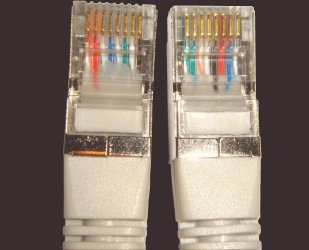
The easy fix is to get a wireless nic card, the way you are doing it is workable but you have the wrong hardware! Ie: Ethernet cable. In order to use your friends machine as a bridge you will need crossover cable and a switch. Crossover cabling is similar but different:
The 10BASE-T and 100BASE-TX Ethernet standards use one wire pair for transmission in each direction. The Tx+ line from each device connects to the tip conductor, and the Tx- line is connected to the ring. This requires that the transmit pair of each device be connected to the receive pair of the device on the other end. When a terminal device is connected to a switch or hub, this crossover is done internally in the switch or hub. A standard straight through cable is used for this purpose where each pin of the connector on one end is connected to the corresponding pin on the other connector.
One terminal device may be connected directly to another without the use of a switch or hub, but in that case the crossover must be done externally in the cable. Since 10BASE-T and 100BASE-TX use pairs 2 and 3, these two pairs must be swapped in the cable. This is a crossover cable. A crossover cable must also be used to connect two internally crossed devices (e.g., two hubs) as the internal crossovers cancel each other out. This can also be accomplished by using a straight through cable in series with a modular crossover adapter.
Because the only difference between the T568A and T568B pin/pair assignments are that pairs 2 and 3 are swapped, a crossover cable may be envisioned as a cable with one connector following T568A and the other T568B. Such a cable will work for 10BASE-T or 100BASE-TX. 1000BASE-T4 (Gigabit crossover), which uses all four pairs, requires the other two pairs (1 and 4) to be swapped and also requires the solid/striped within each of those two pairs to be swapped.

 

Attachments

  • Vergleich_2von2_Crossoverkabel.jpg
    Vergleich_2von2_Crossoverkabel.jpg
    368.4 KB · Views: 27

My Computer

Computer Manufacturer/Model Number
Custom Build
OS
Windows 7 7600 1 X64
CPU
AMD PHENOM II X 550 PROCESSOR 3.1 ghz
Motherboard
ASUS M4A78-TE
Memory
Corsair 4 gig ddr 3
Graphics Card(s)
ati radeon 3300
Sound Card
ati hd
Monitor(s) Displays
syncmaster 2033sw
Screen Resolution
1600X900 60 hz refresh
Hard Drives
twin_seagates SATA's 1 TB & 500 Gig, hitachi_slimline 160 gig
PSU
antec_550 watt
Case
cooler master GLite
Cooling
stock_heat sink
Internet Speed
20mbs up/ 1.5mbs down
Other Info
favorite child "stewie"
favorite dog "brian"
If you can see the other computer you next need to run Internet connection sharing on the Vista computer

When this is set up you will have, on the vista machine, an ip address for the connection to the internet and one for the ethernet connection.

On the Win7 machine you need to set-up the ip address to be one on the same subnet as the Vista Ethernet connection and your default gateway to the ip address of the vista ethernet

EG if the vista Ethernet is 192.168.138.1 a suitable ip for the Win7 machine would be 192.168.138.2 with a subnet mask of 255.255.255.0 and a default gateway as 192.168.138.1 DNS server should be set to 192.168.138.1 also
 

My Computers

System One System Two

  • Computer type
    PC/Desktop
    Computer Manufacturer/Model Number
    ChillBlast - Custom to my design
    OS
    Windows 11 Pro x64 [Latest Release and Release Preview]
    CPU
    Ryzen 9 5950X, 3.8 - 5.2 MHz
    Motherboard
    Asus Prime X570-Pro
    Memory
    64GB [2 x 32GB] DDR4 3200MHz
    Graphics Card(s)
    4GB NVIDIA GEFORCE GTX 1650 Ti
    Sound Card
    On-board SPDIF to 5.1 System + HDMI [5.1 system]
    Monitor(s) Displays
    32" UHD 32 Bit HDR Monitor + 43" UHD 4K 32Bit HDR TV
    Screen Resolution
    2 x 3840 x 2160 @60Hz
    Hard Drives
    1TB M2 SSD OS, 500GB Fast Access SSD, 2 x 8TB Data + Various Externals from 1TB to 4TB, 10TB NAS
    PSU
    NZXT C750 80 PLUS Gold 750W Modular PSU
    Case
    Workstation Case [Matt Black]
    Cooling
    NZXT Kraken X63 280mm CPU Cooler +2x Quiet Case fans
    Keyboard
    Logitech Wireless MX Keys & K400 + others
    Mouse
    Logitech Wireless MX Master 3S
    Internet Speed
    920 MB Down 50 MB Up
    Antivirus
    BitDefender Total Security Pro
    Browser
    Chrome (always run latest Non-Beta)
    Other Info
    Also run ...
    Laptop - Quad 8GB - Windows 10 Pro x64
    Nexus 7 Android tablet x2
    Samsung 10.2" tablet
    Blackview TAB 8 4G Android Tablet c/w Keyboard
    Wacom Intuos Pro Medium Pen Pad
    Wacom Intuos Pro Small Pen Pad
    Wacom Expresskeys Remote
    Loopdeck+ Graphics Controller
    Shuttle Pro v2 Control
  • Computer type
    Laptop
    System Manufacturer/Model Number
    Dell XPS 17 10750H
    OS
    Windows 11 Pro x64 Latest RP
    CPU
    Intel I7 10750H 5.0GHz
    Motherboard
    Dell XPS
    Memory
    32GB [2x16GB] DDR4 2933 MHz
    Graphics Card(s)
    nVidia GTX1650Ti 4 GB GDDR6
    Sound Card
    Stock [Realtek] 4 Speaker
    Monitor(s) Displays
    17" IPS UHD+ Infinity Edge Touchscreen
    Screen Resolution
    3840 x 2400
    Hard Drives
    2TB M2 NVMe, 4TB External + various 500GB & 1TB External NVMe (also have access to spinner HDD from
    PSU
    Stock
    Case
    Stock XPS Aluminium & Carbon Fibre
    Cooling
    Stock - Active Fan Control
    Keyboard
    Backlit + Various Logitech
    Mouse
    Stock Track Pad + Logitech MX Trackball
    Internet Speed
    72 MB Down 18MB Up
    Browser
    Chrome
    Other Info
    Also run ...
    Laptop - Quad 8GB - Windows 10 Pro x64
    Nexus 7 Android tablet x2
    10.2" tablet
    Sony Z3 Android Smartphone
    Wacom Intuos Pro Medium Pen Pad
    Wacom Intuos Pro Small Pen Pad
    Wacom Expresskeys Remote
    Loopdeck+ Graphics Controller
    Shuttle Pro v2 Control Pad
    10TB NAS
Back
Top