
Detail view since June WUP

wptski

New member
Local time
9:27 AM
Messages
38
The first picture is a Detail View of a Sandisk Cruzer Glide 8G and the second is a PNY USB 3.0 128G. I "believe" this started after the June WUP. I also had key clicks on file selection but I found out how to correct that but this issue nothing so far.
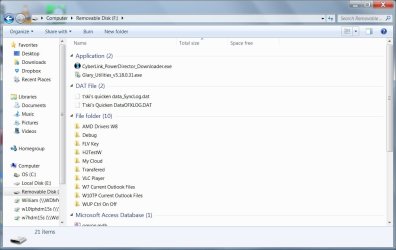
Detail 1.jpg Detail 2.jpg
 

My Computer My Computer

At a glance

W7 Pro 64bit
OS
W7 Pro 64bit
Try: Browse to PNY folder and Open Organize menu - layout - menu bar. Click View
- Group By - select "Type"


Edit: Just realized it is easier to just browse to PNY and right click empty space on right pane, and select Group by: Type
 

My Computer My Computer

At a glance

Windows 7 Ultimate x64 SP1AMD Phenom 2 1090T2x8GB Kingston HyperX Fury Black 1600Mhz Unga...MSI GTX 970 Gaming 4G
Computer type
PC/Desktop
Computer Manufacturer/Model Number
Custom Build
OS
Windows 7 Ultimate x64 SP1
CPU
AMD Phenom 2 1090T
Motherboard
Gigabyte GA-890FXA-UD5
Memory
2x8GB Kingston HyperX Fury Black 1600Mhz Unganged
Graphics Card(s)
MSI GTX 970 Gaming 4G
Sound Card
Realtek On-Board HD 7.1 Audio / Logitech G35
Monitor(s) Displays
3xAcer GD245HQ
Screen Resolution
1920x1080
Hard Drives
Samsung 850 Pro 512GB SSD - OS /
WD Caviar Black SATA 3 - 1 TBx2 - Dynamic RAID 0 /
WD Caviar Green SATA 2 - 640GBx2 - Dynamic RAID 0 /
WD Caviar Green SATA 2 - 640GB - Internal Backup /
Seagate Barracude SATA 3 - 3TB - External Backup/ Sync
PSU
HighPower 1000W
Case
Cooler Master HAF 932
Cooling
Noctua NH-D14
Keyboard
Logitech G19
Mouse
Logitech G500
Internet Speed
100/4 Mbit Cable (100GB quota)
Antivirus
ZoneAlarm Extreme Security / MBAM Pro / MBAE Free / SAS Free
Browser
IE 11 - Firefox - Chrome
Other Info
Logitech F710/ G27/ G940/ Z5500 // TrackIR 5 // Nvidia 3D Surround Vision
Try: Browse to PNY folder and Open Organize menu - layout - menu bar. Click View
- Group By - select "Type"


Edit: Just realized it is easier to just browse to PNY and right click empty space on right pane, and select Group by: Type
I forgot to say that I wanted the detail view as the PNY shows. I think that I checked all that and everything is set the same but I'll look again. There are many routes to the same settings menus.

I also use W10TP which I'm using right now and both have the same look. In W7, all my HDs including my NAS have the same detail view look.
 

My Computer My Computer

At a glance

W7 Pro 64bit
OS
W7 Pro 64bit
Ok, if you want the looks of PNY then select "Group by: None" and "View: Details"
 

My Computer My Computer

At a glance

Windows 7 Ultimate x64 SP1AMD Phenom 2 1090T2x8GB Kingston HyperX Fury Black 1600Mhz Unga...MSI GTX 970 Gaming 4G
Computer type
PC/Desktop
Computer Manufacturer/Model Number
Custom Build
OS
Windows 7 Ultimate x64 SP1
CPU
AMD Phenom 2 1090T
Motherboard
Gigabyte GA-890FXA-UD5
Memory
2x8GB Kingston HyperX Fury Black 1600Mhz Unganged
Graphics Card(s)
MSI GTX 970 Gaming 4G
Sound Card
Realtek On-Board HD 7.1 Audio / Logitech G35
Monitor(s) Displays
3xAcer GD245HQ
Screen Resolution
1920x1080
Hard Drives
Samsung 850 Pro 512GB SSD - OS /
WD Caviar Black SATA 3 - 1 TBx2 - Dynamic RAID 0 /
WD Caviar Green SATA 2 - 640GBx2 - Dynamic RAID 0 /
WD Caviar Green SATA 2 - 640GB - Internal Backup /
Seagate Barracude SATA 3 - 3TB - External Backup/ Sync
PSU
HighPower 1000W
Case
Cooler Master HAF 932
Cooling
Noctua NH-D14
Keyboard
Logitech G19
Mouse
Logitech G500
Internet Speed
100/4 Mbit Cable (100GB quota)
Antivirus
ZoneAlarm Extreme Security / MBAM Pro / MBAE Free / SAS Free
Browser
IE 11 - Firefox - Chrome
Other Info
Logitech F710/ G27/ G940/ Z5500 // TrackIR 5 // Nvidia 3D Surround Vision
Try: Browse to PNY folder and Open Organize menu - layout - menu bar. Click View
- Group By - select "Type"


Edit: Just realized it is easier to just browse to PNY and right click empty space on right pane, and select Group by: Type
In the Detail View I had, Group By "Type" isn't available. There was a "none", selecting that and then go into "more" to select what I wanted. I know darn well I didn't make all these changes, they just happened on their own.

Well, anyway, you did get me to look into the Group By more than I had and fix it. Thanks!:D
 

My Computer My Computer

At a glance

W7 Pro 64bit
OS
W7 Pro 64bit
Ok, if you want the looks of PNY then select "Group by: None" and "View: Details"
That will only give you the Name by default. I just went through all that.
 

My Computer My Computer

At a glance

W7 Pro 64bit
OS
W7 Pro 64bit
Back
Top