Problems Installing Windows 7 with UEFI

Avitra6

New member
Local time
7:27 PM
Messages
7
As the title says, I'm stuck on installing Windows 7 Pro on my laptop using UEFI.

I have followed practically all the tutorials I've found on this site, but so far nothing has worked :cry:

I have a Clevo P15SM which has the option to boot in either BIOS or UEFI.
It currently has Win 7 Home installed on an MBR SSHD (so booting in BIOS)

I would like to use a 4TB SSD with Windows 7. I have a key for Win 7 Pro.

Oh, also, I'm pretty much a complete novice :o

I made a supposedly Bootable UEFI USB Flash Drive using Rufus using this tutorial How to Create a Bootable UEFI USB Flash Drive for Installing Windows 7, Windows 8, or Windows 8.1. I have tried several iso's, the last one of which I downloaded from this tool HeiDoc.net Download Tool as recommended by the tutorial from above, choosing Windows 7 Pro SP1.

Boot mode is set to UEFI. Secure Boot is disabled. Intel Fast Boot is also disabled.

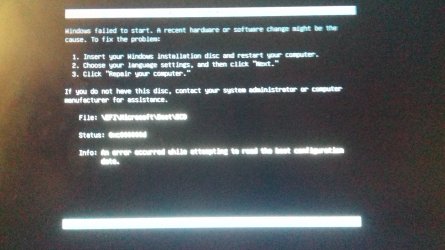
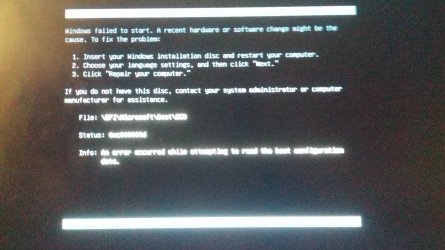
The first error I get when trying to boot from my USB device is: Windows Failed to Start. There's some other info, then:
File: \EFI\Microsoft\Boot\BCD
Status: 0xc000000d
Info: An error occurred while attempting to
Unfortunately, the message is not actually centred on my screen so half of it is cut off...

After that I just get spammed with:

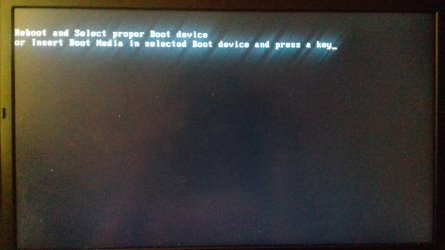
Reboot and Select proper Boot device
or Insert Boot Media in selected Boot device and press a key​
I have actually managed to install Windows 10 on my laptop on the SSD, but I'd really prefer to have Windows 7*.
From there I was able to go into the USB and double click "Setup" which took me to the Win 7 install screen. I went through all the steps as set out here Windows 7: UEFI (Unified Extensible Firmware Interface) - Install Windows 7 with (not a clean install I know, but it was the closest I got). After all that, my laptop just got stuck at "Starting Windows". The first time this happened (yes I tried multiple times...) I restarted my laptop after a few minutes, and it booted into Windows 10 after telling me there had been some problems starting and did some sort of recovery. The second time I tried installing Win 7 with this method, I left it longer, and when I gave up and restarted, I believe Windows 10 had been wiped. I just wonder if I left it even longer things would eventually install...

If I try and use this iteration of USB while UEFI is disabled, then I go straight to "Reboot and Select Proper Boot device".

I have managed to install Windows 7 Pro using the same USB stick when UEFI is disabled, and the settings in Rufus were set to BIOS etc (but obviously I can't use the full 4TB of my SSD), so I don't think it's the USB stick.

I have tried to boot from a DVD burned with Active@ ISO Burner using various iso's, including the one above, but I just go straight to "Reboot and Select Proper Boot device".

The only things I haven't tried yet are
  • manually creating a bootable USB flash Drive from the second method mentioned in the first tutorial I linked


  • or trying another iso from that HeiDoc.net Download Tool

I am at my wits end. As far as I know, installing Win 7 Pro using a UEFI motherboard on my laptop should be possible, but I'm obviously missing something :( I've filled in most of the System Spec for these forums, but I can list anything that's missing from that if necessary.

Any help anyone can offer would be so much appreciated

*I actually wouldn't mind installing and using Windows 10. I vastly prefer Windows 7, but the main reason I can't really use Windows 10 is that the GPU I use is actually an upgrade from the original that came with the laptop, and official Nvidia drivers won't detect it. I have to use drivers published by the people who sold me the GPU, and they have only done drivers for Windows 7 and 8 for this GPU... A windows generic driver does get installed, which I believe means the GPU does actually work in a basic manner, but some programs need a driver which is much more up to date than the one provided by Windows 10. Other things my laptop came with also don't have drivers that work with Windows 10 as far as I've played with (such as the built in fingerprint scanner). Not essential, but I'd be sad to lose these things
 
Last edited:

My Computer

Computer type
Laptop
Computer Manufacturer/Model Number
Clevo
OS
Microsoft Windows 7 Home Premium 64-bit 7601 Multiprocessor Free Service Pack 1
CPU
Intel(R) Core(TM) i7-4800MQ CPU @ 2.70GHz
Motherboard
Notebook P15SM
Memory
24.00 GB
Graphics Card(s)
(1) NVIDIA GeForce GTX 970M (2) Intel(R) HD Graphics 4600
Sound Card
(1) NVIDIA Virtual Audio Device (Wave Extensible) (WDM) (2
Screen Resolution
0 x 0 x 0 bits (0 colors) @ 0 Hz
Hard Drives
ST1000LM014-1EJ164 ATA Device
Welcome to the Forum

To make a UEFI boot able USB flash disk is very simple.
- Format the USB flash disk as Fat32
- Copy all win 7 64 installation disk to the USB flash disk.
- Copy the boot folder to /Efi/boot
https://www.sevenforums.com/attachments/installation-setup/391488d1473288065-windows-7-installer-stuck-setup-starting-boot.zip

391487d1473287656-windows-7-installer-stuck-setup-starting-efi.jpg


The USB flash disk will ONLY boot as UEFI as it doesn't have the MBR on it.

To install Win 7 64 as UEFI - GPT you must boot the flash disk as UEFI. Launch boot menu during POST and select the UEFI flash disk
Go to install and delete ALL partitions on the SSD, then create new
It will create 3 partitions
- UEFI - Fat 32 - 100M
- MSR - RAW - 128M
- Big NTFS
Install win 7 Pro 64 on the big NTFS partition
 
Last edited:

My Computers

System One System Two

  • Computer type
    PC/Desktop
    Computer Manufacturer/Model Number
    custom build
    OS
    Windows 7 HP 64
    CPU
    i5 6600K - 800MHz to 4200MHz
    Motherboard
    GA-Z170-HD3P
    Memory
    4+4G GSkill DDR4 3000
    Graphics Card(s)
    IG - Intel 530
    Monitor(s) Displays
    Samsung 226BW
    Screen Resolution
    1680x1050
    Hard Drives
    (1) -1 SM951 – 128GB M.2 AHCI PCIe SSD drive for Windows 7 and Lubuntu
    (2) -1 WD SATA 3 - 1T for Data
    (3) -1 WD SATA 3 - 1T for backup
    PSU
    Thermaltake 450W TR2 gold
    Keyboard
    Old and good Chicony mechanical keyboard
    Mouse
    Logitech mX performance - 9 buttons (had to disable some)
    Internet Speed
    500Mb/s
    Browser
    Firefox 64
    Other Info
    TinyWall firewall
  • Computer type
    Laptop
    System Manufacturer/Model Number
    Asus Q550LF
    OS
    Windows 7 Pro
    CPU
    i7-4500U 800MHz to 3.0GHz
    Motherboard
    Asus Q550LF
    Memory
    (4+4)G DDR3 1600
    Graphics Card(s)
    IG intel 4400 + NVIDIA GeForce GT 745M
    Sound Card
    Realtek
    Monitor(s) Displays
    LG Display LP156WF4-SPH1
    Screen Resolution
    1920 x 1080
    Hard Drives
    BX500 120G SSD for Windows and programs +
    1T HDD for data
    Internet Speed
    500 Mb/s
    Browser
    Firefox
    Other Info
    TinyWall firewall

My Computers

System One System Two

  • Computer type
    PC/Desktop
    Computer Manufacturer/Model Number
    custom build
    OS
    Windows 7 HP 64
    CPU
    i5 6600K - 800MHz to 4200MHz
    Motherboard
    GA-Z170-HD3P
    Memory
    4+4G GSkill DDR4 3000
    Graphics Card(s)
    IG - Intel 530
    Monitor(s) Displays
    Samsung 226BW
    Screen Resolution
    1680x1050
    Hard Drives
    (1) -1 SM951 – 128GB M.2 AHCI PCIe SSD drive for Windows 7 and Lubuntu
    (2) -1 WD SATA 3 - 1T for Data
    (3) -1 WD SATA 3 - 1T for backup
    PSU
    Thermaltake 450W TR2 gold
    Keyboard
    Old and good Chicony mechanical keyboard
    Mouse
    Logitech mX performance - 9 buttons (had to disable some)
    Internet Speed
    500Mb/s
    Browser
    Firefox 64
    Other Info
    TinyWall firewall
  • Computer type
    Laptop
    System Manufacturer/Model Number
    Asus Q550LF
    OS
    Windows 7 Pro
    CPU
    i7-4500U 800MHz to 3.0GHz
    Motherboard
    Asus Q550LF
    Memory
    (4+4)G DDR3 1600
    Graphics Card(s)
    IG intel 4400 + NVIDIA GeForce GT 745M
    Sound Card
    Realtek
    Monitor(s) Displays
    LG Display LP156WF4-SPH1
    Screen Resolution
    1920 x 1080
    Hard Drives
    BX500 120G SSD for Windows and programs +
    1T HDD for data
    Internet Speed
    500 Mb/s
    Browser
    Firefox
    Other Info
    TinyWall firewall
Thanks for the replies Megahertz07.

Unfortunately I wasn't able to install as UEFI :( (I've been trying ever since your post your method plus various other iterations).

One issue I ran into when trying to follow your suggestion was that I don't have a Windows 7 Pro installation disk to copy to the Fat32 formatted USB flash disk. The closest I have is the DVD I burned using the same iso I tried to use with Rufus for the USB stick. I wasn't sure whether it would make a difference, but I tried it anyway, and it didn't work.

I did find out that there is something wrong with my CD/DVD drive, as despite various programs telling me their burning was a success, it turns out they were just taking a long time to make the DVD's useless (they burned something, but my laptop couldn't read anything on them, and couldn't do anything new with them either). I do have an external CD/DVD drive, so I used that to burn the iso to, and using that to try and boot while in UEFI actually got a Windows loading bar, then the Windows Starting screen with the Windows logo swirling around... at which point it got stuck, but that was on par with the closest I've been so far :huh:

I actually tried booting from a burned DVD with the boot file copied to where you said for the flash drive, but that didn't work at all.

I think I tried copying the files from my old Windows 7 Home CD that came with my laptop years ago to the USB stick, but obviously it didn't work, else I'd be celebrating and marking this topic as solved. I might try copying that CD again, but at the moment I feel as though I'm living the definition of insanity - doing the same thing over and over again and hoping for a different outcome. I'm sure I'm missing something - perhaps some of my hardware just really doesn't like me :/

I apologise for late replies and run on sentences. Trying so many different ways of trying to get this to work for hours on end is frying my brain a bit :confused:
 

My Computer

Computer type
Laptop
Computer Manufacturer/Model Number
Clevo
OS
Microsoft Windows 7 Home Premium 64-bit 7601 Multiprocessor Free Service Pack 1
CPU
Intel(R) Core(TM) i7-4800MQ CPU @ 2.70GHz
Motherboard
Notebook P15SM
Memory
24.00 GB
Graphics Card(s)
(1) NVIDIA GeForce GTX 970M (2) Intel(R) HD Graphics 4600
Sound Card
(1) NVIDIA Virtual Audio Device (Wave Extensible) (WDM) (2
Screen Resolution
0 x 0 x 0 bits (0 colors) @ 0 Hz
Hard Drives
ST1000LM014-1EJ164 ATA Device
On the computer that you have the Win 7 iso file, install 7zip- https://www.7-zip.org/
Open Win 7 iso file with 7zip and extract all files to the USB flash disk. Then add the \efi\boot folder I provided.
 

My Computers

System One System Two

  • Computer type
    PC/Desktop
    Computer Manufacturer/Model Number
    custom build
    OS
    Windows 7 HP 64
    CPU
    i5 6600K - 800MHz to 4200MHz
    Motherboard
    GA-Z170-HD3P
    Memory
    4+4G GSkill DDR4 3000
    Graphics Card(s)
    IG - Intel 530
    Monitor(s) Displays
    Samsung 226BW
    Screen Resolution
    1680x1050
    Hard Drives
    (1) -1 SM951 – 128GB M.2 AHCI PCIe SSD drive for Windows 7 and Lubuntu
    (2) -1 WD SATA 3 - 1T for Data
    (3) -1 WD SATA 3 - 1T for backup
    PSU
    Thermaltake 450W TR2 gold
    Keyboard
    Old and good Chicony mechanical keyboard
    Mouse
    Logitech mX performance - 9 buttons (had to disable some)
    Internet Speed
    500Mb/s
    Browser
    Firefox 64
    Other Info
    TinyWall firewall
  • Computer type
    Laptop
    System Manufacturer/Model Number
    Asus Q550LF
    OS
    Windows 7 Pro
    CPU
    i7-4500U 800MHz to 3.0GHz
    Motherboard
    Asus Q550LF
    Memory
    (4+4)G DDR3 1600
    Graphics Card(s)
    IG intel 4400 + NVIDIA GeForce GT 745M
    Sound Card
    Realtek
    Monitor(s) Displays
    LG Display LP156WF4-SPH1
    Screen Resolution
    1920 x 1080
    Hard Drives
    BX500 120G SSD for Windows and programs +
    1T HDD for data
    Internet Speed
    500 Mb/s
    Browser
    Firefox
    Other Info
    TinyWall firewall
Didn't work, just went straight to:
20180804_002144-min.jpg
(sorry for terrible quality)

The error is with \EFI\Microsoft\Boot\BCD 0xc000000d just like before.

As far as I can tell you advised me to manually create a USB flash drive as set out in the tutorial found here How to Create a Bootable UEFI USB Flash Drive for Installing Windows 7, Windows 8, or Windows 8.1, but saved me doing steps 9 and 11 ^^

Anyway, it didn't work as shown above :/

I'm wondering if my BIOS is up to date and if that would make a difference?

My current BIOS Version/Date is American Megatrends Inc. 4.5.6, 26/12/2013. There may be updates to this BIOS according to this site unofficial repository for Clevo's bioses and manuals (clevo afaik don't host these files anymore), but I'm not sure if they would help, and I'm a bit nervy about bricking my laptop if this really wouldn't help...

Another site suggested I enable Legacy ROMs, but I couldn't find an option for it when in the BIOS, only the option to enable or disable UEFI... (I haven't checked Advanced Boot Options yet - thought I'd reply here first before restarting my system yet again...). The only interesting option I saw was for Secure Boot Control (which I have no clue about).

:banghead:
 
Last edited:

My Computer

Computer type
Laptop
Computer Manufacturer/Model Number
Clevo
OS
Microsoft Windows 7 Home Premium 64-bit 7601 Multiprocessor Free Service Pack 1
CPU
Intel(R) Core(TM) i7-4800MQ CPU @ 2.70GHz
Motherboard
Notebook P15SM
Memory
24.00 GB
Graphics Card(s)
(1) NVIDIA GeForce GTX 970M (2) Intel(R) HD Graphics 4600
Sound Card
(1) NVIDIA Virtual Audio Device (Wave Extensible) (WDM) (2
Screen Resolution
0 x 0 x 0 bits (0 colors) @ 0 Hz
Hard Drives
ST1000LM014-1EJ164 ATA Device
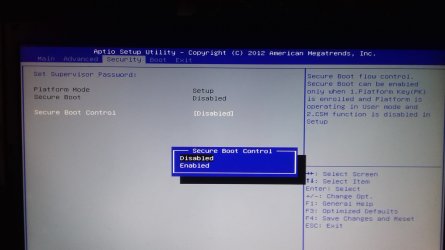
I think you have something set wrong in BIOS.
Secure boot (that you mentioned it's off) isn't compatible with win 7. But it isn't only that.
Do you have a CSM (Compatibility Support Module) option?
Do you have a OS (windows or other) option?
 

My Computers

System One System Two

  • Computer type
    PC/Desktop
    Computer Manufacturer/Model Number
    custom build
    OS
    Windows 7 HP 64
    CPU
    i5 6600K - 800MHz to 4200MHz
    Motherboard
    GA-Z170-HD3P
    Memory
    4+4G GSkill DDR4 3000
    Graphics Card(s)
    IG - Intel 530
    Monitor(s) Displays
    Samsung 226BW
    Screen Resolution
    1680x1050
    Hard Drives
    (1) -1 SM951 – 128GB M.2 AHCI PCIe SSD drive for Windows 7 and Lubuntu
    (2) -1 WD SATA 3 - 1T for Data
    (3) -1 WD SATA 3 - 1T for backup
    PSU
    Thermaltake 450W TR2 gold
    Keyboard
    Old and good Chicony mechanical keyboard
    Mouse
    Logitech mX performance - 9 buttons (had to disable some)
    Internet Speed
    500Mb/s
    Browser
    Firefox 64
    Other Info
    TinyWall firewall
  • Computer type
    Laptop
    System Manufacturer/Model Number
    Asus Q550LF
    OS
    Windows 7 Pro
    CPU
    i7-4500U 800MHz to 3.0GHz
    Motherboard
    Asus Q550LF
    Memory
    (4+4)G DDR3 1600
    Graphics Card(s)
    IG intel 4400 + NVIDIA GeForce GT 745M
    Sound Card
    Realtek
    Monitor(s) Displays
    LG Display LP156WF4-SPH1
    Screen Resolution
    1920 x 1080
    Hard Drives
    BX500 120G SSD for Windows and programs +
    1T HDD for data
    Internet Speed
    500 Mb/s
    Browser
    Firefox
    Other Info
    TinyWall firewall
I just want to say thank you for all your help, I really do appreciate it.

I'm clearly out of my depth :cry:

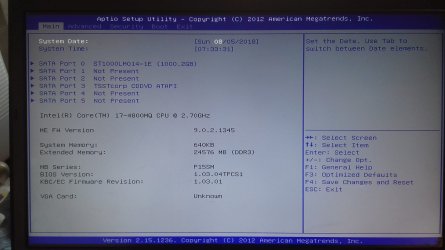
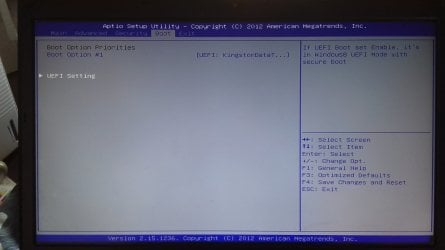
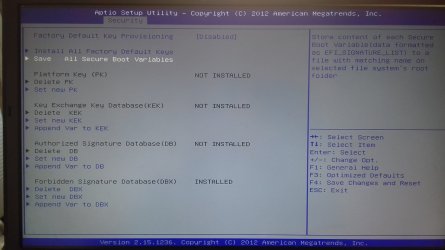
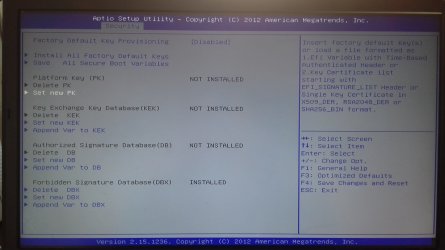
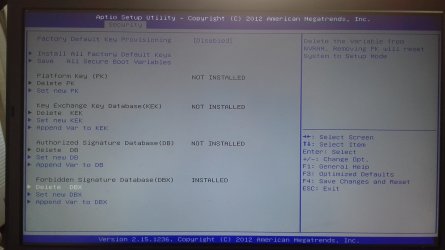
How about if I attach pictures of my BIOS screens and maybe we can work out what settings I need to change? There is one setting that mentions CSM, but when I looked at it I panicked :o

Main BIOS Tab
Main Options-min.jpg

Advanced Tab
Advanced Options-min.jpg

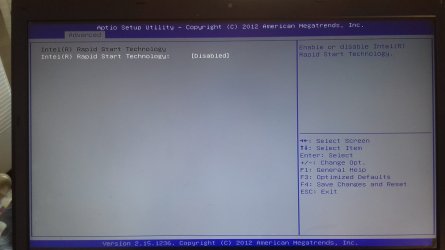
Intel Rapid Start Technology disabled on Advanced Tab
Intel Rapid Start Options from Advanced Options Tab-min.jpg

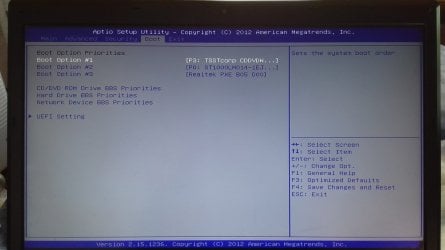
Boot Options when UEFI Disabled
Boot Options when UEFI Disabled-min.jpg

Boot Options when UEFI Enabled
Boot Options when UEFI Enabled-min.jpg

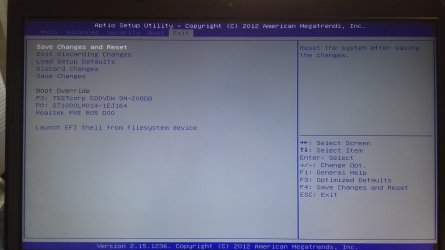
Exit Options (UEFI is disabled here, but if it was enabled, just the list under Boot Override would be different - listing the UEFI USB device)
Exit Options-min.jpg

And now for the interesting options...

Security Options when UEFI Disabled
Security Options when UEFI Disabled-min.jpg

Security Options when UEFI Enabled
Security Options when UEFI Enabled (2)-min.jpg

Description when Secure Boot Control is Enabled (Secure Boot Mode can be Custom or Standard. Key Management doesn't appear with it set to Standard)
Security Options when Secure Boot Control is Enabled - SBC Description-min.jpg

Key Management Description in Security Options
Security Options - Key Management Description-min.jpg

Key Management Options Description 1
Key Management Options 1-min.jpg

Key Management Options Description 2
Key Management Options 2-min.jpg

Key Management Options Description 3
Key Management Options 3-min.jpg

Key Management Options Description 4 (Set new KEK, Append Var to KEK, Set new DB, Append Var to DB, Set new DBX, Append Var to DBX all have the same description)
Key Management Options 4-min.jpg

Key Management Options Description 5
Key Management Options 5-min.jpg

So when you mentioned CSM, I guess there is some option in the Secure Boot Control and Mode that has something to do with it, but I'm clueless. I'm going to have a look at what CSM is and how to change its settings, but for now I leave this post here.
 

My Computer

Computer type
Laptop
Computer Manufacturer/Model Number
Clevo
OS
Microsoft Windows 7 Home Premium 64-bit 7601 Multiprocessor Free Service Pack 1
CPU
Intel(R) Core(TM) i7-4800MQ CPU @ 2.70GHz
Motherboard
Notebook P15SM
Memory
24.00 GB
Graphics Card(s)
(1) NVIDIA GeForce GTX 970M (2) Intel(R) HD Graphics 4600
Sound Card
(1) NVIDIA Virtual Audio Device (Wave Extensible) (WDM) (2
Screen Resolution
0 x 0 x 0 bits (0 colors) @ 0 Hz
Hard Drives
ST1000LM014-1EJ164 ATA Device
On post #6, it says that it had a problem on booting. Is it on booting the Win 7 installation flash disk or after / during installing?
BIOS
- Advanced - Enable Power on Boot beeps- (one beep is normal, more beeps = something wrong)
- Boot options- 1st = HDD; 2nd and 3rd = disabled
- Boot options - UEFI = Disabled. On the up left corner it says: If UEFI boot set enable, it's in Windows 8 (or 10) UEFI mode with secure boot. It means it turns on Secure boot if UEFI = enabled. So it must be Disabled
- Save and exit.
- When you hear the beep, launch boot menu (normally a Fx key) and select the UEFI flash disk
Go to install and delete ALL partitions on the SSD, then create new
It will create 3 partitions
- UEFI - Fat 32 - 100M
- MSR - RAW - 128M
- Big NTFS
Install win 7 Pro 64 on the big NTFS partition
 

My Computers

System One System Two

  • Computer type
    PC/Desktop
    Computer Manufacturer/Model Number
    custom build
    OS
    Windows 7 HP 64
    CPU
    i5 6600K - 800MHz to 4200MHz
    Motherboard
    GA-Z170-HD3P
    Memory
    4+4G GSkill DDR4 3000
    Graphics Card(s)
    IG - Intel 530
    Monitor(s) Displays
    Samsung 226BW
    Screen Resolution
    1680x1050
    Hard Drives
    (1) -1 SM951 – 128GB M.2 AHCI PCIe SSD drive for Windows 7 and Lubuntu
    (2) -1 WD SATA 3 - 1T for Data
    (3) -1 WD SATA 3 - 1T for backup
    PSU
    Thermaltake 450W TR2 gold
    Keyboard
    Old and good Chicony mechanical keyboard
    Mouse
    Logitech mX performance - 9 buttons (had to disable some)
    Internet Speed
    500Mb/s
    Browser
    Firefox 64
    Other Info
    TinyWall firewall
  • Computer type
    Laptop
    System Manufacturer/Model Number
    Asus Q550LF
    OS
    Windows 7 Pro
    CPU
    i7-4500U 800MHz to 3.0GHz
    Motherboard
    Asus Q550LF
    Memory
    (4+4)G DDR3 1600
    Graphics Card(s)
    IG intel 4400 + NVIDIA GeForce GT 745M
    Sound Card
    Realtek
    Monitor(s) Displays
    LG Display LP156WF4-SPH1
    Screen Resolution
    1920 x 1080
    Hard Drives
    BX500 120G SSD for Windows and programs +
    1T HDD for data
    Internet Speed
    500 Mb/s
    Browser
    Firefox
    Other Info
    TinyWall firewall
Ok I'm back.

The image in post #6 happens as soon as I select 'UEFI: USB device' to boot from, with settings UEFI = Enabled.

The power on boot beep, beeps only once every time I restart. Also, if I leave things till after I've heard the beep, usually it's too late, so I have to start pressing the Fn key before then.

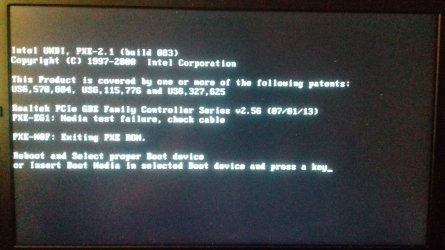
With settings set as you suggested - with the UEFI option disabled, I get the following screen as soon as I choose to boot from 'USB device' (note that in my boot options, the USB device does not have UEFI describing it):

20180808_050019-min.jpg

You don't think it has anything to do with the Key Management options (PK, KEK, DB or DBX) do you? Or maybe that my BIOS is out of date and thus has a setting that is making life difficult?
 

My Computer

Computer type
Laptop
Computer Manufacturer/Model Number
Clevo
OS
Microsoft Windows 7 Home Premium 64-bit 7601 Multiprocessor Free Service Pack 1
CPU
Intel(R) Core(TM) i7-4800MQ CPU @ 2.70GHz
Motherboard
Notebook P15SM
Memory
24.00 GB
Graphics Card(s)
(1) NVIDIA GeForce GTX 970M (2) Intel(R) HD Graphics 4600
Sound Card
(1) NVIDIA Virtual Audio Device (Wave Extensible) (WDM) (2
Screen Resolution
0 x 0 x 0 bits (0 colors) @ 0 Hz
Hard Drives
ST1000LM014-1EJ164 ATA Device
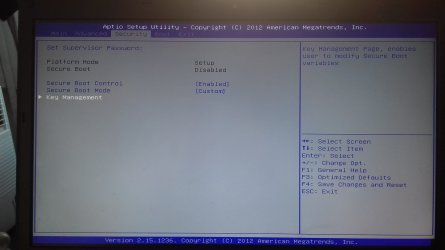
You need to have CSM enabled.
 

My Computers

System One System Two

  • Computer type
    PC/Desktop
    OS
    7 X64
    CPU
    i5 8400
    Motherboard
    gigabyte b365m ds3h
    Memory
    2x8gb 3200mhz
    Hard Drives
    various
    PSU
    pure power 11 400w cm
    Case
    Coolermaster
    Cooling
    cryorig m9i
  • Computer type
    PC/Desktop
    OS
    7x64
    CPU
    g5400
    Motherboard
    ga b365m ds3h
    Memory
    8gb ddr4 2400
    PSU
    xfx pro 450w
It's trying to boot on LAN. You didn't disabled Lan boot.
- Boot options- 1st = HDD; 2nd and 3rd = disabled

Did you created the Win 7 installation USB disk as on post 2?
 

My Computers

System One System Two

  • Computer type
    PC/Desktop
    Computer Manufacturer/Model Number
    custom build
    OS
    Windows 7 HP 64
    CPU
    i5 6600K - 800MHz to 4200MHz
    Motherboard
    GA-Z170-HD3P
    Memory
    4+4G GSkill DDR4 3000
    Graphics Card(s)
    IG - Intel 530
    Monitor(s) Displays
    Samsung 226BW
    Screen Resolution
    1680x1050
    Hard Drives
    (1) -1 SM951 – 128GB M.2 AHCI PCIe SSD drive for Windows 7 and Lubuntu
    (2) -1 WD SATA 3 - 1T for Data
    (3) -1 WD SATA 3 - 1T for backup
    PSU
    Thermaltake 450W TR2 gold
    Keyboard
    Old and good Chicony mechanical keyboard
    Mouse
    Logitech mX performance - 9 buttons (had to disable some)
    Internet Speed
    500Mb/s
    Browser
    Firefox 64
    Other Info
    TinyWall firewall
  • Computer type
    Laptop
    System Manufacturer/Model Number
    Asus Q550LF
    OS
    Windows 7 Pro
    CPU
    i7-4500U 800MHz to 3.0GHz
    Motherboard
    Asus Q550LF
    Memory
    (4+4)G DDR3 1600
    Graphics Card(s)
    IG intel 4400 + NVIDIA GeForce GT 745M
    Sound Card
    Realtek
    Monitor(s) Displays
    LG Display LP156WF4-SPH1
    Screen Resolution
    1920 x 1080
    Hard Drives
    BX500 120G SSD for Windows and programs +
    1T HDD for data
    Internet Speed
    500 Mb/s
    Browser
    Firefox
    Other Info
    TinyWall firewall
Boot Options:

Boot Option #1 - HDD
Boot Option #2 - USB (if this isn't enabled, the USB doesn't show up to boot from)
Boot Option #3 & #4 - Disabled

UEFI Setting - Disabled

Set up like that, I get the image from post #10

I then went into Network Device BBS Priorities and disabled the LAN, and when trying to boot from USB I get:
20180809_033841-min.jpg

And yes I created the Win 7 installation disk as in post #2 (even tried a new USB stick to see if that made any change, but nope)

My next attempt was to boot from a UEFI WinPE CD based on Win 7, with the UEFI setting enabled in BIOS. Didn't boot. After that I made a UEFI WinPE CD based on Win 10, with UEFI setting enabled in BIOS. MAnaged to boot. From there I ran the setup.exe from the usb stick and managed to go through all the install of windows 7 onto my SSD. Unfortunately, when trying to boot from the SSD, I got:
20180804_002144-min.jpg
As a side note, I had formatted the SSD as exFAT (I'd tried to format it as fat32 but diskpart wouldn't do it - I may try again, but waiting 5 hours kinda sucked). The installer said it couldn't install to any partition unless it was ntsf... (so I waited 5 hours for the formatting for nothing v.v)

Next I'll try to boot from a non UEFI WinPE CD with various different settings and see if that works... :sleepy:
 

My Computer

Computer type
Laptop
Computer Manufacturer/Model Number
Clevo
OS
Microsoft Windows 7 Home Premium 64-bit 7601 Multiprocessor Free Service Pack 1
CPU
Intel(R) Core(TM) i7-4800MQ CPU @ 2.70GHz
Motherboard
Notebook P15SM
Memory
24.00 GB
Graphics Card(s)
(1) NVIDIA GeForce GTX 970M (2) Intel(R) HD Graphics 4600
Sound Card
(1) NVIDIA Virtual Audio Device (Wave Extensible) (WDM) (2
Screen Resolution
0 x 0 x 0 bits (0 colors) @ 0 Hz
Hard Drives
ST1000LM014-1EJ164 ATA Device
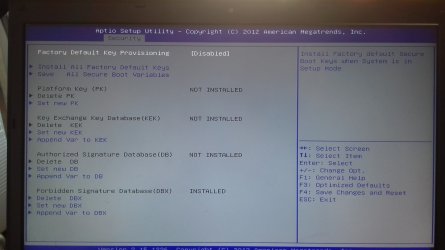
Anyone got anymore ideas?

I tried booting from DVD and got a bit further... I had UEFI enabled on the Boot tab, and I had used the Windows download tool to make the DVD. This time I got as far as the Windows is Starting splash screen, where it promptly got stuck.

My last resort is to update the BIOS... but if anyone has any ideas that are less risky than this, I would be so grateful QQ
 

My Computer

Computer type
Laptop
Computer Manufacturer/Model Number
Clevo
OS
Microsoft Windows 7 Home Premium 64-bit 7601 Multiprocessor Free Service Pack 1
CPU
Intel(R) Core(TM) i7-4800MQ CPU @ 2.70GHz
Motherboard
Notebook P15SM
Memory
24.00 GB
Graphics Card(s)
(1) NVIDIA GeForce GTX 970M (2) Intel(R) HD Graphics 4600
Sound Card
(1) NVIDIA Virtual Audio Device (Wave Extensible) (WDM) (2
Screen Resolution
0 x 0 x 0 bits (0 colors) @ 0 Hz
Hard Drives
ST1000LM014-1EJ164 ATA Device
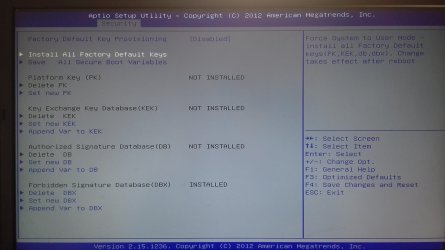
Updating the BIOS can bring more options. Download from Clevo P15SM page of manufacture site.
 

My Computers

System One System Two

  • Computer type
    PC/Desktop
    Computer Manufacturer/Model Number
    custom build
    OS
    Windows 7 HP 64
    CPU
    i5 6600K - 800MHz to 4200MHz
    Motherboard
    GA-Z170-HD3P
    Memory
    4+4G GSkill DDR4 3000
    Graphics Card(s)
    IG - Intel 530
    Monitor(s) Displays
    Samsung 226BW
    Screen Resolution
    1680x1050
    Hard Drives
    (1) -1 SM951 – 128GB M.2 AHCI PCIe SSD drive for Windows 7 and Lubuntu
    (2) -1 WD SATA 3 - 1T for Data
    (3) -1 WD SATA 3 - 1T for backup
    PSU
    Thermaltake 450W TR2 gold
    Keyboard
    Old and good Chicony mechanical keyboard
    Mouse
    Logitech mX performance - 9 buttons (had to disable some)
    Internet Speed
    500Mb/s
    Browser
    Firefox 64
    Other Info
    TinyWall firewall
  • Computer type
    Laptop
    System Manufacturer/Model Number
    Asus Q550LF
    OS
    Windows 7 Pro
    CPU
    i7-4500U 800MHz to 3.0GHz
    Motherboard
    Asus Q550LF
    Memory
    (4+4)G DDR3 1600
    Graphics Card(s)
    IG intel 4400 + NVIDIA GeForce GT 745M
    Sound Card
    Realtek
    Monitor(s) Displays
    LG Display LP156WF4-SPH1
    Screen Resolution
    1920 x 1080
    Hard Drives
    BX500 120G SSD for Windows and programs +
    1T HDD for data
    Internet Speed
    500 Mb/s
    Browser
    Firefox
    Other Info
    TinyWall firewall
For Anyone still pulling the hair; Am a bald guy, tried to do the same thing...I guess I can say ,I know a little abt this.Win7 can go Legacy / UEFI.But not native UEFI..UEFI with CSM support only..So this prevents u from installing Win 7 in UEFI if the BIOS gives only pure Legacy / UEFI Option..In my case it was an Acer E1-510 .Bios upgrade gave us the ability to support Legacy..But that dint include CSM..SO Win 10 will work in any situation but not Win 7..Thats d case
 

My Computer

Computer type
PC/Desktop
OS
Win7 Ultimate 64 Bit
Back
Top