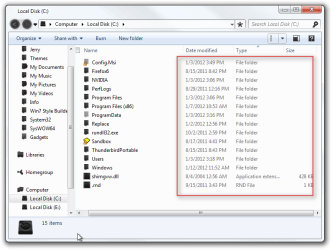
Details view in Explorer utilizes faint font color for most fields.

edDebevic

New member
Local time
12:22 PM
Messages
2
If you use the details view in Windows Explorer, you'll note that save for the name field, all other fields are grayed out, likely due to Microsoft finding them "irrelevant" for most users. This is infuriating, as these are things which I refer to regularly, and I find it asinine that I'm expected to squint difficultly at gray text on a white background just to determine specific characteristics of a file. If anyone out there has any idea of a workaround, be it a third party application to hack around with the OS, or a registry value, or a setting which hitherto has escaped my notice, which would rid me of this annoyance, I offer my preemptive thanks and appreciation. Please, let me know if you have any ideas!

Thank you, again.
 

My Computer My Computer

At a glance

7 ult x64
OS
7 ult x64
Welcome to the Seven Forums
Is this the text you are talking about?

Go from this
Local Disk (C).png

To this
Local Disk (C)2.png

Jerry
 

My Computer My Computer

At a glance

Win 7 Pro x64 / Win 10 ProIntel(R) Core(TM) i7-3630QM CPU @ 2.40GHz12 GB(1) Intel(R) HD Graphics 4000 (2) NVIDIA GeFo...
Computer type
Laptop
Computer Manufacturer/Model Number
Sager NP9170
OS
Win 7 Pro x64 / Win 10 Pro
CPU
Intel(R) Core(TM) i7-3630QM CPU @ 2.40GHz
Motherboard
CLEVO P170EM
Memory
12 GB
Graphics Card(s)
(1) Intel(R) HD Graphics 4000 (2) NVIDIA GeForce GTX 675M
Sound Card
(1) Realtek High Definition Audio (2) Intel(R) Display Aud
Monitor(s) Displays
17.3
Screen Resolution
1920x1080
Hard Drives
(1) Samsung 860 EVO 500GB(OS) (1) Samsung 860 EVO 500GB(Data)
Keyboard
Backlite
Antivirus
MSE, Malwarebytes Pro
Browser
Firefox
Other Info
DESKTOP: Custom-built.
OS: Win 10 Pro x64.
CASE: Rosewill R5.
CPU: Intel I5 4670K CPU @ 3.40GHz.
CPU COOLER: Cool Master Hyper 212 EVO.
MOTHERBOARD: Asus Z87-A.
MEMORY: Kingston HyperX 2x4 GB.
GPU: Nvidia Geforce 650 TI.
PSU: Corsair TX750.
DRIVES: (1) Samsung 840 120 GB SSD (2) Western Digital blue 500 GB 7200 RPM.
Yes, that is exactly what I'm referring to! What's the magic secret to make that happen?
 

My Computer My Computer

At a glance

7 ult x64
OS
7 ult x64
If you are using the default aero theme I can change that for you. I will be making a custom theme with Windows Style Builder. I can post it here in a zip folder.
If you are using a custom theme already you will need to ask the theme maker. It's not cool to change someone else work.
&
You will need to do 1 of these 2 ways of Enabling custom themes for it to work.
http://www.sevenforums.com/tutorials/34579-enabling-custom-themes-windows-7-a.html
Or
http://www.sevenforums.com/tutorials/28377-theme-how-apply-custom-themes.html?filter

I need a name for the theme from you.
Let me know if you want it done.
Jerry
 

My Computer My Computer

At a glance

Win 7 Pro x64 / Win 10 ProIntel(R) Core(TM) i7-3630QM CPU @ 2.40GHz12 GB(1) Intel(R) HD Graphics 4000 (2) NVIDIA GeFo...
Computer type
Laptop
Computer Manufacturer/Model Number
Sager NP9170
OS
Win 7 Pro x64 / Win 10 Pro
CPU
Intel(R) Core(TM) i7-3630QM CPU @ 2.40GHz
Motherboard
CLEVO P170EM
Memory
12 GB
Graphics Card(s)
(1) Intel(R) HD Graphics 4000 (2) NVIDIA GeForce GTX 675M
Sound Card
(1) Realtek High Definition Audio (2) Intel(R) Display Aud
Monitor(s) Displays
17.3
Screen Resolution
1920x1080
Hard Drives
(1) Samsung 860 EVO 500GB(OS) (1) Samsung 860 EVO 500GB(Data)
Keyboard
Backlite
Antivirus
MSE, Malwarebytes Pro
Browser
Firefox
Other Info
DESKTOP: Custom-built.
OS: Win 10 Pro x64.
CASE: Rosewill R5.
CPU: Intel I5 4670K CPU @ 3.40GHz.
CPU COOLER: Cool Master Hyper 212 EVO.
MOTHERBOARD: Asus Z87-A.
MEMORY: Kingston HyperX 2x4 GB.
GPU: Nvidia Geforce 650 TI.
PSU: Corsair TX750.
DRIVES: (1) Samsung 840 120 GB SSD (2) Western Digital blue 500 GB 7200 RPM.
Details View - Font too light

If you use the details view in Windows Explorer, you'll note that save for the name field, all other fields are grayed out, likely due to Microsoft finding them "irrelevant" for most users. This is infuriating, as these are things which I refer to regularly, and I find it asinine that I'm expected to squint difficultly at gray text on a white background just to determine specific characteristics of a file. If anyone out there has any idea of a workaround, be it a third party application to hack around with the OS, or a registry value, or a setting which hitherto has escaped my notice, which would rid me of this annoyance, I offer my preemptive thanks and appreciation. Please, let me know if you have any ideas!

Thank you, again.

I agree this is very annoying. I haven't been able to set the font color to black but I did set the "Icon" font in Window Color and Appearance to bold. That helped.
 

My Computer My Computer

At a glance

Windows 7
OS
Windows 7
Back
Top