missionman
New member
- Local time
- 4:05 PM
- Messages
- 25
Good day to all,
I've recently noticed that when I right-click on My Computer under Installed memory (RAM): 24.0GB (16.0GB usable). Obviously this sucks and I went through a few forum post in an effort to fix this but here's some info first
Motherboard: Gigabyte X58A-UD7 (rev 1.0)
RAM
3 x 4GB Corsair Dominator GT PC3 16000 2000MHz (as can be seen on this link CORSAIR DOMINATOR GT 8GB (2 x 4GB) 240-Pin DDR3 SDRAM DDR3 2000 (PC3 16000) Desktop Memory with Airflow Fan Model CMT8GX3M2A2000C9 - Newegg.ca
3 x 4GB Crucial PC3 10600 1333MHz
No matter which setup I try to use I always get the following in my bios (which was recently updated)
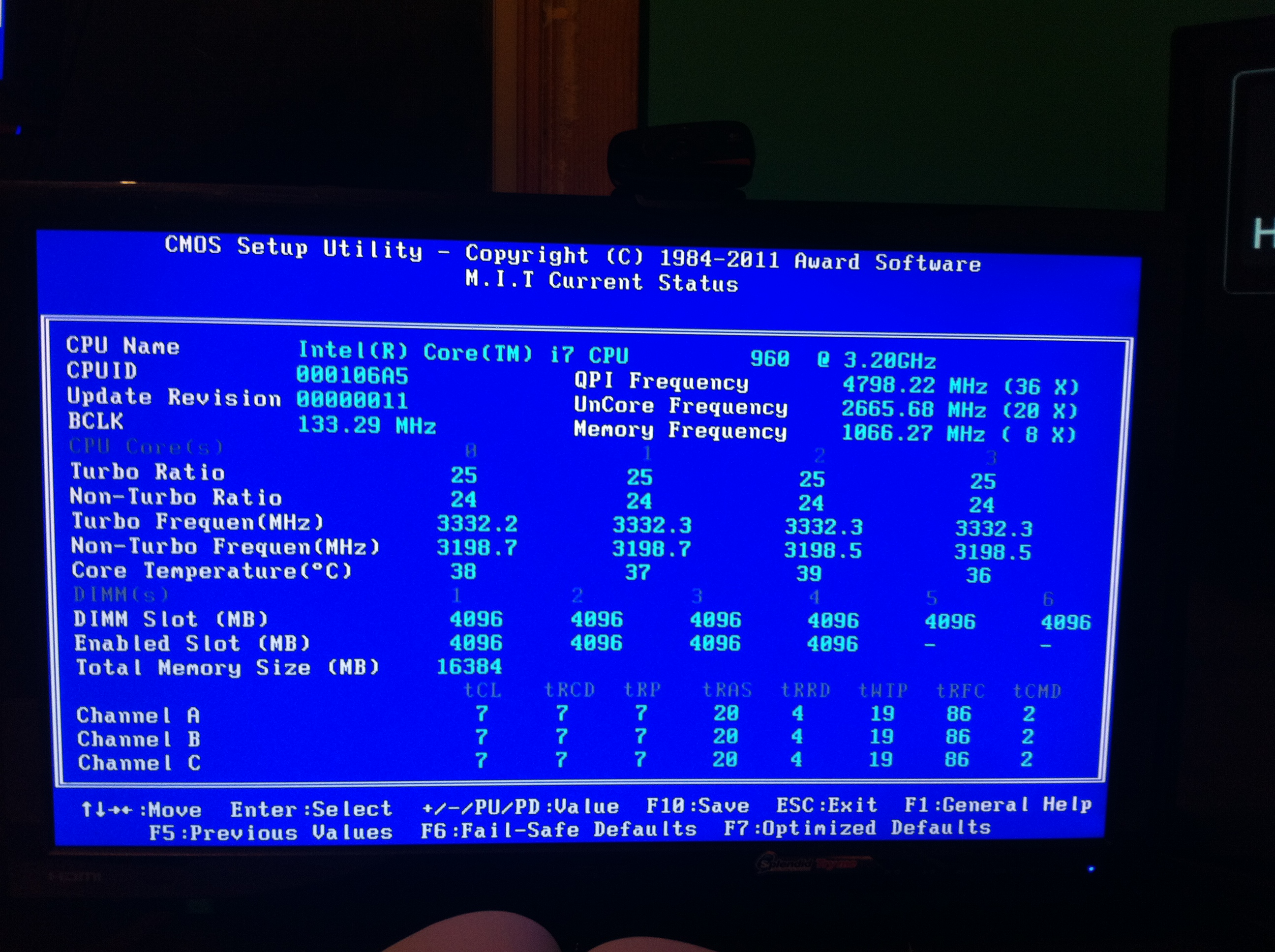
Notice how although slots 6,5 show up as DIMM Slot they do not show up as enabled slots. I have tried several different configurations and before anyone points out to the 2 different RAM types being used, I tried mixing them up in slots 1 to 4 and no matter the configuration the computer always starts up with 16GB of RAM. I'm a little lost as to where to go next. In forums the steps I've read are
1. Update BIOS
2. Reseat all RAM
3. Check CPU for bent pins
Does anyone have any further suggestions? I'll update the post as suggestions come in for further users.
Thanks
I've recently noticed that when I right-click on My Computer under Installed memory (RAM): 24.0GB (16.0GB usable). Obviously this sucks and I went through a few forum post in an effort to fix this but here's some info first
Motherboard: Gigabyte X58A-UD7 (rev 1.0)
RAM
3 x 4GB Corsair Dominator GT PC3 16000 2000MHz (as can be seen on this link CORSAIR DOMINATOR GT 8GB (2 x 4GB) 240-Pin DDR3 SDRAM DDR3 2000 (PC3 16000) Desktop Memory with Airflow Fan Model CMT8GX3M2A2000C9 - Newegg.ca
3 x 4GB Crucial PC3 10600 1333MHz
No matter which setup I try to use I always get the following in my bios (which was recently updated)
Notice how although slots 6,5 show up as DIMM Slot they do not show up as enabled slots. I have tried several different configurations and before anyone points out to the 2 different RAM types being used, I tried mixing them up in slots 1 to 4 and no matter the configuration the computer always starts up with 16GB of RAM. I'm a little lost as to where to go next. In forums the steps I've read are
1. Update BIOS
2. Reseat all RAM
3. Check CPU for bent pins
Does anyone have any further suggestions? I'll update the post as suggestions come in for further users.
Thanks
Last edited:
My Computer
- OS
- Windows 7 Ultimate x64
- CPU
- i7 960
- Motherboard
- Gigabyte UD7 LGA 1366
- Memory
- 12GB DDR3 Crucial
- Graphics Card(s)
- XFX Radeon HD 5850 Black Edition 765 MHz 1GB DDR5
- Monitor(s) Displays
- 32" Samsung
- Hard Drives
- Western Digital Caviar Black 1TB
Western Digital Caviar Black 500GB
Western Digital My Book Home Edition 1TB
Western Digital My Book 1TB
- Case
- Antec p193
- Cooling
- Nexus FLC-3000 92MM CPU Heatsink