
You are using an out of date browser. It may not display this or other websites correctly.
You should upgrade or use an alternative browser.
You should upgrade or use an alternative browser.
determining if a folder is empty without opening it
- Thread starter jpathman
- Start date
x BlueRobot
Closed by request
- Local time
- 10:35 PM
- Messages
- 6,784
Right-Click the file, and then go to Properties, here you will see the number of files within the folder.

My Computer
- Computer type
- Laptop

Welcome to the Seven Forums
Just hover your mouse over it and it should say Empty folder.
Jerry
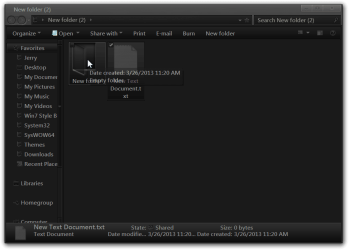
Just hover your mouse over it and it should say Empty folder.
Jerry
My Computer
- Computer type
- Laptop
- Computer Manufacturer/Model Number
- Sager NP9170
- OS
- Win 7 Pro x64 / Win 10 Pro
- CPU
- Intel(R) Core(TM) i7-3630QM CPU @ 2.40GHz
- Motherboard
- CLEVO P170EM
- Memory
- 12 GB
- Graphics Card(s)
- (1) Intel(R) HD Graphics 4000 (2) NVIDIA GeForce GTX 675M
- Sound Card
- (1) Realtek High Definition Audio (2) Intel(R) Display Aud
- Monitor(s) Displays
- 17.3
- Screen Resolution
- 1920x1080
- Hard Drives
- (1) Samsung 860 EVO 500GB(OS) (1) Samsung 860 EVO 500GB(Data)
- Keyboard
- Backlite
- Antivirus
- MSE, Malwarebytes Pro
- Browser
- Firefox
- Other Info
- DESKTOP: Custom-built.
OS: Win 10 Pro x64.
CASE: Rosewill R5.
CPU: Intel I5 4670K CPU @ 3.40GHz.
CPU COOLER: Cool Master Hyper 212 EVO.
MOTHERBOARD: Asus Z87-A.
MEMORY: Kingston HyperX 2x4 GB.
GPU: Nvidia Geforce 650 TI.
PSU: Corsair TX750.
DRIVES: (1) Samsung 840 120 GB SSD (2) Western Digital blue 500 GB 7200 RPM.
x BlueRobot
Closed by request
- Local time
- 10:35 PM
- Messages
- 6,784

Welcome to the forum,
See if option 1 of this tutorial helps,
http://www.sevenforums.com/tutorials/11836-pop-up-descriptions-enable-disable.html
It should have been enabled by default, but things do happen.
If it already is enabled, try disabling then re-enabling and see if you get the hover pop-up.
See if option 1 of this tutorial helps,
http://www.sevenforums.com/tutorials/11836-pop-up-descriptions-enable-disable.html
It should have been enabled by default, but things do happen.
If it already is enabled, try disabling then re-enabling and see if you get the hover pop-up.
My Computer
- Computer type
- PC/Desktop
- Computer Manufacturer/Model Number
- Self Built
- OS
- Win 10 Pro x64
- CPU
- Intel I5-2500K @3.3GHz
- Motherboard
- Asrock P67 Extreme4
- Memory
- 16GB G.Skill Ripjaws X (4x4GB)
- Graphics Card(s)
- EVGA GeForce 750 Ti SC 2GB
- Sound Card
- ASUS Xonar DG 5.1 Channels 24-bit 96KHz PCI Interface Sound
- Monitor(s) Displays
- auria eq2367
- Screen Resolution
- 1920 x 1080
- Hard Drives
- 250GB Samsung 850 EVO SSD
1TB WD Blue
1TB Hitachi
- PSU
- SeaSonic X 650W 80 Plus Gold
- Case
- Corsair Obsidian 750D
- Cooling
- Corsair H60, Three 140mm case fans
- Keyboard
- Logitech Wireless Keyboard K520
- Mouse
- Logitech Wireless Mouse M310
- Internet Speed
- Wave Broadband ~ 100 dn 5 up
- Antivirus
- Windows Defender, Malwarebytes Premium
- Browser
- Edge, IE11, Chrome
- Other Info
- Laptop specs: HP g7-1365dx /
CPU: AMD A6-3420M APU with Radeon(tm) HD Graphics /
RAM: Crucial 8Gb (2x4Gb) /
SSD: Crucial M4-CT128M4SSD2 ATA Device/ FW 000F /
GFX: AMD Radeon HD 6520G /
OS: Windows 10 Pro x64

nilank
Banned
That would be wonderful, but doesn't work. I'm in Windows7 OS
Can't you view the properties of the folder? Be more specific.
x BlueRobot
Closed by request
- Local time
- 10:35 PM
- Messages
- 6,784
Thanks Derekimo!
You're welcome, did that fix it?
My Computer
- Computer type
- PC/Desktop
- Computer Manufacturer/Model Number
- Self Built
- OS
- Win 10 Pro x64
- CPU
- Intel I5-2500K @3.3GHz
- Motherboard
- Asrock P67 Extreme4
- Memory
- 16GB G.Skill Ripjaws X (4x4GB)
- Graphics Card(s)
- EVGA GeForce 750 Ti SC 2GB
- Sound Card
- ASUS Xonar DG 5.1 Channels 24-bit 96KHz PCI Interface Sound
- Monitor(s) Displays
- auria eq2367
- Screen Resolution
- 1920 x 1080
- Hard Drives
- 250GB Samsung 850 EVO SSD
1TB WD Blue
1TB Hitachi
- PSU
- SeaSonic X 650W 80 Plus Gold
- Case
- Corsair Obsidian 750D
- Cooling
- Corsair H60, Three 140mm case fans
- Keyboard
- Logitech Wireless Keyboard K520
- Mouse
- Logitech Wireless Mouse M310
- Internet Speed
- Wave Broadband ~ 100 dn 5 up
- Antivirus
- Windows Defender, Malwarebytes Premium
- Browser
- Edge, IE11, Chrome
- Other Info
- Laptop specs: HP g7-1365dx /
CPU: AMD A6-3420M APU with Radeon(tm) HD Graphics /
RAM: Crucial 8Gb (2x4Gb) /
SSD: Crucial M4-CT128M4SSD2 ATA Device/ FW 000F /
GFX: AMD Radeon HD 6520G /
OS: Windows 10 Pro x64
enabling popups has worked but it takes a little time for the top up to register. Better would be if a "size" column would appear for each folder (in addition to - for each file)
My Computer
- Computer type
- Laptop
- Computer Manufacturer/Model Number
- Thinkpad
- OS
- Windows 7
x BlueRobot
Closed by request
- Local time
- 10:35 PM
- Messages
- 6,784
Have you tried viewing the Folder Properties? That will give the size of files contained within the selected folder (See Post #2).
My Computer
- Computer type
- Laptop
Selecting folder properties works, but that point I might as well open the folder. I'm trying to maker it quicker - so I can see at a glance if a folder is empty or not, just by seeing the list of folders.
My Computer
- Computer type
- Laptop
- Computer Manufacturer/Model Number
- Thinkpad
- OS
- Windows 7

Be very careful. Some folders that report empty are not. You just may not have permission to access it.
My Computer
- Computer type
- Laptop
- Computer Manufacturer/Model Number
- Hewlett-Packard/G62-107SA Notebook
- OS
- Microsoft Windows 7 Home Premium 64-bit Service Pack 1
- CPU
- Intel(R) Core(TM) i3 CPU M 330 @ 2.13GHz
- Motherboard
- Hewlett-Packard 1425
- Memory
- 8 GB DDR3
- Graphics Card(s)
- Intel(R) HD Graphics
- Sound Card
- Realtek High Definition Audio
- Monitor(s) Displays
- Builtin
- Screen Resolution
- 1366 x 768 x 32 bits (4294967296 colors) @ 60 Hz
- Hard Drives
- 250 GB SATA Hard Disk Drive 7200 rpm
2TB Seagate GoFlex USB 2 Drive
1TB Iomega Prestige USB 2 Drive
1.5TB Iomega Prestige USB 2 Drive (Samsung)
2TB WD MyBook Live NAS.
- Mouse
- Logitech Anywhere MX
- Internet Speed
- 152 Mbs download 10 Mbs upload
- Antivirus
- Norton 360
- Browser
- Chrome
x BlueRobot
Closed by request
- Local time
- 10:35 PM
- Messages
- 6,784
You can check for any hidden files by:
My Computer
- Computer type
- Laptop
nilank
Banned
enabling popups has worked but it takes a little time for the top up to register. Better would be if a "size" column would appear for each folder (in addition to - for each file)
Right click in an empty space inside a folder > View > Details.
This way can show sizes of files in a seperate column but NOT sizes of folders.
Windows 7 explorer is not that customizable but here is a third party app that can show all folder sizes, but is not very GUI friendly.
Here's the link: Folder Size for Windows