Deus Ex: Human Revolution crashing

STU9000

New member
Member
VIP
Local time
8:45 PM
Messages
300
Just started playing this on Steam and really enjoying it, only it keeps crashing all the time. It's virtually unplayable, seems to crash on autosave, which can't be disabled as far as I know. Can't get past certain points in the game unless i restart.

Getting nowhere asking on Steam forums or googling so thought I'd try here. As far as i can tell it's probably an issue with the graphics card or drivers.

I have an NVIDIA GeForce GT 540M and I'm on DirectX 11
 

My Computer

Computer Manufacturer/Model Number
SONY VAIO PCG-81312M
OS
Windows 7 Home Premium 64
CPU
Intel Core i7-2630QM
Memory
4GB
Graphics Card(s)
NVidia GeForce with Cuda
Hard Drives
Hitachi 500GB
Just started playing this on Steam and really enjoying it, only it keeps crashing all the time. It's virtually unplayable, seems to crash on autosave, which can't be disabled as far as I know. Can't get past certain points in the game unless i restart.

Getting nowhere asking on Steam forums or googling so thought I'd try here. As far as i can tell it's probably an issue with the graphics card or drivers.

I have an NVIDIA GeForce GT 540M and I'm on DirectX 11


have you right clicked on the Dues app in the steam program and proceed to verify integrity of game cache

If that doesn't work reinstall netframework 4 and direct x run time
 

My Computer

Computer type
PC/Desktop
Computer Manufacturer/Model Number
CoreI7-6700K MrFingerIII Special Builds
OS
Windows 10 Home Premium 64bit sp1
CPU
Intel I7-6700K @ 4.6 Ghz 1.344 volts everyday OC
Motherboard
Asrock Fatality K6 Z170 Socket 1151
Memory
32GB G-Skill TridentZ 3200mhz 16-18-18-38 DDR4
Graphics Card(s)
Sli Gigabyte Windforce GTX 980 G1
Sound Card
AC97 Creative Rage Tactic 3D Headphones Bluetooth
Monitor(s) Displays
27" Asus ROG Swift PG278Q G-Sync 48" Vizio Smart HD TV
Screen Resolution
2560x1440p 27"- 48" Currently Gaming at 2560x1440p Res 2K
Hard Drives
250GB Samsung Evo840SSD Seagate baracuda 500 GB WD Mybook 500Gb 1TB Seagate Barracuda
PSU
HX1050w Corsair Silver 80plus certified crosfire/sli
Case
Enthod Pro Full Tower
Cooling
Corsair H110i GT 280 mm High Performance WaterBlock
Keyboard
Logitech wireless keyboard
Mouse
Logitech wireless mouse
Internet Speed
Cox Cable 100+ mb
Antivirus
WebRoot Spysweeper with Antivirus
Browser
IE-10, Chrome, Opera
Other Info
My Other Rig is a AMD FX8320E @4.6Ghz 16GB Ballistic Sport Ram
Mobo Asrock Fatality 990FX 120GB OCZ SSD 1TB Seagate Barracuda Corsair H75 Cooling PSU Corsair CX750
GPU GTX Gigabyte 970G1
No. How do I do all those things?

it has happened a few times on other games, but seems to be getting worse on DX to the point where it's virtually unplayable.
 

My Computer

Computer Manufacturer/Model Number
SONY VAIO PCG-81312M
OS
Windows 7 Home Premium 64
CPU
Intel Core i7-2630QM
Memory
4GB
Graphics Card(s)
NVidia GeForce with Cuda
Hard Drives
Hitachi 500GB
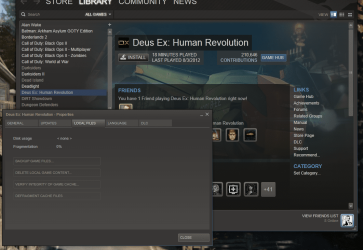
Ok well I don't have it installed anymore but here is a Screen shot you right click on the game go to properties then to local files and as you see in the picture it has the options of what to do

You will want to Verify the game Integrity
 

Attachments

  • dues.PNG
    dues.PNG
    140.4 KB · Views: 20

My Computer

Computer type
PC/Desktop
Computer Manufacturer/Model Number
CoreI7-6700K MrFingerIII Special Builds
OS
Windows 10 Home Premium 64bit sp1
CPU
Intel I7-6700K @ 4.6 Ghz 1.344 volts everyday OC
Motherboard
Asrock Fatality K6 Z170 Socket 1151
Memory
32GB G-Skill TridentZ 3200mhz 16-18-18-38 DDR4
Graphics Card(s)
Sli Gigabyte Windforce GTX 980 G1
Sound Card
AC97 Creative Rage Tactic 3D Headphones Bluetooth
Monitor(s) Displays
27" Asus ROG Swift PG278Q G-Sync 48" Vizio Smart HD TV
Screen Resolution
2560x1440p 27"- 48" Currently Gaming at 2560x1440p Res 2K
Hard Drives
250GB Samsung Evo840SSD Seagate baracuda 500 GB WD Mybook 500Gb 1TB Seagate Barracuda
PSU
HX1050w Corsair Silver 80plus certified crosfire/sli
Case
Enthod Pro Full Tower
Cooling
Corsair H110i GT 280 mm High Performance WaterBlock
Keyboard
Logitech wireless keyboard
Mouse
Logitech wireless mouse
Internet Speed
Cox Cable 100+ mb
Antivirus
WebRoot Spysweeper with Antivirus
Browser
IE-10, Chrome, Opera
Other Info
My Other Rig is a AMD FX8320E @4.6Ghz 16GB Ballistic Sport Ram
Mobo Asrock Fatality 990FX 120GB OCZ SSD 1TB Seagate Barracuda Corsair H75 Cooling PSU Corsair CX750
GPU GTX Gigabyte 970G1
OK ta, will look into that. I just had a look into seeing whether I am up to date with the drivers and downloaded this from here-

NVIDIA DRIVERS 306.97WHQL

GEFORCE R304 DRIVER


Version:
306.97 WHQL
Release Date:
2012.10.10
Operating System:
Windows 8 64-bit, Windows 7 64-bit, Windows Vista 64-bit
Language:
English (U.S.)
File Size:
220 MB

I checked windows update and no mention of an update on 10-10-12 so not sure if I have the most up to date drivers installed for my graphics cards. How do i check what drivers I have installed, can't find how to do this in Device manager?
 

My Computer

Computer Manufacturer/Model Number
SONY VAIO PCG-81312M
OS
Windows 7 Home Premium 64
CPU
Intel Core i7-2630QM
Memory
4GB
Graphics Card(s)
NVidia GeForce with Cuda
Hard Drives
Hitachi 500GB
If you are using a Laptop you can't update the drivers unless the Manufatuer has them if you updated i hope you got them from the makers site

that is probably the issue
 

My Computer

Computer type
PC/Desktop
Computer Manufacturer/Model Number
CoreI7-6700K MrFingerIII Special Builds
OS
Windows 10 Home Premium 64bit sp1
CPU
Intel I7-6700K @ 4.6 Ghz 1.344 volts everyday OC
Motherboard
Asrock Fatality K6 Z170 Socket 1151
Memory
32GB G-Skill TridentZ 3200mhz 16-18-18-38 DDR4
Graphics Card(s)
Sli Gigabyte Windforce GTX 980 G1
Sound Card
AC97 Creative Rage Tactic 3D Headphones Bluetooth
Monitor(s) Displays
27" Asus ROG Swift PG278Q G-Sync 48" Vizio Smart HD TV
Screen Resolution
2560x1440p 27"- 48" Currently Gaming at 2560x1440p Res 2K
Hard Drives
250GB Samsung Evo840SSD Seagate baracuda 500 GB WD Mybook 500Gb 1TB Seagate Barracuda
PSU
HX1050w Corsair Silver 80plus certified crosfire/sli
Case
Enthod Pro Full Tower
Cooling
Corsair H110i GT 280 mm High Performance WaterBlock
Keyboard
Logitech wireless keyboard
Mouse
Logitech wireless mouse
Internet Speed
Cox Cable 100+ mb
Antivirus
WebRoot Spysweeper with Antivirus
Browser
IE-10, Chrome, Opera
Other Info
My Other Rig is a AMD FX8320E @4.6Ghz 16GB Ballistic Sport Ram
Mobo Asrock Fatality 990FX 120GB OCZ SSD 1TB Seagate Barracuda Corsair H75 Cooling PSU Corsair CX750
GPU GTX Gigabyte 970G1
OK i thought Windows Update did all that. I have that and Vaio update, not sure how it all works really. How do i check what drivers I have at the moment before I update? Is there a way to auto check for drivers so I can be sure they are the correct drivers?
 

My Computer

Computer Manufacturer/Model Number
SONY VAIO PCG-81312M
OS
Windows 7 Home Premium 64
CPU
Intel Core i7-2630QM
Memory
4GB
Graphics Card(s)
NVidia GeForce with Cuda
Hard Drives
Hitachi 500GB
OK i thought Windows Update did all that. I have that and Vaio update, not sure how it all works really. How do i check what drivers I have at the moment before I update? Is there a way to auto check for drivers so I can be sure they are the correct drivers?

I would try going through the Vaio update as it should be a complete package for everything
Windows updates some of the things not all it also produces generic drivers just to let you know

Most cases people don't need all that update software but seems most laptop makers make it impossible to go with out it seems like

anyhow it should have a description of what it updates the main one you are looking for is video driver also im not sure if you are using switchable graphics this could be a problem as well but you did note the video card shows up as main gpu
 

My Computer

Computer type
PC/Desktop
Computer Manufacturer/Model Number
CoreI7-6700K MrFingerIII Special Builds
OS
Windows 10 Home Premium 64bit sp1
CPU
Intel I7-6700K @ 4.6 Ghz 1.344 volts everyday OC
Motherboard
Asrock Fatality K6 Z170 Socket 1151
Memory
32GB G-Skill TridentZ 3200mhz 16-18-18-38 DDR4
Graphics Card(s)
Sli Gigabyte Windforce GTX 980 G1
Sound Card
AC97 Creative Rage Tactic 3D Headphones Bluetooth
Monitor(s) Displays
27" Asus ROG Swift PG278Q G-Sync 48" Vizio Smart HD TV
Screen Resolution
2560x1440p 27"- 48" Currently Gaming at 2560x1440p Res 2K
Hard Drives
250GB Samsung Evo840SSD Seagate baracuda 500 GB WD Mybook 500Gb 1TB Seagate Barracuda
PSU
HX1050w Corsair Silver 80plus certified crosfire/sli
Case
Enthod Pro Full Tower
Cooling
Corsair H110i GT 280 mm High Performance WaterBlock
Keyboard
Logitech wireless keyboard
Mouse
Logitech wireless mouse
Internet Speed
Cox Cable 100+ mb
Antivirus
WebRoot Spysweeper with Antivirus
Browser
IE-10, Chrome, Opera
Other Info
My Other Rig is a AMD FX8320E @4.6Ghz 16GB Ballistic Sport Ram
Mobo Asrock Fatality 990FX 120GB OCZ SSD 1TB Seagate Barracuda Corsair H75 Cooling PSU Corsair CX750
GPU GTX Gigabyte 970G1
Seems to be a graphics driver update and a few other things on Vaio Update, looking into this now.

Generally like to steer clear of manufactures third party software, but I guess Sony know what they are doing.
 

My Computer

Computer Manufacturer/Model Number
SONY VAIO PCG-81312M
OS
Windows 7 Home Premium 64
CPU
Intel Core i7-2630QM
Memory
4GB
Graphics Card(s)
NVidia GeForce with Cuda
Hard Drives
Hitachi 500GB
Seems to be a graphics driver update and a few other things on Vaio Update, looking into this now.

Generally like to steer clear of manufactures third party software, but I guess Sony know what they are doing.


What sucks is unless you do a clean install it is stuck with the recovery partition Vaios software
I find his rather disturbing

But that is part of there recovery software i suppose
 

My Computer

Computer type
PC/Desktop
Computer Manufacturer/Model Number
CoreI7-6700K MrFingerIII Special Builds
OS
Windows 10 Home Premium 64bit sp1
CPU
Intel I7-6700K @ 4.6 Ghz 1.344 volts everyday OC
Motherboard
Asrock Fatality K6 Z170 Socket 1151
Memory
32GB G-Skill TridentZ 3200mhz 16-18-18-38 DDR4
Graphics Card(s)
Sli Gigabyte Windforce GTX 980 G1
Sound Card
AC97 Creative Rage Tactic 3D Headphones Bluetooth
Monitor(s) Displays
27" Asus ROG Swift PG278Q G-Sync 48" Vizio Smart HD TV
Screen Resolution
2560x1440p 27"- 48" Currently Gaming at 2560x1440p Res 2K
Hard Drives
250GB Samsung Evo840SSD Seagate baracuda 500 GB WD Mybook 500Gb 1TB Seagate Barracuda
PSU
HX1050w Corsair Silver 80plus certified crosfire/sli
Case
Enthod Pro Full Tower
Cooling
Corsair H110i GT 280 mm High Performance WaterBlock
Keyboard
Logitech wireless keyboard
Mouse
Logitech wireless mouse
Internet Speed
Cox Cable 100+ mb
Antivirus
WebRoot Spysweeper with Antivirus
Browser
IE-10, Chrome, Opera
Other Info
My Other Rig is a AMD FX8320E @4.6Ghz 16GB Ballistic Sport Ram
Mobo Asrock Fatality 990FX 120GB OCZ SSD 1TB Seagate Barracuda Corsair H75 Cooling PSU Corsair CX750
GPU GTX Gigabyte 970G1
I just updated the drivers and still the same problem. This update was released in may it says but i think there is one more recently that didn't come up in the Vaio update. Starting to think it could just be a bug in the game and tempted to ask for a refund now.
 

My Computer

Computer Manufacturer/Model Number
SONY VAIO PCG-81312M
OS
Windows 7 Home Premium 64
CPU
Intel Core i7-2630QM
Memory
4GB
Graphics Card(s)
NVidia GeForce with Cuda
Hard Drives
Hitachi 500GB
did you update the direct x run time ?

also alot of games need NETFRAMWORK4 look those up on the microsoft site

download them reinstall them and see if it has been fixed
 

My Computer

Computer type
PC/Desktop
Computer Manufacturer/Model Number
CoreI7-6700K MrFingerIII Special Builds
OS
Windows 10 Home Premium 64bit sp1
CPU
Intel I7-6700K @ 4.6 Ghz 1.344 volts everyday OC
Motherboard
Asrock Fatality K6 Z170 Socket 1151
Memory
32GB G-Skill TridentZ 3200mhz 16-18-18-38 DDR4
Graphics Card(s)
Sli Gigabyte Windforce GTX 980 G1
Sound Card
AC97 Creative Rage Tactic 3D Headphones Bluetooth
Monitor(s) Displays
27" Asus ROG Swift PG278Q G-Sync 48" Vizio Smart HD TV
Screen Resolution
2560x1440p 27"- 48" Currently Gaming at 2560x1440p Res 2K
Hard Drives
250GB Samsung Evo840SSD Seagate baracuda 500 GB WD Mybook 500Gb 1TB Seagate Barracuda
PSU
HX1050w Corsair Silver 80plus certified crosfire/sli
Case
Enthod Pro Full Tower
Cooling
Corsair H110i GT 280 mm High Performance WaterBlock
Keyboard
Logitech wireless keyboard
Mouse
Logitech wireless mouse
Internet Speed
Cox Cable 100+ mb
Antivirus
WebRoot Spysweeper with Antivirus
Browser
IE-10, Chrome, Opera
Other Info
My Other Rig is a AMD FX8320E @4.6Ghz 16GB Ballistic Sport Ram
Mobo Asrock Fatality 990FX 120GB OCZ SSD 1TB Seagate Barracuda Corsair H75 Cooling PSU Corsair CX750
GPU GTX Gigabyte 970G1
Tried turning off some of the settings in properties. It appeared to want to reinstall direct X 11 when i started it up again, but still the problem persists. I have had no other problems with any other games until this.

How do update direct X run time and what's this netframwork 4?
 

My Computer

Computer Manufacturer/Model Number
SONY VAIO PCG-81312M
OS
Windows 7 Home Premium 64
CPU
Intel Core i7-2630QM
Memory
4GB
Graphics Card(s)
NVidia GeForce with Cuda
Hard Drives
Hitachi 500GB
I just tried turning off Direct X 11 in the options and it seems to have fixed the issue. Not really sure why or why Direct X is required, or as yet if this will impair the quality of the game..?

Will report back, if anyone knows any other way to fix this please let me know.
 

My Computer

Computer Manufacturer/Model Number
SONY VAIO PCG-81312M
OS
Windows 7 Home Premium 64
CPU
Intel Core i7-2630QM
Memory
4GB
Graphics Card(s)
NVidia GeForce with Cuda
Hard Drives
Hitachi 500GB
Seems to be working fine so far now I turned off DX11 bar a few minor glitches with the video tutorials. Other people seem to have solved the problem this way as well. Since I don't know what DX11 is or does I have no idea why this has solved the issue. As far as I was aware i thought these games needed DX to run?
 

My Computer

Computer Manufacturer/Model Number
SONY VAIO PCG-81312M
OS
Windows 7 Home Premium 64
CPU
Intel Core i7-2630QM
Memory
4GB
Graphics Card(s)
NVidia GeForce with Cuda
Hard Drives
Hitachi 500GB
could be your card is not dx11 but could be dx10
 

My Computer

Computer type
PC/Desktop
Computer Manufacturer/Model Number
CoreI7-6700K MrFingerIII Special Builds
OS
Windows 10 Home Premium 64bit sp1
CPU
Intel I7-6700K @ 4.6 Ghz 1.344 volts everyday OC
Motherboard
Asrock Fatality K6 Z170 Socket 1151
Memory
32GB G-Skill TridentZ 3200mhz 16-18-18-38 DDR4
Graphics Card(s)
Sli Gigabyte Windforce GTX 980 G1
Sound Card
AC97 Creative Rage Tactic 3D Headphones Bluetooth
Monitor(s) Displays
27" Asus ROG Swift PG278Q G-Sync 48" Vizio Smart HD TV
Screen Resolution
2560x1440p 27"- 48" Currently Gaming at 2560x1440p Res 2K
Hard Drives
250GB Samsung Evo840SSD Seagate baracuda 500 GB WD Mybook 500Gb 1TB Seagate Barracuda
PSU
HX1050w Corsair Silver 80plus certified crosfire/sli
Case
Enthod Pro Full Tower
Cooling
Corsair H110i GT 280 mm High Performance WaterBlock
Keyboard
Logitech wireless keyboard
Mouse
Logitech wireless mouse
Internet Speed
Cox Cable 100+ mb
Antivirus
WebRoot Spysweeper with Antivirus
Browser
IE-10, Chrome, Opera
Other Info
My Other Rig is a AMD FX8320E @4.6Ghz 16GB Ballistic Sport Ram
Mobo Asrock Fatality 990FX 120GB OCZ SSD 1TB Seagate Barracuda Corsair H75 Cooling PSU Corsair CX750
GPU GTX Gigabyte 970G1
My computer is pretty new, pretty much top spec as of 1 year ago.

What exactly does DX do anyway?
 

My Computer

Computer Manufacturer/Model Number
SONY VAIO PCG-81312M
OS
Windows 7 Home Premium 64
CPU
Intel Core i7-2630QM
Memory
4GB
Graphics Card(s)
NVidia GeForce with Cuda
Hard Drives
Hitachi 500GB

My Computer

Computer type
PC/Desktop
Computer Manufacturer/Model Number
CoreI7-6700K MrFingerIII Special Builds
OS
Windows 10 Home Premium 64bit sp1
CPU
Intel I7-6700K @ 4.6 Ghz 1.344 volts everyday OC
Motherboard
Asrock Fatality K6 Z170 Socket 1151
Memory
32GB G-Skill TridentZ 3200mhz 16-18-18-38 DDR4
Graphics Card(s)
Sli Gigabyte Windforce GTX 980 G1
Sound Card
AC97 Creative Rage Tactic 3D Headphones Bluetooth
Monitor(s) Displays
27" Asus ROG Swift PG278Q G-Sync 48" Vizio Smart HD TV
Screen Resolution
2560x1440p 27"- 48" Currently Gaming at 2560x1440p Res 2K
Hard Drives
250GB Samsung Evo840SSD Seagate baracuda 500 GB WD Mybook 500Gb 1TB Seagate Barracuda
PSU
HX1050w Corsair Silver 80plus certified crosfire/sli
Case
Enthod Pro Full Tower
Cooling
Corsair H110i GT 280 mm High Performance WaterBlock
Keyboard
Logitech wireless keyboard
Mouse
Logitech wireless mouse
Internet Speed
Cox Cable 100+ mb
Antivirus
WebRoot Spysweeper with Antivirus
Browser
IE-10, Chrome, Opera
Other Info
My Other Rig is a AMD FX8320E @4.6Ghz 16GB Ballistic Sport Ram
Mobo Asrock Fatality 990FX 120GB OCZ SSD 1TB Seagate Barracuda Corsair H75 Cooling PSU Corsair CX750
GPU GTX Gigabyte 970G1
Back
Top