Device and printer window screen blank

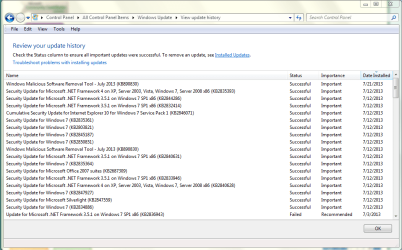
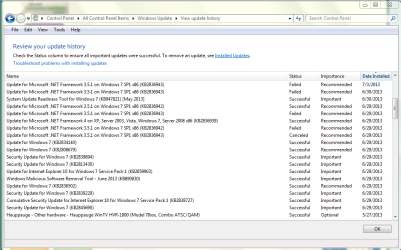
Well, same old same old. Installed software off of HP website. I would like to go back to my original problem. When I logged onto the administrative side of users and click on Computer, devices and printers all my devices show up in the window that opens. When I log out of there and go into the family side of users and click on Computer, devices and printers the window open and the page is blank, the green line at the top just keeps scrolling to the right. It used to show the same as on the administrative side did. Also when I put my SD card in an emblem down on th lower right bar opens. When I was done I could right click on that icon and click on Its safe to remove device. Even that message that showed up after right clicking on that emblem doesn't even show up anymore. I can't remember where I seen it but I do remember seeing where Windows update installed a bunch of software on one particular day, any possible cause there ? Thanks
 

Attachments

  • Capture#6.PNG
    Capture#6.PNG
    132.6 KB · Views: 5

My Computer

OS
Windows 7 Home Premium 32 bit
The last round of updates was on July the 9th. Second Tues of each month, "Patch Tuesday".
 

My Computer

Computer type
PC/Desktop
Computer Manufacturer/Model Number
Home Built Desktop By DataTech
OS
Windows 7 Ultimate X64 SP1
CPU
Intel i5-2550K, Differing ~4.4-4.8GHz No built in GPU
Motherboard
ASUS P8Z68-V PRO/GEN3
Memory
16GB G.Skill Sniper 1866MHz @ 2133MHz 2x8GB
Graphics Card(s)
ASUS GTX650TIB-DC2OC-2GD5, (650TI Boost)
Sound Card
Onboard Realtek 5-1
Monitor(s) Displays
Samsung P2570HD
Screen Resolution
1920x1080
Hard Drives
Samsung 840 Pro 256GB SSD for OS, 500GB Seagate Constellation (Enterprise drive) for Data
PSU
Corsair HX650W
Case
Inwin Dragon Rider
Cooling
Hyper 212 EVO w/two Noctua fans, push-pull, @1300 RPM
Keyboard
E-Z Eyes, bright yellow keys with large characters
Mouse
steelseries SENSEI Laser Pro Gaming
Internet Speed
48-51Mbs Mbs down, 11 Mbs up Xfinity Cable
Antivirus
Norton Internet Security 2013
Browser
IE 10, Opera, Pale Moon if needed
Other Info
4 case fans, LG BluRay-RE, ASUS DVD-RW, Mr. Fusion power supply, 1.21 gigawatts.
Here is my Windows Update
 

Attachments

  • Capture#7.PNG
    Capture#7.PNG
    105.9 KB · Views: 3
  • Capture #8.PNG
    Capture #8.PNG
    104.5 KB · Views: 3

My Computer

OS
Windows 7 Home Premium 32 bit
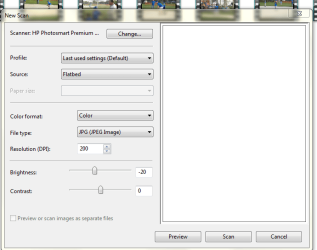
I found this .exe file, I can click on it to open the image in #3. This is the window I used to use. Is the .exe for scanner actually in the folder Windows Live Photo gallery? The #1 clip is the top of the folder and clip #2 is the bottom of the folder. Thanks
 

Attachments

  • Capture Windows Live Photo Gallery#1.PNG
    Capture Windows Live Photo Gallery#1.PNG
    6.4 KB · Views: 23
  • Capture Windows Live Photo Gallery#2.PNG
    Capture Windows Live Photo Gallery#2.PNG
    6 KB · Views: 23
  • Capture Windows Live Photo Gallery#3.PNG
    Capture Windows Live Photo Gallery#3.PNG
    85.1 KB · Views: 5

My Computer

OS
Windows 7 Home Premium 32 bit
Cool, it looks just like my hp scanner window.
 

My Computer

Computer type
PC/Desktop
Computer Manufacturer/Model Number
Home Built Desktop By DataTech
OS
Windows 7 Ultimate X64 SP1
CPU
Intel i5-2550K, Differing ~4.4-4.8GHz No built in GPU
Motherboard
ASUS P8Z68-V PRO/GEN3
Memory
16GB G.Skill Sniper 1866MHz @ 2133MHz 2x8GB
Graphics Card(s)
ASUS GTX650TIB-DC2OC-2GD5, (650TI Boost)
Sound Card
Onboard Realtek 5-1
Monitor(s) Displays
Samsung P2570HD
Screen Resolution
1920x1080
Hard Drives
Samsung 840 Pro 256GB SSD for OS, 500GB Seagate Constellation (Enterprise drive) for Data
PSU
Corsair HX650W
Case
Inwin Dragon Rider
Cooling
Hyper 212 EVO w/two Noctua fans, push-pull, @1300 RPM
Keyboard
E-Z Eyes, bright yellow keys with large characters
Mouse
steelseries SENSEI Laser Pro Gaming
Internet Speed
48-51Mbs Mbs down, 11 Mbs up Xfinity Cable
Antivirus
Norton Internet Security 2013
Browser
IE 10, Opera, Pale Moon if needed
Other Info
4 case fans, LG BluRay-RE, ASUS DVD-RW, Mr. Fusion power supply, 1.21 gigawatts.
So do you have an icon on your desktop so you can start it from clicking on it? Or do you have to go into Windows Live Photo Gallery and click on import to get it to open? Is there away to get an icon put on the desktop? I used to have one. Thanks
 

My Computer

OS
Windows 7 Home Premium 32 bit
I normally start a scan from the printer's controls screen.
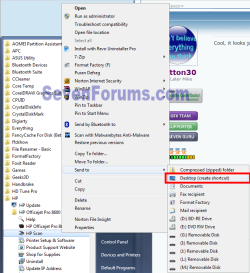
You can make a shortcut on the desktop for almost anything in the Start/All Programs menu. Open the hp folder on its start menu entry, Right click hp scan and hover on Send To and click Desktop (Create Shortcut).
shortcut.png
 

My Computer

Computer type
PC/Desktop
Computer Manufacturer/Model Number
Home Built Desktop By DataTech
OS
Windows 7 Ultimate X64 SP1
CPU
Intel i5-2550K, Differing ~4.4-4.8GHz No built in GPU
Motherboard
ASUS P8Z68-V PRO/GEN3
Memory
16GB G.Skill Sniper 1866MHz @ 2133MHz 2x8GB
Graphics Card(s)
ASUS GTX650TIB-DC2OC-2GD5, (650TI Boost)
Sound Card
Onboard Realtek 5-1
Monitor(s) Displays
Samsung P2570HD
Screen Resolution
1920x1080
Hard Drives
Samsung 840 Pro 256GB SSD for OS, 500GB Seagate Constellation (Enterprise drive) for Data
PSU
Corsair HX650W
Case
Inwin Dragon Rider
Cooling
Hyper 212 EVO w/two Noctua fans, push-pull, @1300 RPM
Keyboard
E-Z Eyes, bright yellow keys with large characters
Mouse
steelseries SENSEI Laser Pro Gaming
Internet Speed
48-51Mbs Mbs down, 11 Mbs up Xfinity Cable
Antivirus
Norton Internet Security 2013
Browser
IE 10, Opera, Pale Moon if needed
Other Info
4 case fans, LG BluRay-RE, ASUS DVD-RW, Mr. Fusion power supply, 1.21 gigawatts.
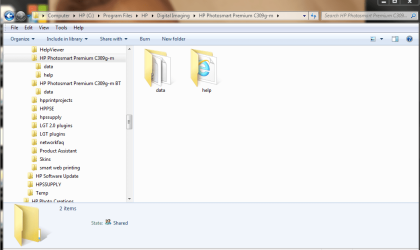
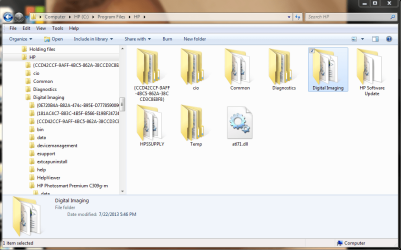
You say you start your scan from the printer's control screen. What does that printer control screen look like? I still only have a HP Solution Center desktop icon and all that gives me an option to scan pictures or documents, and that's where the error starts. What do you think, I uninstalled and used Driver Sweeper 4 times and nothing seem to be working correctly. As you can see from the following snips I don't have an icon that starts the scanner in my Programs/HP files. Thanks
 

Attachments

  • HP#4.PNG
    HP#4.PNG
    175.9 KB · Views: 2
  • HP#3.PNG
    HP#3.PNG
    158.7 KB · Views: 2
  • HP#2.PNG
    HP#2.PNG
    147.1 KB · Views: 2
  • HP#1.PNG
    HP#1.PNG
    205.2 KB · Views: 3

My Computer

OS
Windows 7 Home Premium 32 bit
Sorry, it's a LCD touch screen on the printer itself.

Click on the :orb:All programs, go to hp, click it, see what's in there.
 

My Computer

Computer type
PC/Desktop
Computer Manufacturer/Model Number
Home Built Desktop By DataTech
OS
Windows 7 Ultimate X64 SP1
CPU
Intel i5-2550K, Differing ~4.4-4.8GHz No built in GPU
Motherboard
ASUS P8Z68-V PRO/GEN3
Memory
16GB G.Skill Sniper 1866MHz @ 2133MHz 2x8GB
Graphics Card(s)
ASUS GTX650TIB-DC2OC-2GD5, (650TI Boost)
Sound Card
Onboard Realtek 5-1
Monitor(s) Displays
Samsung P2570HD
Screen Resolution
1920x1080
Hard Drives
Samsung 840 Pro 256GB SSD for OS, 500GB Seagate Constellation (Enterprise drive) for Data
PSU
Corsair HX650W
Case
Inwin Dragon Rider
Cooling
Hyper 212 EVO w/two Noctua fans, push-pull, @1300 RPM
Keyboard
E-Z Eyes, bright yellow keys with large characters
Mouse
steelseries SENSEI Laser Pro Gaming
Internet Speed
48-51Mbs Mbs down, 11 Mbs up Xfinity Cable
Antivirus
Norton Internet Security 2013
Browser
IE 10, Opera, Pale Moon if needed
Other Info
4 case fans, LG BluRay-RE, ASUS DVD-RW, Mr. Fusion power supply, 1.21 gigawatts.
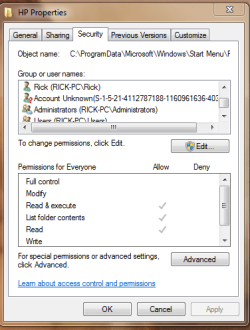
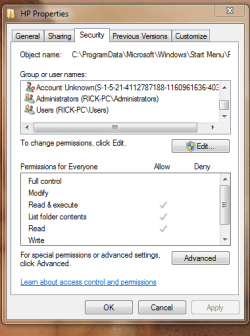
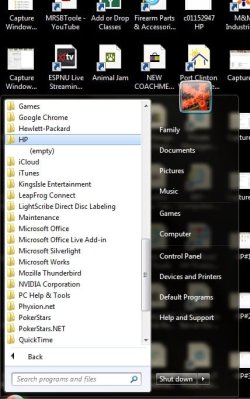
I can't get a snip from my Start/All Programs/HP folder. I'll try to type it out. I have never registered this printer during all the reinstalls because I registered it when I first installed it years back. That couldn't be the problem? Also when I open start/All Programs/HP folder and right click on, HP, and open properties securities folder I have all these groups and users in the window, there is only the administration side that I have to log into and the family side that starts automaticly when we restart the computer. Isn't there way to many things in this window? Thanks:
HP folder
HP solution center
HP update
Shop for HP supplies
HP photo creations folder
>HP photo creations
>Uninstall HP photo creations
HP smart web printing folder
>HP smart web printing help
Photosmart Premium 309g-m
>Add a device
>Help
>Product registration
>Product support website
>Readme
>Uninstall
>USB to wireless
 

Attachments

  • HP#5.PNG
    HP#5.PNG
    69.9 KB · Views: 5
  • HP#6.PNG
    HP#6.PNG
    58.8 KB · Views: 4
  • HP#7.PNG
    HP#7.PNG
    73.8 KB · Views: 3

My Computer

OS
Windows 7 Home Premium 32 bit
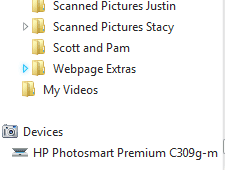
To get a snip, open the All Programs/hp folder, press PrntScrn. Open MS Paint and Paste, the screen will appear, you can drag it till you see the section you want and use the Cop tool to make the area to save. Double click inside the selection and it will go to the smaller section. Go to Save, Save As and save to your desktop as a .jpg.

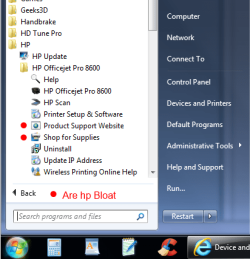
Here's all of what's in my hp folder, not as much as yours, a lot of it is hp bloat and unneeded stuff that hp "thinks" we need.

hp Folder.png
 

My Computer

Computer type
PC/Desktop
Computer Manufacturer/Model Number
Home Built Desktop By DataTech
OS
Windows 7 Ultimate X64 SP1
CPU
Intel i5-2550K, Differing ~4.4-4.8GHz No built in GPU
Motherboard
ASUS P8Z68-V PRO/GEN3
Memory
16GB G.Skill Sniper 1866MHz @ 2133MHz 2x8GB
Graphics Card(s)
ASUS GTX650TIB-DC2OC-2GD5, (650TI Boost)
Sound Card
Onboard Realtek 5-1
Monitor(s) Displays
Samsung P2570HD
Screen Resolution
1920x1080
Hard Drives
Samsung 840 Pro 256GB SSD for OS, 500GB Seagate Constellation (Enterprise drive) for Data
PSU
Corsair HX650W
Case
Inwin Dragon Rider
Cooling
Hyper 212 EVO w/two Noctua fans, push-pull, @1300 RPM
Keyboard
E-Z Eyes, bright yellow keys with large characters
Mouse
steelseries SENSEI Laser Pro Gaming
Internet Speed
48-51Mbs Mbs down, 11 Mbs up Xfinity Cable
Antivirus
Norton Internet Security 2013
Browser
IE 10, Opera, Pale Moon if needed
Other Info
4 case fans, LG BluRay-RE, ASUS DVD-RW, Mr. Fusion power supply, 1.21 gigawatts.
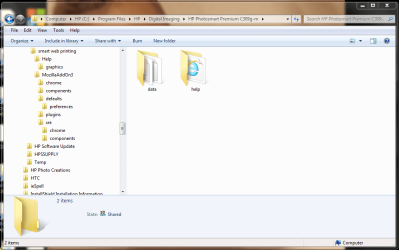
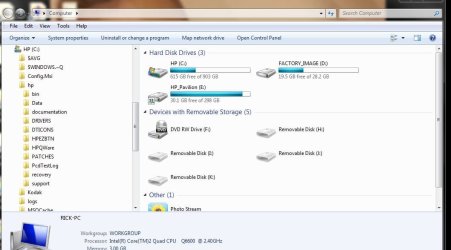
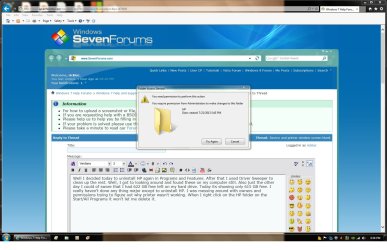
Well I decided today to uninstall HP again in Programs and Features. After that I used Driver Sweeper to clean up the rest. Well, I got to looking around and found these on my computer, still. Also just the other day I could of sworn that I had 622 GB free left on my hard drive. Today its showing only 615 GB free. I really haven't done any thing major except to uninstall HP. I was messing around with owners and permissions trying to figure out why printer wasn't working. When I right click on the HP folder on the Start/All Programs it won't let me delete it. I get the two windows. Also found these folder/files on C: drive, and can't delete them either. Thanks
 

Attachments

  • HP#10.JPG
    HP#10.JPG
    84.1 KB · Views: 3
  • HP#11.jpg
    HP#11.jpg
    108.3 KB · Views: 2
  • HP#12.PNG
    HP#12.PNG
    47.7 KB · Views: 2
  • HP#13.jpg
    HP#13.jpg
    386.3 KB · Views: 2

My Computer

OS
Windows 7 Home Premium 32 bit
Are you trying from an administrator level account?
 

My Computer

Computer type
PC/Desktop
Computer Manufacturer/Model Number
Home Built Desktop By DataTech
OS
Windows 7 Ultimate X64 SP1
CPU
Intel i5-2550K, Differing ~4.4-4.8GHz No built in GPU
Motherboard
ASUS P8Z68-V PRO/GEN3
Memory
16GB G.Skill Sniper 1866MHz @ 2133MHz 2x8GB
Graphics Card(s)
ASUS GTX650TIB-DC2OC-2GD5, (650TI Boost)
Sound Card
Onboard Realtek 5-1
Monitor(s) Displays
Samsung P2570HD
Screen Resolution
1920x1080
Hard Drives
Samsung 840 Pro 256GB SSD for OS, 500GB Seagate Constellation (Enterprise drive) for Data
PSU
Corsair HX650W
Case
Inwin Dragon Rider
Cooling
Hyper 212 EVO w/two Noctua fans, push-pull, @1300 RPM
Keyboard
E-Z Eyes, bright yellow keys with large characters
Mouse
steelseries SENSEI Laser Pro Gaming
Internet Speed
48-51Mbs Mbs down, 11 Mbs up Xfinity Cable
Antivirus
Norton Internet Security 2013
Browser
IE 10, Opera, Pale Moon if needed
Other Info
4 case fans, LG BluRay-RE, ASUS DVD-RW, Mr. Fusion power supply, 1.21 gigawatts.
What I would do is reinstall the hp suite of software and see what you get then.
 

My Computer

Computer type
PC/Desktop
Computer Manufacturer/Model Number
Home Built Desktop By DataTech
OS
Windows 7 Ultimate X64 SP1
CPU
Intel i5-2550K, Differing ~4.4-4.8GHz No built in GPU
Motherboard
ASUS P8Z68-V PRO/GEN3
Memory
16GB G.Skill Sniper 1866MHz @ 2133MHz 2x8GB
Graphics Card(s)
ASUS GTX650TIB-DC2OC-2GD5, (650TI Boost)
Sound Card
Onboard Realtek 5-1
Monitor(s) Displays
Samsung P2570HD
Screen Resolution
1920x1080
Hard Drives
Samsung 840 Pro 256GB SSD for OS, 500GB Seagate Constellation (Enterprise drive) for Data
PSU
Corsair HX650W
Case
Inwin Dragon Rider
Cooling
Hyper 212 EVO w/two Noctua fans, push-pull, @1300 RPM
Keyboard
E-Z Eyes, bright yellow keys with large characters
Mouse
steelseries SENSEI Laser Pro Gaming
Internet Speed
48-51Mbs Mbs down, 11 Mbs up Xfinity Cable
Antivirus
Norton Internet Security 2013
Browser
IE 10, Opera, Pale Moon if needed
Other Info
4 case fans, LG BluRay-RE, ASUS DVD-RW, Mr. Fusion power supply, 1.21 gigawatts.
If you're still running HP preinstalled Win7 it is the worst possible install you can have, with the worst load of crapware in the industry. You've never even experienced native Win7's perfect performance yet on that PC.

That's why most tech enthusiasts won't run such an install but instead choose to Clean Reinstall - Factory OEM Windows 7.

Afterwards install only the printer driver to see if you can settle for the scan function on the rightclick Context menu in Devices and Printers. This avoid all of the crapware and allows you to print just fine with only a driver. If you need to scan from the printer top to the desktop then you'll need HP Solution Center running at Startup, but it's still a panacea compared to having a dozen HP crapwares starting wtih Win7 hogging its resources and clogging its registry.
 
No, my computer came with an older version and I bought an upgrade, maybe two. Thanks
 

My Computer

OS
Windows 7 Home Premium 32 bit
Well I'm back. Cleaned everything off of drive that pertained to HP, I think. Reinstalled software on Admin. side. Everything on Admin. side works great. Can even put shortcut on desktop to open scan documents and/or pictures. Can see printer in device and printer folder on start menu. Go over on family account and no icon in device and printer folder, no way to start scan with out going into Windows Live Photo Gallery and clicking on import. There is some reason going from admin. account and into family account loses something. On admin side there a folder in start/programs for HP, inside that folder there's an icon to click on to start HP scan and print window. On the family account all that's in HP folder on start/ programs is HP update and some other icons like product registration, add device, help, readme, and uninstall. Nothing to click on to open scan print window. Anymore advice?. Thanks

 

My Computer

OS
Windows 7 Home Premium 32 bit
Back
Top