device doctor

xblade002003

New member
Local time
5:42 PM
Messages
34
hello everybody: i was searching the web for hardware updater and google offers me device doctor and i need you assistance about the program is it good for me because when i used it to check the drivers it told me there are 30 hardware need to be updated so i don't want to start using it until i hear from you guys. and thank you
 

My Computer

Computer Manufacturer/Model Number
hp pavilion dv6 notebook pc
OS
windows 7 home premium 64 bit.
CPU
intel (R) core i5
Memory
6 gb
Graphics Card(s)
1 gb
Hard Drives
500 gb
Welcome
I can speak for most us here, with that question. The best way is to learn how to go to the website yourself and update. The native Windows updater as well as other software are not the way to go.
It is very easy to update yourself. In any event if you just leave windows update set to give automatic updates, for other than Micorosoft products you will be updated, but doing yourself is still the best. Why not set updater and then just check yourself or more recent, or better drivers.
 
Last edited:

My Computer

Computer type
PC/Desktop
Computer Manufacturer/Model Number
Dell XPS 420
OS
Windows 10, Home Clean Install
CPU
Intel Core2 processsor Q8200(2.33Ghz 1333FSB) Quad Core Tech
Motherboard
Dell
Memory
6 gb
Graphics Card(s)
ATI Radeon 256MB HD3650
Sound Card
Intergrated 7.1 Channel Audio
Monitor(s) Displays
Dell SP2009W 20"
Hard Drives
640 GB Serial ATA Hard drive
Cooling
Fan
Keyboard
Dell USB Keyboard
Mouse
Dell Premium Optical USB
Internet Speed
DSL 2.85
Welcome
I can speak for most us here, with that question. The best way is to learn how to go to the website yourself and update. The native Windows updater as well as other software are not the way to go.
It is very easy to update yourself. In any event if you just leave windows update set to give automatic updates, for other than Micorosoft products you will be updated, but doing yourself is still the best. Why not set updater and then just check yourself or more recent, or better drivers.
thanks for the advice but my problem is i don't know the device that need to be updated so this program can detect them
 

My Computer

Computer Manufacturer/Model Number
hp pavilion dv6 notebook pc
OS
windows 7 home premium 64 bit.
CPU
intel (R) core i5
Memory
6 gb
Graphics Card(s)
1 gb
Hard Drives
500 gb
There is the easy way and the right way. With the former you learn nothing and can compound you problems, the latter you learn and grow.

Go to the mfr and read.
 

My Computer

Computer Manufacturer/Model Number
HP Pavillion dv-7 1005 Tx
OS
Win 8 Release candidate 8400
CPU
[email protected]
Memory
4 gigs
Graphics Card(s)
Nvidia 9600M
Sound Card
HD built-in
Monitor(s) Displays
17" Wxga
Screen Resolution
1440x900
Cooling
none
Internet Speed
45Mb down 5Mb up
:orb:Xblade002003
If you would like (I highly suggest), we can check your drivers and make sure they are all up date.
This process will take longer and it wont work automagically however, we have people who have reliable credentials and very knowledgeble people. In fact Do Windows updates and afterwwards check Device manager and take a screenshot of it.

To access device manager.
1) Click on :orb:
2) Navigate to where it says "Computer" and click on it
3)Click on "System Properties". Located on top row.(see picture 1)
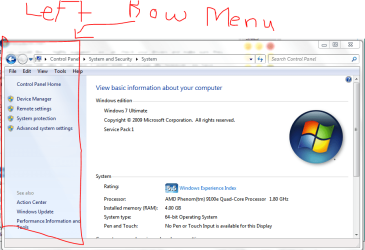
4)Click on "Device Manager" on left row menu(see picture 2)

----
To upload to Seven forums please read this
http://www.sevenforums.com/tutorials/9733-screenshots-files-upload-post-seven-forums.html

Also why are you concern about updating drivers.
 

Attachments

  • TopRowComputer.PNG
    TopRowComputer.PNG
    46.8 KB · Views: 9
  • LeftRowMenu.PNG
    LeftRowMenu.PNG
    48.4 KB · Views: 9

My Computer

Computer type
PC/Desktop
Computer Manufacturer/Model Number
Gateway / Slight Modifications
OS
Windows 8 64 bit PRO
CPU
AMD Phenom X4 9100e
Motherboard
Gateway RS780
Memory
2GB X2 DDR2
Graphics Card(s)
Sapphire HD 6850
Sound Card
Integrated
Monitor(s) Displays
Gateway 19" + Dell 19"
Screen Resolution
1440X900 sometimes 2880 by 900
Hard Drives
WD 80GB
WD 640GB
WD 1,000GB
PSU
Antec BP 550watts
Case
Antec 300
Cooling
Stock Cooling
Keyboard
Saitek Eclipse II
Mouse
Gigabyte GM-M6800
Internet Speed
D: 30Mbps U:4Mbps
Antivirus
Avast version 8
Browser
Internet Explorer ver 10 64 bit
Other Info
This is my work computer.
I have another laptop running Windows 7 64 bit.
Another PC running Windows 8 64 bit pro.
Total of 3
Boot Computer, then,
Try going to search, by start button, and type device manager.
 

My Computer

Computer type
PC/Desktop
Computer Manufacturer/Model Number
Dell XPS 420
OS
Windows 10, Home Clean Install
CPU
Intel Core2 processsor Q8200(2.33Ghz 1333FSB) Quad Core Tech
Motherboard
Dell
Memory
6 gb
Graphics Card(s)
ATI Radeon 256MB HD3650
Sound Card
Intergrated 7.1 Channel Audio
Monitor(s) Displays
Dell SP2009W 20"
Hard Drives
640 GB Serial ATA Hard drive
Cooling
Fan
Keyboard
Dell USB Keyboard
Mouse
Dell Premium Optical USB
Internet Speed
DSL 2.85
I have Computer>Manage>Device Manager, Start>run>devmgtm.msc...I haev done everything known to man kind and I have done it all in safemode as well. and still nothing, I have been reading forums for an hour now, doing everything suggested and still nothing.
 

My Computer

OS
Windows 7

My Computer

Computer type
PC/Desktop
Computer Manufacturer/Model Number
Gateway / Slight Modifications
OS
Windows 8 64 bit PRO
CPU
AMD Phenom X4 9100e
Motherboard
Gateway RS780
Memory
2GB X2 DDR2
Graphics Card(s)
Sapphire HD 6850
Sound Card
Integrated
Monitor(s) Displays
Gateway 19" + Dell 19"
Screen Resolution
1440X900 sometimes 2880 by 900
Hard Drives
WD 80GB
WD 640GB
WD 1,000GB
PSU
Antec BP 550watts
Case
Antec 300
Cooling
Stock Cooling
Keyboard
Saitek Eclipse II
Mouse
Gigabyte GM-M6800
Internet Speed
D: 30Mbps U:4Mbps
Antivirus
Avast version 8
Browser
Internet Explorer ver 10 64 bit
Other Info
This is my work computer.
I have another laptop running Windows 7 64 bit.
Another PC running Windows 8 64 bit pro.
Total of 3
the only other thing this laptop is doing is.....RunDLL Error on Startup "C;\ProgramData\JavatrayNotification.dll" and the Wireless is not working properly...thats why I went to the device manager and found it wouldnt pull up either.
 

My Computer

OS
Windows 7
Please run the System File Checker, and post back results.
Uninstall anything Java, and reinstall if you use it, java.com: Java + You
 

My Computer

Computer type
PC/Desktop
Computer Manufacturer/Model Number
Gateway / Slight Modifications
OS
Windows 8 64 bit PRO
CPU
AMD Phenom X4 9100e
Motherboard
Gateway RS780
Memory
2GB X2 DDR2
Graphics Card(s)
Sapphire HD 6850
Sound Card
Integrated
Monitor(s) Displays
Gateway 19" + Dell 19"
Screen Resolution
1440X900 sometimes 2880 by 900
Hard Drives
WD 80GB
WD 640GB
WD 1,000GB
PSU
Antec BP 550watts
Case
Antec 300
Cooling
Stock Cooling
Keyboard
Saitek Eclipse II
Mouse
Gigabyte GM-M6800
Internet Speed
D: 30Mbps U:4Mbps
Antivirus
Avast version 8
Browser
Internet Explorer ver 10 64 bit
Other Info
This is my work computer.
I have another laptop running Windows 7 64 bit.
Another PC running Windows 8 64 bit pro.
Total of 3
Back
Top