
"Device in Use" No Sound From Speakers.

FurqanHanif

New member
Local time
6:45 AM
Messages
26
Location
Pakistan
i played an Audio File But No Sound coming From Speakers , i test the Speaker , but everyTime i test the Speaker i Get " Device in USE " Error. Some One help me to Fix This.
My Windows and All Drivers are Up-to-date. (IDT High Definition Audio).
I tried every available solution on Google but No help.
Someone help me to identify which service/ program etc conflicting with my Audio Driver and causing This Issue... :(
Please Reply Soon.
Thanks in Advance...
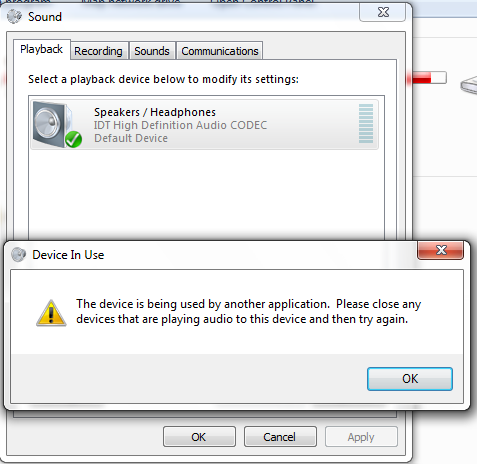
Ih9pHEX.png
 

My Computer My Computer

At a glance

Windows 7 Professional 32bitIntel B9502GBIntel HD Graphics
Computer type
Laptop
Computer Manufacturer/Model Number
Dell
OS
Windows 7 Professional 32bit
CPU
Intel B950
Motherboard
Intel HM67
Memory
2GB
Graphics Card(s)
Intel HD Graphics
Sound Card
IDT High Definition Audio Controller
Screen Resolution
1366x768
Hard Drives
Western Digital (WD5000LPVX)
Keyboard
Dell Keyboard
Mouse
Dell TouchPad
Internet Speed
4Mb Broadband Connection
Antivirus
Microsoft Security Essentials
Browser
Chrome/Firefox
AnyOne ???? :(
 

My Computer My Computer

At a glance

Windows 7 Professional 32bitIntel B9502GBIntel HD Graphics
Computer type
Laptop
Computer Manufacturer/Model Number
Dell
OS
Windows 7 Professional 32bit
CPU
Intel B950
Motherboard
Intel HM67
Memory
2GB
Graphics Card(s)
Intel HD Graphics
Sound Card
IDT High Definition Audio Controller
Screen Resolution
1366x768
Hard Drives
Western Digital (WD5000LPVX)
Keyboard
Dell Keyboard
Mouse
Dell TouchPad
Internet Speed
4Mb Broadband Connection
Antivirus
Microsoft Security Essentials
Browser
Chrome/Firefox
What programs, that may use audio, do you have running? What is in the Notification area (lower right) such as Skype, etc?
 

My Computer My Computer

At a glance

Windows 10 64 bitIntel i7 6700K16GB Corsair DominatorIntel CPU Graphics
Computer type
PC/Desktop
Computer Manufacturer/Model Number
My Own Build
OS
Windows 10 64 bit
CPU
Intel i7 6700K
Motherboard
ASUS ROG Maximus VIII Hero
Memory
16GB Corsair Dominator
Graphics Card(s)
Intel CPU Graphics
Sound Card
RealTek
Monitor(s) Displays
27" Dell S2719dgf
Screen Resolution
2560X1440
Hard Drives
1 TB Samsung 850 EVO SSD for Win 10 Pro
500GB Samsung 850 EVO SSD for Win 10 Insider
2 TB drive for backup
PSU
EVGA Supernova 750G2
Case
BeQuiet Silent Base 600
Cooling
Deepcool Captain 120EX
Keyboard
Microsoft Wireless 2000
Mouse
Microsoft wireless
Internet Speed
100 MB/sec (Cable)
Antivirus
Microsoft Defender and Malwarebytes
Browser
Edge/Firefox
Other Info
Cakewalk (Sonar) by BandLab and Studio One 4.1 Pro recording studio software. MOTU 896Mk3 Hybrid recording interface, Frontier Tranzport wireless control unit, Behringer X-Touch Control Surface.
Five USB connected optical drives for CD Audio production using Nero BurningROM
Their is No Program Running which is Using Audio .... :( But Sometime it Works Fine ( and i run VLC , Skype and Games at the same Time , no Issue). But Sometimes Not a Single Program Works and i get Device in Use issue... :(
 

My Computer My Computer

At a glance

Windows 7 Professional 32bitIntel B9502GBIntel HD Graphics
Computer type
Laptop
Computer Manufacturer/Model Number
Dell
OS
Windows 7 Professional 32bit
CPU
Intel B950
Motherboard
Intel HM67
Memory
2GB
Graphics Card(s)
Intel HD Graphics
Sound Card
IDT High Definition Audio Controller
Screen Resolution
1366x768
Hard Drives
Western Digital (WD5000LPVX)
Keyboard
Dell Keyboard
Mouse
Dell TouchPad
Internet Speed
4Mb Broadband Connection
Antivirus
Microsoft Security Essentials
Browser
Chrome/Firefox
Recycle the sound device. If there are any Windows corruptions this will fix it.
Go to the Device Manager, RIGHT click on the IDT sound entry and then LEFT click "Uninstall". DO NOT uninstall the driver. Restart the PC and when Windows starts it will detect and reinstall the IDT sound.
 

My Computer My Computer

At a glance

Windows 10 64 bitIntel i7 6700K16GB Corsair DominatorIntel CPU Graphics
Computer type
PC/Desktop
Computer Manufacturer/Model Number
My Own Build
OS
Windows 10 64 bit
CPU
Intel i7 6700K
Motherboard
ASUS ROG Maximus VIII Hero
Memory
16GB Corsair Dominator
Graphics Card(s)
Intel CPU Graphics
Sound Card
RealTek
Monitor(s) Displays
27" Dell S2719dgf
Screen Resolution
2560X1440
Hard Drives
1 TB Samsung 850 EVO SSD for Win 10 Pro
500GB Samsung 850 EVO SSD for Win 10 Insider
2 TB drive for backup
PSU
EVGA Supernova 750G2
Case
BeQuiet Silent Base 600
Cooling
Deepcool Captain 120EX
Keyboard
Microsoft Wireless 2000
Mouse
Microsoft wireless
Internet Speed
100 MB/sec (Cable)
Antivirus
Microsoft Defender and Malwarebytes
Browser
Edge/Firefox
Other Info
Cakewalk (Sonar) by BandLab and Studio One 4.1 Pro recording studio software. MOTU 896Mk3 Hybrid recording interface, Frontier Tranzport wireless control unit, Behringer X-Touch Control Surface.
Five USB connected optical drives for CD Audio production using Nero BurningROM
Tried , and it Fix the Sound Temporary , again after some restarts Same issue ... :cry:
 

My Computer My Computer

At a glance

Windows 7 Professional 32bitIntel B9502GBIntel HD Graphics
Computer type
Laptop
Computer Manufacturer/Model Number
Dell
OS
Windows 7 Professional 32bit
CPU
Intel B950
Motherboard
Intel HM67
Memory
2GB
Graphics Card(s)
Intel HD Graphics
Sound Card
IDT High Definition Audio Controller
Screen Resolution
1366x768
Hard Drives
Western Digital (WD5000LPVX)
Keyboard
Dell Keyboard
Mouse
Dell TouchPad
Internet Speed
4Mb Broadband Connection
Antivirus
Microsoft Security Essentials
Browser
Chrome/Firefox
Look at the Task Manager, may find the program that is causing it listed.

Example:
 

Attachments

  • Capture.JPG
    Capture.JPG
    48.1 KB · Views: 25

My Computer My Computer

At a glance

Windows 10 64 bitIntel i7 6700K16GB Corsair DominatorIntel CPU Graphics
Computer type
PC/Desktop
Computer Manufacturer/Model Number
My Own Build
OS
Windows 10 64 bit
CPU
Intel i7 6700K
Motherboard
ASUS ROG Maximus VIII Hero
Memory
16GB Corsair Dominator
Graphics Card(s)
Intel CPU Graphics
Sound Card
RealTek
Monitor(s) Displays
27" Dell S2719dgf
Screen Resolution
2560X1440
Hard Drives
1 TB Samsung 850 EVO SSD for Win 10 Pro
500GB Samsung 850 EVO SSD for Win 10 Insider
2 TB drive for backup
PSU
EVGA Supernova 750G2
Case
BeQuiet Silent Base 600
Cooling
Deepcool Captain 120EX
Keyboard
Microsoft Wireless 2000
Mouse
Microsoft wireless
Internet Speed
100 MB/sec (Cable)
Antivirus
Microsoft Defender and Malwarebytes
Browser
Edge/Firefox
Other Info
Cakewalk (Sonar) by BandLab and Studio One 4.1 Pro recording studio software. MOTU 896Mk3 Hybrid recording interface, Frontier Tranzport wireless control unit, Behringer X-Touch Control Surface.
Five USB connected optical drives for CD Audio production using Nero BurningROM
This solution worked for me.

I have had this problem on a Dell Latitude, and I finally found a solution that worked for me. In the Control Panel, in Hardware and Sound, there is an IDT Audio Control Panel. In that panel, I unchecked "Enable Power Management." I rebooted and the problem disappeared and has not returned.
 

My Computer My Computer

At a glance

Windows 7 Enterprise
Computer type
PC/Desktop
OS
Windows 7 Enterprise
I have had this problem on a Dell Latitude, and I finally found a solution that worked for me. In the Control Panel, in Hardware and Sound, there is an IDT Audio Control Panel. In that panel, I unchecked "Enable Power Management." I rebooted and the problem disappeared and has not returned.
Thank you VERY much for posting this! Your fix has resolved quite a frustrating ongoing random issue for us. Thank you!
 

My Computer My Computer

At a glance

Windows 7 w/ XP VM
OS
Windows 7 w/ XP VM
Back
Top