
Device Installation Settings

How to Change Device Driver and Information Installation Settings in Windows 7 and Windows 8


   Information
This will show you how to allow or change how Windows is to automatically or not download recommended drivers and detailed information and icons for your devices through Windows Update.

   Note
Windows 7 and Windows 8 can find and download two kinds of updates for devices connected to your computer:

  • Drivers
    A driver is software that allows your computer to communicate with hardware devices. Without drivers, the devices you connect to your computer—for example, a mouse or external hard drive—won't work properly. Windows can automatically check if there are drivers available for new devices you connect to your computer.
    For hardware that you've connected to your computer in the past, updated drivers might become available at a later date; but those drivers aren't installed automatically. To install these optional updates, go to Windows Update in Control Panel, check for updates, and then view and install driver updates that are available for your computer.
  • Information
  • Windows can download high-resolution icons for many hardware devices that you connect to your computer, along with detailed information about them, such as product name, manufacturer, and model number—even detailed information about the sync capabilities of a device. This is much more detailed device information than was previously available in earlier versions of Windows. These details can make it easier for you to distinguish between similar devices that are connected to your computer, such as if you have several different portable music players and mobile phones. Additionally, they make it easier to check the capabilities of a device.
    • Updated icons are displayed in the Devices and Printers folder, making it easier to see all your devices at a glance and find the one you're looking for.
    • Windows can automatically download this detailed information about your devices if you turn on Recommended updates.


Here's How:

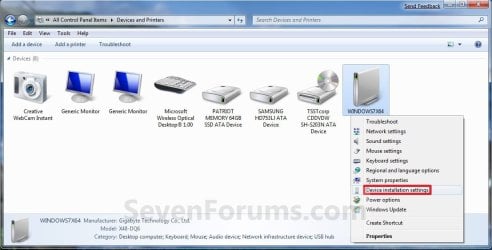
1. Open Devices and Printers, and right click or press and hold on the Computer icon with your computer name on it, then click/tap on Device installation settings. (see screenshot below) Devices_Printers.jpg2. Do step 3, 4, or 5 for how you would like to set the settings.

3. To Allow Device Drivers and Information to be Installed Automatically
NOTE: This will allow both the device drivers and information to be installed automatically by Windows 7 through Windows Update. A) Select (dot) Yes, do this automatically. (see screenshot below step 6)

B) You will need to select Install updates automatically, and check the Give me recommended updates the same way I receive important updates in the Windows Update settings. (see screenshot below) WU_Settings-Devices.jpg
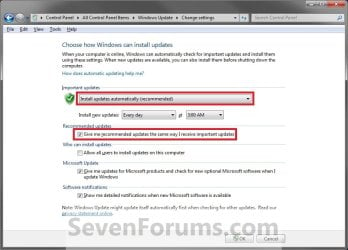
C) Click/tap on OK, and go to step 6 below.4. To Not Allow Device Drivers and Information to be Installed
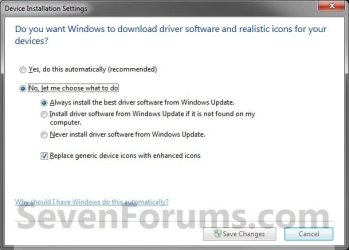
NOTE: This will not allow both the device drivers and information to be installed automatically by Windows 7 through Windows Update. You can still choose to install the driver updates manually by reviewing available updates when you check for updates in Windows Update. A) Select (dot) No, let me choose what to do. (see screenshot below step 6)

B) Select (dot) Never install driver software from Windows Update. (see screenshot below step 6)

C) Uncheck the Replace generic device icons with enhanced icons box. (see screenshot below step 6)

D) Go to step 6 below.
5. To Choose What to Install Instead A) Select (dot) No, let me choose what to do. (see screenshot below step 6)

B) Select (dot) either the Always install the best driver software from Windows Update or Install driver software from Windows Update if it is not found on my computer settings. (see screenshot below step 6)
NOTE: If you want the device information and new icons downloaded for Devices and Printers.

C) Check the Replace generic device icons with enhanced icons box if you want high def icons for devices in Devices and Printers, or uncheck if not.

D) You will need to turn on Windows Updates and check Give me recommended updates the same way I receive important updates in the Windows Update settings. (see screenshot below) WU_Settings-Devices.jpg

E) Click/tap on OK, and go to step 6 below.
6. Click/tap on the Save Changes button. (see screenshot below) Settings.jpg
7. If prompted by UAC, then click/tap on Yes.

8. Close the Device and Printers window. (see screenshot below step 2)


That's it,
Shawn


Last edited:
Hello Brink :), got this device installation settings short-cut on my desktop from your ( very good ) instructions.

I want to myself (manually ) install new drivers for sound and have already for months my updates on "check for updates but let me chose".

Can I now just go to any manufacturer ( needs to be good with Windows 7 sp 1 home service and my Inspiron laptop ) and install ?

Will that automatically remove the old ( 2009 ) sound driver ? Hope you get this, it's an old thread from juni 2015.
 

My Computer

Computer type
Laptop
Computer Manufacturer/Model Number
HP Presario CQ70
OS
windows 7 professional 64 bit
CPU
CPU Genuine Intel (R) CPU [email protected]
Motherboard
APCI x 64 - based PC
Memory
RAM 3 GB
Graphics Card(s)
Toshiba MK2555 GSX ATA
Sound Card
Conexant High Def Smart Audio 221,
Monitor(s) Displays
monitor Generic PnP.
Screen Resolution
?
Hard Drives
HDAUDIO Soft Data Fax Modern with smart CP
PSU
?
Keyboard
Standard PS/2 keyboard
Mouse
PS/2 Compatible mouse
Antivirus
Hyjackthis and Superanti spyware, Mamb Ccleaner
Browser
Google Chrome
Hello Thelma, :)

Yes, you could go to your device manufacturer's support website to download the latest driver for that specific model number.

For Dell Inspiron M501R:

Product Support | Dell US
 

My Computer

Computer type
PC/Desktop
Computer Manufacturer/Model Number
Self built custom
OS
64-bit Windows 11 Pro for Workstations
CPU
Intel i7-8700K OC'd to 5 GHz
Motherboard
ASUS ROG Maximus XI Formula Z390
Memory
64 GB (4x16GB) G.SKILL TridentZ RGB DDR4 3600 MHz
Graphics Card(s)
ASUS ROG-STRIX-GTX1080TI-O11G-GAMING
Sound Card
Integrated
Monitor(s) Displays
2 x Samsung Odyssey G7 27"
Screen Resolution
2560x1440
Hard Drives
1TB Samsung 990 PRO M.2,
4TB Samsung 990 PRO PRO M.2,
TerraMaster F8 SSD Plus NAS
PSU
Seasonic Prime Titanium 850W
Case
Thermaltake Core P3
Cooling
Corsair Hydro H115i
Keyboard
Logitech wireless K800
Mouse
Logitech MX Master 4
Internet Speed
2 Gb/s Download and 100 Mb/s Upload
Antivirus
Malwarebyte Anti-Malware Premium
Browser
Google Chrome
Other Info
Logitech Z625 speaker system,
Logitech BRIO 4K Pro webcam,
HP Color LaserJet Pro MFP M477fdn,
APC SMART-UPS RT 1000 XL - SURT1000XLI,
Galaxy S23 Plus phone
Thanks a lot Brink :), will have a go tomorrow !

Cheers,
Thelma

PS :Thanks for the link ;)
 

My Computer

Computer type
Laptop
Computer Manufacturer/Model Number
HP Presario CQ70
OS
windows 7 professional 64 bit
CPU
CPU Genuine Intel (R) CPU [email protected]
Motherboard
APCI x 64 - based PC
Memory
RAM 3 GB
Graphics Card(s)
Toshiba MK2555 GSX ATA
Sound Card
Conexant High Def Smart Audio 221,
Monitor(s) Displays
monitor Generic PnP.
Screen Resolution
?
Hard Drives
HDAUDIO Soft Data Fax Modern with smart CP
PSU
?
Keyboard
Standard PS/2 keyboard
Mouse
PS/2 Compatible mouse
Antivirus
Hyjackthis and Superanti spyware, Mamb Ccleaner
Browser
Google Chrome
You're most welcome. :)
 

My Computer

Computer type
PC/Desktop
Computer Manufacturer/Model Number
Self built custom
OS
64-bit Windows 11 Pro for Workstations
CPU
Intel i7-8700K OC'd to 5 GHz
Motherboard
ASUS ROG Maximus XI Formula Z390
Memory
64 GB (4x16GB) G.SKILL TridentZ RGB DDR4 3600 MHz
Graphics Card(s)
ASUS ROG-STRIX-GTX1080TI-O11G-GAMING
Sound Card
Integrated
Monitor(s) Displays
2 x Samsung Odyssey G7 27"
Screen Resolution
2560x1440
Hard Drives
1TB Samsung 990 PRO M.2,
4TB Samsung 990 PRO PRO M.2,
TerraMaster F8 SSD Plus NAS
PSU
Seasonic Prime Titanium 850W
Case
Thermaltake Core P3
Cooling
Corsair Hydro H115i
Keyboard
Logitech wireless K800
Mouse
Logitech MX Master 4
Internet Speed
2 Gb/s Download and 100 Mb/s Upload
Antivirus
Malwarebyte Anti-Malware Premium
Browser
Google Chrome
Other Info
Logitech Z625 speaker system,
Logitech BRIO 4K Pro webcam,
HP Color LaserJet Pro MFP M477fdn,
APC SMART-UPS RT 1000 XL - SURT1000XLI,
Galaxy S23 Plus phone
Does anyone know where the executable is for the Device Installation Settings pop-up being talked about in this thread, the one that asks "Do you want Windows to download driver software etc, etc, etc." as shown in this image :


(
can't get the image to show no matter what I do;
please just take a moment to look here, if you would, thx :

https://postimg.org/image/6m0r4f81d/
)
6m0r4f81d


… so that I can create a shortcut to it and invoke it directly? I know that this pop-up does in fact have its own executable, meaning it isn't necessary to go through Devices and Printers. I have a folder that contains direct shortcuts to quite a few Windows settings like this one, and would like to add this one.
 

My Computer

OS
Windows® 7 (64-bit)
CPU
intel® Core™ i5-4690 @ 3.50 GHz
Motherboard
GIGABYTE™ H97-D3H
Memory
8 GB DDR3

My Computer

Computer type
PC/Desktop
Computer Manufacturer/Model Number
Self built custom
OS
64-bit Windows 11 Pro for Workstations
CPU
Intel i7-8700K OC'd to 5 GHz
Motherboard
ASUS ROG Maximus XI Formula Z390
Memory
64 GB (4x16GB) G.SKILL TridentZ RGB DDR4 3600 MHz
Graphics Card(s)
ASUS ROG-STRIX-GTX1080TI-O11G-GAMING
Sound Card
Integrated
Monitor(s) Displays
2 x Samsung Odyssey G7 27"
Screen Resolution
2560x1440
Hard Drives
1TB Samsung 990 PRO M.2,
4TB Samsung 990 PRO PRO M.2,
TerraMaster F8 SSD Plus NAS
PSU
Seasonic Prime Titanium 850W
Case
Thermaltake Core P3
Cooling
Corsair Hydro H115i
Keyboard
Logitech wireless K800
Mouse
Logitech MX Master 4
Internet Speed
2 Gb/s Download and 100 Mb/s Upload
Antivirus
Malwarebyte Anti-Malware Premium
Browser
Google Chrome
Other Info
Logitech Z625 speaker system,
Logitech BRIO 4K Pro webcam,
HP Color LaserJet Pro MFP M477fdn,
APC SMART-UPS RT 1000 XL - SURT1000XLI,
Galaxy S23 Plus phone
You're most welcome. :party:
 

My Computer

Computer type
PC/Desktop
Computer Manufacturer/Model Number
Self built custom
OS
64-bit Windows 11 Pro for Workstations
CPU
Intel i7-8700K OC'd to 5 GHz
Motherboard
ASUS ROG Maximus XI Formula Z390
Memory
64 GB (4x16GB) G.SKILL TridentZ RGB DDR4 3600 MHz
Graphics Card(s)
ASUS ROG-STRIX-GTX1080TI-O11G-GAMING
Sound Card
Integrated
Monitor(s) Displays
2 x Samsung Odyssey G7 27"
Screen Resolution
2560x1440
Hard Drives
1TB Samsung 990 PRO M.2,
4TB Samsung 990 PRO PRO M.2,
TerraMaster F8 SSD Plus NAS
PSU
Seasonic Prime Titanium 850W
Case
Thermaltake Core P3
Cooling
Corsair Hydro H115i
Keyboard
Logitech wireless K800
Mouse
Logitech MX Master 4
Internet Speed
2 Gb/s Download and 100 Mb/s Upload
Antivirus
Malwarebyte Anti-Malware Premium
Browser
Google Chrome
Other Info
Logitech Z625 speaker system,
Logitech BRIO 4K Pro webcam,
HP Color LaserJet Pro MFP M477fdn,
APC SMART-UPS RT 1000 XL - SURT1000XLI,
Galaxy S23 Plus phone
You're most welcome. :party:

Works great, love it. I'll invoke it a few more times to get my fill, then move on to something else ;).
 

My Computer

OS
Windows® 7 (64-bit)
CPU
intel® Core™ i5-4690 @ 3.50 GHz
Motherboard
GIGABYTE™ H97-D3H
Memory
8 GB DDR3
Back
Top