Solved Device manager "Changed" my video card

CrimsonFox

New member
Local time
8:51 AM
Messages
14
I got this laptop several years ago from costco. The Dell Inspiron N5010

It listed a nice video card. When it was delivered I think they said they were out of that vidcard but gave me another equivalent. I forget the details now tho.

For the longest time, the video card driver was listed as "ATI Radeon HD 4650"

Just recently I had some BSOD issues of the Display timeout type. One of the things I tried to fix the issue was to check for device driver. But windows said that everything was fine and updated.

One of the last things I tried with it was to disable the video card device driver (Radeon 4650)
Then Try looking for updates again.

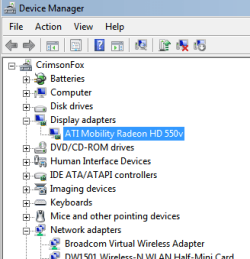
When I did this, the system CHAGED DRIVERS on me. It changed to Radeon 550v. This sounded VERY familiar! Like I think this was the original card that was supposed to be there. Or else it was the one they switched to. THe details are cloudy but I remember this name.

So which card do I have? DO I trust what WIndows just did?
 

My Computer

Computer type
Laptop
Computer Manufacturer/Model Number
Dell
OS
Windows 7 Home Premium x64
CPU
i5
Motherboard
AMD
Memory
8 GB
Graphics Card(s)
Radeon 550v or Radeon HD 4650?
Antivirus
Malwarebytes
Browser
Chrome
Why would you disable the Display device to find another driver? You'd want to Update driver to do that, or uninstall at the most to force a reinstall of the existing driver.

Re-enable the device you disabled and now what devices are listed under Display? From view Tab in Device Manager, unhide any devices.

Enable Automatically deliver drivers via Windows Update (Step 3) then check for Updates, install all Important and Optional Updates except Bing. Look for drivers but also install all patches because these may be needed to make your devices work correctly.

To confirm the actual device make/model trace it's Hardware Identification. Once you have the true make/model device, go to your PC's Support Download webpage to look for the latest version of that driver in case it is modded by manufacturer for you laptop. If not, you can try the device maker's latest driver from its Support Downloads webpage.
 
I didn't disable it to find it. I disabled it because I was having Blue Screens of death that seemed to be video related and I was trying to debug.

Granted I haven't had BSOD's since the computer replaced the driver.

Just freezes though. However there was a big windows update that happened around the same time too so not positive what fixed the BSOD problem.
 

My Computer

Computer type
Laptop
Computer Manufacturer/Model Number
Dell
OS
Windows 7 Home Premium x64
CPU
i5
Motherboard
AMD
Memory
8 GB
Graphics Card(s)
Radeon 550v or Radeon HD 4650?
Antivirus
Malwarebytes
Browser
Chrome
And when Windows changed the driver, it DID enable the new one.
 

My Computer

Computer type
Laptop
Computer Manufacturer/Model Number
Dell
OS
Windows 7 Home Premium x64
CPU
i5
Motherboard
AMD
Memory
8 GB
Graphics Card(s)
Radeon 550v or Radeon HD 4650?
Antivirus
Malwarebytes
Browser
Chrome
You're lucky you have any display at all, if you actually disabled the only display driver.
 
wow that hardward finder is amazing! thanks for that!

Okay
what is says:
The vendor is Advanced Micro Devices, Inc.

Chip description is ATI Mobility Radeon HD 4650

So that IS what is in there and the 550v is what was USUALLY in this package but they gave me a different one.
 

My Computer

Computer type
Laptop
Computer Manufacturer/Model Number
Dell
OS
Windows 7 Home Premium x64
CPU
i5
Motherboard
AMD
Memory
8 GB
Graphics Card(s)
Radeon 550v or Radeon HD 4650?
Antivirus
Malwarebytes
Browser
Chrome
You're lucky you have any display at all, if you actually disabled the only display driver.

there's like a default driver isn't there?
I thought this was just for the videocard itself.
 

My Computer

Computer type
Laptop
Computer Manufacturer/Model Number
Dell
OS
Windows 7 Home Premium x64
CPU
i5
Motherboard
AMD
Memory
8 GB
Graphics Card(s)
Radeon 550v or Radeon HD 4650?
Antivirus
Malwarebytes
Browser
Chrome
dispdev.png
 

My Computer

Computer type
Laptop
Computer Manufacturer/Model Number
Dell
OS
Windows 7 Home Premium x64
CPU
i5
Motherboard
AMD
Memory
8 GB
Graphics Card(s)
Radeon 550v or Radeon HD 4650?
Antivirus
Malwarebytes
Browser
Chrome

My Computer

Computer type
Laptop
Computer Manufacturer/Model Number
Dell
OS
Windows 7 Home Premium x64
CPU
i5
Motherboard
AMD
Memory
8 GB
Graphics Card(s)
Radeon 550v or Radeon HD 4650?
Antivirus
Malwarebytes
Browser
Chrome
Uninstall the display driver if you have confirmed it is incorrect, in Control Panel>Programs and Device Manager including its software.

Then enable Automatically deliver drivers via Windows Update (Step 3) to Check for Updates, install all Important and Optional except Bing.

Are any drivers delivered?

If not then after Updates are installed and you check for more, once all are installed go to the Dell Support Downloads webpage for your tag number to see if they have loaded the driver for your display model there.

If no driver is provided yet, then try the one for your card here: AMD Radeonâ
 
okay sweet. It worked. I uninstalled the 500v driver and my screen shrunk to a small box which was a little worrisome.

But it then did its thing installing other device drivers.

When it finished, the 4650 driver was back again.

Things look good

I don't know why it did that to begin with. I'm thinking it was a dell settings thing.
This computer package was SUPPOSE to have that other card in it.
Do you suppose it's in the bios somewhere as having the other card?
or it's a dell program setting?
 

My Computer

Computer type
Laptop
Computer Manufacturer/Model Number
Dell
OS
Windows 7 Home Premium x64
CPU
i5
Motherboard
AMD
Memory
8 GB
Graphics Card(s)
Radeon 550v or Radeon HD 4650?
Antivirus
Malwarebytes
Browser
Chrome
You can keep your Updates at Automatic but check Optional weekly to see if it shows up to hide it, install all others.

If it happens again, change Updates to Manual and wait til it shows up to hide it before setting them back to Auto.

I would not have any Dell bloatware running. Turn it all off at startup as shown in Clean Up Factory Bloatware. Those steps can also mitigate somewhat the diminished performance which every factory install brings along.

The Factory install is also the worst install of Win7 one can have, so I'd strongly consider a Clean Reinstall Windows 7 to have the very best. The tutorial has helped a million consumers get a perfect install without a single complaint, and no returns with problems by those who stick with the tools and methods given.
 
Well the good thing is that ever since I made this change to the video driver and reset it back, the freezes have stopped. yay.
crossing my fingers and knocking on wood and all that.

I don't run the bloatware anymore.
If there is something specific you are talking about let me know. thanks for your assistance.
 

My Computer

Computer type
Laptop
Computer Manufacturer/Model Number
Dell
OS
Windows 7 Home Premium x64
CPU
i5
Motherboard
AMD
Memory
8 GB
Graphics Card(s)
Radeon 550v or Radeon HD 4650?
Antivirus
Malwarebytes
Browser
Chrome
Back
Top