Solved Device Manager doesn't have INITIALIZE on the drop-down

jlumbtx

New member
Member
Local time
1:17 PM
Messages
51
I'm installing a new hard drive. In Device Manager I right click the new hard drive and the drop down menu says:

Update Driver Software
Disable
Uninstall

Scan for hardware changes
Properties

Nowhere do I see INITIALIZE or FORMAT. What am I doing wrong?

John
 

My Computer

Computer Manufacturer/Model Number
custom
OS
Win7 Ultimate x64
CPU
AMD 4 core
Motherboard
Gigabyte GA- 890GPA-UD3H
Memory
16 gigabytes
Graphics Card(s)
EVGA/NVIDIA GT 640
Sound Card
integral
Monitor(s) Displays
ViewSonic 24"
Hard Drives
2 WD
PSU
500 watts
Case
Gigabyte
Cooling
Zalman
Keyboard
Logitech
Mouse
Logitech
You want "Disk Manager" not Device manager.
 

My Computer

Computer type
PC/Desktop
Computer Manufacturer/Model Number
Self Built
OS
Win 10 Pro x64
CPU
Intel I5-2500K @3.3GHz
Motherboard
Asrock P67 Extreme4
Memory
16GB G.Skill Ripjaws X (4x4GB)
Graphics Card(s)
EVGA GeForce 750 Ti SC 2GB
Sound Card
ASUS Xonar DG 5.1 Channels 24-bit 96KHz PCI Interface Sound
Monitor(s) Displays
auria eq2367
Screen Resolution
1920 x 1080
Hard Drives
250GB Samsung 850 EVO SSD
1TB WD Blue
1TB Hitachi
PSU
SeaSonic X 650W 80 Plus Gold
Case
Corsair Obsidian 750D
Cooling
Corsair H60, Three 140mm case fans
Keyboard
Logitech Wireless Keyboard K520
Mouse
Logitech Wireless Mouse M310
Internet Speed
Wave Broadband ~ 100 dn 5 up
Antivirus
Windows Defender, Malwarebytes Premium
Browser
Edge, IE11, Chrome
Other Info
Laptop specs: HP g7-1365dx /
CPU: AMD A6-3420M APU with Radeon(tm) HD Graphics /
RAM: Crucial 8Gb (2x4Gb) /
SSD: Crucial M4-CT128M4SSD2 ATA Device/ FW 000F /
GFX: AMD Radeon HD 6520G /
OS: Windows 10 Pro x64
OK> I found that.
Now, when I try to Format I get a pop-up that says:
This is the active partition on this disc. All the data on the partition will be lost.
Are you sure you want to format this partition?

I click YES as there is no data on the disk yet.
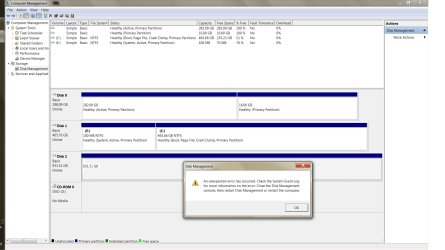
I get a pop-up:

An unexpected error has occurred. Check the System Event
Log for more information on the error. Close the disk management console,
then restart Disk Management or restart the computer.

I looked at the Event Log but can't find anything that looks like "Failure to Format".

I tried something else and I get a popup that says:

The operation failed to complete because the Disk Management console view
is not up to date. Refresh the view by using the refresh task. Restart... etc.

I have restarted the Disk Manager twice, restarted the computer twice.
What next? I don't see any button labeled Refresh.

Also, HELP says I should be seeing a format wizard, but I am not.
 

My Computer

Computer Manufacturer/Model Number
custom
OS
Win7 Ultimate x64
CPU
AMD 4 core
Motherboard
Gigabyte GA- 890GPA-UD3H
Memory
16 gigabytes
Graphics Card(s)
EVGA/NVIDIA GT 640
Sound Card
integral
Monitor(s) Displays
ViewSonic 24"
Hard Drives
2 WD
PSU
500 watts
Case
Gigabyte
Cooling
Zalman
Keyboard
Logitech
Mouse
Logitech
Disk Manager
 

My Computer

Computer Manufacturer/Model Number
custom
OS
Win7 Ultimate x64
CPU
AMD 4 core
Motherboard
Gigabyte GA- 890GPA-UD3H
Memory
16 gigabytes
Graphics Card(s)
EVGA/NVIDIA GT 640
Sound Card
integral
Monitor(s) Displays
ViewSonic 24"
Hard Drives
2 WD
PSU
500 watts
Case
Gigabyte
Cooling
Zalman
Keyboard
Logitech
Mouse
Logitech

My Computer

Computer type
PC/Desktop
Computer Manufacturer/Model Number
Self Built
OS
Win 10 Pro x64
CPU
Intel I5-2500K @3.3GHz
Motherboard
Asrock P67 Extreme4
Memory
16GB G.Skill Ripjaws X (4x4GB)
Graphics Card(s)
EVGA GeForce 750 Ti SC 2GB
Sound Card
ASUS Xonar DG 5.1 Channels 24-bit 96KHz PCI Interface Sound
Monitor(s) Displays
auria eq2367
Screen Resolution
1920 x 1080
Hard Drives
250GB Samsung 850 EVO SSD
1TB WD Blue
1TB Hitachi
PSU
SeaSonic X 650W 80 Plus Gold
Case
Corsair Obsidian 750D
Cooling
Corsair H60, Three 140mm case fans
Keyboard
Logitech Wireless Keyboard K520
Mouse
Logitech Wireless Mouse M310
Internet Speed
Wave Broadband ~ 100 dn 5 up
Antivirus
Windows Defender, Malwarebytes Premium
Browser
Edge, IE11, Chrome
Other Info
Laptop specs: HP g7-1365dx /
CPU: AMD A6-3420M APU with Radeon(tm) HD Graphics /
RAM: Crucial 8Gb (2x4Gb) /
SSD: Crucial M4-CT128M4SSD2 ATA Device/ FW 000F /
GFX: AMD Radeon HD 6520G /
OS: Windows 10 Pro x64
Are you just wanting to install a new Hard Drive, or reinstall Windows on this new Hard Drive.

Can you post a Screen Shot of your Disc Management window. This will show what is what as far as your discs are concerned.

From what you have described it sounds like you are try to format your Operating System disc, which cannot be done from within Windows.
 

My Computer

Computer type
PC/Desktop
Computer Manufacturer/Model Number
Self built using existing case
OS
Windows 7 Home Premium 64 bit sp1
CPU
Intel i5 3570 3.4Ghz Ivy Bridge SKT 1155 quad core
Motherboard
Gigabyte Z77-HD3 SKT 1155 2xSata 3, 4x USB 3.0
Memory
G-Skill Rip Jaws 16Gb (8x2) DDR3 -1600 PC3 12800 CL 10 red
Graphics Card(s)
Gigabyte NVIDIA GT610 1Gb DDR3 810/1200 PCI-E 2.0 Silent
Sound Card
NVIDIA High Definition & Realtech High Definition Audio
Monitor(s) Displays
2 x Philips 226V4L 16:9 aspect ratio
Screen Resolution
1920 x 1080 HD
Hard Drives
Samsung 840 Pro 256gb SSD, SATA 3.
Hitachi Touro Portable 1tb, USB 3.0 HDD used for image b/ups.
PSU
Corsair VS450
Case
Codeng
Cooling
PSU fan & CPU fan
Keyboard
Logitech
Mouse
Logitech Wireless trackball M570
Internet Speed
Wireless 3G. 3mg down & 550kb up.
Antivirus
Bitdefender Internet Security 2020
Browser
Opera (Current Version) & Firefox
Other Info
MS Office 2013 Pro. Davis weather station software. MGE Nova 600 avr UPS.
Screen shot later.
Actually, I'm trying to clone my C drive onto a new hard drive. The new SSHD is in a dock. I can't start the cloning until I get the new drive formatted.

John
 

My Computer

Computer Manufacturer/Model Number
custom
OS
Win7 Ultimate x64
CPU
AMD 4 core
Motherboard
Gigabyte GA- 890GPA-UD3H
Memory
16 gigabytes
Graphics Card(s)
EVGA/NVIDIA GT 640
Sound Card
integral
Monitor(s) Displays
ViewSonic 24"
Hard Drives
2 WD
PSU
500 watts
Case
Gigabyte
Cooling
Zalman
Keyboard
Logitech
Mouse
Logitech
screen shot of disk manager attached. What am I doing wrong?
 

Attachments

  • screen shot.png
    screen shot.png
    61.2 KB · Views: 5

My Computer

Computer Manufacturer/Model Number
custom
OS
Win7 Ultimate x64
CPU
AMD 4 core
Motherboard
Gigabyte GA- 890GPA-UD3H
Memory
16 gigabytes
Graphics Card(s)
EVGA/NVIDIA GT 640
Sound Card
integral
Monitor(s) Displays
ViewSonic 24"
Hard Drives
2 WD
PSU
500 watts
Case
Gigabyte
Cooling
Zalman
Keyboard
Logitech
Mouse
Logitech
How is your Dock connected to your computer?.
 

My Computer

Computer type
PC/Desktop
Computer Manufacturer/Model Number
Self built using existing case
OS
Windows 7 Home Premium 64 bit sp1
CPU
Intel i5 3570 3.4Ghz Ivy Bridge SKT 1155 quad core
Motherboard
Gigabyte Z77-HD3 SKT 1155 2xSata 3, 4x USB 3.0
Memory
G-Skill Rip Jaws 16Gb (8x2) DDR3 -1600 PC3 12800 CL 10 red
Graphics Card(s)
Gigabyte NVIDIA GT610 1Gb DDR3 810/1200 PCI-E 2.0 Silent
Sound Card
NVIDIA High Definition & Realtech High Definition Audio
Monitor(s) Displays
2 x Philips 226V4L 16:9 aspect ratio
Screen Resolution
1920 x 1080 HD
Hard Drives
Samsung 840 Pro 256gb SSD, SATA 3.
Hitachi Touro Portable 1tb, USB 3.0 HDD used for image b/ups.
PSU
Corsair VS450
Case
Codeng
Cooling
PSU fan & CPU fan
Keyboard
Logitech
Mouse
Logitech Wireless trackball M570
Internet Speed
Wireless 3G. 3mg down & 550kb up.
Antivirus
Bitdefender Internet Security 2020
Browser
Opera (Current Version) & Firefox
Other Info
MS Office 2013 Pro. Davis weather station software. MGE Nova 600 avr UPS.
USB. Device Manager sees the hard drive so the connection is OK.
 

My Computer

Computer Manufacturer/Model Number
custom
OS
Win7 Ultimate x64
CPU
AMD 4 core
Motherboard
Gigabyte GA- 890GPA-UD3H
Memory
16 gigabytes
Graphics Card(s)
EVGA/NVIDIA GT 640
Sound Card
integral
Monitor(s) Displays
ViewSonic 24"
Hard Drives
2 WD
PSU
500 watts
Case
Gigabyte
Cooling
Zalman
Keyboard
Logitech
Mouse
Logitech
Try uninstalling it in device manager, let windows reinstall the driver.

Then go back to disk manager.

I guess you tried partition wizard I recommended above?
 

My Computer

Computer type
PC/Desktop
Computer Manufacturer/Model Number
Self Built
OS
Win 10 Pro x64
CPU
Intel I5-2500K @3.3GHz
Motherboard
Asrock P67 Extreme4
Memory
16GB G.Skill Ripjaws X (4x4GB)
Graphics Card(s)
EVGA GeForce 750 Ti SC 2GB
Sound Card
ASUS Xonar DG 5.1 Channels 24-bit 96KHz PCI Interface Sound
Monitor(s) Displays
auria eq2367
Screen Resolution
1920 x 1080
Hard Drives
250GB Samsung 850 EVO SSD
1TB WD Blue
1TB Hitachi
PSU
SeaSonic X 650W 80 Plus Gold
Case
Corsair Obsidian 750D
Cooling
Corsair H60, Three 140mm case fans
Keyboard
Logitech Wireless Keyboard K520
Mouse
Logitech Wireless Mouse M310
Internet Speed
Wave Broadband ~ 100 dn 5 up
Antivirus
Windows Defender, Malwarebytes Premium
Browser
Edge, IE11, Chrome
Other Info
Laptop specs: HP g7-1365dx /
CPU: AMD A6-3420M APU with Radeon(tm) HD Graphics /
RAM: Crucial 8Gb (2x4Gb) /
SSD: Crucial M4-CT128M4SSD2 ATA Device/ FW 000F /
GFX: AMD Radeon HD 6520G /
OS: Windows 10 Pro x64
I have used the Partition wizard suggested and it seems to have worked. I have not installed the new hard drive yet. Disk Manager shows that it contains data.
I'll install it tomorrow.

Thanks for your assistance.
 

My Computer

Computer Manufacturer/Model Number
custom
OS
Win7 Ultimate x64
CPU
AMD 4 core
Motherboard
Gigabyte GA- 890GPA-UD3H
Memory
16 gigabytes
Graphics Card(s)
EVGA/NVIDIA GT 640
Sound Card
integral
Monitor(s) Displays
ViewSonic 24"
Hard Drives
2 WD
PSU
500 watts
Case
Gigabyte
Cooling
Zalman
Keyboard
Logitech
Mouse
Logitech
You're welcome, let us know how it goes.
 

My Computer

Computer type
PC/Desktop
Computer Manufacturer/Model Number
Self Built
OS
Win 10 Pro x64
CPU
Intel I5-2500K @3.3GHz
Motherboard
Asrock P67 Extreme4
Memory
16GB G.Skill Ripjaws X (4x4GB)
Graphics Card(s)
EVGA GeForce 750 Ti SC 2GB
Sound Card
ASUS Xonar DG 5.1 Channels 24-bit 96KHz PCI Interface Sound
Monitor(s) Displays
auria eq2367
Screen Resolution
1920 x 1080
Hard Drives
250GB Samsung 850 EVO SSD
1TB WD Blue
1TB Hitachi
PSU
SeaSonic X 650W 80 Plus Gold
Case
Corsair Obsidian 750D
Cooling
Corsair H60, Three 140mm case fans
Keyboard
Logitech Wireless Keyboard K520
Mouse
Logitech Wireless Mouse M310
Internet Speed
Wave Broadband ~ 100 dn 5 up
Antivirus
Windows Defender, Malwarebytes Premium
Browser
Edge, IE11, Chrome
Other Info
Laptop specs: HP g7-1365dx /
CPU: AMD A6-3420M APU with Radeon(tm) HD Graphics /
RAM: Crucial 8Gb (2x4Gb) /
SSD: Crucial M4-CT128M4SSD2 ATA Device/ FW 000F /
GFX: AMD Radeon HD 6520G /
OS: Windows 10 Pro x64
Back
Top