Device manager

Aurora 1

New member
Local time
3:08 PM
Messages
9
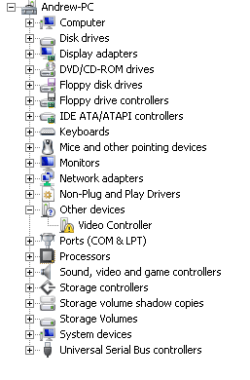
My video controller will not update or install a driver its the only problems im having any ideas (is it motherboard or graphics card drivers)
 
Last edited:

My Computer

Computer Manufacturer/Model Number
Custom built by me
OS
window 7 RC 7100
CPU
Amd 64 3000+
Motherboard
Asus A8v
Memory
2GB
Graphics Card(s)
Ati sapphire 9500 512mb
Sound Card
realtek AC'97 audio for VIA
Monitor(s) Displays
philips 170v (17inch lcd)
Screen Resolution
1024 x 768
Hard Drives
maxtor 6y160p0 ATA
Keyboard
sony ps2 slot
Mouse
cheap ps2
Internet Speed
54mbp wireless
Other Info
Addon GWU190 wireless adapter
device manager

My video controller will not update or install a driver its the only problems im having any ideas (is it motherboard or graphics card drivers)

You might want to try un-installing the driver and then re-installing it

Ken
 

My Computer

Computer Manufacturer/Model Number
HP Pavillion dv-7 1005 Tx
OS
Win 8 Release candidate 8400
CPU
[email protected]
Memory
4 gigs
Graphics Card(s)
Nvidia 9600M
Sound Card
HD built-in
Monitor(s) Displays
17" Wxga
Screen Resolution
1440x900
Cooling
none
Internet Speed
45Mb down 5Mb up
but it said there is no driver installed
 

My Computer

Computer Manufacturer/Model Number
Custom built by me
OS
window 7 RC 7100
CPU
Amd 64 3000+
Motherboard
Asus A8v
Memory
2GB
Graphics Card(s)
Ati sapphire 9500 512mb
Sound Card
realtek AC'97 audio for VIA
Monitor(s) Displays
philips 170v (17inch lcd)
Screen Resolution
1024 x 768
Hard Drives
maxtor 6y160p0 ATA
Keyboard
sony ps2 slot
Mouse
cheap ps2
Internet Speed
54mbp wireless
Other Info
Addon GWU190 wireless adapter
device manager

My video controller will not update or install a driver its the only problems im having any ideas (is it motherboard or graphics card drivers)

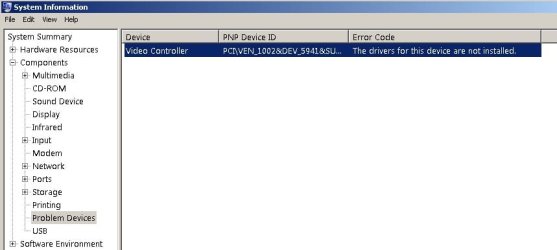
Could you send us a snip of device manager? You can also type msinfo32 into search and clip the components tab. if you need help on how to there are tutorials or I could help

In search of a solution

Ken
 

My Computer

Computer Manufacturer/Model Number
HP Pavillion dv-7 1005 Tx
OS
Win 8 Release candidate 8400
CPU
[email protected]
Memory
4 gigs
Graphics Card(s)
Nvidia 9600M
Sound Card
HD built-in
Monitor(s) Displays
17" Wxga
Screen Resolution
1440x900
Cooling
none
Internet Speed
45Mb down 5Mb up
i dont no how to snip and post but from what ive checked up on is ati sapphire 9250 ? was made well before x64 and dont work with it. is that me or is it right
 

My Computer

Computer Manufacturer/Model Number
Custom built by me
OS
window 7 RC 7100
CPU
Amd 64 3000+
Motherboard
Asus A8v
Memory
2GB
Graphics Card(s)
Ati sapphire 9500 512mb
Sound Card
realtek AC'97 audio for VIA
Monitor(s) Displays
philips 170v (17inch lcd)
Screen Resolution
1024 x 768
Hard Drives
maxtor 6y160p0 ATA
Keyboard
sony ps2 slot
Mouse
cheap ps2
Internet Speed
54mbp wireless
Other Info
Addon GWU190 wireless adapter
snipping

i dont no how to snip and post but from what ive checked up on is ati sapphire 9250 ? was made well before x64 and dont work with it. is that me or is it right

after you go to msinfo32 and highlight the components tab type snip into search use the red cursor to crop what you want to include (video info) Then save it. When you reply use the paperclip to include the snip make sure you click on upload. that clip will be included with your reply.

There are instructions in the tutorial section.

With that info we can help you more

Ken
 

My Computer

Computer Manufacturer/Model Number
HP Pavillion dv-7 1005 Tx
OS
Win 8 Release candidate 8400
CPU
[email protected]
Memory
4 gigs
Graphics Card(s)
Nvidia 9600M
Sound Card
HD built-in
Monitor(s) Displays
17" Wxga
Screen Resolution
1440x900
Cooling
none
Internet Speed
45Mb down 5Mb up
hope this is what you wonted if not please tell me
 

Attachments

  • Untitled.jpg
    Untitled.jpg
    55.2 KB · Views: 38
  • device manager.PNG
    device manager.PNG
    6.3 KB · Views: 17
  • Untitled 2.jpg
    Untitled 2.jpg
    26.1 KB · Views: 21

My Computer

Computer Manufacturer/Model Number
Custom built by me
OS
window 7 RC 7100
CPU
Amd 64 3000+
Motherboard
Asus A8v
Memory
2GB
Graphics Card(s)
Ati sapphire 9500 512mb
Sound Card
realtek AC'97 audio for VIA
Monitor(s) Displays
philips 170v (17inch lcd)
Screen Resolution
1024 x 768
Hard Drives
maxtor 6y160p0 ATA
Keyboard
sony ps2 slot
Mouse
cheap ps2
Internet Speed
54mbp wireless
Other Info
Addon GWU190 wireless adapter
I am wondering what it shows under display adapters? almost looks like an I/O conflict for the graphic card?
try to delete both what is under "display adapter" in device manager and the one with the exclamation mark. once you deleted them reboot and I cross my fingers.

edit1: never mind. the standard vga driver shows there. and you tried uninstalling the problematic one already. only other suggestion I have is to uninstall both drivers in 'safe mode' and then reboot - sorry. hope you find a solution
 

My Computer

OS
Windows 7 RC 64bit
driver install

hope this is what you wonted if not please tell me

Could you tell me where you got the driver, what it is called, and how you installed it. The pics are perfect. I think this is going to be an easy fix.

Keep up the good work, and thanks for filling in your system specs.

Ken
 

My Computer

Computer Manufacturer/Model Number
HP Pavillion dv-7 1005 Tx
OS
Win 8 Release candidate 8400
CPU
[email protected]
Memory
4 gigs
Graphics Card(s)
Nvidia 9600M
Sound Card
HD built-in
Monitor(s) Displays
17" Wxga
Screen Resolution
1440x900
Cooling
none
Internet Speed
45Mb down 5Mb up
Hi

Are you actually having any problems with your display?
Many times items that aren't used show up under the "Other Devices" section, such as an onboard display chip when the graphics is being controlled by a plug in card.
 

My Computer

Computer Manufacturer/Model Number
Personal Build
OS
Vista Ult 64bit - Windows 7 Ult 7264 64bit
CPU
Intel Core 2 Duo E6750
Motherboard
Asus Commando
Memory
4 G's Crucial Ballistix Tracer
Graphics Card(s)
BFG Nvidia 8800 GTS 340
Sound Card
Creative Sound Blaster X-FI Platinum FATAL1TY
Monitor(s) Displays
2-22" HP W2207 LCD
Screen Resolution
1920 x 1080
Hard Drives
3 x 500G WD Caviar SATA II
PSU
Enermax Noise Taker II 600W
Case
NZXT Lexa Classic (dual doored & windowed)
Cooling
Zalman 9700 CPU cooler - 4 x 120mm, 1 x 90mm fans
Keyboard
Logitech MX 5500
Mouse
Logitech MX Revolution
Internet Speed
Blazing...
Hi

Are you actually having any problems with your display?
Many times items that aren't used show up under the "Other Devices" section, such as an onboard display chip when the graphics is being controlled by a plug in card.
in that case he should see a correct driver under 'display adapters'. from the other part of the screen shot however it seems that the system is using the Standard VGA which he can't do much with....
 

My Computer

OS
Windows 7 RC 64bit
the driver being used is the standard vga but my ati card and drivers are not showing up anywhere it was working before the upgrade to w7 rc 7100

zigzag it downloaded the driver its self could not stop it any ideas
 

My Computer

Computer Manufacturer/Model Number
Custom built by me
OS
window 7 RC 7100
CPU
Amd 64 3000+
Motherboard
Asus A8v
Memory
2GB
Graphics Card(s)
Ati sapphire 9500 512mb
Sound Card
realtek AC'97 audio for VIA
Monitor(s) Displays
philips 170v (17inch lcd)
Screen Resolution
1024 x 768
Hard Drives
maxtor 6y160p0 ATA
Keyboard
sony ps2 slot
Mouse
cheap ps2
Internet Speed
54mbp wireless
Other Info
Addon GWU190 wireless adapter
Back
Top