Please geeks, do not try to find issues where no issues exist. The behavior of Sound Mixer Volume levels on OP's system is totally normal, as it should be.
The main volume level and application volume levels are two different things, showing different values.
The main system volume control and the indicator, the bar presenting the volume level is there to control the system volume output, how loud the system speakers should output the incoming audio signal. This is, of course not a de facto value but relative as the volume level of the incoming signal varies.
The various application volume indicators and volume controls are then to control respective applications audio output signal levels. They are not, could not be always the same level. Same music video, one the original on the artist's website, the other pirated, filmed with a video camera from TV screen and then published in YouTube naturally have very different audio properties and output levels.
In other words, the application volume level indicator shows on what level the audio signal from the application is sent to system, whereas the main volume level indicator shows the audio volume level sent from system to speakers. Two very different things, it would be almost impossible for them to be the same. The signal strength, audio volume level sent from an application can also be higher than the system output volume level.
Here, just to show my point: I went to YouTube and clicked the first music video on the front page, opened the Sound Mixer and took the screenshot after I lowered the volume on this YouTube video. You see the difference?
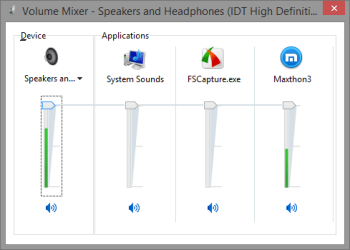
Usually it's this way around, app volume is lower than main volume. But sometimes an app can send volume levels which are basically too high for the system.
Kari



