
Devices and Printers Not Loading

takenaback

New member
Local time
11:38 PM
Messages
31
Devices and printers just continues to search without finding anything. I have read in other threads where this is a Bluetooth support service problem and can be rectified by setting Bluetooth support service to automatic in local services. When I go to services and then try to set the Bluetooth support service to automatic it comes up with a message saying the specified path could not be found. How can I set the Bluetooth support service to automatically start when it says it can't find the path specified?

Solution found here.
http://social.technet.microsoft.com...g/thread/ee0fe719-352a-4ff0-a858-243e6b5ee0c9

Thanks
 
Last edited:

My Computer

Computer Manufacturer/Model Number
custom-built
OS
Windows 7 64bit Ultimate
CPU
Core i7 870 OC 4Ghz
Motherboard
Gigabyte GA-P55-UD4 P55 DDR3
Memory
Kingston 8G(2x2G)2000Mhz PC16000 DDR3
Graphics Card(s)
Sapphire ATI HD4350 512M DDR2 VGA DVI HDMI LP Silent Heatsin
Sound Card
on-board
Monitor(s) Displays
Asus VK222U
Hard Drives
WD 1TB SATAII HDD 64M Cache Green Power/
WD 1TB SATAII HDD 64M Cache Green Power External esata Backup
PSU
Corsair HX-620
Case
NZXT Hush
Cooling
2 120mm case fans/Noctua NH-U12P Special Edition SE2
Keyboard
Cherry silent keyboard
Mouse
Logitech Marble man mouse wheel
Internet Speed
8.2Mbps/.86Mbps
Other Info
Logitech Z-2300 THX 2.1 Speakers System/Quickcam Pro 9000
Ok, you set me to lookin :) When you right click on the Bluetooth Support Service, and choose properties, what is the path listed?
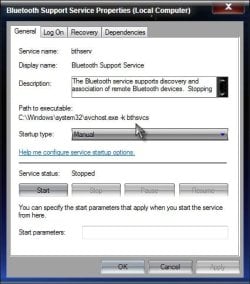
Service Path.jpg

C:\Windows\system32\svchost.exe -k bthsvcs

Now navigate to

HKEY_LOCAL_MACHINE\SYSTEM\CurrentControlSet\services\bthserv

and see if the path there matches

RegPath.jpg

%SystemRoot%\system32\svchost.exe -k bthsvcs

As you can see, mine both match, they use a different method to list, but it is the same path. If your are different, let us know. Post screenshots if you can.

http://www.sevenforums.com/tutorials/9733-screenshots-files-upload-post-seven-forums.html

A Guy
 

My Computer

Computer type
PC/Desktop
OS
Windows 10 Home x64
CPU
INTEL Core i5-750 Quad-Core 3.37GHz
Motherboard
ASUS P7P55D
Memory
HyperX Fury Black Series 8GB (2 x 4GB) 1866Mhz
Graphics Card(s)
EVGA GeForce GTX 750 Superclocked 1GB 128-Bit GDDR5
Monitor(s) Displays
LG 32MA68HY 32" IPS
Screen Resolution
1920 x 1080
Hard Drives
Samsung 840 Evo 120GB, SEAGATE 500GB Barracuda® 7200.12, SATA 3 Gb/s, 7200 RPM, 16MB cache
PSU
ANTEC TruePower New TP-550, 80 PLUS, 550W
Case
ANTEC Three Hundred Illusion
Cooling
COOLER MASTER Hyper 212 Plus, 4 x 120mm 1 x 140mm Noctua's
Internet Speed
85 + Mbps
Antivirus
Avast
Browser
Vivaldi
Devices and printers just continues to search without finding anything. I have read in other threads where this is a Bluetooth support service problem and can be rectified by setting Bluetooth support service to automatic in local services.

This is strange to me. I have the Bluetooth service completely disabled and yet my Devices and Printers works just fine. Of course, I have no Bluetooth devices installed or any way to connect them (no wireless card in my desktop).

Do you have any Bluetooth devices? If not, then I don't see how the Bluetooth service should be your problem.
 

My Computer

Computer Manufacturer/Model Number
Dell Inspiron 530
OS
Windows 7 Ultimate (x64)
CPU
Q6600
Memory
8 GB
Graphics Card(s)
ATI Radeon HD 2600 XT
Monitor(s) Displays
Samsung Syncmaster P2450
Screen Resolution
1920x1080
Hard Drives
Samsung HD103UJ
Samsung HD501LJ
Internet Speed
25 Mb/s
Hmmm, I just assumed it was bluetooth device(s), we'll see what the OP says. A Guy
 

My Computer

Computer type
PC/Desktop
OS
Windows 10 Home x64
CPU
INTEL Core i5-750 Quad-Core 3.37GHz
Motherboard
ASUS P7P55D
Memory
HyperX Fury Black Series 8GB (2 x 4GB) 1866Mhz
Graphics Card(s)
EVGA GeForce GTX 750 Superclocked 1GB 128-Bit GDDR5
Monitor(s) Displays
LG 32MA68HY 32" IPS
Screen Resolution
1920 x 1080
Hard Drives
Samsung 840 Evo 120GB, SEAGATE 500GB Barracuda® 7200.12, SATA 3 Gb/s, 7200 RPM, 16MB cache
PSU
ANTEC TruePower New TP-550, 80 PLUS, 550W
Case
ANTEC Three Hundred Illusion
Cooling
COOLER MASTER Hyper 212 Plus, 4 x 120mm 1 x 140mm Noctua's
Internet Speed
85 + Mbps
Antivirus
Avast
Browser
Vivaldi
Back
Top