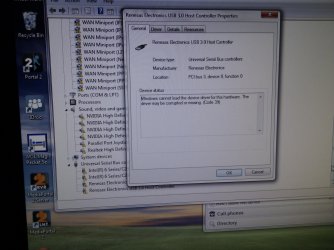
I was working on my PC and USB mouse suddenly stopped working. I disconnected the mouse and when I reconnected it, I heard device error sound and mouse was still not working. I have tried with another mouse and it made same error. So I have rebooted computer using keyboard.
But after reboot, no device is working. Keyboard and mouse are not responding and there is no networking (according to status bar icon). Because of this, I have no way to control PC to open device manager or check anything. Safe mode does not help.
There is even no sound when I plug anything in andlaser on mouse does not light, so there is even no power output from USB ports.
EDIT: There is power (I can charge my phone through USB port). When I connect mouse, laser would just blink shortly and then stay off.
Everything is working on dual-boot XP on same computer (from where I'm typing message now), so it's not issue in hardware or BIOS.
Any idea what could I do to?
But after reboot, no device is working. Keyboard and mouse are not responding and there is no networking (according to status bar icon). Because of this, I have no way to control PC to open device manager or check anything. Safe mode does not help.
There is even no sound when I plug anything in and
EDIT: There is power (I can charge my phone through USB port). When I connect mouse, laser would just blink shortly and then stay off.
Everything is working on dual-boot XP on same computer (from where I'm typing message now), so it's not issue in hardware or BIOS.
Any idea what could I do to?
Last edited:
My Computer
- OS
- Windows 7 64bit
- CPU
- Core i7 2600K
- Motherboard
- Asus P8P67
- Memory
- APACER DDR3 8GB (2x4GB) 1333 CL9 (DL.08GAJ.H9EK2)
- Graphics Card(s)
- Gigabyte NVIDIA GTX 570
- Sound Card
- Integrated
- Screen Resolution
- 1680x1050
- Hard Drives
- System: KINGSTON SSD HYPERX SH100S3120G
Data: HDD SAMSUNG 1TB SATA2 32MB/7200 (HD103SJ)
- PSU
- 750W (I think)