Solved Dhcp is messing with internet access?

arcanehack

New member
Local time
2:25 AM
Messages
9
I have been having this problem for quite a while and it seems to fix itself every now and then but its now interfering with my games. It acts like dchp isn't enabled but when I check the services it said its started. It interferes with my games by not letting them connect to people and its limiting my internet access a bit. I have tried ipconfig/flushdns and renew that doesn't seem to work. I also want my computer to have a static ip but when I go to the tcp/ipv4 settings its on all obtain address. I reinstalled my network adapter and changed it to a different one and that didn't seem to work either. But when I assign an ip and all the other settings it seems to think there is a problem then it gives me something like "dchp wasn't enabled would you like to apply this fix?" when I do that it fixes it and every time my computer reboots or after a while like 2 days or so it goes back to seems like disabling dhcp. So any fixes or thoughts?


P.S I didn't know if I should have put this in the network thread or what, sorry if its in the wrong section.
 

My Computer My Computer

Computer type
PC/Desktop
Computer Manufacturer/Model Number
Custom Build
OS
Windows 7 Ultimate x64
CPU
AMD Phenom II x4 960T
Motherboard
AMD
Memory
8GB of RAM
Graphics Card(s)
Nvidia Gefore 550 Ti
Screen Resolution
1920x1080
Hard Drives
1TB HDD and a 500GB HDD
Antivirus
McAfee
Browser
Chrome, Srware Iron, Firefox, Waterfox
Are you able to provide a screenshot of the dialog box prompting you to configure your network card for a DHCP server.

Could you please follow this tutorial and provide a screenshot of your IPconfig - http://www.sevenforums.com/network-sharing/144365-network-posting-tips.html

Also where is the DHCP server on your network? Is it on your router or do you have another device acting as one?

Many Thanks,
Josh! :)
 

My Computer My Computer

Computer type
PC/Desktop
Computer Manufacturer/Model Number
Custom Built
OS
Windows 7 Professional x64 SP1 ; Windows Server 2012 R2 Standard
CPU
Intel Core i5 2400 @ 3.10GHz
Motherboard
Foxconn H67MP-S/-V/H67MP
Memory
8.0GB DDR3 @ 665MHz (2GBx4)
Graphics Card(s)
AMD Radeon HD 6870
Sound Card
Realtek High Definition Audio
Monitor(s) Displays
AOC 2243W & SMB1930NW
Screen Resolution
1440x900 & 1920x1080
Hard Drives
977GB Seagate ST31000524AS ATA Drive (SATA)
250GB WD iSCSI attached Drive
PSU
750W Gaming PSU
Case
Novatech Night
Cooling
Fan
Keyboard
Dell Standard PS/2 Keyboard
Mouse
R.A.T 07 Gaming Mouse
Internet Speed
Download: 10 Mbps Ping: 30ms Upload: 0.81 Mbps
Browser
Google Chrome
Other Info
Optiarc DVD RW AD-5260S ATA Device
Josh, the OP shows McAfee as the ant-virus program and may want to check the firewall and program permissions.

There are a couple of places to check, whether the browser has full access, and check anything (DHCP server?) related to the network for blocked access.

All the OP's browsers listed should have full access, if not try allowing it .
 

My Computer My Computer

Computer type
PC/Desktop
Computer Manufacturer/Model Number
Gateway DX4831-01e (Mid-Tower Desktop)
OS
Originally Win 7 Hm Prem x64 Ver 6.1.7600 Build 7601-SP1 | Upgraded to Windows 10 December 14, 2019
CPU
Intel i3 530 2.93GHz, 2933MHz 2 Cores 4 Logical Processors
Motherboard
Gateway H57M01 133 megahertz
Memory
6GB of 1,333MHz DDR3 SDRAM
Graphics Card(s)
32MB Intel Graphics Media Accelerator HD IGChip
Sound Card
Realtek High Definition Audio
Monitor(s) Displays
Gateway HX2000 20inch TFT active matrix TN
Screen Resolution
1600 x 900 x 59 hertz
Hard Drives
WDC WD10EADS-00M2B0 [HDD] (1000.20 GB) -- drive 0,
HL-DT-ST DVDRAM GH41N [CD-ROM dr]
Four card readers, and Four USB 2.0
PSU
300watts.
Case
Mid-Tower Desktop
Cooling
Stock from Gateway
Keyboard
Natural Ergonomic Keyboard 4000, see Other Info
Mouse
Orig. Gateway wore out now using Insignia USB wired optical
Internet Speed
Vz FIOS 10ms png 57.64Mbps down 65.53Mbps up Speedtest.org
Antivirus
Zamana Anti-logger with Anti-malware, MSE, Windows Firewall,
Browser
IE11.0.9600.19399-Upd ver11.0.135, Firefox 68.0.1 x64
Other Info
System Specs by Belarc.

BIOS: American Megatrends Inc. P01-A0 11/17/2009

Replaced the MS 'Natural' Standard PS/2 Enhanced 101-102 Keyboard with a new Natural Ergonomic Keyboard 4000 on August 1st 2014.

Canon Pixma MG3222 Printer.

Updated to IE11 on 12102015 | Fios Quantum Router g1100

Additional AV: SpywareBlaster, manual Mbam, SAS
Aye, it's a possibility that firewall is blocking ports needed for games however if I can see the ipconfig I can determine if the DHCP server is causing a problem with regards to connection to the internet. I am intrigued about the "dchp wasn't enabled would you like to apply this fix?" since this isn't a normal windows prompt.

Josh :)
 

My Computer My Computer

Computer type
PC/Desktop
Computer Manufacturer/Model Number
Custom Built
OS
Windows 7 Professional x64 SP1 ; Windows Server 2012 R2 Standard
CPU
Intel Core i5 2400 @ 3.10GHz
Motherboard
Foxconn H67MP-S/-V/H67MP
Memory
8.0GB DDR3 @ 665MHz (2GBx4)
Graphics Card(s)
AMD Radeon HD 6870
Sound Card
Realtek High Definition Audio
Monitor(s) Displays
AOC 2243W & SMB1930NW
Screen Resolution
1440x900 & 1920x1080
Hard Drives
977GB Seagate ST31000524AS ATA Drive (SATA)
250GB WD iSCSI attached Drive
PSU
750W Gaming PSU
Case
Novatech Night
Cooling
Fan
Keyboard
Dell Standard PS/2 Keyboard
Mouse
R.A.T 07 Gaming Mouse
Internet Speed
Download: 10 Mbps Ping: 30ms Upload: 0.81 Mbps
Browser
Google Chrome
Other Info
Optiarc DVD RW AD-5260S ATA Device
The intrigue could be a pop-up from McAfee itself.

There are three solutions and a tool that may help, but I don't want to skew your diagnosis, I'll wait until you think you may want to see the link to it.
 

My Computer My Computer

Computer type
PC/Desktop
Computer Manufacturer/Model Number
Gateway DX4831-01e (Mid-Tower Desktop)
OS
Originally Win 7 Hm Prem x64 Ver 6.1.7600 Build 7601-SP1 | Upgraded to Windows 10 December 14, 2019
CPU
Intel i3 530 2.93GHz, 2933MHz 2 Cores 4 Logical Processors
Motherboard
Gateway H57M01 133 megahertz
Memory
6GB of 1,333MHz DDR3 SDRAM
Graphics Card(s)
32MB Intel Graphics Media Accelerator HD IGChip
Sound Card
Realtek High Definition Audio
Monitor(s) Displays
Gateway HX2000 20inch TFT active matrix TN
Screen Resolution
1600 x 900 x 59 hertz
Hard Drives
WDC WD10EADS-00M2B0 [HDD] (1000.20 GB) -- drive 0,
HL-DT-ST DVDRAM GH41N [CD-ROM dr]
Four card readers, and Four USB 2.0
PSU
300watts.
Case
Mid-Tower Desktop
Cooling
Stock from Gateway
Keyboard
Natural Ergonomic Keyboard 4000, see Other Info
Mouse
Orig. Gateway wore out now using Insignia USB wired optical
Internet Speed
Vz FIOS 10ms png 57.64Mbps down 65.53Mbps up Speedtest.org
Antivirus
Zamana Anti-logger with Anti-malware, MSE, Windows Firewall,
Browser
IE11.0.9600.19399-Upd ver11.0.135, Firefox 68.0.1 x64
Other Info
System Specs by Belarc.

BIOS: American Megatrends Inc. P01-A0 11/17/2009

Replaced the MS 'Natural' Standard PS/2 Enhanced 101-102 Keyboard with a new Natural Ergonomic Keyboard 4000 on August 1st 2014.

Canon Pixma MG3222 Printer.

Updated to IE11 on 12102015 | Fios Quantum Router g1100

Additional AV: SpywareBlaster, manual Mbam, SAS
No, please offer the solution. Any suggestions that would fix this is welcome :)
 

My Computer My Computer

Computer type
PC/Desktop
Computer Manufacturer/Model Number
Custom Built
OS
Windows 7 Professional x64 SP1 ; Windows Server 2012 R2 Standard
CPU
Intel Core i5 2400 @ 3.10GHz
Motherboard
Foxconn H67MP-S/-V/H67MP
Memory
8.0GB DDR3 @ 665MHz (2GBx4)
Graphics Card(s)
AMD Radeon HD 6870
Sound Card
Realtek High Definition Audio
Monitor(s) Displays
AOC 2243W & SMB1930NW
Screen Resolution
1440x900 & 1920x1080
Hard Drives
977GB Seagate ST31000524AS ATA Drive (SATA)
250GB WD iSCSI attached Drive
PSU
750W Gaming PSU
Case
Novatech Night
Cooling
Fan
Keyboard
Dell Standard PS/2 Keyboard
Mouse
R.A.T 07 Gaming Mouse
Internet Speed
Download: 10 Mbps Ping: 30ms Upload: 0.81 Mbps
Browser
Google Chrome
Other Info
Optiarc DVD RW AD-5260S ATA Device

My Computer My Computer

Computer type
PC/Desktop
Computer Manufacturer/Model Number
Gateway DX4831-01e (Mid-Tower Desktop)
OS
Originally Win 7 Hm Prem x64 Ver 6.1.7600 Build 7601-SP1 | Upgraded to Windows 10 December 14, 2019
CPU
Intel i3 530 2.93GHz, 2933MHz 2 Cores 4 Logical Processors
Motherboard
Gateway H57M01 133 megahertz
Memory
6GB of 1,333MHz DDR3 SDRAM
Graphics Card(s)
32MB Intel Graphics Media Accelerator HD IGChip
Sound Card
Realtek High Definition Audio
Monitor(s) Displays
Gateway HX2000 20inch TFT active matrix TN
Screen Resolution
1600 x 900 x 59 hertz
Hard Drives
WDC WD10EADS-00M2B0 [HDD] (1000.20 GB) -- drive 0,
HL-DT-ST DVDRAM GH41N [CD-ROM dr]
Four card readers, and Four USB 2.0
PSU
300watts.
Case
Mid-Tower Desktop
Cooling
Stock from Gateway
Keyboard
Natural Ergonomic Keyboard 4000, see Other Info
Mouse
Orig. Gateway wore out now using Insignia USB wired optical
Internet Speed
Vz FIOS 10ms png 57.64Mbps down 65.53Mbps up Speedtest.org
Antivirus
Zamana Anti-logger with Anti-malware, MSE, Windows Firewall,
Browser
IE11.0.9600.19399-Upd ver11.0.135, Firefox 68.0.1 x64
Other Info
System Specs by Belarc.

BIOS: American Megatrends Inc. P01-A0 11/17/2009

Replaced the MS 'Natural' Standard PS/2 Enhanced 101-102 Keyboard with a new Natural Ergonomic Keyboard 4000 on August 1st 2014.

Canon Pixma MG3222 Printer.

Updated to IE11 on 12102015 | Fios Quantum Router g1100

Additional AV: SpywareBlaster, manual Mbam, SAS
I'm starting to think it has something to do with my internet adapter or some type of setting within my computer. I don't have macafee anymore I have malwarebytes and security essentials. I definitely know it has something to do with my internet adapter or one of the settings. But I reinstalled it got a new internet adapter and installed it, still the same problem, last time when dhcp was enabled or maybe forced it started to work just fine. I'm on a regular home network if that helps. Also I have internet access it just acts like ports are being blocked when they are open.


EDIT: I got it fixed it had something to do with the router and my IP address. I just changed my IP to something else and it seems to work just fine
 
Last edited:

My Computer My Computer

Computer type
PC/Desktop
Computer Manufacturer/Model Number
Custom Build
OS
Windows 7 Ultimate x64
CPU
AMD Phenom II x4 960T
Motherboard
AMD
Memory
8GB of RAM
Graphics Card(s)
Nvidia Gefore 550 Ti
Screen Resolution
1920x1080
Hard Drives
1TB HDD and a 500GB HDD
Antivirus
McAfee
Browser
Chrome, Srware Iron, Firefox, Waterfox
I'm starting to think it has something to do with my internet adapter or some type of setting within my computer. I don't have macafee anymore I have malwarebytes and security essentials. I definitely know it has something to do with my internet adapter or one of the settings. But I reinstalled it got a new internet adapter and installed it, still the same problem, last time when dhcp was enabled or maybe forced it started to work just fine. I'm on a regular home network if that helps. Also I have internet access it just acts like ports are being blocked when they are open.

I can only hope that the Op removed McAfee using the special tool. If not, good luck on anything working right. ;)

How to uninstall or reinstall supported McAfee products using the Consumer Products Removal tool (MCPR)
 

My Computer My Computer

Computer type
PC/Desktop
Computer Manufacturer/Model Number
Home built
OS
Windows 7 Ult, Windows 8.1 Pro,
CPU
Q9650-4.275GHz, E8600 4.5GHz, E6750-3.8GHz
Motherboard
Evga 780i FTW
Memory
G.Skill PC2 9600 1200Mhz 5 5 5 15 2T
Graphics Card(s)
GTX480
Sound Card
Asus Xonar D2
Monitor(s) Displays
HannsG
Screen Resolution
1680X1050
Hard Drives
GSkill Phoenix Pro 120GB SSD
PSU
ThermalTake Toughpower 1000Watt modular
Case
ThermalTake XaserV
Cooling
Xigmatek S1283
Keyboard
Logitech G15
Mouse
Logitech G9
Internet Speed
T1
DHCP does not interfere with anything. Once an IP address and DNS is configured, the pc sees/hears nothing from it again.

The gaming problem is most likely that you did not use port forwarding to allow Access across the router NAT and into your PC. The PC will also then need the firewall to be adjusted to ALLOW inbound traffic on those same gaming port numbers.
 

My Computer My Computer

Computer type
PC/Desktop
OS
win 7 pro 64bit
jobeard said:
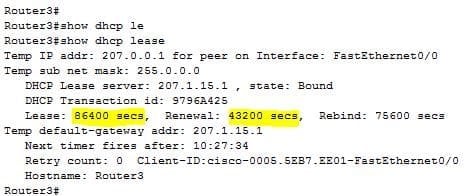
DHCP does not interfere with anything. Once an IP address and DNS is configured, the pc sees/hears nothing from it again.

The machine will contact the DHCP server AGAIN once the lease has passed 50% before expiration in order to renew its lease.

DHCP lease.JPG

43200 / 86400 = 0.5 = 1 half :)
 

My Computer My Computer

Computer type
PC/Desktop
Computer Manufacturer/Model Number
Custom Built
OS
Windows 7 Professional x64 SP1 ; Windows Server 2012 R2 Standard
CPU
Intel Core i5 2400 @ 3.10GHz
Motherboard
Foxconn H67MP-S/-V/H67MP
Memory
8.0GB DDR3 @ 665MHz (2GBx4)
Graphics Card(s)
AMD Radeon HD 6870
Sound Card
Realtek High Definition Audio
Monitor(s) Displays
AOC 2243W & SMB1930NW
Screen Resolution
1440x900 & 1920x1080
Hard Drives
977GB Seagate ST31000524AS ATA Drive (SATA)
250GB WD iSCSI attached Drive
PSU
750W Gaming PSU
Case
Novatech Night
Cooling
Fan
Keyboard
Dell Standard PS/2 Keyboard
Mouse
R.A.T 07 Gaming Mouse
Internet Speed
Download: 10 Mbps Ping: 30ms Upload: 0.81 Mbps
Browser
Google Chrome
Other Info
Optiarc DVD RW AD-5260S ATA Device
The machine will contact the DHCP server AGAIN once the lease has passed
absolutely correct, but in the context of the O.P. question/issue of interference, naa.
 

My Computer My Computer

Computer type
PC/Desktop
OS
win 7 pro 64bit
True, all i'm saying is try and avoid broad statements since it isn't just the OP looking at this thread (Other users on google) :)
 

My Computer My Computer

Computer type
PC/Desktop
Computer Manufacturer/Model Number
Custom Built
OS
Windows 7 Professional x64 SP1 ; Windows Server 2012 R2 Standard
CPU
Intel Core i5 2400 @ 3.10GHz
Motherboard
Foxconn H67MP-S/-V/H67MP
Memory
8.0GB DDR3 @ 665MHz (2GBx4)
Graphics Card(s)
AMD Radeon HD 6870
Sound Card
Realtek High Definition Audio
Monitor(s) Displays
AOC 2243W & SMB1930NW
Screen Resolution
1440x900 & 1920x1080
Hard Drives
977GB Seagate ST31000524AS ATA Drive (SATA)
250GB WD iSCSI attached Drive
PSU
750W Gaming PSU
Case
Novatech Night
Cooling
Fan
Keyboard
Dell Standard PS/2 Keyboard
Mouse
R.A.T 07 Gaming Mouse
Internet Speed
Download: 10 Mbps Ping: 30ms Upload: 0.81 Mbps
Browser
Google Chrome
Other Info
Optiarc DVD RW AD-5260S ATA Device
I'm starting to think it has something to do with my internet adapter or some type of setting within my computer. I don't have macafee anymore I have malwarebytes and security essentials. I definitely know it has something to do with my internet adapter or one of the settings. But I reinstalled it got a new internet adapter and installed it, still the same problem, last time when dhcp was enabled or maybe forced it started to work just fine. I'm on a regular home network if that helps. Also I have internet access it just acts like ports are being blocked when they are open.

I can only hope that the Op removed McAfee using the special tool. If not, good luck on anything working right. ;)

How to uninstall or reinstall supported McAfee products using the Consumer Products Removal tool (MCPR)

I reinstalled windows so I don't have it anymore ^_^ also I found out that the ip address I was using was telling the router that if that computer has that ip address than put restrictions on it so I just changed the ip and it seems to work fine and I will later edit those settings on the router
 

My Computer My Computer

Computer type
PC/Desktop
Computer Manufacturer/Model Number
Custom Build
OS
Windows 7 Ultimate x64
CPU
AMD Phenom II x4 960T
Motherboard
AMD
Memory
8GB of RAM
Graphics Card(s)
Nvidia Gefore 550 Ti
Screen Resolution
1920x1080
Hard Drives
1TB HDD and a 500GB HDD
Antivirus
McAfee
Browser
Chrome, Srware Iron, Firefox, Waterfox
Back
Top